The customer is a comprehensive online education and training group headquartered in Zhongguancun, Beijing, China and listed on the New York Stock Exchange in 2006. Its businesses include foreign language training, K12 education, preschool education, online education, consultancy for studying abroad, and book publishing. It also has several education sub-brands.
Customer Challenges
Every summer, a large number of students study on the customer's platforms. Previously, the storage and transcoding logic for audio/video courseware were implemented in a self-built IDC based on servers and NFS. However, due to the high volume of traffic during the summer, the servers in the IDC might not be able to meet the computing requirements, and it would take very long to purchase new hardware devices for self-built services, so the customer wanted to find a flexible method to support rapid business deployment and complete transcoding efficiently.
In use cases such as video and social networking, users upload high numbers of images and audio/video files frequently, which has high requirements for the real-timeness and concurrency capabilities of the processing system. Traditional container services require the customer to maintain the container clusters on their own and have a poor elastic scalability.
SCF Solution
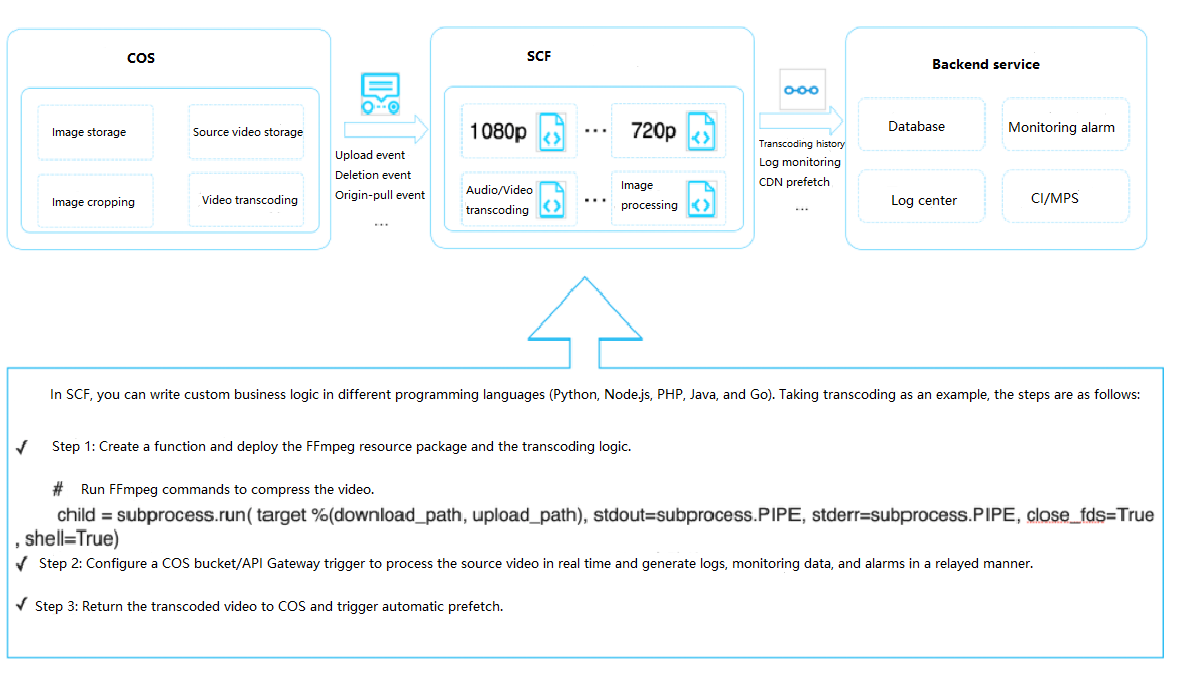
SCF supports custom transcoding functions to help enterprises quickly build customized task processing capabilities. This makes up for the blind pots of current separate cloud services and conveniently migrates the FFmpeg service from physical servers, cloud servers, or containers to SCF.
SCF, FFmpeg, and COS can be used in combination as shown below to transcode audio/video files:
In terms of technical solution, SCF and COS are used in combination in the cloud to achieve elastic scalability and sustain all local traffic switched to the cloud. In the new business process, a task scheduling module is added to automatically or manually forward the received business traffic to the proprietary cloud-based services. In addition, many high-availability technologies are added to the process, including full-linkage tracking by task TraceID and automatic local retry upon cloud computing failure. In the new solution, cloud-based services are easier to develop and maintain and more cost-effective. The pay-as-you-go SCF billing mode also reduces resource costs greatly.
Serverless Application Benefits
Strengths of using SCF to implement the audio/video transcoding service:
SCF provides a standard runtime environment, ensures the high availability and auto scalability of resources, and requires no dedicated maintenance.
SCF is billed by actual usage, eliminating the waste of resources.
Development and debugging in SCF are more efficient, and dependencies are decoupled from the business and can be hot updated separately in real time.
Runtime environments are isolated, so the failure of one single request will not affect the normal execution of other requests.
You need to pay attention to the following to connect your existing business to SCF:
The introduction of SCF needs to be integrated with the existing CI/CD process, so there may be some changes in the development method.
You need to make certain modifications on your existing business code to integrate FFmpeg to the function code and deploy it together with the code file to SCF.