MQTT Trigger
Download
Focus Mode
Font Size
You can write a cloud function to handle messages received in MQTT. The SCF backend module can act as a consumer to process MQTT messages and pass them to the cloud function.
MQTT Trigger has the following features:
Pull model: The SCF backend module acts as a consumer, connects to the MQTT instance, and consumes messages. After receiving messages, the backend module encapsulates them into a data structure and calls designated functions to pass the message data to the cloud function.
Sync invocation: MQTT trigger uses sync invocation type to invoke function. For more information, see invocation type.
Note:
Since the Message Queue MQTT Edition Products are currently available in partial regions, the openness of functions to MQTT triggers varies in different regions. MQTT-enabled regions currently support it. Whether the creation of MQTT triggers is supported in a specific region depends on the actual display in the console.
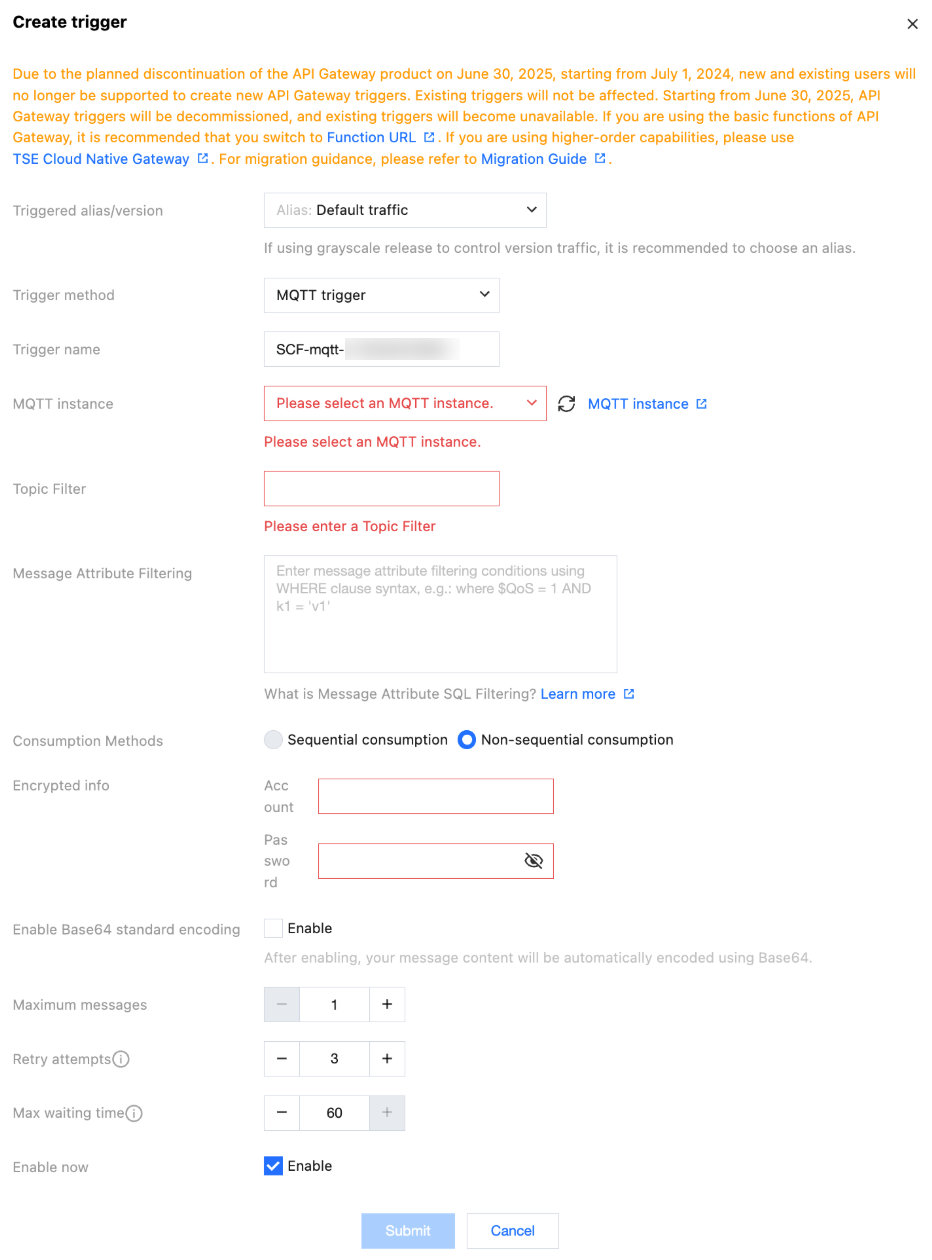
MQTT Trigger Properties
Trigger name: supports a maximum of 60 characters, supports
a-z, A-Z, 0-9, -, and _. It must start with a letter, and multiple MQTT triggers with the same name are not supported under one function.MQTT instance: Configure the connected MQTT instance, only supporting selection of instances in the same region.
Topic Filter: Supports subscription to self-created topics and built-in system topics of MQTT Message Queue. The filter expression rule follows the standard rule of the MQTT protocol, allowing the use of "+" and "#" wildcards for more semantics. For details, refer to MQTT V5.0 standard protocol.
Message property filtering: Use custom WHERE statements to enable more flexible message property filtering. Only messages that satisfy the user attribute filter declaration under the subscribed Topic will trigger function execution.
Consumption method: Sequential consumption or non-sequential consumption. Currently only support non-sequential consumption.
Encrypted information: Requires configuration of account and password with access privileges in the MQTT instance ACL policy.
Enable Base64 standard encoding: Automatically encodes your message content in Base64.
Maximum number of messages: The maximum number of messages when pulling and batch delivering to the current cloud function, defaults to 1 with a highest configuration of 10000. Combined with factors like message size and write speed, the message count delivered each time the cloud function is triggered may not reach the maximum value, but rather a change value between 1 and the maximum number of messages.
Retry count: The maximum number of retries when a Runtime error (including User Code Error and Runtime error) occurs in the function, defaults to 3.
Maximum wait time: The maximum wait time for a single trigger. For example: If the user-configured maximum number of messages is 1000 and the maximum wait time is 60 seconds. Suppose after 10 seconds, the cloud function has already collected 1000 messages, it will directly trigger function execution. If after 60 seconds, the cloud function has only collected 50 messages, it will still trigger function execution.
MQTT Consumption and Messaging
Since MQTT messages lack proactive push capability, the consumer needs to pull messages via a pull method and consume them. Therefore, after configuring the MQTT trigger, the SCF backend will start the MQTT consumption module as a consumer and create a client-side consumer in MQTT to perform consumption.
The SCF backend's consumption module, after consuming messages, will combine them into an event structure and initiate a function call (sync call) based on the cumulative message quantity size and maximum number of batch messages, etc. Relevant restrictions are as follows:
Event size limit for sync call: 6MB. For details, see limitation notes. If the Topic message is large, for example, a single message has already reached 6MB, then due to the 6MB sync call limit, the event structure passed to the cloud function will contain only one message rather than the maximum message count configured by the user.
Maximum number of batch messages: Configurable by users. Currently supports highest configuration of 10000.
Help and Support
Was this page helpful?
You can also Contact sales or Submit a Ticket for help.
Help us improve! Rate your documentation experience in 5 mins.
Feedback