Java SDK
Download
포커스 모드
폰트 크기
Overview
This document introduces the directions for using the Java client to connect to an elastic Topic and send and receive messages.
Prerequisites
Directions
Step 1: Creating a Topic and Subscription Relationship
1. On the Elastic Topic list page of the console, create a Topic.

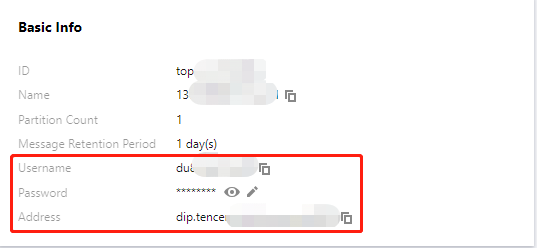
2. Click the ID of the Topic to enter the basic information page and obtain the username, password, and address information.
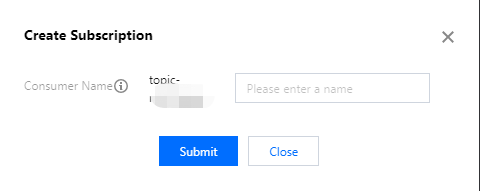
3. In the Subscription Relationships tab, create a subscription relationship (consumption group).
Step 2: Adding the Configuration File
1. Add the following dependencies to pom.xml.
<dependencies><dependency><groupId>org.apache.kafka</groupId><artifactId>kafka-clients</artifactId><version>2.1.0</version></dependency><dependency><groupId>org.slf4j</groupId><artifactId>slf4j-api</artifactId><version>1.7.5</version></dependency><dependency><groupId>org.slf4j</groupId><artifactId>slf4j-simple</artifactId><version>1.6.4</version></dependency></dependencies>
2. Create a JAAS configuration file
ckafka_client_jaas.conf and modify it with the user created on the User Management interface.KafkaClient {org.apache.kafka.common.security.plain.PlainLoginModule requiredusername="username"password="password";};
3. Create the CKafka configuration file kafka.properties.
## Configure the connection address. It can be obtained from the basic information page of an elastic Topic in the console.bootstrap.servers=xx.xx.xx.xx:port## The topic name. It can be obtained from the basic information page of an elastic Topic in the console.topic=XXX## The consumption group name. It can be obtained from the **Subscription Relationships** list of an elastic Topic in the console.group.id=XXX## SASL configurationjava.security.auth.login.config.plain=/xxxx/ckafka_client_jaas.conf
4. Create the configuration file load program named CKafkaConfigurer.java.
public class CKafkaConfigurer {private static Properties properties;public static void configureSaslPlain() {//If it is already set by -D or other means, you can skip setting here.if (null == System.getProperty("java.security.auth.login.config")) {//Make sure to change XXX to your own path.System.setProperty("java.security.auth.login.config",getCKafkaProperties().getProperty("java.security.auth.login.config.plain"));}}public synchronized static Properties getCKafkaProperties() {if (null != properties) {return properties;}//Get the content of the configuration file `kafka.properties`.Properties kafkaProperties = new Properties();try {kafkaProperties.load(CKafkaProducerDemo.class.getClassLoader().getResourceAsStream("kafka.properties"));} catch (Exception e) {System.out.println("getCKafkaProperties error");}properties = kafkaProperties;return kafkaProperties;}}
Parameter | Description |
bootstrapServers | The connection address. It can be obtained from the basic information page of an elastic Topic in the console. 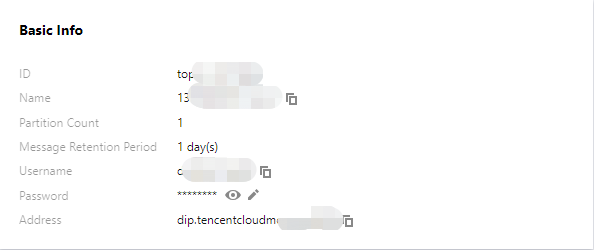 |
username | The username. It can be obtained from the basic information page of an elastic Topic in the console. |
password | The user password. It can be obtained from the basic information page of an elastic Topic in the console. |
topic | The topic name. It can be obtained from the basic information page of an elastic Topic in the console. |
group.id | The consumption group name. It can be obtained from the subscription relationship list in the console.  |
Step 3: Producing Messages
1. Create a program named KafkaSaslProducerDemo.java to send messages.
public class KafkaSaslProducerDemo {public static void main(String[] args) {//Set the path of the JAAS configuration file.CKafkaConfigurer.configureSaslPlain();//Load kafka.properties.Properties kafkaProperties = CKafkaConfigurer.getCKafkaProperties();Properties props = new Properties();//To set the connection point, obtain the connection point of the corresponding Topic through the console.props.put(ProducerConfig.BOOTSTRAP_SERVERS_CONFIG,kafkaProperties.getProperty("bootstrap.servers"));//// SASL_PLAINTEXT public network connection//props.put(CommonClientConfigs.SECURITY_PROTOCOL_CONFIG, "SASL_PLAINTEXT");//Use Plain mode for SASL.props.put(SaslConfigs.SASL_MECHANISM, "PLAIN");//The method for serializing TDMQ for Kafka messages.props.put(ProducerConfig.KEY_SERIALIZER_CLASS_CONFIG,"org.apache.kafka.common.serialization.StringSerializer");props.put(ProducerConfig.VALUE_SERIALIZER_CLASS_CONFIG,"org.apache.kafka.common.serialization.StringSerializer");//The maximum request wait time.props.put(ProducerConfig.MAX_BLOCK_MS_CONFIG, 30 * 1000);//Set the number of internal retries for the client.props.put(ProducerConfig.RETRIES_CONFIG, 5);//Set the internal retry interval for the client.props.put(ProducerConfig.RECONNECT_BACKOFF_MS_CONFIG, 3000);//If `ack` is 0, the producer will not wait for confirmation from the broker, and the retry configuration will not take effect. Note that if traffic throttling is triggered, the connection will be closed.//If `ack` is 1, the broker leader will directly return `ack` without waiting for acknowledgment from all broker followers.//If `ack` is `all`, the broker leader will return `ack` only after receiving acknowledgment from all broker followers.props.put(ProducerConfig.ACKS_CONFIG, "all");//Build a producer object. Note: A producer object is thread-safe, and generally one Producer object is sufficient for a process.KafkaProducer<String, String> producer = new KafkaProducer<>(props);//Build a TDMQ for CKafka message.String topic = kafkaProperties.getProperty("topic"); //The Topic to which the message belongs. Please apply for it on the console and fill it in here.String value = "this is ckafka msg value"; //Content of the message.try {//Batch getting Future objects can speed up the process. Note that the batch size should not be too large.List<Future<RecordMetadata>> futures = new ArrayList<>(128);for (int i = 0; i < 100; i++) {//Send the message and get a Future object.ProducerRecord<String, String> kafkaMessage = new ProducerRecord<>(topic,value + ": " + i);Future<RecordMetadata> metadataFuture = producer.send(kafkaMessage);futures.add(metadataFuture);}producer.flush();for (Future<RecordMetadata> future : futures) {//Synchronize the Future object obtained.RecordMetadata recordMetadata = future.get();System.out.println("Produce ok:" + recordMetadata.toString());}} catch (Exception e) {//If the sending still fails after client internal retries, the system needs to report and handle the error.System.out.println("error occurred");}}}
2. Compile and run KafkaSaslProducerDemo.java to send messages.
3. View the operation result (output).
Produce ok:ckafka-topic-demo-0@198Produce ok:ckafka-topic-demo-0@199
Step 4: Consuming Messages
1. Create the program for a consumer to subscribe to messages named
KafkaSaslConsumerDemo.java.public class KafkaSaslConsumerDemo {public static void main(String[] args) {//Set the path of the JAAS configuration file.CKafkaConfigurer.configureSaslPlain();//Load `kafka.properties`.Properties kafkaProperties = CKafkaConfigurer.getCKafkaProperties();Properties props = new Properties();//Set the connection point. Get the connection point of the corresponding topic in the console.props.put(ProducerConfig.BOOTSTRAP_SERVERS_CONFIG,kafkaProperties.getProperty("bootstrap.servers"));//// SASL_PLAINTEXT public network connection//props.put(CommonClientConfigs.SECURITY_PROTOCOL_CONFIG, "SASL_PLAINTEXT");//Use Plain mode for SASL.props.put(SaslConfigs.SASL_MECHANISM, "PLAIN");//Consumer timeout period//If a consumer does not send a heartbeat within this duration, the server deems the consumer as inactive. The server then removes the consumer from the Consumer Group and triggers a Rebalance. The default is 30s.props.put(ConsumerConfig.SESSION_TIMEOUT_MS_CONFIG, 30000);//The maximum time interval between two polls.//Before the version 0.10.1.0 is released, these two concepts were mixed, both represented by session.timeout.ms.props.put(ConsumerConfig.MAX_POLL_INTERVAL_MS_CONFIG, 30000);//The maximum number of each poll.//Do not set this parameter to an excessively large value. If polled messages are not all consumed before the next poll starts, load-balancing is triggered and lagging occurs.props.put(ConsumerConfig.MAX_POLL_RECORDS_CONFIG, 30);//Set the method for deserializing messages.props.put(ConsumerConfig.KEY_DESERIALIZER_CLASS_CONFIG,"org.apache.kafka.common.serialization.StringDeserializer");props.put(ConsumerConfig.VALUE_DESERIALIZER_CLASS_CONFIG,"org.apache.kafka.common.serialization.StringDeserializer");//The consumption group of the current consumption instance after you apply for one in the console.//The instances in the same consumption group consume messages in load-balancing mode.props.put(ConsumerConfig.GROUP_ID_CONFIG, kafkaProperties.getProperty("group.id"));//Build a consumption object. This generates a consumption instance.KafkaConsumer<String, String> consumer = new KafkaConsumer<String, String>(props);//Set one or more topics to which the consumption group subscribes.//It is recommended to configure consumption instances with the same `GROUP_ID_CONFIG` value to subscribe to the same topics.List<String> subscribedTopics = new ArrayList<String>();//If you want to subscribe to multiple topics, add the topics here.//You need to create the topics in the console in advance.String topicStr = kafkaProperties.getProperty("topic");String[] topics = topicStr.split(",");for (String topic : topics) {subscribedTopics.add(topic.trim());}consumer.subscribe(subscribedTopics);//Consume messages in loop.while (true) {try {ConsumerRecords<String, String> records = consumer.poll(1000);//All messages should be consumed before the next poll, and the total duration cannot exceed the timeout interval specified by `SESSION_TIMEOUT_MS_CONFIG`.for (ConsumerRecord<String, String> record : records) {System.out.println(String.format("Consume partition:%d offset:%d", record.partition(),record.offset()));}} catch (Exception e) {System.out.println("consumer error!");}}}}
2. Compile and run KafkaSaslConsumerDemo.java to consume messages.
3. View the execution result.
Consume partition:0 offset:298Consume partition:0 offset:299
피드백