tencent cloud

TDMQ for CKafka

Release Notes and Announcements
Release Notes
Broker Release Notes
Announcement
Product Introduction
Introduction and Selection of the TDMQ Product Series
What Is TDMQ for CKafka
Strengths
Scenarios
Technology Architecture
Product Series Introduction
Apache Kafka Version Support Description
Comparison with Apache Kafka
High Availability
Use Limits
Regions and AZs
Related Cloud Services
Billing
Billing Overview
Pricing
Billing Example
Changing from Postpaid by Hour to Monthly Subscription
Renewal
Viewing Consumption Details
Overdue Payments
Refund
Getting Started
Guide for Getting Started
Preparations
VPC Network Access
Public Domain Name Access
User Guide
Usage Process Guide
Configuring Account Permission
Creating Instance
Configuring Topic
Connecting Instance
Managing Messages
Managing Consumer Group
Managing Instance
Changing Instance Specification
Configuring Traffic Throttling
Configuring Elastic Scaling Policy
Configuring Advanced Features
Viewing Monitoring Data and Configuring Alarm Rules
Synchronizing Data Using CKafka Connector
Use Cases
Cluster Resource Assessment
Client Practical Tutorial
Log Integration
Open-Source Ecosystem Integration
Replacing Supporting Route (Old)
Migration Guide
Migration Solution Overview
Migrating Cluster Using Open-Source Tool
Troubleshooting
Topics
Clients
Messages
​​API Reference
History
Introduction
API Category
Making API Requests
Other APIs
ACL APIs
Instance APIs
Routing APIs
DataHub APIs
Topic APIs
Data Types
Error Codes
SDK Reference
SDK Overview
Java SDK
Python SDK
Go SDK
PHP SDK
C++ SDK
Node.js SDK
SDK for Connector
Security and Compliance
Permission Management
Network Security
Deletion Protection
Event Record
CloudAudit
FAQs
Instances
Topics
Consumer Groups
Client-Related
Network-Related
Monitoring
Messages
Agreements
CKafka Service Level Agreements
Contact Us
Glossary

Connecting Filebeats to CKafka

PDF
聚焦模式
字号
最后更新时间: 2024-09-09 21:29:32
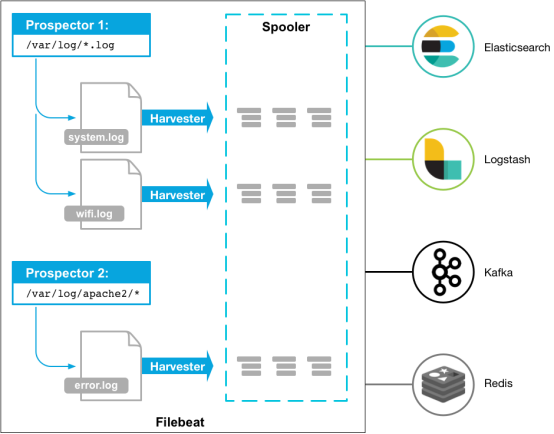
Beats platform integrates a variety of single-purpose data collectors. Once installed, these collectors can serve as lightweight agents, sending collected data from hundreds or thousands of machines to a specified target.

Beats offers multiple collectors, and you can download the appropriate collector according to your needs. This document will introduce how to connect Filebeat (a lightweight log collector) to CKafka and solutions to FAQs encountered after connection.

Prerequisites

Download and install Filebeat (see Download Filebeat)
Download and install JDK 8 (see Download JDK 8)

Directions

Step 1: Preparations

1. On the Elastic Topic list page of the console, create a Topic.

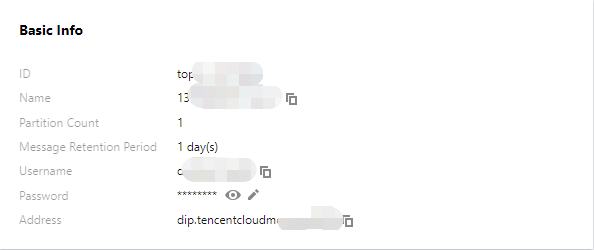
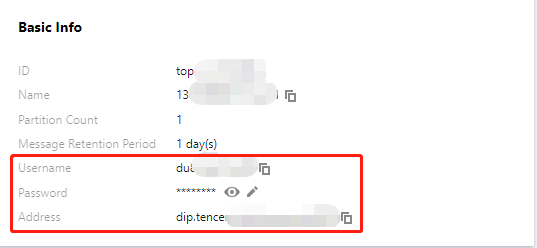
2. Click the ID of the Topic to enter the Basic Information page and obtain the username, password, and address information.

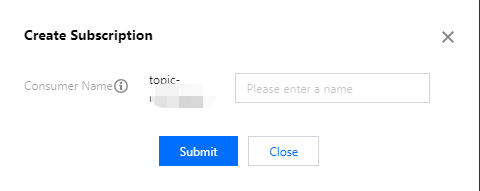
3. In the Subscription Relationships tab, create a subscription relationship (consumption group).


Step 2: Preparing the Configuration File

Enter the Filebeat installation directory and create the configuration monitoring file named filebeat.yml.
#======= For versions later than Filebeat 7.x, change `filebeat.prospectors` to `filebeat.inputs` =======
filebeat.prospectors:


- input_type: log

# This is the monitoring file path.
paths:
- /var/log/messages

#======= Outputs =========

#------------------ kafka -------------------------------------
output.kafka:
version:0.10.2 // Configure them according to different CKafka instance open-source versions.
# Set the CKafka connection address.
hosts: ["xx.xx.xx.xx:xxxx"]
# Set the name of the target topic.
topic: 'test'
partition.round_robin:
reachable_only: false

required_acks: 1
compression: none
max_message_bytes: 1000000

# SASL requires the following information to be configured. If SASL is not needed, you can skip the following two options.
username: "yourusername"
password: "yourpassword"
Parameter
Description
host
The connection address. It can be obtained from the basic information page of an elastic Topic in the console.

username
The username. It can be obtained from the basic information page of an elastic Topic in the console.
password
The user password. It can be obtained from the basic information page of an elastic Topic in the console.
topic
The topic name. It can be obtained from the basic information page of an elastic Topic in the console.

Step 3: Sending Messages with Filebeat

1. Run the following command to start the client.
sudo ./filebeat -e -c filebeat.yml
2. Add data to the monitoring file (example: write to the monitored testlog file).
echo ckafka1 >> testlog
echo ckafka2 >> testlog
echo ckafka3 >> testlog
3. Start the Consumer to consume the corresponding Topic and get the following data.
{"@timestamp":"2017-09-29T10:01:27.936Z","beat":{"hostname":"10.193.9.26","name":"10.193.9.26","version":"5.6.2"},"input_type":"log","message":"ckafka1","offset":500,"source":"/data/ryanyyang/hcmq/beats/filebeat-5.6.2-linux-x86_64/testlog","type":"log"}
{"@timestamp":"2017-09-29T10:01:30.936Z","beat":{"hostname":"10.193.9.26","name":"10.193.9.26","version":"5.6.2"},"input_type":"log","message":"ckafka2","offset":508,"source":"/data/ryanyyang/hcmq/beats/filebeat-5.6.2-linux-x86_64/testlog","type":"log"}
{"@timestamp":"2017-09-29T10:01:33.937Z","beat":{"hostname":"10.193.9.26","name":"10.193.9.26","version":"5.6.2"},"input_type":"log","message":"ckafka3","offset":516,"source":"/data/ryanyyang/hcmq/beats/filebeat-5.6.2-linux-x86_64/testlog","type":"log"}

SASL/PLAINTEXT Mode

If you want to configure SASL/PLAINTEXT, you need to set the username and password under the Kafka configuration.
# SASL requires the following information to be configured. If SASL is not needed, you can skip the next two options.
username: "yourusername"
password: "yourpassword"

FAQs

If you find a large number of INFO logs in the Filebeat logs (default path /var/log/filebeat/filebeat), such as:
2019-03-20T08:55:02.198+0800 INFO kafka/log.go:53 producer/broker/544 starting up
2019-03-20T08:55:02.198+0800 INFO kafka/log.go:53 producer/broker/544 state change to [open] on wp-news-filebeat/4
2019-03-20T08:55:02.198+0800 INFO kafka/log.go:53 producer/leader/wp-news-filebeat/4 selected broker 544
2019-03-20T08:55:02.198+0800 INFO kafka/log.go:53 producer/broker/478 state change to [closing] because EOF
2019-03-20T08:55:02.199+0800 INFO kafka/log.go:53 Closed connection to broker bitar1d12:9092
2019-03-20T08:55:02.199+0800 INFO kafka/log.go:53 producer/leader/wp-news-filebeat/5 state change to [retrying-3]
2019-03-20T08:55:02.199+0800 INFO kafka/log.go:53 producer/leader/wp-news-filebeat/4 state change to [flushing-3]
2019-03-20T08:55:02.199+0800 INFO kafka/log.go:53 producer/leader/wp-news-filebeat/5 abandoning broker 478
2019-03-20T08:55:02.199+0800 INFO kafka/log.go:53 producer/leader/wp-news-filebeat/2 state change to [retrying-2]
2019-03-20T08:55:02.199+0800 INFO kafka/log.go:53 producer/leader/wp-news-filebeat/2 abandoning broker 541
2019-03-20T08:55:02.199+0800 INFO kafka/log.go:53 producer/leader/wp-news-filebeat/3 state change to [retrying-2]
2019-03-20T08:55:02.199+0800 INFO kafka/log.go:53 producer/broker/478 shut down
A large number of INFO logs may indicate a potential issue with the Filebeat version. Products in the Elastic family are updated frequently, and different major versions often have compatibility issues. For example, v6.5.x supports Kafka v0.9, v0.10, v1.1.0, and v2.0.0 by default, while v5.6.x supports Kafka v0.8.2.0 by default.
You should check the version configuration in the configuration file:
output.kafka:
version:0.10.2 // Configure them according to different CKafka instance open-source versions.


帮助和支持

本页内容是否解决了您的问题?

填写满意度调查问卷,共创更好文档体验。

文档反馈