tencent cloud

TDMQ for CKafka

Release Notes and Announcements
Release Notes
Broker Release Notes
Announcement
Product Introduction
Introduction and Selection of the TDMQ Product Series
What Is TDMQ for CKafka
Strengths
Scenarios
Technology Architecture
Product Series Introduction
Apache Kafka Version Support Description
Comparison with Apache Kafka
High Availability
Use Limits
Regions and AZs
Related Cloud Services
Billing
Billing Overview
Pricing
Billing Example
Changing from Postpaid by Hour to Monthly Subscription
Renewal
Viewing Consumption Details
Overdue Payments
Refund
Getting Started
Guide for Getting Started
Preparations
VPC Network Access
Public Domain Name Access
User Guide
Usage Process Guide
Configuring Account Permission
Creating Instance
Configuring Topic
Connecting Instance
Managing Messages
Managing Consumer Group
Managing Instance
Changing Instance Specification
Configuring Traffic Throttling
Configuring Elastic Scaling Policy
Configuring Advanced Features
Viewing Monitoring Data and Configuring Alarm Rules
Synchronizing Data Using CKafka Connector
Use Cases
Cluster Resource Assessment
Client Practical Tutorial
Log Integration
Open-Source Ecosystem Integration
Replacing Supporting Route (Old)
Migration Guide
Migration Solution Overview
Migrating Cluster Using Open-Source Tool
Troubleshooting
Topics
Clients
Messages
​​API Reference
History
Introduction
API Category
Making API Requests
Other APIs
ACL APIs
Instance APIs
Routing APIs
DataHub APIs
Topic APIs
Data Types
Error Codes
SDK Reference
SDK Overview
Java SDK
Python SDK
Go SDK
PHP SDK
C++ SDK
Node.js SDK
SDK for Connector
Security and Compliance
Permission Management
Network Security
Deletion Protection
Event Record
CloudAudit
FAQs
Instances
Topics
Consumer Groups
Client-Related
Network-Related
Monitoring
Messages
Agreements
CKafka Service Level Agreements
Contact Us
Glossary

Connecting Logstash to CKafka

PDF
Focus Mode
Font Size
Last updated: 2024-09-09 21:30:22
Logstash is an open-source log processing tool that can be used to collect data from multiple sources, filter the collected data, and store it for various uses.
Logstash is highly flexible and has powerful syntax analysis capabilities. With a variety of plugins, it supports multiple input and output sources. In addition, as a horizontally scalable data pipeline, Logstash works seamlessly with Elasticsearch and Kibana, offering robust functionality in log collection and search.

How Logstash Works

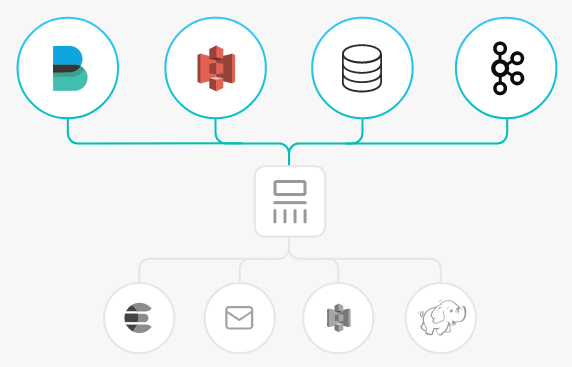
The Logstash data processing can be divided into three stages: inputs → filters → outputs.
1. Inputs: Collect data from multiple sources like file, syslog, redis, and beats.
2. Filters: Modify and filter the collected data. Filters are intermediate processing components in the Logstash data pipeline. They can modify events based on specific conditions. Some commonly used filters are grok, mutate, drop, and clone.
3. Outputs: Transfer the processed data to other destinations. An event can be transferred to multiple outputs, and the event ends when the transfer is completed. Elasticsearch is the most commonly used outputs.
In addition, Logstash supports encoding and decoding data, so you can specify data formats on the input and output ends.


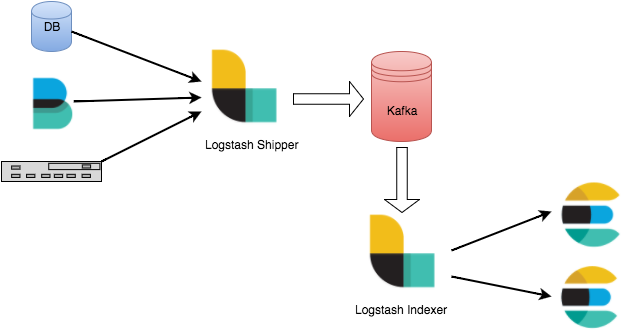
Advantages of Connecting Logstash to Kafka

Asynchronous data processing: It can prevent traffic spikes.
Decoupling: When an exception occurs in Elasticsearch, the upstream work will not be affected.
Note
Logstash consumes resources when filtering data. If you deploy Logstash on a production server, the performance of the server may be affected.


Prerequisites

Download and install Logstash, see Download Logstash.
Download and install JDK 8, see Download JDK 8.

Directions

Step 1: Preparations

1. On the Elastic Topic list page of the console, create a Topic.

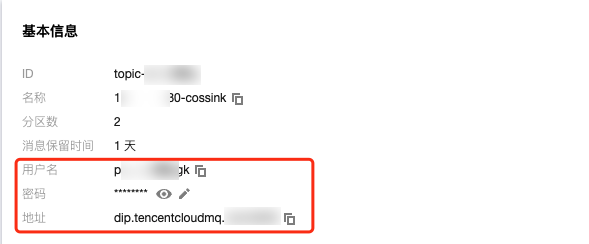
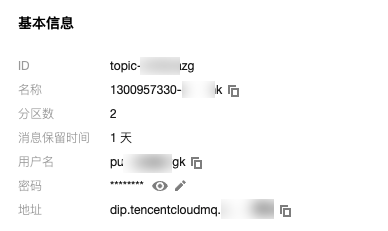
2. Click the ID of the Topic to enter the Basic Information page, and obtain username, password, and address information.

3. On the Subscription Relationship tab, create a subscription relationship (consumption group).


Step 2: Connecting to CKafka

Note
You can click the tabs below to view the specific steps for connecting CKafka as inputs or outputs.
Connecting as Inputs
Connecting as Outputs
1. Run bin/logstash-plugin list to check if the supported plugins include logstash-input-kafka.

2. In the .bin/ directory, create the configuration file named input.conf. Here, standard output serves as the data destination and Kafka serves as the data source. The kafka-client-jaas.conf file is used for configuring SASL-PLAINTEXT username and password.
input {
kafka {
bootstrap_servers => "xx.xx.xx.xx:xxxx" // Ckafka connection address
group_id => "logstash_group" // CKafka group ID
topics => ["logstash_test"] // CKafka topic name
consumer_threads => 3 // Number of consumption threads, which is generally the same as the number of CKafka partitions.
auto_offset_reset => "earliest"
security_protocol => "SASL_PLAINTEXT"
sasl_mechanism => "PLAIN"
jaas_path => "xx/xx/kafka-client-jaas.conf"
}
}
output {
stdout{codec=>rubydebug}
}
The content of kafka-client-jaas.conf is as follows:
KafkaClient {
org.apache.kafka.common.security.plain.PlainLoginModule required
username="username"
password="password";
};
3. Run the following command to start Logstash and begin message consumption:
./logstash -f input.conf
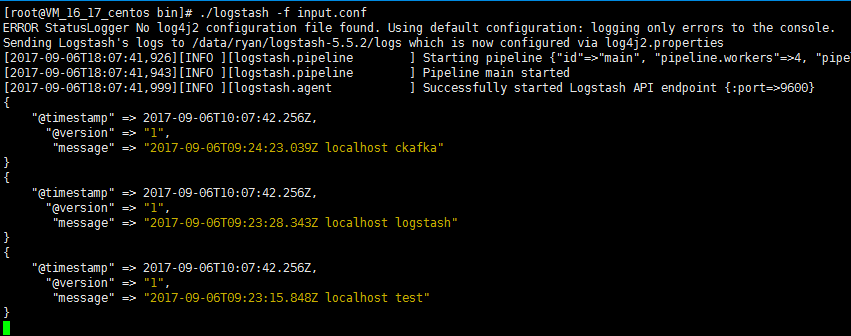
The returned result is as follows:

You can see the data from the Topic has been consumed.
1. Run bin/logstash-plugin list to check if the supported plugins include logstash-output-kafka.

2. Write a configuration file output.conf in the .bin/ directory. Here, standard input serves as the data source and Kafka serves as the data destination. The kafka-client-jaas.conf file is used for configuring SASL-PLAINTEXT username and password.
input {
stdin{}
}

output {
kafka {
bootstrap_servers => "xx.xx.xx.xx:xxxx" // Ckafka connection address
topic_id => "logstash_test" // CKafka topic name
security_protocol => "SASL_PLAINTEXT"
sasl_mechanism => "PLAIN"
jaas_path => "xx/xx/kafka-client-jaas.conf"
}
}
The content of kafka-client-jaas.conf is as follows:
KafkaClient {
org.apache.kafka.common.security.plain.PlainLoginModule required
username="username"
password="password";
};
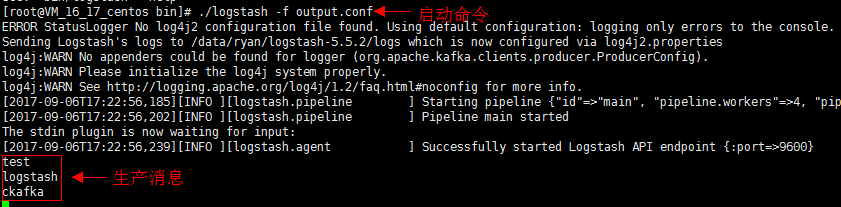
3. Run the following command to start Logstash and send messages to the created Topic.
./logstash -f output.conf

4. Start the CKafka consumer and verify the production data in the previous step.

Parameter
Description
bootstrapServers
The connection address. It can be obtained from the basic information page of an elastic Topic in the console.

username
The username. It can be obtained from the basic information page of an elastic Topic in the console.
password
The user password. It can be obtained from the basic information page of an elastic Topic in the console.
topic_id
The topic name. It can be obtained from the basic information page of an elastic Topic in the console.
group.id
The consumption group name. It can be obtained from the subscription relationship list of an elastic Topic in the console.


Help and Support

Was this page helpful?

Help us improve! Rate your documentation experience in 5 mins.

Feedback