tencent cloud

DocumentaçãoCloud Log Service

Collecting Kubernetes Metrics (Configure VMagent Collection Version)

Baixar
Modo Foco
Tamanho da Fonte
Última atualização: 2026-05-27 21:15:28
This document describes how to collect metrics to Cloud Log Service (CLS) using VMagent from self-built Kubernetes or Tencent Kubernetes Engine (TKE) clusters.

Operation Steps

Installing VMagent

Dependencies:
kubectl has been installed, and the cluster can be accessed via kubectl normally.
Linux environment. MacOS is not supported.
1. Run the following command to download the VMagent installation script.
wget https://mirrors.tencent.com/install/cls/vmagent/vmagent.sh
2. Run the following command to install VMagent.
./vmagent.sh install --secretid <secretid> --secretkey <secretkey> --endpoint https://<region-url>/prometheus/<topicID>/api/v1/write --cluster_id <cluster_id>
Note:
In the installation command, --secretid, --secretkey, --endpoint, topicID, and cluster_id are required. For details, see Parameter Description.

Description

Parameter Name
Required
Parameter Description
topicID
Yes
Log topic ID.
secretid
Yes
Part of the Cloud API Key. SecretId is used to identify the API caller's identity.
secretkey
Yes
Part of the Cloud API Key. SecretKey is the key used to encrypt the signature string and verify the signature string on the server side.
endpoint
Yes
The URL to access the CLS metric topic. The path consists of the CLS domain name and topicID. For details, see Metrics Reporting.
cluster_id
Yes
Cluster ID, used as a metric label to distinguish the source of metrics.
namespace
No
Specifies the namespace to install VMagent. If not specified, the default value is kube-system. Generally, it does not need to be specified.
name
No
Specifies the name of the deployment to install VMagent. If not specified, the default value is VMagent. Generally, it does not need to be specified.
dep
No
Whether to install dependent components (node-exporter and kube-state-metric) during installation. The default value is false.

Configuring Metrics Collection

Create a metric collection configuration ConfigMap by referring to the following format.
Note:
For how to create a ConfigMap, see kubectl create configmap.
kind: ConfigMap apiVersion: v1 metadata: name: ${name}-config ## The name parameter specified during VMagent installation namespace: ${namespace} ## The namespace parameter specified during VMagent installation data: vmagent.yml: |- ## Prometheus metrics collection configuration. For details, see https://prometheus.io/docs/prometheus/latest/configuration/configuration/ global: scrape_interval: 15s external_labels: cluster: ${clusterID} ## The clusterID parameter specified during VMagent installation scrape_configs: - job_name: xxx

Querying Collected Metrics

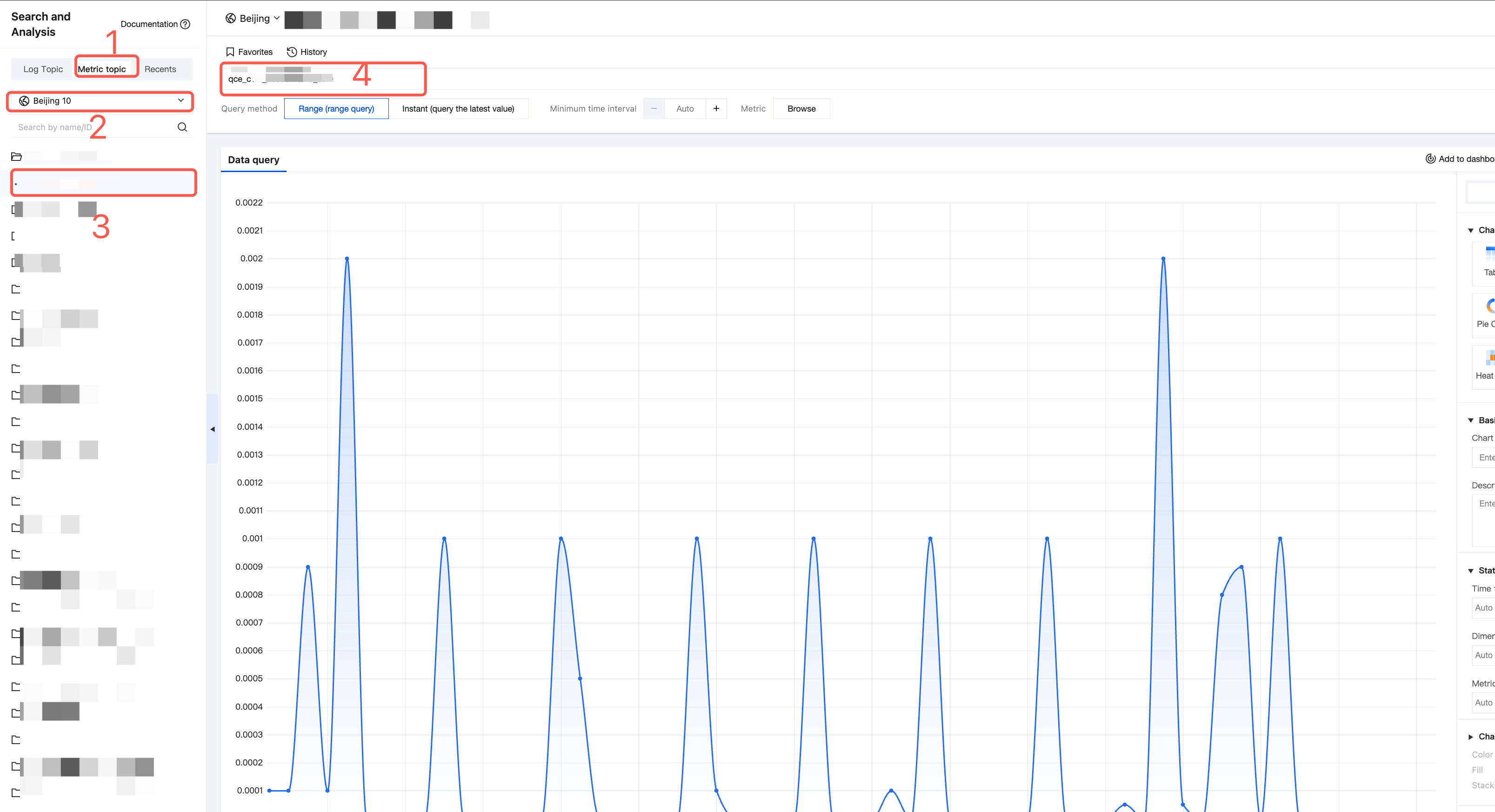
1. Log in to the Cloud Log Service (CLS) console, choose Search and Analysis in the left sidebar, select the Metric topic and its region at the top, and then select the target metric topic.


2. Enter the metric name in the input box to query metrics.
Uninstalling VMagent

Run the following command to uninstall VMagent:
./vmagent.sh uninstall --name <vmagent-name> --namespace <ns-name> --dep true

Description

Parameter Name
Required
Parameter Description
namespace
No
The namespace for VMagent. If not specified, the default value is kube-system.
name
No
The name of the VMagent deployment. If not specified, the default value is VMagent.
dep
No
Whether to uninstall dependent components (node-exporter and kube-state-metric). The default value is true.

Ajuda e Suporte

Esta página foi útil?

comentários