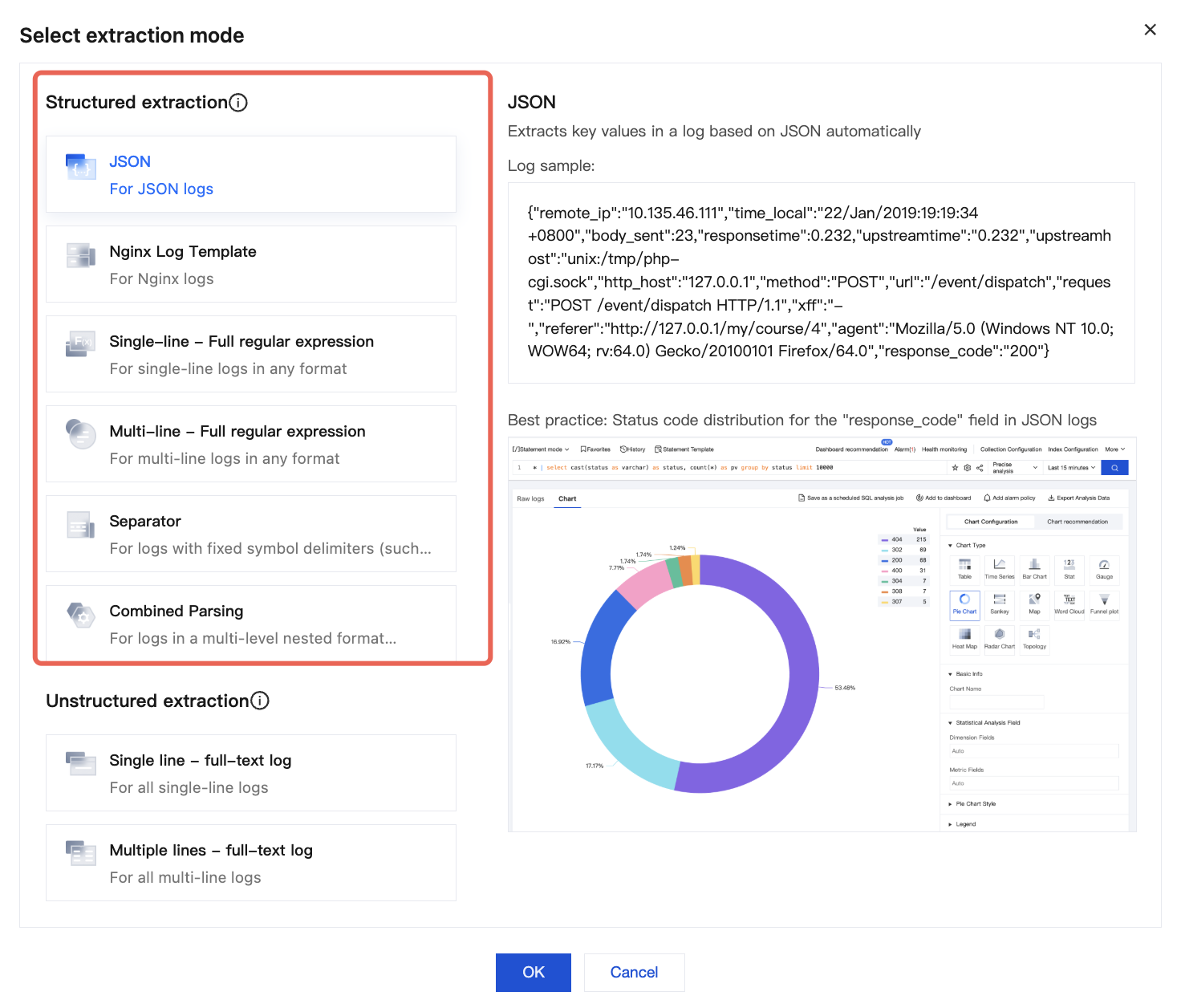
What Is the Difference between Unstructured Extraction Mode and Structured Extraction Mode?
Unstructured extraction mode refers to that in the collection configuration, the extraction mode is configured as single-line full text or multi-line full text. This extraction mode does not format and parse the log, but collects it in full text. In this extraction mode,logs collected can only be used for the simplest full-text retrieval, log number statistics, and log number alarm.
CLS supports more powerful search and analysis, visualization, and monitoring alarms based on specific fields in log content. This capability relies on formatted parsing of collected logs, which is achieved by selecting Structured Extraction Mode in the collection configuration. If your log output format is consistent, we recommend configuring Structured Extraction Mode (free) to maximize your log analysis experience.
How to Configure Structured Extraction Mode?
1. Log in to CLS, click Log Topic in the left sidebar to go to the Log Topic Management page.
2. Locate the target log topic and click Log Topic Name to go to the Log Topic Configuration page.
3. Select the Collection Configuration tab, locate the collection configuration whose extraction mode is single-line or multi-line full text under LogListener Collection Configuration, and click View to go to the Collection Configuration Details page.
4. On the Collection Configuration Details page, click Modify Configuration to go to the Collection Configuration Edit page.
5. Locate the Extraction Mode configuration item. Based on your log format, click Modify and select the corresponding structured extraction mode.
6. Structured extraction modes
Single-Line Full Regular Expression Format
Multi-line Full Regular Expression Format
JSON Format
Delimiter format
The single-line full regular expression format is usually used to process structured logs. This represents a log parsing mode in which multiple key-value pairs are extracted from a complete log entry using regular expressions.
Assume that the raw data of a log is:
10.135.46.111--[22/Jan/2019:19:19:30+0800]"GET /my/course/1 HTTP/1.1"127.0.0.12007829703"http://127.0.0.1/course/explore?filter%5Btype%5D=all&filter%5Bprice%5D=all&filter%5BcurrentLevelId%5D=all&orderBy=studentNum""Mozilla/5.0 (Windows NT 10.0; WOW64; rv:64.0) Gecko/20100101 Firefox/64.0"0.3540.354
http_user_agent: Mozilla/5.0 (Windows NT 10.0; WOW64; rv:64.0) Gecko/20100101 Firefox/64.0
remote_addr: 10.135.46.111
request_length: 782
request_method: GET
request_time: 0.354
request_url: /my/course/1
status: 200
time_local: [22/Jan/2019:19:19:30 +0800]
upstream_response_time: 0.354
The multi-line full regular expression mode is a log parsing mode suitable for log text where a complete log entry spans multiple lines (for example, Java program logs). It extracts multiple key-value pairs using regular expressions. If you do not need to extract key-value pairs, refer to Multi-line Full Text Format for configuration. When configuring the multi-line full regular expression mode, you need to first input a log sample and then customize the regular expression. After configuration is complete, the system extracts the corresponding key-value pairs based on the capture groups in the regular expression.
According to the extracted key, the collected data of CLS is:
time:2018-10-01T10:30:01,000`
level: INFO`
msg:java.lang.Exception: exception happened
at TestPrintStackTrace.f(TestPrintStackTrace.java:3)
at TestPrintStackTrace.g(TestPrintStackTrace.java:7)
at TestPrintStackTrace.main(TestPrintStackTrace.java:16)
JSON format logs automatically extract the first-level key as the field name and the first-level value as the field value. The entire log will be structured in this way, and each complete log will end with a line break character \\n.
Delimiter-based logs refer to log data that can be structured by using a specified delimiter to process the entire log entry, with each complete log ending with the newline character \\n. When CLS processes logs in delimiter format, you must define a unique key for each separated field.
Assume that the raw data of a log is:
10.20.20.10:::[Tue Jan 2214:49:45CST2019+0800]:::GET/online/sample HTTP/1.1:::127.0.0.1:::200:::647:::35::: http://127.0.0.1/
When the delimiter for log parsing is specified as :::, this log will be divided into eight fields, and each of these fields will be assigned a unique key, as shown below: