tencent cloud

Web Application Firewall

Release Notes and Announcements
Release Notes
Product Announcement
Security Advisory
User Guide
Product Introduction
Overview
Product Category
Strengths
Scenarios
Plans and Editions
Supported Regions
Basic Concepts
Purchase Guide
Billing Overview
Purchase Guide
WAF Plan Upgrade Method
Renewing Connections
Payment Overdue
Refund
Getting Started
Getting Started
FAQs for Beginners
Operation Guide
Overview
Connection Management
Security Operations
Protection Policies
Service Settings
Practical Tutorial
WAF CCP Overview
Bot Management
API Security
Integration
Protection Configuration
API Documentation
History
Introduction
API Category
Making API Requests
Asset Management APIs
Billing APIs
Protection Settings APIs
Other APIs
IP Management APIs
Integration APIs
Log Service APIs
Security Overview APIs
Rule Engine APIs
Data Types
Error Codes
FAQS
Product Consultation
Connection
Usage
Permissions
Sandbox Isolation Status
Service Level Agreement
WAF Policy
Privacy Policy
Data Processing And Security Agreement
Contact Us
Glossary

Sandbox Isolation Status

PDF
Focus Mode
Font Size
Last updated: 2026-03-13 16:15:36
Within the same natural day, if the instance's business QPS peak exceeds the instance specification value but does not reach the instance's sandbox isolation threshold for a cumulative of 3 times (including) or if the QPS peak exceeds the instance sandbox isolation threshold once (including), the instance business traffic will immediately enter the sandbox isolation status. Instances in the sandbox isolation status will no longer guarantee the compliance of SLA.

This document will introduce what the sandbox isolation status is, the conditions under which an instance enters the sandbox isolation status, and how to lift an instance from the sandbox isolation status.

1. Overview of the Isolated Cluster

Isolated clusters are separated isolation spaces set up for abnormal instance traffic where the actual business QPS peak exceeds the QPS traffic specification value.

Instance QPS Traffic Specification Value

Instance QPS traffic specification value is the sum of the QPS specification value within the version, the extended QPS specification value, and the elastic postpaid QPS value. The calculation method of the instance QPS traffic specification value is as follows:

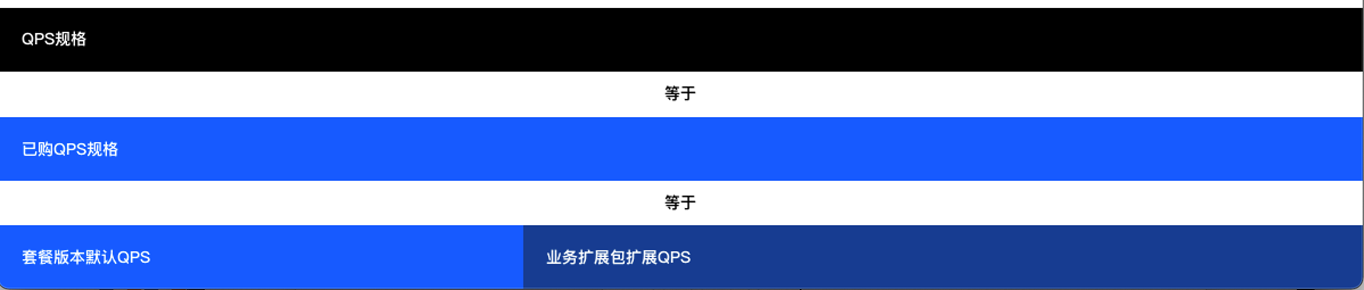
Instances with Elastic Pay-as-you-go Not Enabled

Instance QPS specification value = purchased QPS specification value = default QPS for the package version + extended QPS for the business extension package


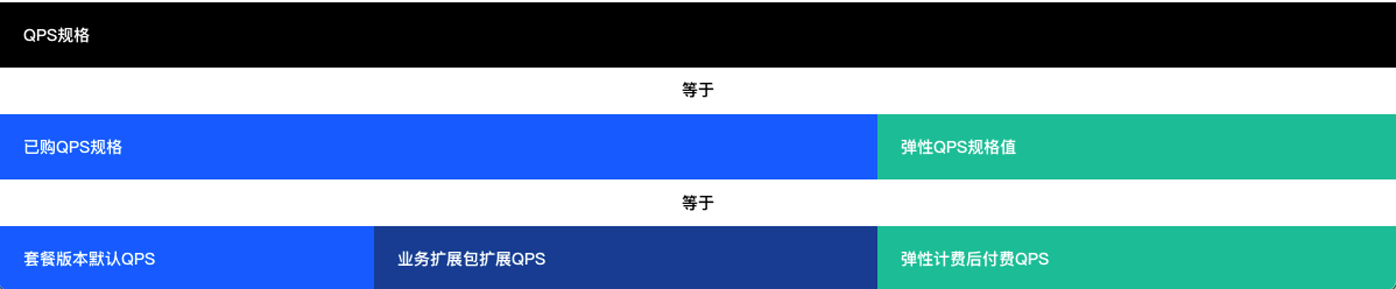
Instances with Elastic Pay-as-you-go Enabled

Instance QPS specification value = purchased QPS specification value + elastic QPS specification value = default QPS for the package version + extended QPS for the business extension package + elastic postpaid QPS


Sandbox Isolation Threshold

The sandbox isolation threshold is the maximum protective QPS threshold for short-term service of WAF instances with different QPS specifications. When the QPS of an instance exceeds the threshold, the instance will immediately enter the isolated cluster. The calculation method of the QPS sandbox isolation threshold of an instance is as follows:

Instances with Elastic Pay-as-you-go Not Enabled and Purchased Business Extension Package Not Customized

Instance QPS sandbox isolation threshold = purchased QPS specification value x 3
Example: If an Enterprise Edition SaaS WAF instance in a Chinese mainland region has purchased 3 extension packages, the QPS sandbox isolation threshold of the instance is (5,000 + 3 x 1,000) x 3.


Instances with Elastic Pay-as-you-Go Enabled and Purchased Business Extension Package Customized

Instance QPS sandbox isolation threshold = take the maximum value among [instance QPS specification value, maximum QPS sandbox isolation threshold for the instance version]
Maximum QPS sandbox isolation threshold for the instance version = (default QPS specification value for the package version + maximum extendable QPS specification value for the instance) x 3
Example 1: For an SaaS Enterprise Edition WAF instance in a Chinese mainland region, you can purchase 40 extension packages after applying for customizing the number of expansion packages available for purchase, the instance QPS specification value = 5,000 + 40 x 1,000 = 45,000. The maximum QPS sandbox isolation threshold for the instance version = (5,000 + 30,000) x 3 = 105,000. Instance QPS sandbox isolation threshold = take the maximum value among [45,000, 105,000] = 105,000 QPS.
Example 2: For an Enterprise Edition WAF instance in a Chinese mainland region, you can purchase 150 extension packages after applying for customizing the number of extension packages available for purchase, the instance QPS specification value = 5,000 + 150 x 1,000 = 155,000 QPS. The maximum QPS sandbox isolation threshold for the instance version = (5,000 + 30,000) x 3 = 105,000 QPS. The final instance QPS sandbox isolation threshold = take the maximum value among [155,000, 105,000] = 155,000 QPS.
Example 3: More example data for Instances with Elastic Pay-as-you-go not Enabled and Business Extension Package Available for Purchase Customized is as follows:
Region
Version
Default Purchasable Business Extension Packages
Actually Purchased Business Extension Packages
Instance QPS Specification Value
Maximum QPS Sandbox Isolation Threshold for Instance Version
Instance QPS Sandbox Isolation Threshold
Regions in the Chinese Mainland
Advanced Edition
20
30
2,500+30 x 1,000=32,500
(2,500+20 x 1,000) x 3= 67,500
67500
Enterprise Edition
30
80
5,000+80 x 1,000=85,000
(5,000+30 x 1,000) x 3= 105,000
105000
120
5,000+120 x 1,000=125,000
125000
Ultimate Edition
40
100
10,000+100 x 1,000=110,000
(10,000+40 x 1,000) x 3=150,000
150000
150
10,000+150 x 1,000=160,000
160000
Non-Chinese Mainland regions
Advanced Edition
5
10
2,500+10 x 1,000=12,500
(2,500+5 x 1,000) x 3=22,500
22500
Enterprise Edition
10
12
5,000+12 x 1,000=17,000
(5,000+10 x 1,000) x 3=45,000
45000
50
5,000+50 x 1,000=55,000
55000
Ultimate Edition
20
60
10,000+60 x 1,000=70,000
(10,000+20 x 1,000) x 3=90,000
90000
100
10,000+100 x 1,000=110,000
110000
Note:
The maximum number of extendable business extension packages (including the maximum extendable QPS specification value) varies by region and WAF instance version. For details, see plan and edition description.

Instances with Elastic Pay-as-you-go Enabled and Purchased Business Extension Package Not Customized

Instance QPS sandbox isolation threshold = purchased QPS specification value x 3 + elastic QPS specification value
Example: If an Enterprise Edition WAF instance in a Chinese mainland region has purchased 3 extension packages, you can enable Elastic protection, and set the specification value to 50,000. The instance QPS sandbox isolation threshold = (5,000 + 3 x 1,000) x 3 + 50,000.


Instances with Elastic Pay-as-you-go Enabled and with Purchased Business Extension Package Customized

Instance QPS sandbox isolation threshold = take the maximum value among [instance QPS specification value, maximum QPS sandbox isolation threshold for the instance version]
Maximum QPS sandbox isolation threshold for instance version = (default package version QPS specification value + maximum instance extendable QPS specification value) x 3 + elastic QPS specification value
Example 1: If an Enterprise Edition WAF instance in a Chinese mainland region has purchased 40 extension packages after customization is applied, you can enable elastic billing, and set the specification value to 50,000. The instance QPS specification value = 5,000 + 40 x 1,000 + 50,000 = 95,000, and the maximum QPS sandbox isolation threshold for instance version = (5,000 + 30,000) x 3 + 50,000 = 155,000. The instance QPS sandbox isolation threshold = take the maximum value [95,000, 155,000] = 155,000 QPS.
Example 2: If an Enterprise Edition WAF instance in a Chinese mainland region has purchased 150 extension packages after customization is applied, you can enable elastic billing, and set the specification value to 50,000. The instance QPS specification value = 5,000 + 150 x 1,000 + 50,000 = 205,000 QPS, and the maximum QPS sandbox isolation threshold for instance version = (5,000 + 30,000) x 3 + 50,000 = 155,000 QPS. The instance QPS sandbox isolation threshold = take the maximum value among [205,000, 155,000] = 205,000 QPS.
Example 3: More example data for Instances with Elastic Pay-as-you-go enabled and Purchased Business Extension Package Customized is as follows:
Region
Version
Default Purchasable Business Extension Packages
Default Maximum Elastic QPS that Can Be Enabled
Actually Purchased Business Extension Packages
Elastic Postpaid Actually Enabled Specification Value
Instance QPS Specification Value
Maximum QPS Sandbox Isolation Threshold for the Instance Version
Instance QPS Sandbox Isolation Threshold
Regions in the Chinese Mainland
Advanced Edition
40
200000
10
200000
2,500+10 x 1,000+200,000=212,500
(2,500+40 x 1,000) x 3+200,000=327500
327500
Enterprise Edition
60
300000
100
300000
5,000+100 x 1,000+300,000=405,000
(5,000+60 x 1,000) x 3+300,000= 495,000
495000
120
5,000+120 x 1,000+300,000=425,000
495000
Ultimate Edition
80
400000
100
400000
10,000+100 x 1,000+400,000=510,000
(10,000+80 x 1,000) x 3 + 400,000
=670000
 
670000
400000
150
400000
10,000+150 x 1,000+400,000=560,000
670000
Non-Chinese mainland regions
Advanced Edition
10
Not involved
10
Not involved
2,500+10 x 1,000=12,500
(2,500+10 x 1,000) x 3=37,500
37500
Enterprise Edition
20
12
5,000+12 x 1,000=17,000
(5,000+20 x 1,000) x 3=75,000
75000
50
5,000+50 x 1,000=55,000
(5,000+20 x 1,000) x 3=75,000
75000
Ultimate Edition
40
60
10,000+60 x 1,000=70,000
(10,000+40 x 1,000) x 3=150,000
150000
100
10,000+100 x 1000=110,000
(10,000+40 x 1,000) x 3=150,000
150000

2. Conditions for an Instance to Enter and Exit Isolation Status

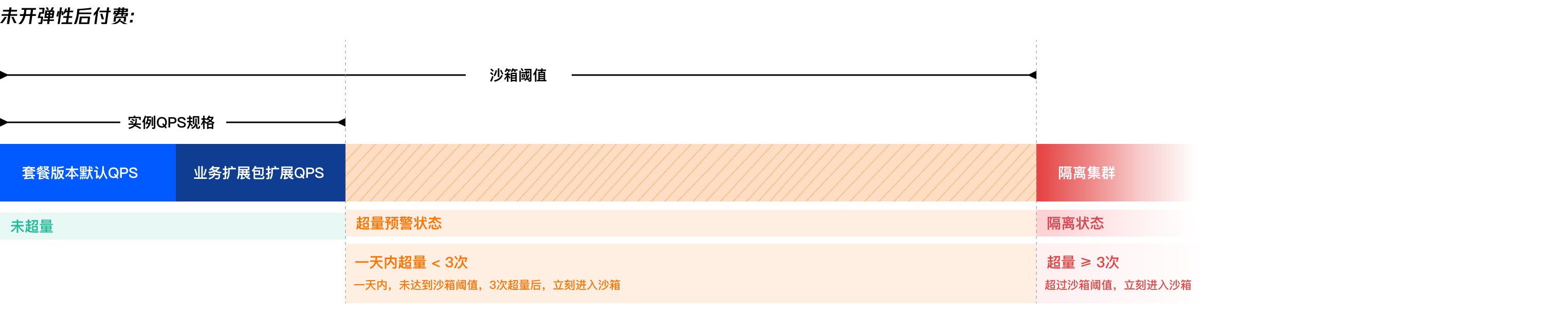
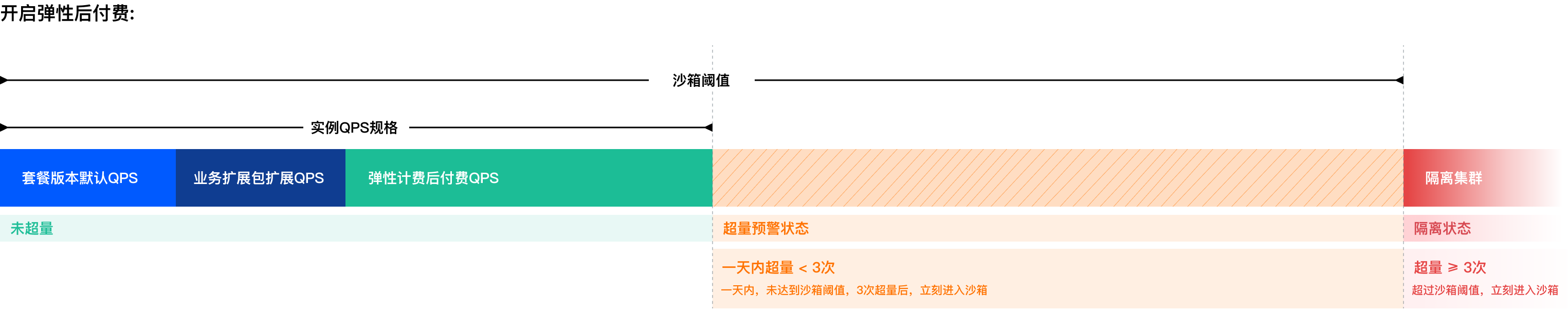
Within the same natural day, if the instance QPS peak is greater than the instance QPS specification value but less than the instance QPS sandbox isolation threshold for a cumulative of 3 times (including), or exceeds the instance QPS sandbox isolation threshold once (including), the instance will immediately enter the isolated cluster. WAF instances that enter the isolated cluster will no longer guarantee the compliance of SLA.
Note:
QPS excess count judgment rules: WAF will obtain the average value (10s) of QPS at each time point in real time to determine the peak value of of each point, which is considered as the instance QPS.
If the instance QPS peak exceeds the instance QPS specification value but does not exceed the instance QPS sandbox isolation threshold, it is deemed as one excess. The number of excesses within 5 minutes are counted as one excess. If the instance's QPS excess count reach three times, the instance will immediately enter the isolation status.
If the instance QPS peak exceeds the current instance QPS sandbox isolation threshold once, the excess count for the day will no longer be calculated, and the instance will directly enter the isolation status.
After an instance enters the isolation status, you can extend the instance QPS specification value. When the extended instance QPS specification value is greater than the maximum business peak value, the isolation will automatically end, and normal protection and product service SLA will be restored. If the instance QPS specification value is not extended, the business QPS peak value need to continuously drop below the instance QPS specification value for 3 consecutive natural days for the instance to be released from the isolation status.

3. Impact on the Business When an Instance Enters the Isolated Cluster

Instances that enter the isolated cluster will no longer guarantee the compliance of SLA (i.e., the service availability is not guaranteed by WAF regardless of whether the instance QPS exceeds the specification value). Domain names and instance protection objects connected to this instance may experience abnormal business access at any time, including but not limited to packet loss, speed limit, connection limit, protection failure, abnormal log or report data, access timeout, entering DDoS cleaning or black hole.
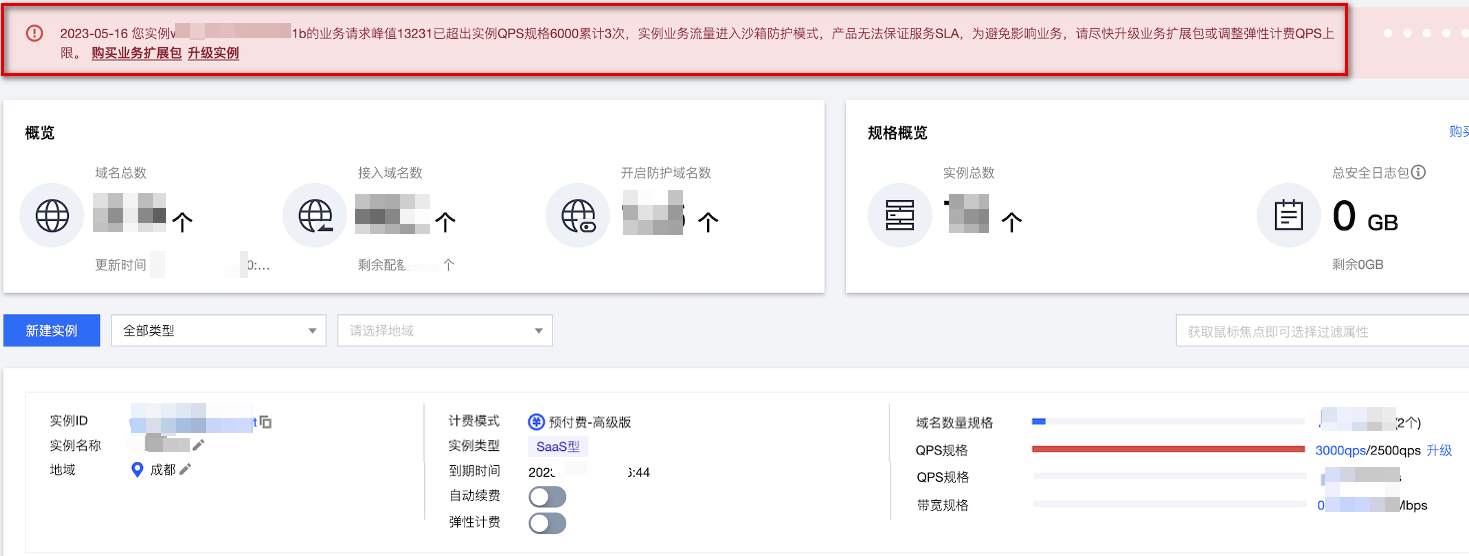
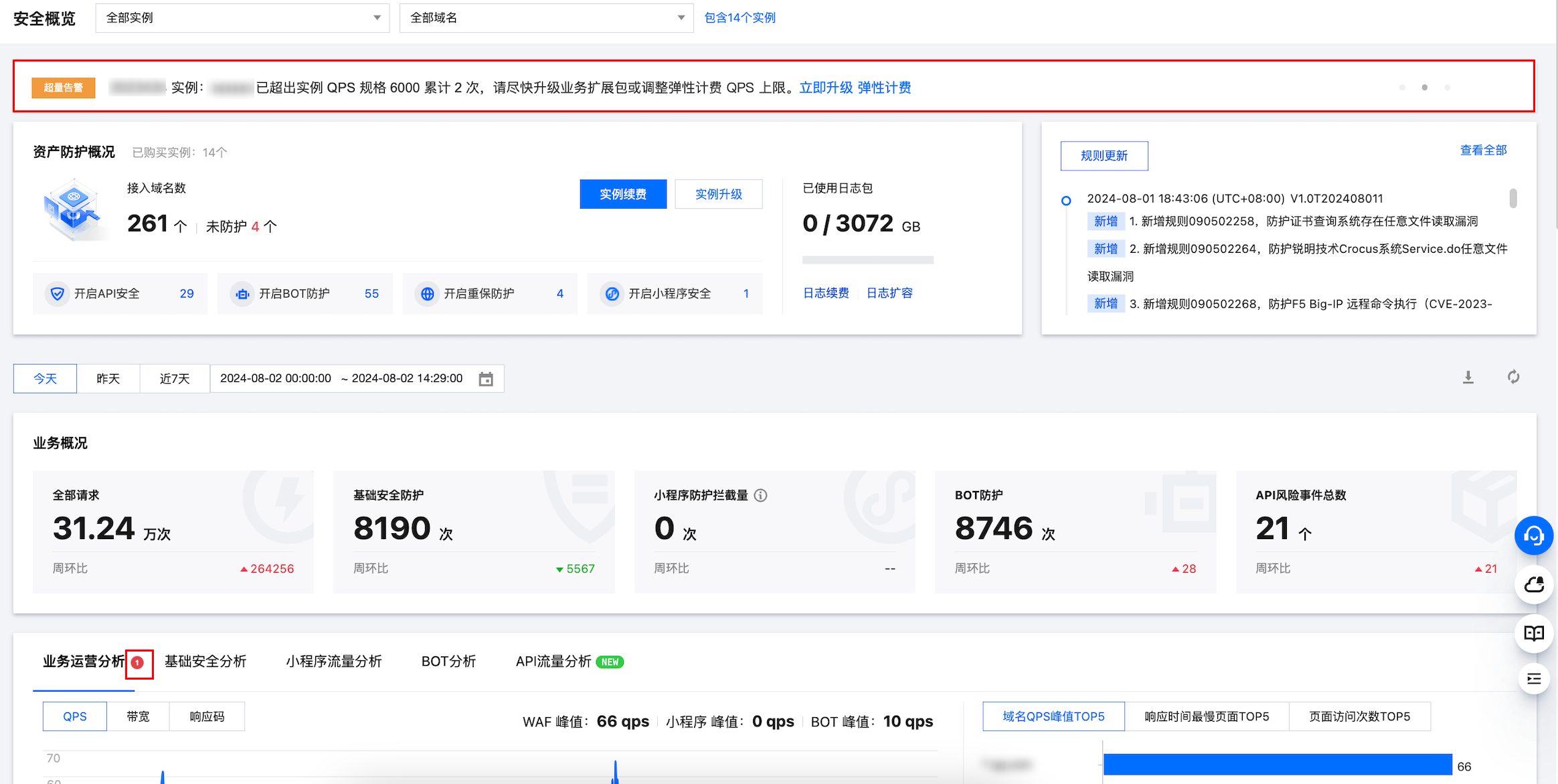
After an instance enters the isolated cluster, the system will notify you via email, SMS, or Message Center. Simultaneously, you can view QPS excess alarms and warning events at the top of the Security Overview and Instances Management pages in the console.
After an instance enters the isolated cluster, if you enable Elastic Pay-as-you-go or purchase a business extension package to extend the instance QPS specification value, and the extended instance QPS specification value is greater than the maximum business peak at the time of the current day's QPS excess, the instance isolation status can be lifted immediately.

4. Viewing Instances in the Isolated Status

After the instance QPS exceeds the limit, at the top of the Instance Management page in the WAF console (as shown in Figure 1), you will receive an alarm for the event; moreover, in the specification section of the instance list, you can view the business QPS peaks and the instance QPS specification values within 30 days. If there is an excess usage event within 30 days, it will be highlighted in red, and you can click to jump to the Security Overview page to view the QPS traffic trend of that instance within 30 days (as shown in Figure 2).


After the instance QPS exceeds the limit and enters an isolated status, the security overview page will display an isolation status alarm; by clicking Operations analysis, in the QPS area, you can view the actual QPS usage through the QPS peak chart.


5. How to Lift the Sandbox Isolation Status of an Instance

The isolation status of yearly/monthly subscription instances will not automatically be lifted within the same day, even if the actual QPS usage has dropped back within the current instance QPS specification value. You need to either extend the instance QPS specification value or have the business QPS peak value dropped below the instance QPS specification value for 3 consecutive natural days to lift the isolation status. If your instance QPS exceeds the limit again after an upgrade and enters isolation, you need to extend the instance QPS specification value again.
You can end the instance isolation status using the following methods:

Upgrading the Package or Business Extension Package of the Instance to Extend the QPS Specification Value

On the Instance Management page, select the excessive instances, and click Upgrade > Extra domain package / Extra capacity package to upgrade the package QPS specification, or click More > Extra capacity package to extend the instance QPS specification value. Once the extended instance QPS specification value is greater than the maximum business peak at the time of excess for that day, the product will automatically lift the instance isolation status, and the instance will restore normal service in compliance of SLA, while the QPS excess count resets to zero.


Enabling Elastic Billing to Extend the QPS Specification Value

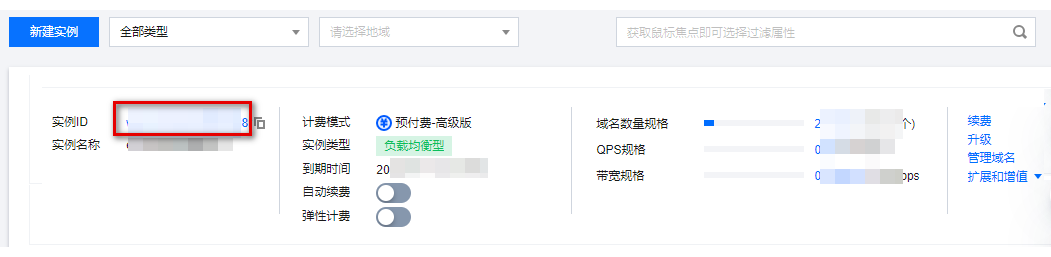
1. For instances without elastic billing enabled, you can go to Instance Management page and click on the target Instance ID.

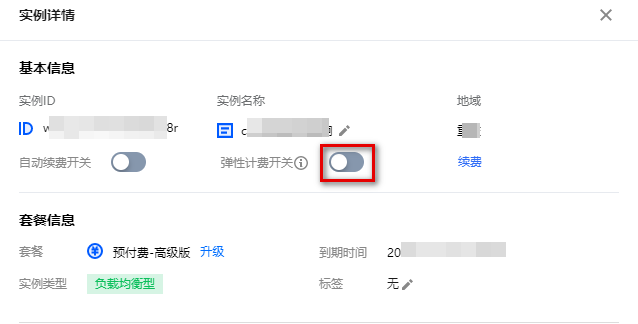
2. On the instance details page, click

to expand the QPS specification value.

3. After elastic billing is enabled, you can adjust and increase the elastic billing's upper limit to extend the QPS specification value. Once the adjusted instance QPS specification value is greater than the maximum business peak at the time of excess for that day, the product will automatically lift the instance isolation status, restore the normal service in compliance of SLA, and reset the QPS excess count to zero.


Help and Support

Was this page helpful?

Help us improve! Rate your documentation experience in 5 mins.

Feedback