SDK Integration Guide (Flutter)
Download
Focus Mode
Font Size
Step 1: Seamless Integration of Tencent Special Effect Resources
2. Migrate Tencent special effect resources
1. Find the
src/main/assets folder in the android/app module of your project. Copy the lut and MotionRes folders from demo/android/app/src/main/assets in the demo project to android/app/src/main/assets in your project. If your project does not have an assets folder, you can manually create one.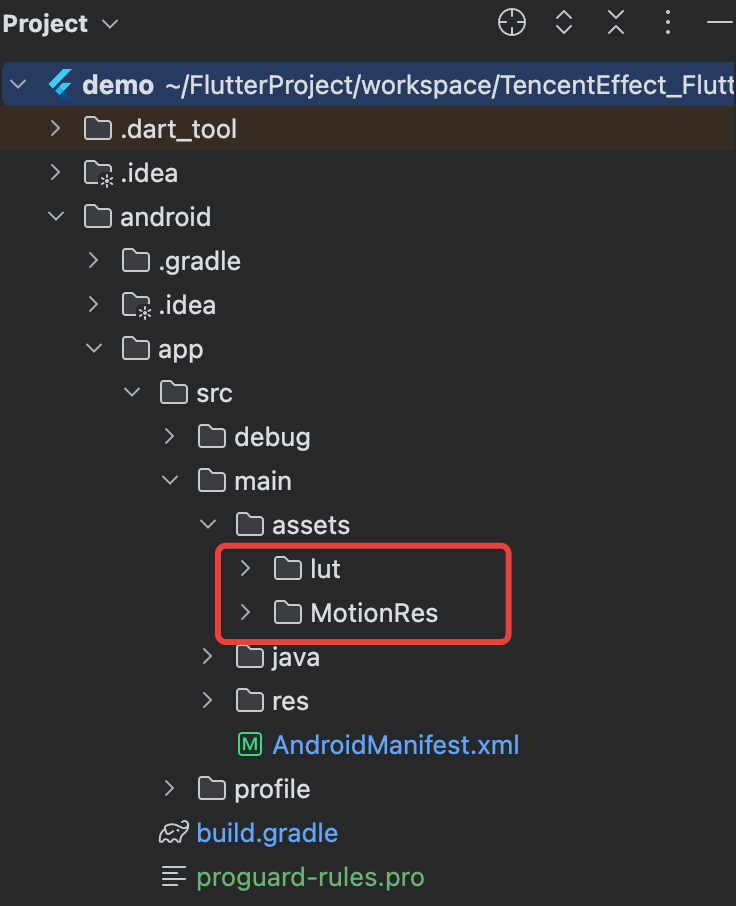
2. In the
android/app/build.gradle file of your project, add the dependency of the Beauty SDK for the Android side. The specific dependency depends on the package you selected. For example, if you selected the S1-04 package, add the following:dependencies {implementation 'com.tencent.mediacloud:TencentEffect_S1-04:latest.release'}
Note:
The maven urls corresponding to each package, please see Documentation. The latest version number of the SDK can be viewed in Version History.
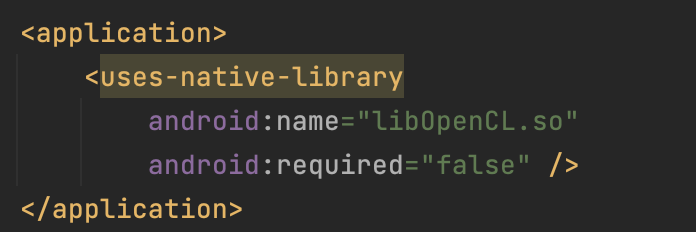
3. If you use an Android version of beauty SDK less than 3.9, you need to find the AndroidManifest.xml file under the app module and add the following tags in the application table:
<uses-native-libraryandroid:name="libOpenCL.so"android:required="false" />//true indicates that libOpenCL is necessary for the current app. If there is no such library, the system will not allow the app to install.//false indicates that libOpenCL is not necessary for the current app. The app can be properly installed regardless of whether this library is present. If the device has this library, the GAN type effects in the beauty effect SDK (for example, Fairy Tale Face, Chinese Cartoon face) will take effect normally. If the device does not have this library, the GAN type will not take effect, but it does not affect the usage of other functions in the SDK.//For the description of uses-native-library, please refer to the Android official website introduction: https://developer.android.com/guide/topics/manifest/uses-native-library-element
As shown below after addition:
4. Obfuscation configuration.
When building a release package with code optimization and obfuscation features enabled (minifyEnabled = true), the compilation tool may remove code that is not explicitly called at the Java/Kotlin layer. If this code is dynamically called by the native layer, a NoSuchMethodError exception (such as no xxx method) will be triggered.
It is recommended to proactively retain the necessary code of the Xmagic module through ProGuard rules in proguard-rules.pro:
-keep class com.tencent.xmagic.** { *;}-keep class org.light.** { *;}-keep class org.libpag.** { *;}-keep class org.extra.** { *;}-keep class com.gyailib.**{ *;}-keep class com.tencent.cloud.iai.lib.** { *;}-keep class com.tencent.beacon.** { *;}-keep class com.tencent.qimei.** { *;}-keep class androidx.exifinterface.** { *;}-keep class com.tencent.effect.** { *;}
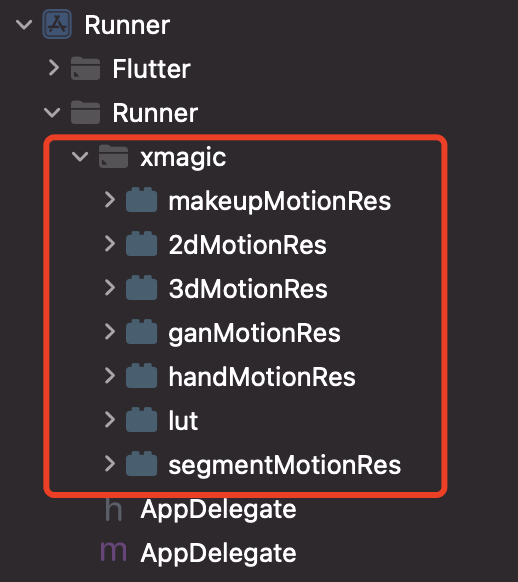
Copy the xmagic folder under the ios/Runner directory in the demo project to the ios/Runner directory in your project. After addition, it is as shown in the figure below:
Note:
The above materials copied from the demo project are test materials. For official materials, you need to contact the staff of Tencent Special Effect Beauty after purchasing a package to obtain and re-add them.
Step Two: Integration of tencent_effect_flutter
You can depend on tencent_effect_flutter in your Flutter project in the following ways.
1. Remote dependency
Add the following reference in your pubspec.yaml file:
tencent_effect_flutter:git:url: https://github.com/Tencent-RTC/TencentEffect_Flutter
2. Local dependency
Download the latest version of tencent_effect_flutter from github, and then add the following reference in the pubspec.yaml file:
tencent_effect_flutter:path: path to tencent_effect_flutter
Step 3: Beauty Effect and TRTC Association
Add the following code in the onCreate method of the application class (or the onCreate method of the FlutterActivity):
TRTCPlugin.setBeautyProcesserFactory(new XmagicProcesserFactory());
Add the following code in the didFinishLaunchingWithOptions method in the AppDelegate file under the ios/Runner directory:
let instance = XmagicProcesserFactory()TencentRTCCloud.setBeautyProcesserFactory(factory: instance)
XmagicProcesserFactory *instance = [[XmagicProcesserFactory alloc] init];[TencentRTCCloud setBeautyProcesserFactoryWithFactory:instance];
Step 4: Beauty Effect Resource Initialization and Authorization
1. Resource initialization
TencentEffectApi.getApi()?.setResourcePath(resourceDir);TencentEffectApi.getApi()?.initXmagic((result) {// TODO});
TencentEffectApi.getApi()?.initXmagic(dir,(reslut) {//TODO});
2. Beauty authorization
TencentEffectApi.getApi()?.setLicense(licenseKey, licenseUrl, (errorCode, msg) {if (errorCode == 0) {// Success}});
Step 5: Enable/Disable Beauty Effects
After completing the above operations, you can enable/disable beauty effects through TRTC's hidden interface:
_enableCustomBeautyByNative(bool open) {trtcCloud.callExperimentalAPI("{\\"api\\": \\"enableVideoProcessByNative\\", \\"params\\": {\\"enable\\": $open}}");}
Note:
Enable beauty effects on the page. When closing the camera, you need to disable beauty effects first. Enable and disable are used in pairs.
Document Reference
You have completed the association between TRTC and Special Effect Beauty Enhancement. You can learn more about how to use Special Effect Beauty Enhancement through the following document:
Help and Support
Was this page helpful?
You can also Contact sales or Submit a Ticket for help.
Help us improve! Rate your documentation experience in 5 mins.
Feedback