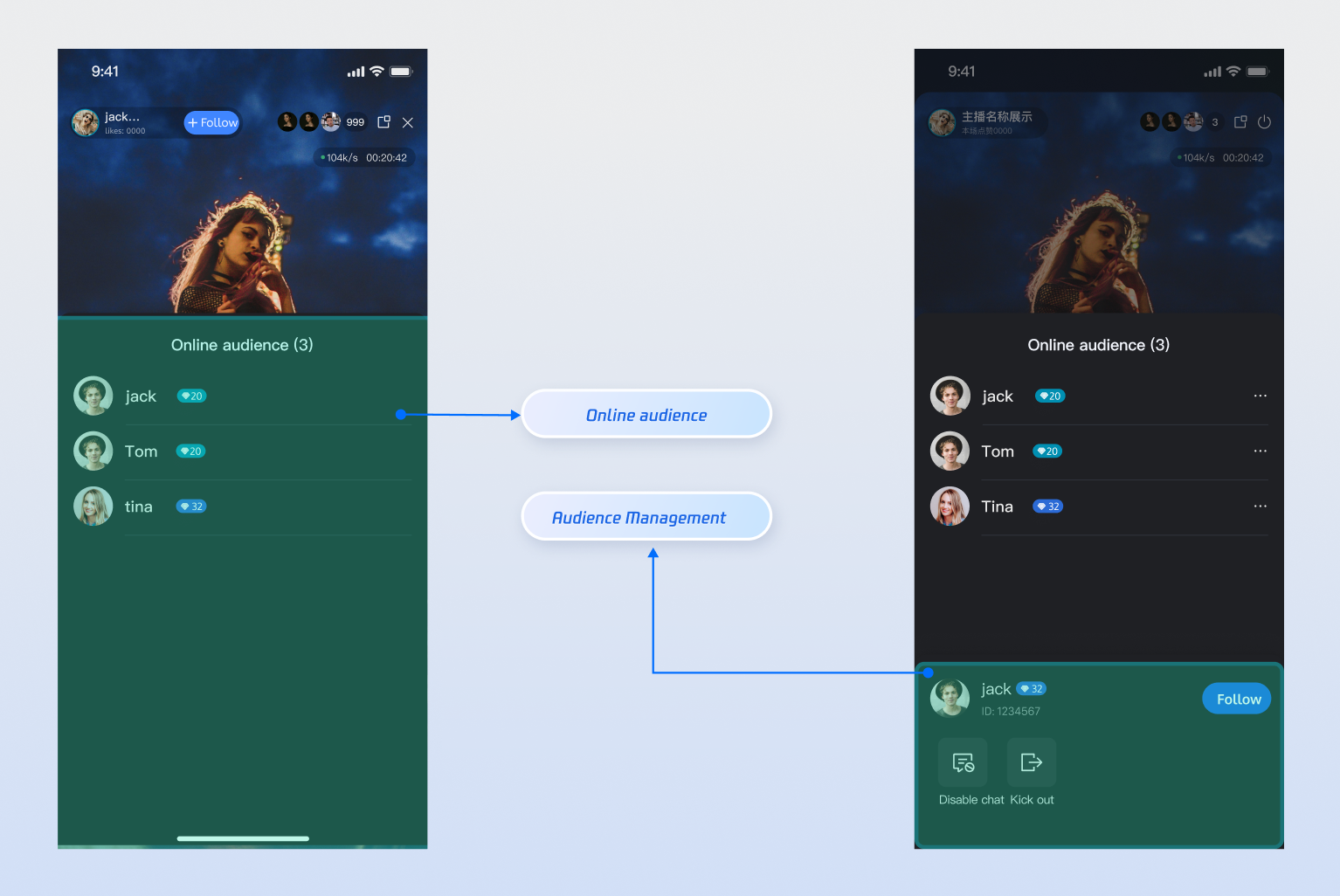
LiveAudienceStore is a module in AtomicXCore specialized in managing live streaming room audience information. With LiveAudienceStore, you can build a complete audience list and management system for your live stream application.
Core Features
Real-Time Audience List: Access and display details for all current audience members in the live room.
Audience Count Statistics: Get the real-time total number of audience members in the live room.
Audience Events: Subscribe to events to instantly detect when audience members join or leave.
Admin Privileges: Hosts can promote audience members to administrators or revoke their admin status.
Room Management: Hosts or administrators can remove (kick out) any regular audience member from the live room.
Core Concepts
The following table introduces the core concepts of LiveAudienceStore:
|
| class
| Represents the basic information model for an audience member. Includes the user’s unique identifier (userID), nickname (userName), and avatar URL (avatarURL). |
| class
| Represents the current status of the audience module. Its core attribute audienceList is a ValueListenable<List<LiveUserInfo>>, storing a snapshot of the audience list; audienceCount signifies the total number of current audience. |
| class
| Handles real-time event listening for audience activity. Includes two callbacks: onAudienceJoined (audience member joins) and onAudienceLeft (audience member leaves), used for incremental updates to the audience list. |
| class
| The main management class for audience list operations. Use it to get audience snapshots, perform management actions, and receive real-time updates via addLiveAudienceListener. |
Implementation Steps
Step 1: Integrate the Components
Live streaming: Refer to Quick Access for seamless integration with AtomicXCore and service access. Voice chat room: Refer to Quick Access for integration with AtomicXCore and access completed. Step 2: Initialize and Obtain Audience List
Retrieve a LiveAudienceStore instance bound to the current live streaming room liveId, actively pull the current audience list once for first-time show.
To release resources when leaving the live room, call the dispose method on AudienceManager.
import 'package:atomic_x_core/atomicxcore.dart';
class AudienceManager {
final String liveId;
late final LiveAudienceStore audienceStore;
late LiveAudienceListener _audienceListener;
late final VoidCallback _audienceListChangedListener = _onAudienceListChanged;
late final VoidCallback _audienceCountChangedListener = _onAudienceCountChanged;
List<LiveUserInfo> audienceList = [];
int audienceCount = 0;
Function()? onStateChanged;
AudienceManager({required this.liveId}) {
audienceStore = LiveAudienceStore.create(liveId);
_subscribeToAudienceState();
_subscribeToAudienceEvents();
fetchInitialAudienceList();
}
Future<void> fetchInitialAudienceList() async {
final result = await audienceStore.fetchAudienceList();
if (result.isSuccess) {
print("First pull audience list successfully");
} else {
print("First pull audience list failed: ${result.errorMessage}");
}
}
void dispose() {
audienceStore.liveAudienceState.audienceList.removeListener(_audienceListChangedListener);
audienceStore.liveAudienceState.audienceCount.removeListener(_audienceCountChangedListener);
audienceStore.removeLiveAudienceListener(_audienceListener);
}
}
The audience list and other state subscriptions will be explained in detail in the next step.
Step 3: Monitoring the Audience List Status and Real-Time Updates
Subscribe to liveAudienceState and LiveAudienceListener on audienceStore to receive full audience list snapshots and real-time join/leave events, driving UI updates.
extension AudienceManagerSubscription on AudienceManager {
void _subscribeToAudienceState() {
audienceStore.liveAudienceState.audienceList.addListener(_audienceListChangedListener);
audienceStore.liveAudienceState.audienceCount.addListener(_audienceCountChangedListener);
}
void _onAudienceListChanged() {
audienceList = audienceStore.liveAudienceState.audienceList.value;
onStateChanged?.call();
}
void _onAudienceCountChanged() {
audienceCount = audienceStore.liveAudienceState.audienceCount.value;
onStateChanged?.call();
}
void _subscribeToAudienceEvents() {
_audienceListener = LiveAudienceListener(
onAudienceJoined: (audience) {
print("Audience ${audience.userName} joined the live streaming room");
if (!audienceList.any((a) => a.userID == audience.userID)) {
audienceList.add(audience);
onStateChanged?.call();
}
},
onAudienceLeft: (audience) {
print("Audience ${audience.userName} left the live streaming room");
audienceList.removeWhere((a) => a.userID == audience.userID);
onStateChanged?.call();
},
);
audienceStore.addLiveAudienceListener(_audienceListener);
}
}
Step 4: Manage Audience Members
As a host or administrator, you can manage audience members in the live room.
4.1 Remove Audience Member from Live Room
Call the kickUserOutOfRoom API to remove designated users from the live streaming room.
extension AudienceManagerActions on AudienceManager {
Future<void> kick(String userId) async {
final result = await audienceStore.kickUserOutOfRoom(userId);
if (result.isSuccess) {
print("Successfully kicked user $userId out of room");
} else {
print("Failed to kick out user $userId: ${result.errorMessage}");
}
}
}
4.2 Set or Revoke Administrator Privileges
Use the setAdministrator and revokeAdministrator APIs to manage user administrator privileges.
extension AudienceManagerAdmin on AudienceManager {
Future<void> promoteToAdmin(String userId) async {
final result = await audienceStore.setAdministrator(userId);
if (result.isSuccess) {
print("Successfully set user $userId as administrator");
}
}
Future<void> revokeAdmin(String userId) async {
final result = await audienceStore.revokeAdministrator(userId);
if (result.isSuccess) {
print("Successfully revoked user $userId's administrator privileges");
}
}
}
Advanced Features
Show Welcome Message in Live Comments
When a new audience enters the live room, the bullet screen/chat area will automatically display a welcome message locally, such as "Welcome [user nickname] to the live room."
Implementation
Subscribe to the onAudienceJoined event from LiveAudienceStore to receive real-time notifications when a new audience member joins. When triggered, extract the user’s nickname and call the appendLocalTip API from BarrageStore to insert the welcome message.
Release resources when leaving the live room by calling the dispose method on LiveRoomManager.
import 'package:atomic_x_core/atomicxcore.dart';
class LiveRoomManager {
final String liveId;
late LiveAudienceListener _welcomeListener;
LiveRoomManager({required this.liveId}) {
_setupWelcomeMessageFlow();
}
void _setupWelcomeMessageFlow() {
final audienceStore = LiveAudienceStore.create(liveId);
final barrageStore = BarrageStore.create(liveId);
_welcomeListener = LiveAudienceListener(
onAudienceJoined: (audience) {
final welcomeTip = Barrage(
messageType: BarrageType.text,
textContent: "Welcome ${audience.userName} to the live streaming room."
);
barrageStore.appendLocalTip(welcomeTip);
},
);
audienceStore.addLiveAudienceListener(_welcomeListener);
}
void dispose() {
final audienceStore = LiveAudienceStore.create(liveId);
audienceStore.removeLiveAudienceListener(_welcomeListener);
}
}
API documentation
For detailed information on all public APIs, properties, and methods for LiveAudienceStore and related classes, see the official AtomicXCore API documentation. The relevant Stores used in this guide are listed below: |
LiveCoreWidget | Core view component for live video stream display and interaction. Handles video stream rendering and widget management, supporting host live streaming, audience co-hosting, and host connection scenarios. | |
LiveCoreController | LiveCoreWidget controller: used to set up live streaming ID, control preview, and perform other operations. | |
LiveAudienceStore | Audience management: get real-time audience list (ID/name/avatar), check audience size, listen to Enter/Exit Event. | |
BarrageStore | Live comments: send text/custom comments, maintain the comment list, and monitor comment status in real time. | |
FAQs
How is the online audience count (audienceCount) in LiveAudienceState updated? What are the timing and frequency?
Active Room Entry/Exit: When a user joins or leaves the live room normally, the audience count notification is triggered instantly. You will immediately see the change in audienceCount in LiveAudienceState.
Abnormal Disconnection: If a user disconnects due to network issues, app crashes, or similar problems, the system uses a heartbeat mechanism to determine their status. Only after missing heartbeats for 90 consecutive seconds will the system consider the user offline and trigger a count change notification.
Update Mechanism & Frequency Control:
Whether triggered instantly or delayed, all audience count change notifications are sent as messages within the room.
Each room is limited to a maximum of 40 messages per second.
Key Point: In high-traffic scenarios, such as live comment storms or gift spamming, if the room’s message rate exceeds 40 messages per second, the system prioritizes core messages (like live comments). Audience count change messages may be dropped due to frequency control.
What does this mean for developers?
audienceCount is a high-precision estimate very close to real time, but under extreme high concurrency scenarios, it may have brief delay or data loss. Therefore, we recommend that you use it for UI display and should not take it as the only basis for scenarios requiring absolute accuracy such as billing or statistics.