Automatic and Manual Snapshot Backup
Download
Focus Mode
Font Size
Tencent Cloud ES provides automatic backup, automatically creating snapshots of the cluster's primary index shards and backing up to COS, furthermore restoring backup data to the cluster as needed.
Backup Instructions
Tencent Cloud ES automatically performs snapshot backup, with free retention of snapshot data for the most recent 15 days.
The data of automatic snapshot backup can be restored to the original cluster or can also be recovered to another cluster in the same region.
It is recommended to set the start time of the automatic snapshot backup task during periods when cluster access pressure is not high, based on business needs.
The first snapshot of a cluster is a complete copy of cluster data, and the execution time depends on the amount of data. Subsequent snapshots retain the incremental difference between the saved snapshot and new data, with relatively shorter time.
When the health status of your cluster is RED, the automatic snapshot service will be suspended, so you are recommended to pay close attention to the health status of your cluster.
Snapshot backup supports encrypting backup data. With encryption being enabled, data from automatic snapshot backup and manual snapshots will be automatically encrypted. Currently, backup encryption is an allowlist feature. Submit a ticket to request usage.
Operation Steps
Creating Automatic Snapshot Backup Policy
1. Log in to the Elasticsearch Service console, click the cluster ID/name in the cluster list to enter the cluster details page.
2. On the "Backup Management" webpage, click Create Backup Policy.
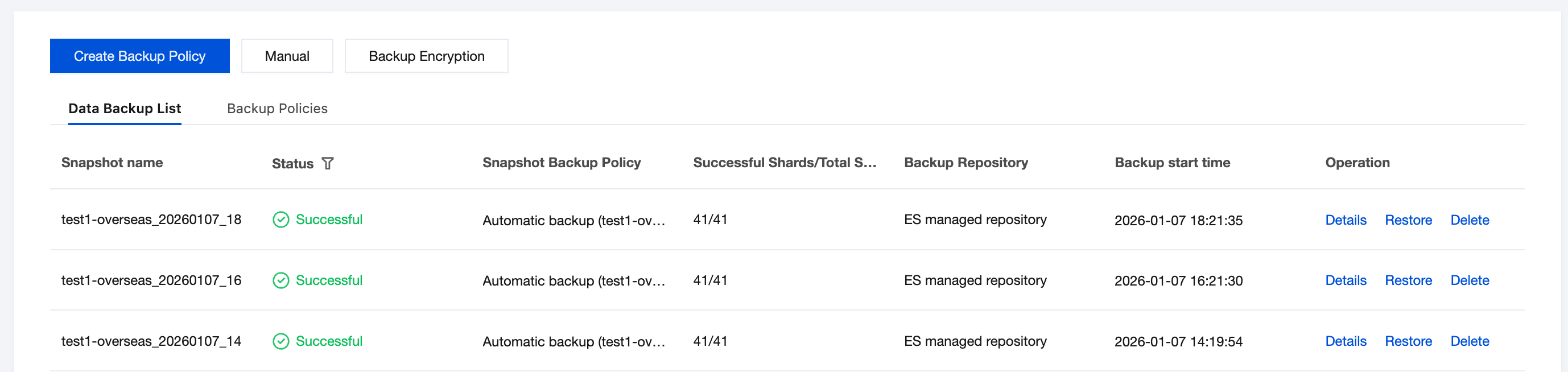
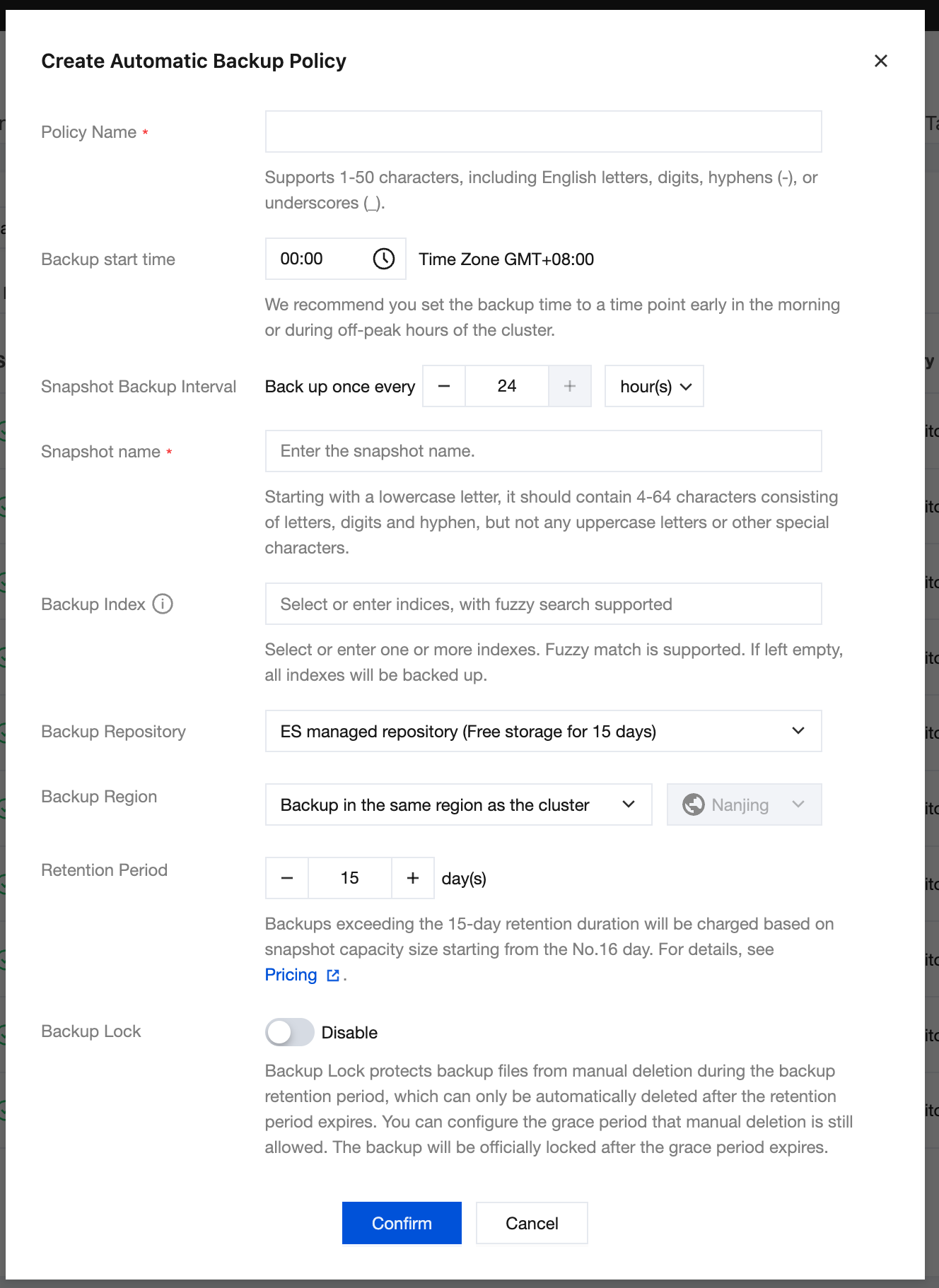
3. Set backup strategy
User-customized backup policy name and snapshot name. A single cluster supports creating a maximum of 3 auto backup policies.
Snapshot backup cycle: shortest once per hour, longest once every 180 days.
Backup index supports one or multiple indexes. Leave it empty to back up all cluster indexes.
Recommended to choose ES managed repository for backup repository.
Managed by Tencent Cloud ES, COS Repository offers free backup data storage for 15 days. Excess usage will be charged on a pay-as-you-go basis. For more details about the price, see Cloud Object Storage capacity fee. ES managed repository uses standard storage by default.
Managed repositories support intra-regional backup or cross-region backup. Cross-region backup will generate cross-region traffic fees (including backup generation and restoration). For more details about the price, see Cloud Object Storage traffic fee. ES managed repositories use global acceleration traffic, and charges are based on cross-regional conditions.
The premise for cross-region backup is that node outbound access is enabled for the cluster. To enable it, refer to Management Node for descriptions.
A backup repository can also be a custom repository created by the user, such as a COS Repository. Specific fees are generated by the user's COS. To create a custom repository, refer to the following steps:
PUT _snapshot/my_cos_backup{"type": "cos","settings": {"app_id": "xxxxxxx","access_key_id": "xxxxxx","access_key_secret": "xxxxxxx","bucket": "xxxxxx","region": "ap-guangzhou","compress": true,"chunk_size": "500mb","base_path": "/"}}
Field description:
"my_cos_backup" is the custom repository name to be filled in the auto backup policy form.
app_id: Tencent Cloud account APPID.
access_key_id: TencentCloud API key SecretId
access_key_secret: TencentCloud API key SecretKey.
bucket: COS bucket name. The name cannot contain
-{appId} suffix. For detailed steps on creating a COS storage bucket, please refer to Create a Bucket.region: COS bucket region. For region codes, please refer to Regions and Availability Zones.Cross-region backup will generate global acceleration traffic cost for this COS bucket, and the cluster must first enable node outbound access.
compress: Set to true by default to compress JSON-formatted index metadata.
base_path: The backup directory.
Custom retention days support up to 10000 days.
The lock feature supports users in locking generated backups to protect backup files from manual deletion during the backup retention period. They can only be automatically deleted after the retention period. Users can set a grace period during which manual deletion is still possible. After the grace period, the lock becomes official. The lock feature is currently an allowlist feature. Submit a ticket to request access.
Managing Automatic Snapshot Backup Policy
View created automatic snapshot backup policies in the list, and edit or delete them.
After editing the automatic snapshot backup policy, the new policy will only apply to newly generated backups. Generated or generating policies are not affected.
After deleting the automatic snapshot backup policy, new backup generation will stop. Generated or generating policies are not affected.
Manually Creating Snapshot Backup
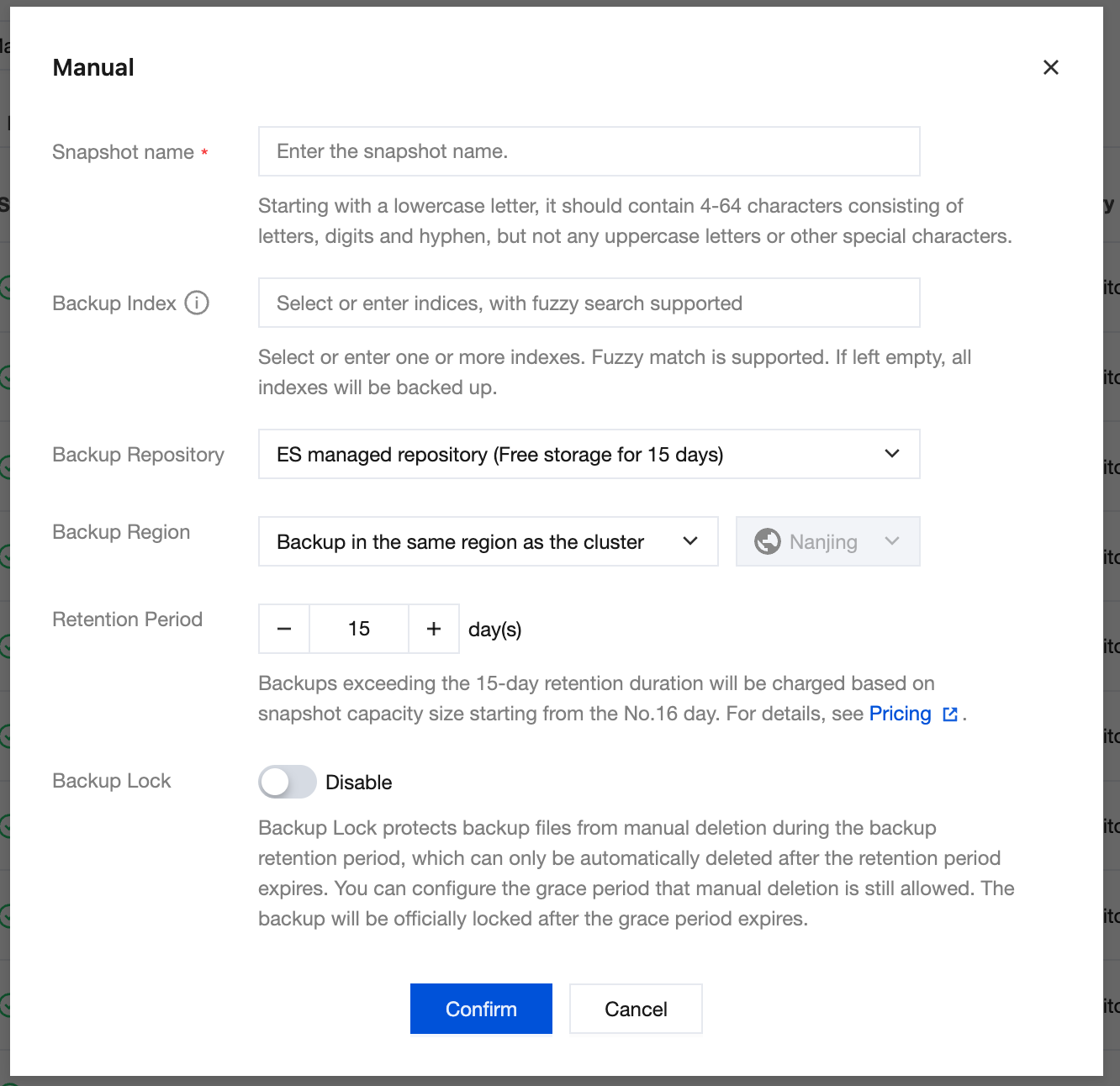
On the backup management page, click the "Manual Backup" button to perform a one-time manual snapshot backup. The snapshot policy setting rules are the same as the automatic backup policy.
Help and Support
Was this page helpful?
You can also Contact sales or Submit a Ticket for help.
Help us improve! Rate your documentation experience in 5 mins.
Feedback