tencent cloud

Elastic MapReduce

  • Release Notes and Announcements
  • Product Introduction
  • Purchase Guide
    • EMR on CVM Billing Instructions
    • EMR on TKE Billing Instructions
    • EMR Serverless HBase Billing Instructions
    • EMR Serverless TCBase Billing Overview
  • Getting Started
  • EMR on CVM Operation Guide
    • Planning Cluster
    • Administrative rights
    • Configuring Cluster
    • Managing Cluster
    • Managing Service
    • Monitoring and Alarms
    • TCInsight
  • EMR on TKE Operation Guide
  • EMR Serverless HBase Operation Guide
  • EMR Serverless TCBase Operation Guide
  • EMR Development Guide
    • Hadoop Development Guide
    • Spark Development Guide
    • Hbase Development Guide
    • Phoenix on Hbase Development Guide
    • Hive Development Guide
    • Presto Development Guide
    • Sqoop Development Guide
    • Hue Development Guide
    • Oozie Development Guide
    • Flume Development Guide
    • Kerberos Development Guide
    • Knox Development Guide
    • Alluxio Development Guide
    • Kylin Development Guide
    • Livy Development Guide
    • Kyuubi Development Guide
    • Zeppelin Development Guide
    • Hudi Development Guide
    • Superset Development Guide
    • Impala Development Guide
    • Druid Development Guide
    • TensorFlow Development Guide
    • Kudu Development Guide
    • Ranger Development Guide
    • Kafka Development Guide
    • StarRocks Development Guide
    • Flink Development Guide
    • JupyterLab Development Guide
    • MLflow Development Guide
  • Practical Tutorial
    • Practice of EMR on CVM Ops
    • Data Migration
    • Practical Tutorial on Custom Scaling
  • API Documentation
    • History
    • Introduction
    • API Category
    • Making API Requests
    • Cluster Resource Management APIs
    • Cluster Services APIs
    • User Management APIs
    • Information Query APIs
    • Scaling APIs
    • Configuration APIs
    • Other APIs
    • Cluster Lifecycle APIs
    • Serverless HBase APIs
    • YARN Resource Scheduling APIs
    • Data Types
    • Error Codes
  • FAQs
    • EMR on CVM
  • Service Level Agreement
  • Contact Us

Cluster Scripts

Download
Mode fokus
Ukuran font
Terakhir diperbarui: 2026-02-03 15:14:52

Feature Overview

The cluster script feature allows you to run a script on multiple nodes at a time for higher efficiency. Only one cluster script can be run in a cluster at a time. If a cluster script is running (such as installing a third-party software or modifying the running environment of the cluster), you cannot submit and execute new cluster scripts.
Caution
Only files in COS can be selected as the script to run.
Only nodes in the current cluster can be selected to run the script on.
You can set custom parameters based on your business requirements.
The EMR console does not verify the scripts you run. Therefore, running a custom script is risky, so please operate with caution.

Prerequisites

The cluster script feature is only available for clusters that are running.
The script to be run must be a shell script file in the COS STANDARD storage class.
To use the cluster script feature, you must grant EMR the permission to access COS.

Directions

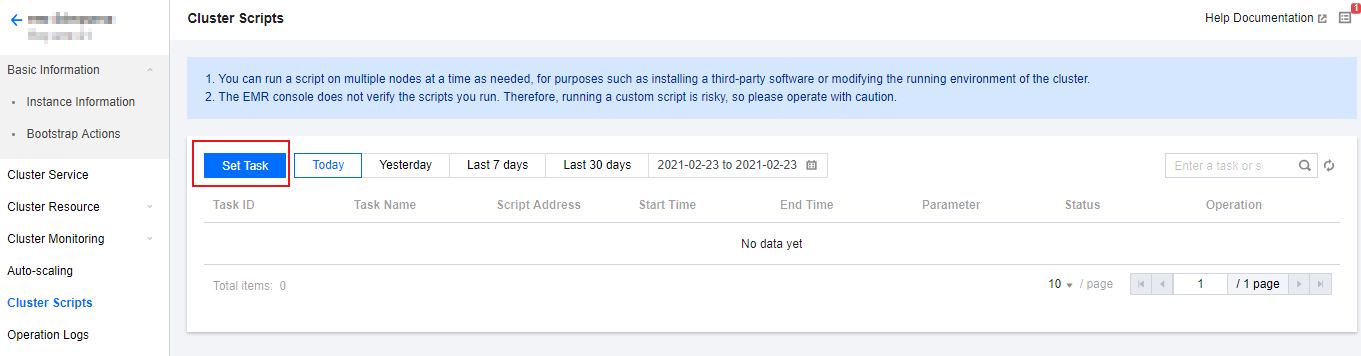
1. Log in to the EMR console and click a cluster ID in the cluster list to go the instance information page. Choose Script Management > Cluster Script > Set Task.

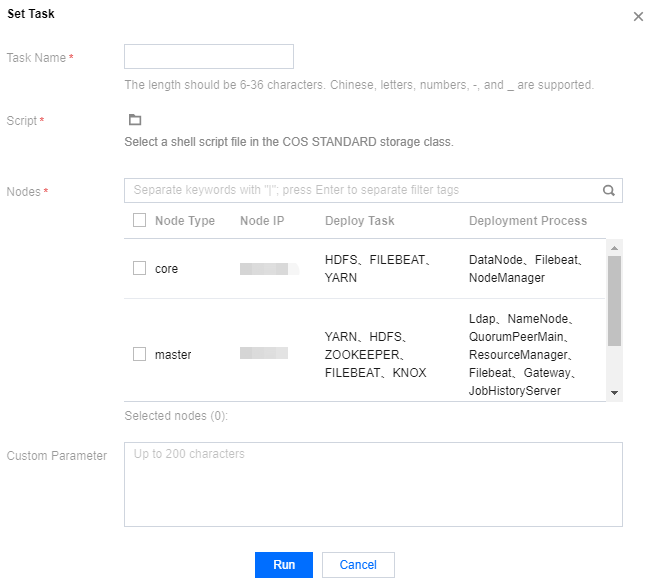
2. Set the Task Name, Script, Nodes, Custom Parameter and Execution duration fields. After that, click Run to generate a task in the task list.
Execution duration: the execution duration of the current task. If the task is not completed within the specified duration, it is terminated.

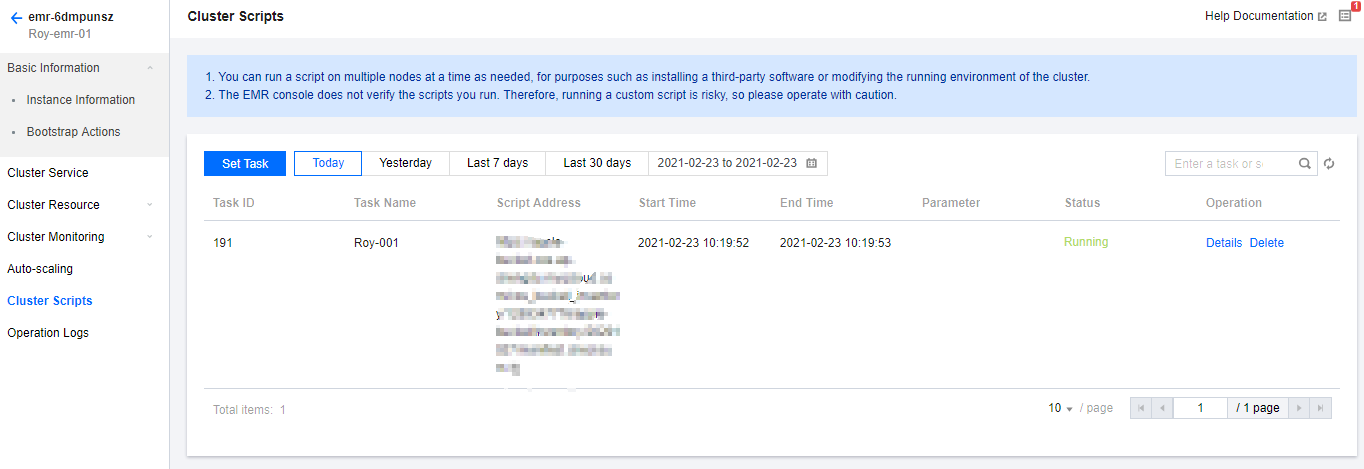
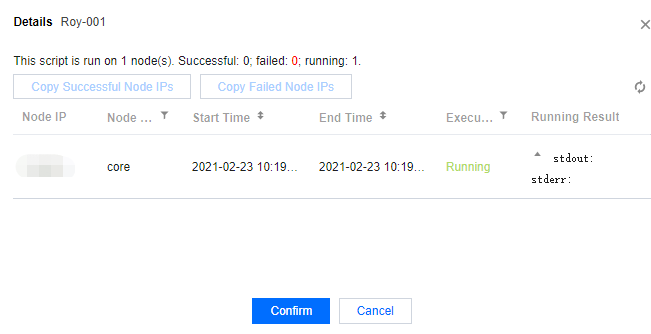
3. There are various task statuses depending on the execution results, including successful, failed, partially failed, etc. You can click Details to view details.


4. A cluster script may run successfully on some nodes and fail on other nodes. You can batch copy the failed nodes to run the script again.
Bantuan dan Dukungan

Apakah halaman ini membantu?

masukan