tencent cloud

Elastic MapReduce

  • Release Notes and Announcements
  • Product Introduction
  • Purchase Guide
    • EMR on CVM Billing Instructions
    • EMR on TKE Billing Instructions
    • EMR Serverless HBase Billing Instructions
    • EMR Serverless TCBase Billing Overview
  • Getting Started
  • EMR on CVM Operation Guide
    • Planning Cluster
    • Administrative rights
    • Configuring Cluster
    • Managing Cluster
    • Managing Service
    • Monitoring and Alarms
    • TCInsight
  • EMR on TKE Operation Guide
  • EMR Serverless HBase Operation Guide
  • EMR Serverless TCBase Operation Guide
  • EMR Development Guide
    • Hadoop Development Guide
    • Spark Development Guide
    • Hbase Development Guide
    • Phoenix on Hbase Development Guide
    • Hive Development Guide
    • Presto Development Guide
    • Sqoop Development Guide
    • Hue Development Guide
    • Oozie Development Guide
    • Flume Development Guide
    • Kerberos Development Guide
    • Knox Development Guide
    • Alluxio Development Guide
    • Kylin Development Guide
    • Livy Development Guide
    • Kyuubi Development Guide
    • Zeppelin Development Guide
    • Hudi Development Guide
    • Superset Development Guide
    • Impala Development Guide
    • Druid Development Guide
    • TensorFlow Development Guide
    • Kudu Development Guide
    • Ranger Development Guide
    • Kafka Development Guide
    • StarRocks Development Guide
    • Flink Development Guide
    • JupyterLab Development Guide
    • MLflow Development Guide
  • Practical Tutorial
    • Practice of EMR on CVM Ops
    • Data Migration
    • Practical Tutorial on Custom Scaling
  • API Documentation
    • History
    • Introduction
    • API Category
    • Making API Requests
    • Cluster Resource Management APIs
    • Cluster Services APIs
    • User Management APIs
    • Information Query APIs
    • Scaling APIs
    • Configuration APIs
    • Other APIs
    • Cluster Lifecycle APIs
    • Serverless HBase APIs
    • YARN Resource Scheduling APIs
    • Data Types
    • Error Codes
  • FAQs
    • EMR on CVM
  • Service Level Agreement
  • Contact Us

Cluster Scale-in

Download
Mode fokus
Ukuran font
Terakhir diperbarui: 2023-12-27 10:27:35

Overview

When the resources of your EMR cluster are excessive, you can remove task nodes in the console. When the cluster has router nodes that do not share the load of the master node or that serve as task submitters in the cluster, you can remove nodes to achieve cluster scale-in.

Preparations

Since core nodes store data, we recommend you not terminate them to avoid data security issues. After a node is terminated, the data stored in it will be deleted. By terminating a node, you confirm that the data in it can be deleted.
Pay-as-you-go cluster: Once terminated, the cluster will not be retained in the recycle bin but will be permanently terminated. Please proceed with caution.
Caution
Before terminating a cluster, please make sure that your data has been backed up as it cannot be recovered after cluster termination.

Directions

1. Log in to the EMR console and click the ID/Name of the target cluster in the cluster list.
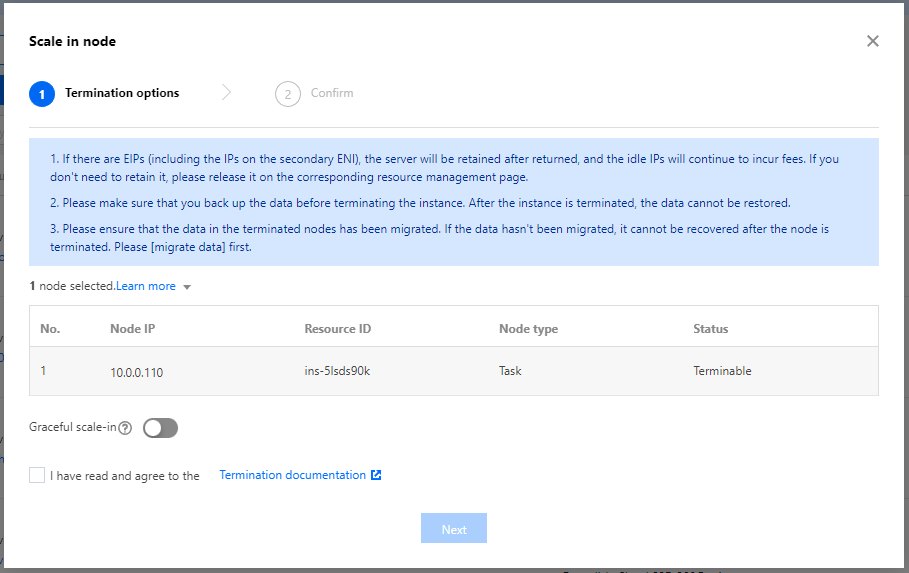
2. On the Cluster details page, select Cluster resources > Resources, select cloud resources (task or router nodes) that can scale in from the node list. If two or more types of nodes are selected, the Scale in button will be unavailable.

3. In the pop-up window, confirm the instances to be terminated (removed). If the cluster metaDB is a shared metadatabase, the disk will be retained in this operation and needs to be manually removed in the CDB console.
Bantuan dan Dukungan

Apakah halaman ini membantu?

masukan