Restarting Instance
Unduh
Mode fokus
Ukuran font
This document describes how to restart an instance in the console.
Overview
Instance restart is a common maintenance method for TDSQL for MySQL and is similar to restarting a local database.
Notes
Preparation for restart: during the restart, the instance cannot provide services. Therefore, before the restart, please ensure that TDSQL for MySQL has stopped accepting business requests. During the restart, dirty pages will be generated if the business write volume is high. In this case, the restart may fail in order to shorten the business interruption.
Restart method: you are recommended to restart an instance by following the steps provided by Tencent Cloud instead of running the restart command on the instance.
Restart time: generally, it takes only a few minutes to restart an instance.
Physical instance features: restarting an instance does not change its physical features or private IP.
Directions
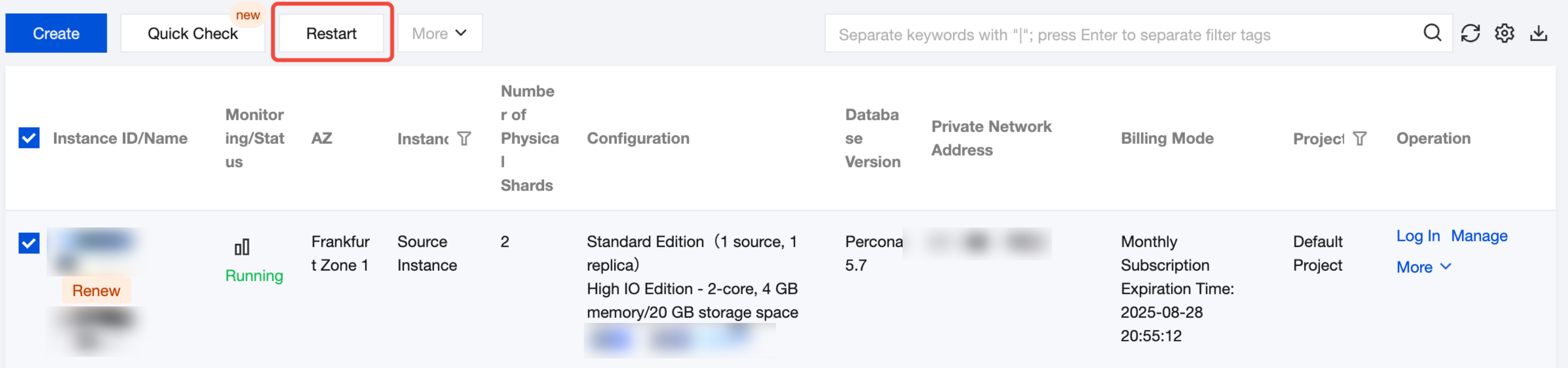
1. Log in to the TDSQL for MySQL console, select one or more instances from the instance list, and click Restart at the top.
2. In the pop-up dialog box, check that all information is correct, and click OK to restart a single instance or multiple instances in batches.
Bantuan dan Dukungan
Apakah halaman ini membantu?
Anda juga dapat Menghubungi Penjualan atau Mengirimkan Tiket untuk meminta bantuan.
masukan