Android(Compose)
Unduh
Mode fokus
Ukuran font
Component Overview
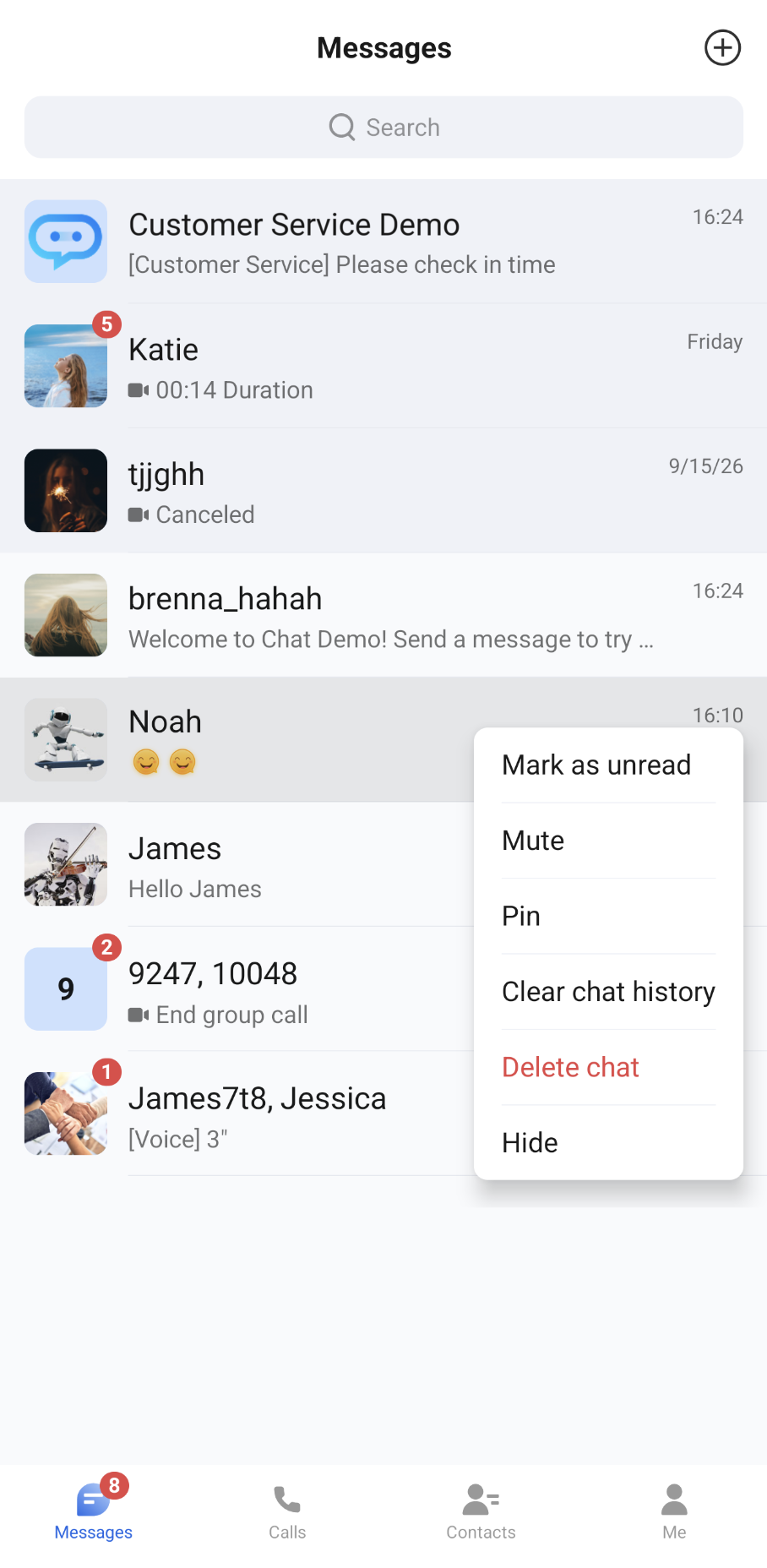
ConversationList is a Jetpack Compose component for displaying and managing user chat conversations. It provides the full conversation list functionality, including core capabilities such as displaying conversations and opening an action menu when you long-press a conversation.
Conversation List | Conversation Actions |
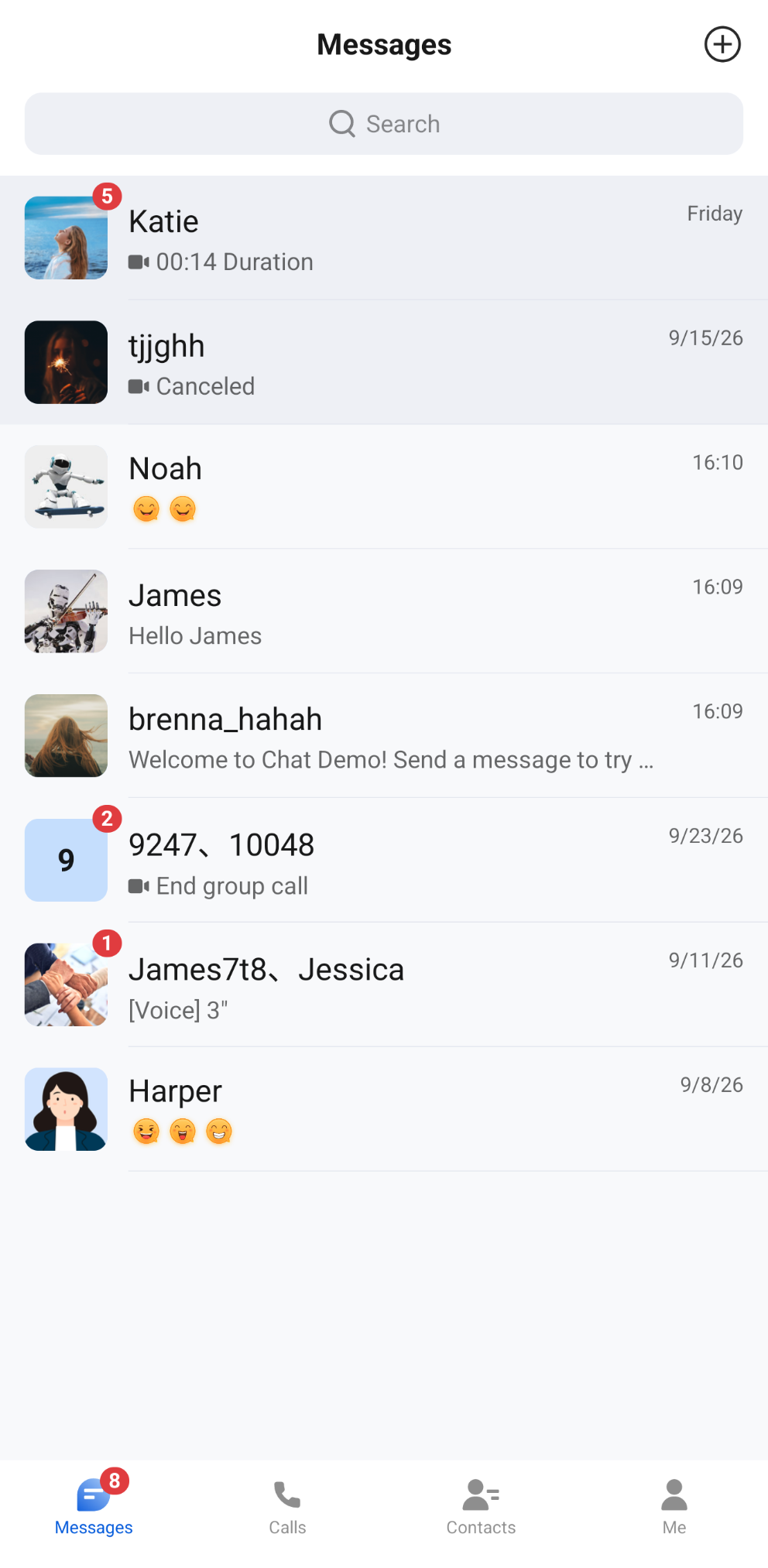 | 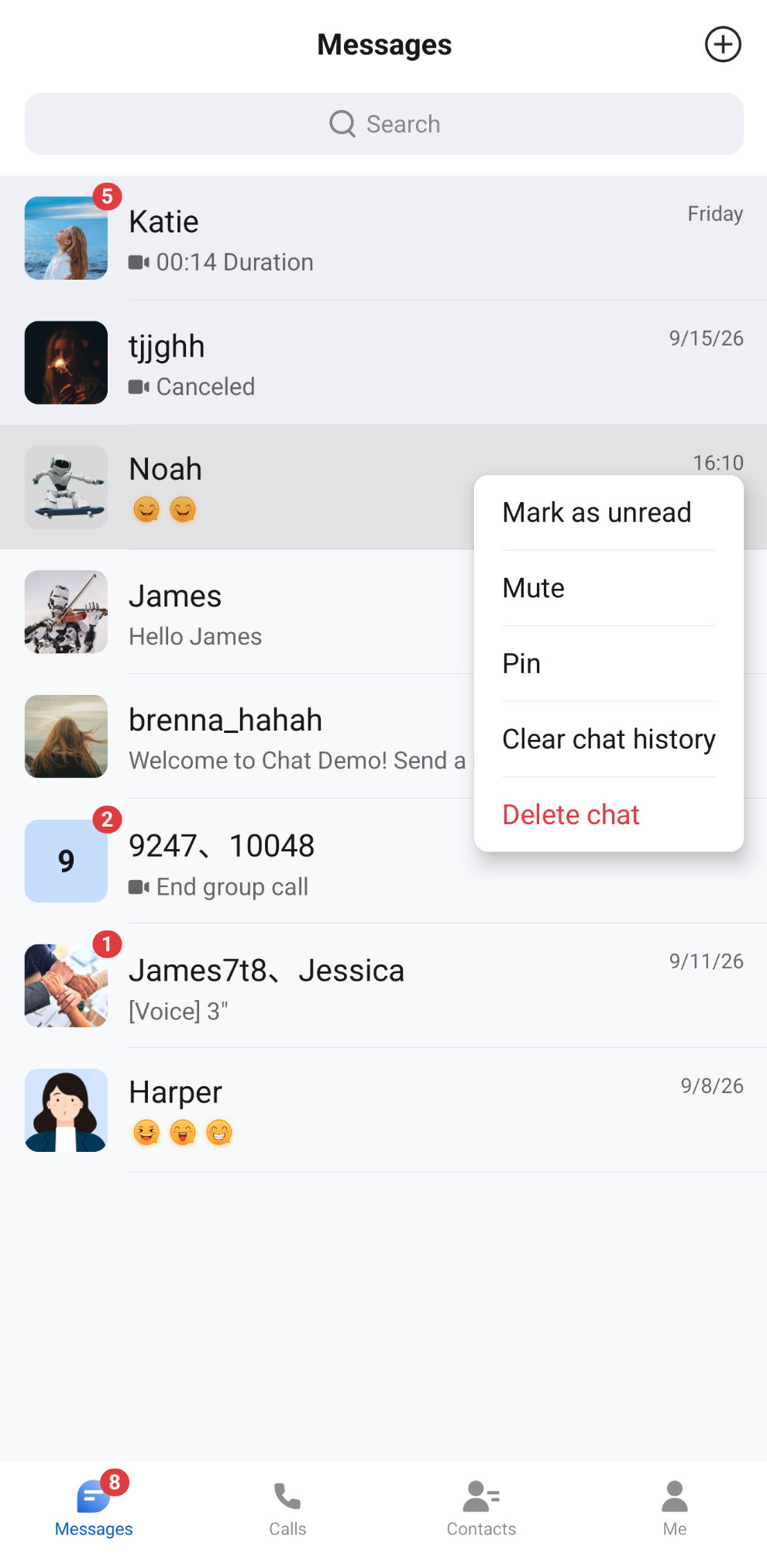 |
Component Integration
ConversationList is a component of TUIKit Compose. Integrate TUIKit Compose to get and use ConversationList. For detailed integration steps, see the TUIKit Compose documentation.
Component Structure
The ConversationList component exposes only the initialization method for the conversation list. All other logic is encapsulated in ConversationList.
Public Methods
Method | Parameter | Description |
ConversationList | modifier: Modifier | Sets the component's style, layout, behavior, and appearance in Jetpack Compose. |
| config: ConversationActionConfigProtocol | Conversation action menu configuration. Optional. The default value is ChatConversationActionConfig(). You can set whether the default actions are shown, and edit actions through customizeActions. |
| conversationListViewModelFactory: ConversationListViewModelFactory | Factory class for creating the internal ConversationListViewModel. Typically, you do not need to create it manually, because the component already provides a default implementation. |
| customActions: List<ConversationCustomAction> | Custom conversation actions, appended to the end of the action menu. Optional. |
| onConversationClick: (ConversationInfo) -> Unit | Sets the conversation click callback. Optional. |
Basic Usage
The ConversationList component can be initialized and used directly. All parameters have default values, and you usually only need to pass the onConversationClick callback.
Parameter Name | Type | Description |
onConversationClick | (ConversationInfo) -> Unit | Conversation click callback, triggered when a user clicks a conversation cell. The conversationID in the ConversationInfo callback parameter can be used to open the corresponding chat page. |
Sample code:
import io.trtc.tuikit.chat.uikit.components.conversationlist.ui.ConversationListBox(modifier = Modifier.fillMaxSize().systemBarsPadding()) {ConversationList(onConversationClick = { conversation ->// Recommended: Navigate to the chat page here. conversation.conversationID is the conversation ID})}
Customization
You can customize the action menu that appears when you long-press a conversation cell. The default actions, from top to bottom, are: Mark as read (or Mark as unread), Mute (or Unmute), Pin (or Unpin), Clear chat history, and Delete chat. Clicking "Clear chat history" or "Delete chat" shows a confirmation dialog first. The customization methods are as follows.
Method 1. Hide Conversation Action Items
Set
config when initializing ConversationList to specify which default actions the current conversation list shows. import io.trtc.tuikit.chat.uikit.components.conversationlist.config.ChatConversationActionConfigimport io.trtc.tuikit.chat.uikit.components.conversationlist.ui.ConversationListConversationList(config = ChatConversationActionConfig(isSupportMarkUnread = true, // Show "Mark as read/Mark as unread"isSupportMute = true, // Show "Mute/Unmute"isSupportPin = true, // Show "Pin/Unpin"isSupportClearHistory = true, // Show "Clear chat history"isSupportDelete = false // Do not show "Delete chat"),onConversationClick = { conversation ->// Navigate on conversation cell click})
Currently Supported Action Menu Toggles
Action Type | Action ID | Description |
isSupportMarkUnread | ConversationActionIDs.MARK_UNREAD | Whether to show "Mark as read/Mark as unread". "Mark as read" is shown when the conversation has unread messages or is marked as unread; otherwise, "Mark as unread" is shown. |
isSupportMute | ConversationActionIDs.MUTE | Whether to show "Mute/Unmute". |
isSupportPin | ConversationActionIDs.PIN | Whether to show "Pin/Unpin". |
isSupportClearHistory | ConversationActionIDs.CLEAR_HISTORY | Whether to show "Clear chat history". Clicking it shows a confirmation dialog first. |
isSupportDelete | ConversationActionIDs.DELETE | Whether to show "Delete chat". The title is displayed in red, and clicking it shows a confirmation dialog first. |
Method 2. Add Conversation Action Items
Pass
customActions when initializing ConversationList. ConversationList adds your custom options to the end of the default actions:Parameter Name | Type | Description |
customActions | List<ConversationCustomAction> | Custom conversation actions, shown when you long-press a conversation cell to open the action menu. |
The fields of ConversationCustomAction are as follows:
Field | Type | Description |
ID | String | Unique identifier of the action. Required. |
title | String | Action title. The default is an empty string. |
titleResID | Int | String resource ID of the action title, used only when title is empty. An action is not shown if neither title nor titleResID is set. |
dangerous | Boolean | Whether this is a dangerous action. When true, the title is displayed in red. The default is false. |
action | (ConversationInfo) -> Unit | Callback invoked when the action is clicked. The parameter is the conversation that was long-pressed. |
Sample code:
import io.trtc.tuikit.chat.uikit.components.conversationlist.model.ConversationCustomActionimport io.trtc.tuikit.chat.uikit.components.conversationlist.ui.ConversationListConversationList(customActions = listOf(ConversationCustomAction(ID = "custom.conversation.hide",title = "Hide",action = { conversation ->println("Hide conversation: ${conversation.title}")})),onConversationClick = { conversation ->// Handle click events})
Method 3. Edit Conversation Action Menu
To reorder actions, change the title or behavior of default actions, or dynamically add or remove actions based on the conversation, edit the action menu through
customizeActions of ChatConversationActionConfig. Each time you long-press a conversation cell, the component first generates the default actions based on the toggles, then runs the code in customizeActions, and finally appends the actions in customActions at the end.In customizeActions, you can get the conversation that was long-pressed through
editorContext.conversation, get the Android Context through editorContext.androidContext, and call the following methods to edit the actions:Method | Description |
add(item) | Adds an action at the end. Throws IllegalArgumentException if the ID of item is blank or duplicates an existing action. |
remove(ID) | Removes the action with the specified ID. Returns false if it does not exist. |
replace(ID) { item -> ... } | Replaces the action with the specified ID. Returns false if it does not exist. The replaced action must keep the same ID; otherwise, an exception is thrown. |
insertBefore(anchorID, item) / insertAfter(anchorID, item) | Inserts an action before or after the anchor action. Returns false and does not insert if the anchor does not exist. The ID rules for item are the same as for add. |
moveBefore(ID, anchorID) / moveAfter(ID, anchorID) | Moves an action before or after the anchor action. Returns false if either ID does not exist. |
clear() | Removes all actions. |
items | A read-only snapshot of the current action list. |
Sample code:
import io.trtc.tuikit.atomicxcore.api.conversation.ConversationTypeimport io.trtc.tuikit.chat.uikit.components.conversationlist.config.ChatConversationActionConfigimport io.trtc.tuikit.chat.uikit.components.conversationlist.model.ConversationActionIDsimport io.trtc.tuikit.chat.uikit.components.conversationlist.model.ConversationCustomActionimport io.trtc.tuikit.chat.uikit.components.conversationlist.ui.ConversationListval actionConfig = ChatConversationActionConfig().customizeActions {// The conversation that was long-pressedval conversation = editorContext.conversation// Remove "Clear chat history"remove(ConversationActionIDs.CLEAR_HISTORY)// Change the title of "Delete chat". Keep the ID unchanged. A confirmation dialog is still shown first when clickedreplace(ConversationActionIDs.DELETE) { action ->action.copy(title = "Delete conversation")}// For group chats only, insert a custom action before "Delete conversation"if (conversation.type == ConversationType.GROUP) {insertBefore(ConversationActionIDs.DELETE,ConversationCustomAction(ID = "custom.conversation.groupProfile",title = "View group profile",action = { target ->// Navigate to the group profile page. The format of target.conversationID is group_groupID}))}}ConversationList(config = actionConfig,onConversationClick = { conversation ->// Navigate on conversation cell click})
Note:
Actions whose ID is
ConversationActionIDs.DELETE or ConversationActionIDs.CLEAR_HISTORY (including actions modified through replace) show a confirmation dialog first when clicked. The action is executed only after the user confirms.The customization effects are shown in the following images:
Conversation Actions (Default Options) | Conversation Actions (Hide Delete Option) | Conversation Actions (Add Hide Conversation Option) |
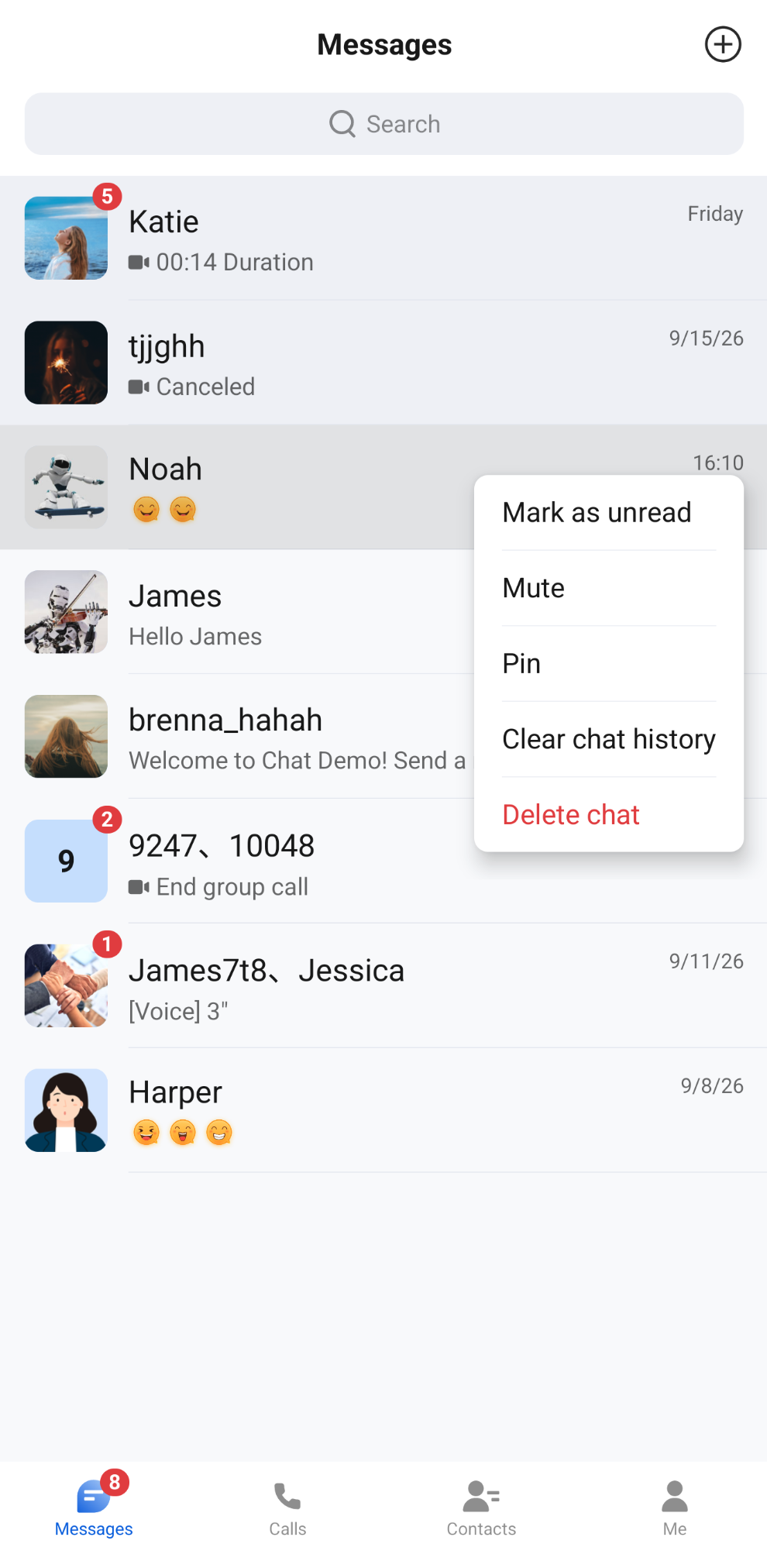 | 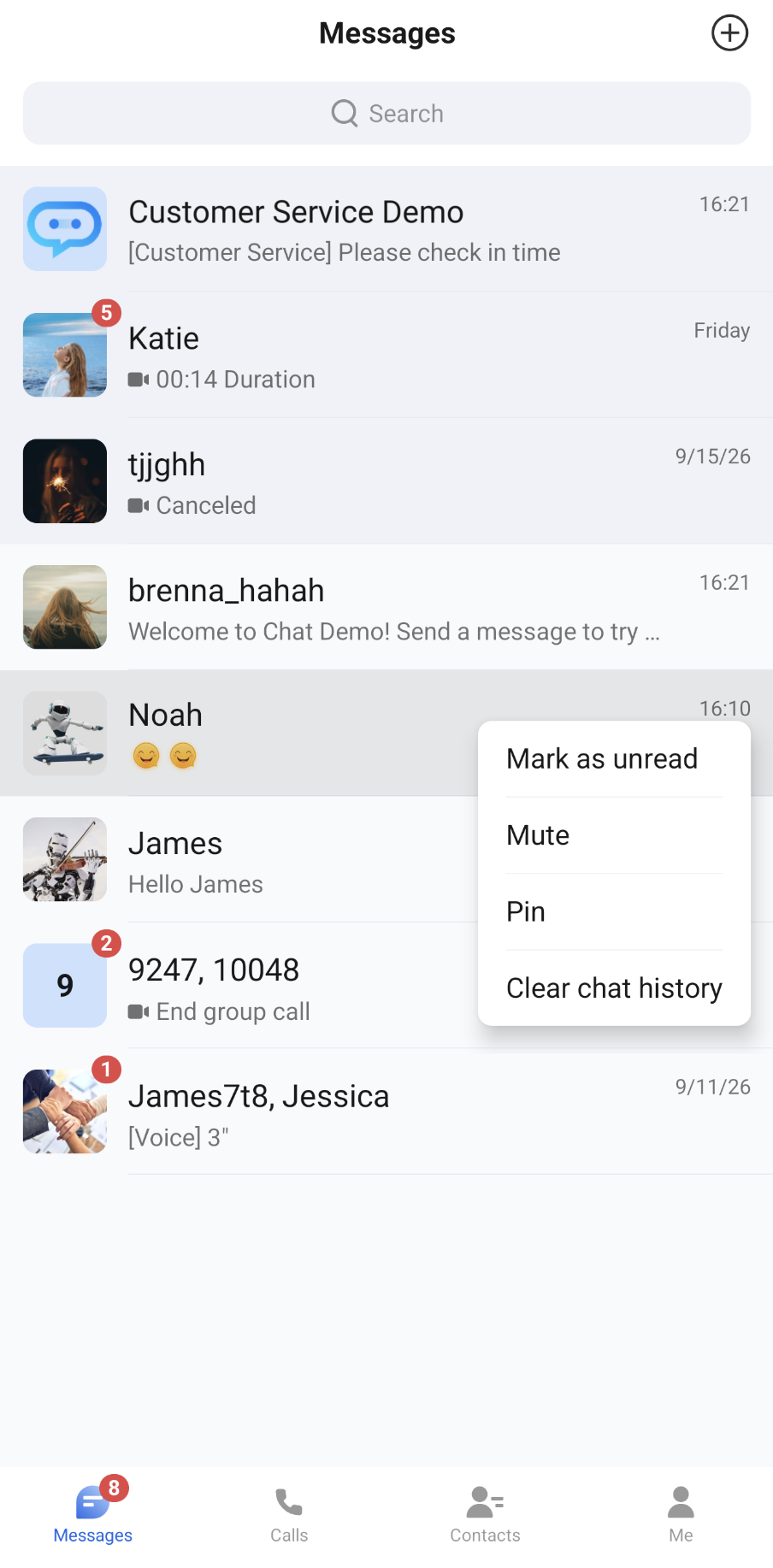 |  |
Bantuan dan Dukungan
Apakah halaman ini membantu?
Anda juga dapat Menghubungi Penjualan atau Mengirimkan Tiket untuk meminta bantuan.
masukan