Binding Management
Unduh
Mode fokus
Ukuran font
This document describes how to associate SSH keys with CVM instances on the SSM console.
Prerequisite
You have created a CVM SSH key secret.
You have created a CVM instance. For details, see Guidelines for Creating Instances.
Directions
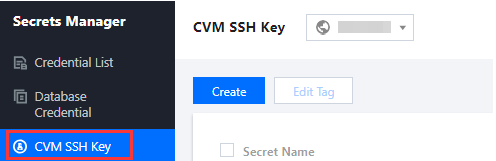
1. Log in to the SSM Console and click CVM SSH Key on the left sidebar.
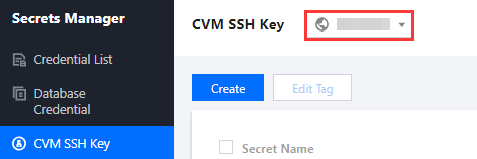
2. On the CVM SSH Key page, click the drop-down list in the top left corner to select a region.
3. Click the search box, select a filter (Tag or Secret Name) from the list, and enter keywords to get results.

4. Select the secret you want to associate with a CVM instance, and click Associated Resources on the right.

5. On the SSH Key page of the CVM console, click Bind Instance on the right of the CVM instance you selected.

Bantuan dan Dukungan
Apakah halaman ini membantu?
Anda juga dapat Menghubungi Penjualan atau Mengirimkan Tiket untuk meminta bantuan.
masukan