Exporting DNS Records
Mode fokus
Ukuran font
Overview
This document describes how to quickly export DNS records.
Directions
1. Log in to the Private DNS console and go to the Private Domain List page.
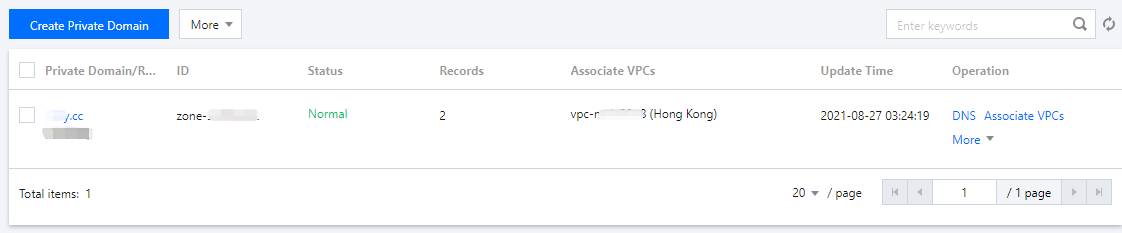
2. In the private domain list, click the private domain of which you want to export the DNS records, as shown below:
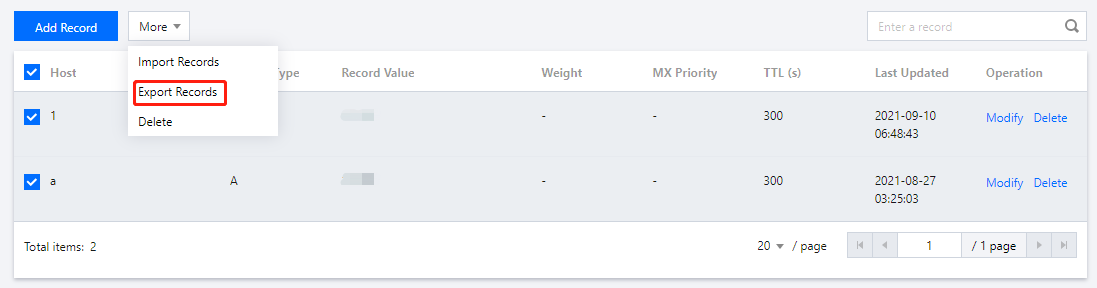
3. In the DNS Records page, click More > Export Records, as shown below:
4. In the Export Records dialog box, select an export format, as shown below:
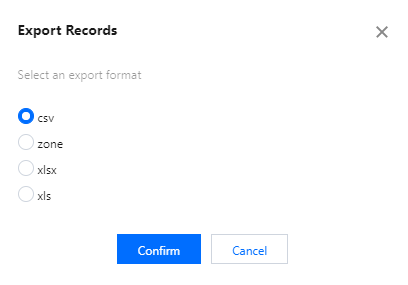
5. Click Confirm to export the DNS records.
Bantuan dan Dukungan
Apakah halaman ini membantu?
Anda juga dapat Menghubungi Penjualan atau Mengirimkan Tiket untuk meminta bantuan.
masukan