Adjusting Database Proxy Configuration
Unduh
Mode fokus
Ukuran font
The database proxy feature supports configuration adjustments. You can adjust the proxy specifications, availability zones (AZs), and the number of nodes of the database proxy in the console.
Prerequisites
Note
If a new version of the database proxy is available when you adjust its configuration, the database proxy is automatically upgraded during the configuration adjustment process.
If the selected database proxy and the primary instance are not in the same AZ, write performance may degrade when connections are made through the database proxy.
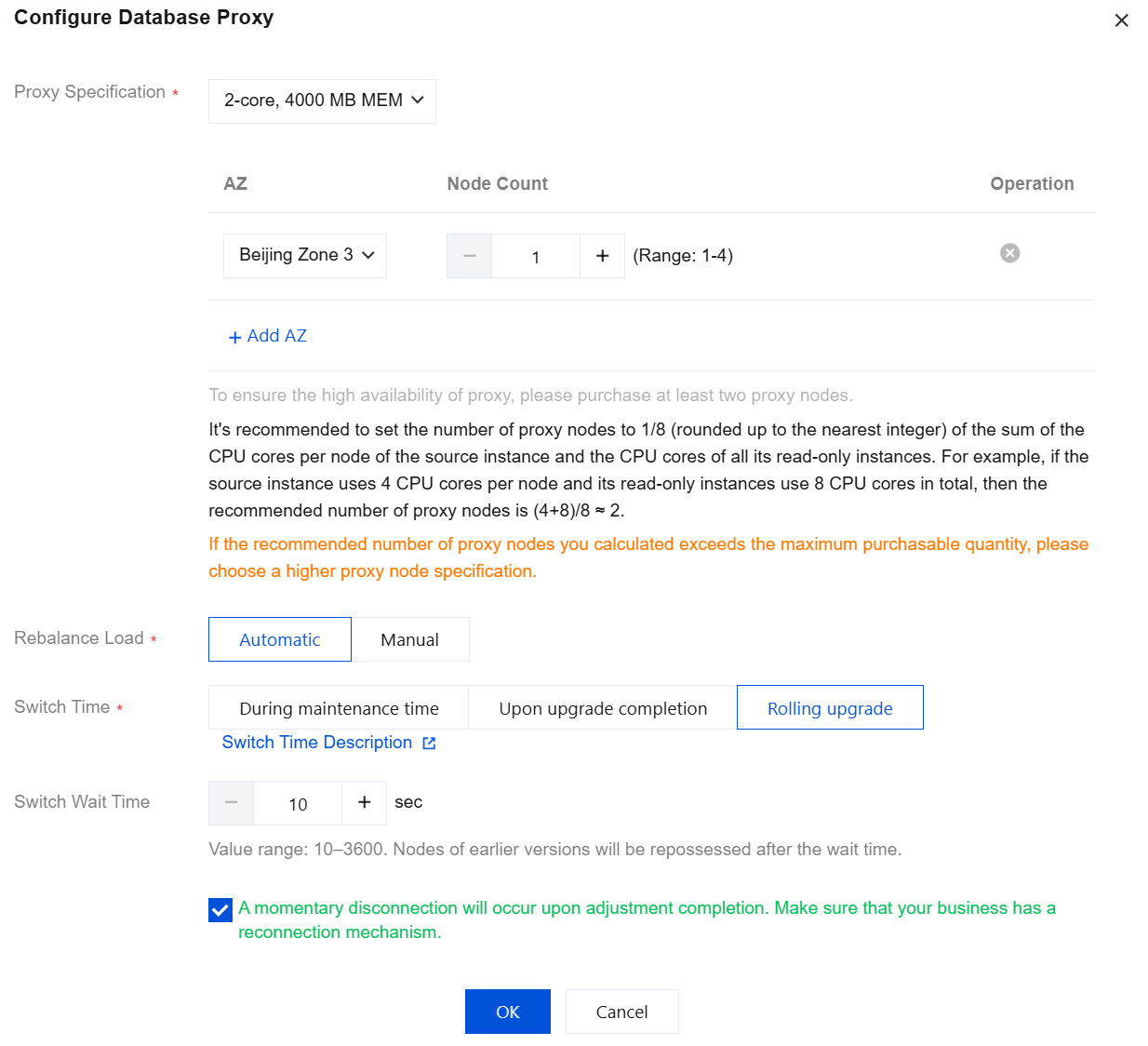
If the number of proxy nodes required after calculation exceeds the purchase limit, it is recommended that you select a proxy with higher specifications.
When the proxy specification is 2 cores and 4000 MB memory, the recommended number of proxies is one-eighth of the sum of the CPU cores of the primary instance and read-only instances, rounded up.
When the proxy specification is 4 cores and 8000 MB memory, the recommended number of proxies is one-sixteenth of the sum of the CPU cores of the primary instance and read-only instances, rounded up.
When the proxy specification is 8 cores and 16000 MB memory, the recommended number of proxies is 1/32 of the sum of the CPU cores of the primary instance and read-only instances (rounded up).
Configuration Adjustment Switch Time Description
You can select the switch time for the configuration adjustment according to the actual business situation to achieve a smoother adjustment.
During maintenance time: If you select to switch within the maintenance time, the system performs the switch within the maintenance period you set after the configuration adjustment is complete. To set the instance maintenance time, see Modifying Instance Maintenance Time.
Upon upgrade completion: If you select to switch upon upgrade completion, the system automatically switches to the new configuration immediately after the configuration adjustment is complete.
Rolling upgrade: If you select Rolling upgrade, you can customize the switch waiting time. The default value is 10 seconds, and the value range is 10 - 3600 seconds. The old version nodes are reclaimed after the waiting time is reached.
Impact Description
If your operation involves the following scenarios, a momentary disconnection is inevitable. It is recommended that you select Rolling upgrade for the switch time.
Scenario 1: Database proxy specification change.
Scenario 2: The number of nodes in the same AZ of the database proxy is reduced.
Scenario 3: The number of nodes in the current AZ is reduced due to a database proxy AZ change.
If your operation involves the following scenarios, a temporary load imbalance among proxy nodes may occur shortly after the upgrade. You can rebalance the load based on your current business situation. When the operation is performed, the database proxy triggers a global momentary disconnection. You need to assess the impact of the disconnection and reasonably choose the execution requirements for rebalancing the load. You can choose to automatically rebalance the load during a proxy configuration change, or manually perform the operation after adjusting the configuration.
Scenario 1: The number of nodes in the same AZ of the database proxy is increased.
Scenario 2: The number of nodes in other AZs is increased due to a database proxy AZ change.
Operation Steps
1. Log in to the TDSQL-C for MySQL console, select a cluster with the proxy enabled in the cluster list, and click the cluster ID to enter the cluster management page.
2. In the topology diagram under Cluster Management > Cluster Details, hover the mouse pointer over the database proxy section and click Details to enter the database proxy management page. Alternatively, you can directly select the Database Proxy tab on the cluster management page to enter the database proxy management page.
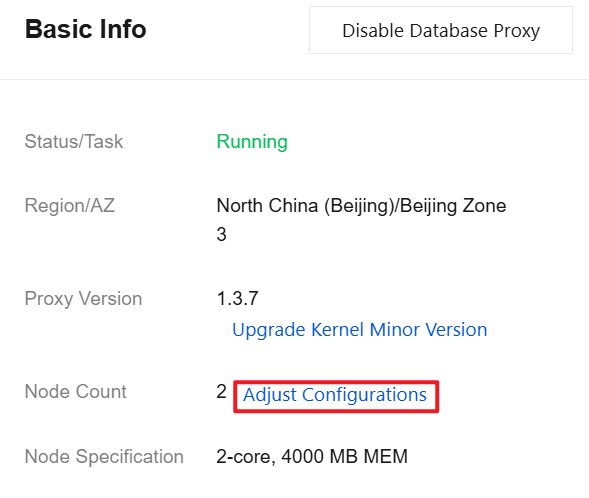
3. On the Overview page of the database proxy, click Adjust Configurations after Basic Info > Node Count.
4. In the pop-up dialog box, modify the relevant configurations of the database proxy (proxy specification, AZ, and number of nodes) as needed, and click OK.
5. On the Database Proxy page under Basic Info, the upgrade is complete when the task status changes from Upgrading to Running/Waiting to upgrade.
Notes:
If you selected During maintenance time for the switch but need to switch earlier due to business requirements, you can click Execute now after the configuration adjustment is complete, on the database proxy page under Overview > Basic Info > Status / Task after the upgrade is pending switch.
If you select to manually rebalance the load after the configuration is adjusted, you can manually rebalance the load under Overview > Connection Address on the database proxy page after the configuration adjustment is complete.
Related APIs
API | Description |
This interface (UpgradeProxy) is used to upgrade the database proxy configuration. |
Bantuan dan Dukungan
Apakah halaman ini membantu?
Anda juga dapat Menghubungi Penjualan atau Mengirimkan Tiket untuk meminta bantuan.
masukan