Large-Scale Delayed Messages
Download
Mode fokus
Ukuran font
The TDMQ for Apache Pulsar 3.0 engine edition supports delayed messages at a larger scale. This feature is deeply optimized for massive-scale delayed messaging scenarios, supporting the processing of a million-level message backlog. It also ensures the accuracy and stability of consumption progress, meeting the demands of more long-chain business processes, such as future order closure and long-cycle scheduled tasks. This effectively resolves performance bottlenecks in scenarios like scheduled task dispatching and delayed notifications for industries such as e-commerce, social networking, and finance.
Large-Scale Delayed Message Policy
Background
In distributed systems, many business processes are not executed immediately but are scheduled for a specific future time. The delayed messages feature of message queues is designed precisely for such scenarios. Typical use cases include: automatically closing unpaid orders upon timeout, triggering marketing campaigns at scheduled times, and retrying failed requests according to a backoff policy. The common characteristic of these scenarios is: there is a predictable time gap between message production and consumption. Delayed messages delegate this "waiting" period to the message queue for management. The business side only needs to specify the expiration time when sending a message, and the consumer side is automatically delivered the message upon its expiration. This approach offers simple logic and thorough decoupling. However, when the scale of delayed messages increases from tens of thousands to millions, the Apache Pulsar community solution can cause:
The message gaps issue: When there are many delayed messages with uneven expiration times, a large number of undelivered messages occupy the consumer offset for an extended period. This creates gaps and prevents the consumption progress from advancing. If a topic reload occurs, this portion of the progress, which has not been persisted in memory, is lost. Consequently, messages that have already been delivered are pulled again, leading to large-scale duplicate consumption.
Memory consumption and index rebuild time: The Apache Pulsar delayed messages index is fully loaded into memory by default. Once the message volume increases, both memory consumption and index rebuild time become bottlenecks that cannot be ignored. Although later community editions introduced bucket-based persistent storage to mitigate this, the management, merging, and metadata storage of buckets (which relies on ZooKeeper's Cursor Properties) introduces new complexities.
Feature Architecture
The TDMQ for Apache Pulsar large-scale delayed messages solution: It uses an external multi-level time wheel index and does not rely on memory to build the delayed message index. Only the most recently expired delayed messages are recorded in the topic, which reduces the scale of consumption gaps. This makes both memory consumption and duplicate consumption risk manageable in million-level scenarios.
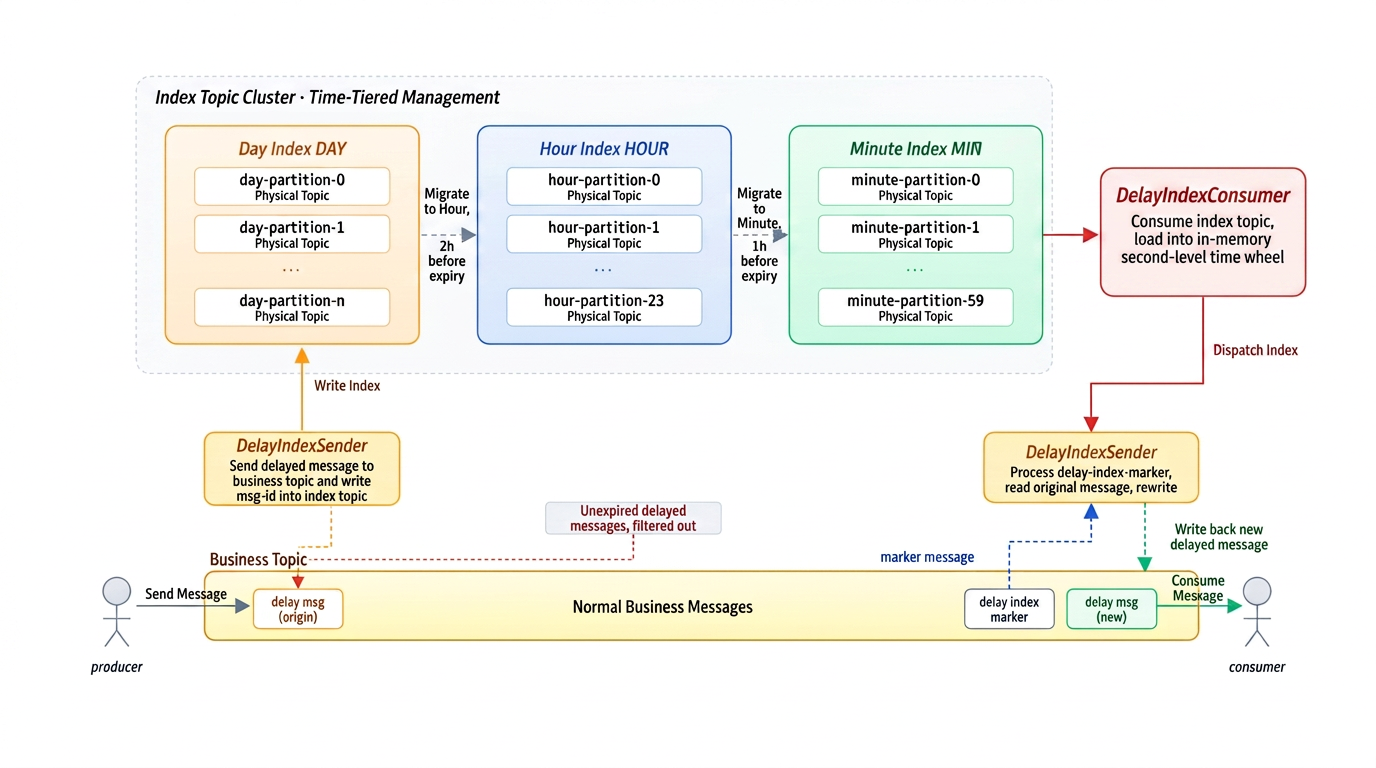
Core Features
The system splits delayed indexes of different time spans into index topics of different dimensions. It only gradually loads finer-grained indexes when delivery is imminent, preventing the full index from permanently residing in memory. Memory always holds only the currently loaded index data. Whether the total number of delayed messages is one hundred thousand or one million, memory consumption remains manageable. All messages in the index topic are automatically deleted after being consumed, eliminating the need for manual cleanup.
When a delayed message expires, the original message is read from the business topic and rewritten. The consumer skips messages that have not yet expired and only processes the rewritten expired messages. This confines the scope of message gaps from the entire set of delayed messages to a minute-level window near delivery, preventing the generation of large-scale gaps.
The large-scale delayed messages feature of TDMQ for Apache Pulsar is completely transparent to clients. Delayed messages are sent to the business topic as usual, and the processing logic for the production and consumption pipeline remains exactly the same. No client-side modifications are required. The server ensures that the message ID remains consistent throughout the entire pipeline of production, storage, and consumption. Ops capabilities such as message queries and message tracing are natively compatible and require no additional adaptation.
Tutorial
On the client side, the access method for the new large-scale delayed message feature is the same as that for the community edition's delayed message feature. For details, see: Scheduled and Delayed Messages.
Currently, the large-scale delayed messages policy feature is available upon request. If your business scenario involves this capability, submit a ticket to apply as needed.
Usage Recommendations:
If the number of message gaps in your business scenario is less than 10,000, it is recommended not to enable the large-scale delayed message feature.
To enable the large-scale delayed messages feature, ensure that the topic's message retention period exceeds the maximum delay duration. Otherwise, undelivered delayed messages may be lost.
The number of delayed messages expiring within 1 minute should be kept below 1 million. Exceeding this volume may cause issues such as message delivery delays and inaccurate timing.
The Exclusive/Failover subscription modes do not natively support the delayed message feature. Therefore, using the large-scale delayed messages policy in these modes is not recommended to avoid incurring additional overhead.
Avoid using TDMQ_DELAY_INDEX as a namespace to prevent conflicts with the system namespace for large-scale delayed messages, which can cause abnormal monitoring data.
Avoid using TDMQ_Delay_Cursor as a subscription name. Otherwise, it may conflict with the system subscription name for delayed messages, resulting in message loss or consumption failures.
When the large-scale delayed messages policy is used, the system may create producers prefixed with "tdmq-internal_" in the business topic.
Do not forcibly delete topics that have the large-scale delayed messages policy enabled.
It is recommended to manage delayed messages and non-delayed messages using separate topics. Specifically, send scheduled and delayed messages to a dedicated Topic, and send general messages to another Topic. This approach facilitates subsequent management and maintenance, thereby enhancing stability.
When using scheduled and delayed messages, ensure that the machine clocks of the client and the server (all regions use UTC+8 Beijing Time) are synchronized. Otherwise, a time discrepancy will occur.
Scheduled and delayed messages have a time deviation of approximately 1 second.
Scheduled and delayed messages do not support the batch mode (batch sending). Batch sending may lead to a message backlog. As a precaution, set the enableBatching parameter to false when you create the producer.
The maximum time range for both scheduled and delayed messages is 10 days. If a delayed message is produced with a delay exceeding 10 days, it may cause client blocking or repeated reconnections.
Scheduled and delayed messages can only be consumed in Shared mode. The Key_Shared mode is prohibited.
Bantuan dan Dukungan
Apakah halaman ini membantu?
Anda juga dapat Menghubungi Penjualan atau Mengirimkan Tiket untuk meminta bantuan.
masukan