This document describes how to invoke the Zhuque AIGC detection model via Tencent Cloud EdgeOne Makers Model Pro to perform AI-generated content recognition on text and images. It covers two capabilities: text detection (zhuque-text) and image detection (zhuque-image), and supports both synchronous and asynchronous invocation modes. The API paths, parameters, and responses in this document are based on end-to-end integration test results from the production environment.
Overview
Zhuque is Tencent's capability for AIGC content detection, which can determine whether text or images are AI-generated. After unified access through the EdgeOne AI gateway, you can use the following two types of models:
Provider Name
Capability
Typical Use Case
zhuque-text
AIGC text detection
Determines whether the text is AI-generated and provides segment tags and percentages. Applicable to scenarios such as AI content moderation and originality detection.
zhuque-image
AIGC image detection
Determines whether the image is AI-generated and provides a confidence score. Applicable to scenarios such as AI image content moderation and copyright protection.
Note:
This feature is only available for the Enterprise Edition plan. To use it, please contact us to enable it.
Fee Instructions
Invoking the Zhuque model incurs charges. The billing unit is the EIU (Edge Inference Unit). For details on the specific unit price, EIU consumption per invocation, and billing rules, refer to Edge Inference Usage Unit Billing Description.
Charges will be incurred in your Tencent Cloud account. You can log in to the Tencent Cloud Billing Center to view your bills and usage details.
User Guide
Step 1: Creating a Gateway
1. Log in to the EdgeOne console. Then, based on whether you already have EdgeOne resources, select the corresponding entry point below:
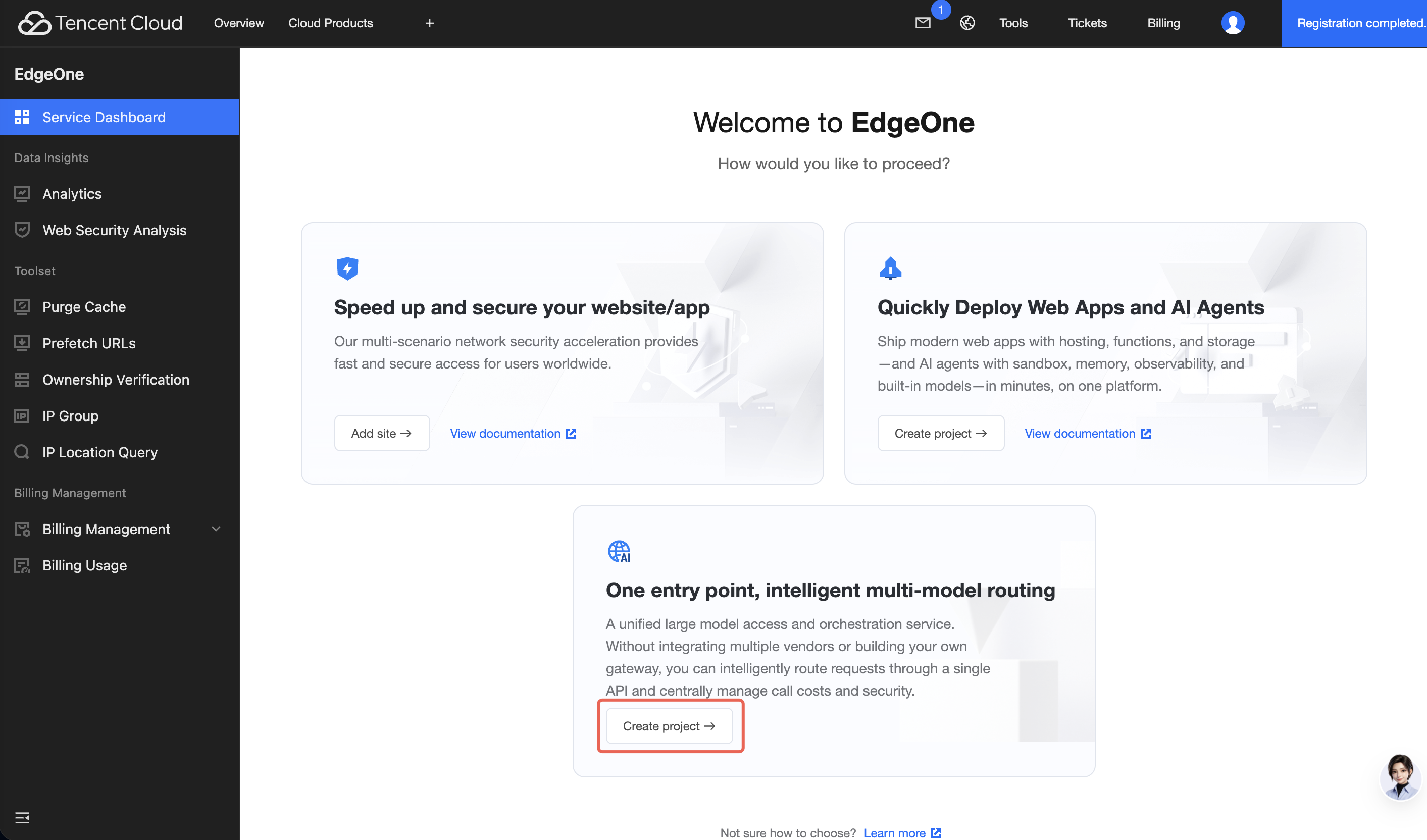
If you have no EdgeOne resources: On the console homepage, locate the One entry point, intelligent multi-model routing card, click Create project, and go directly to the process of creating an AI gateway.
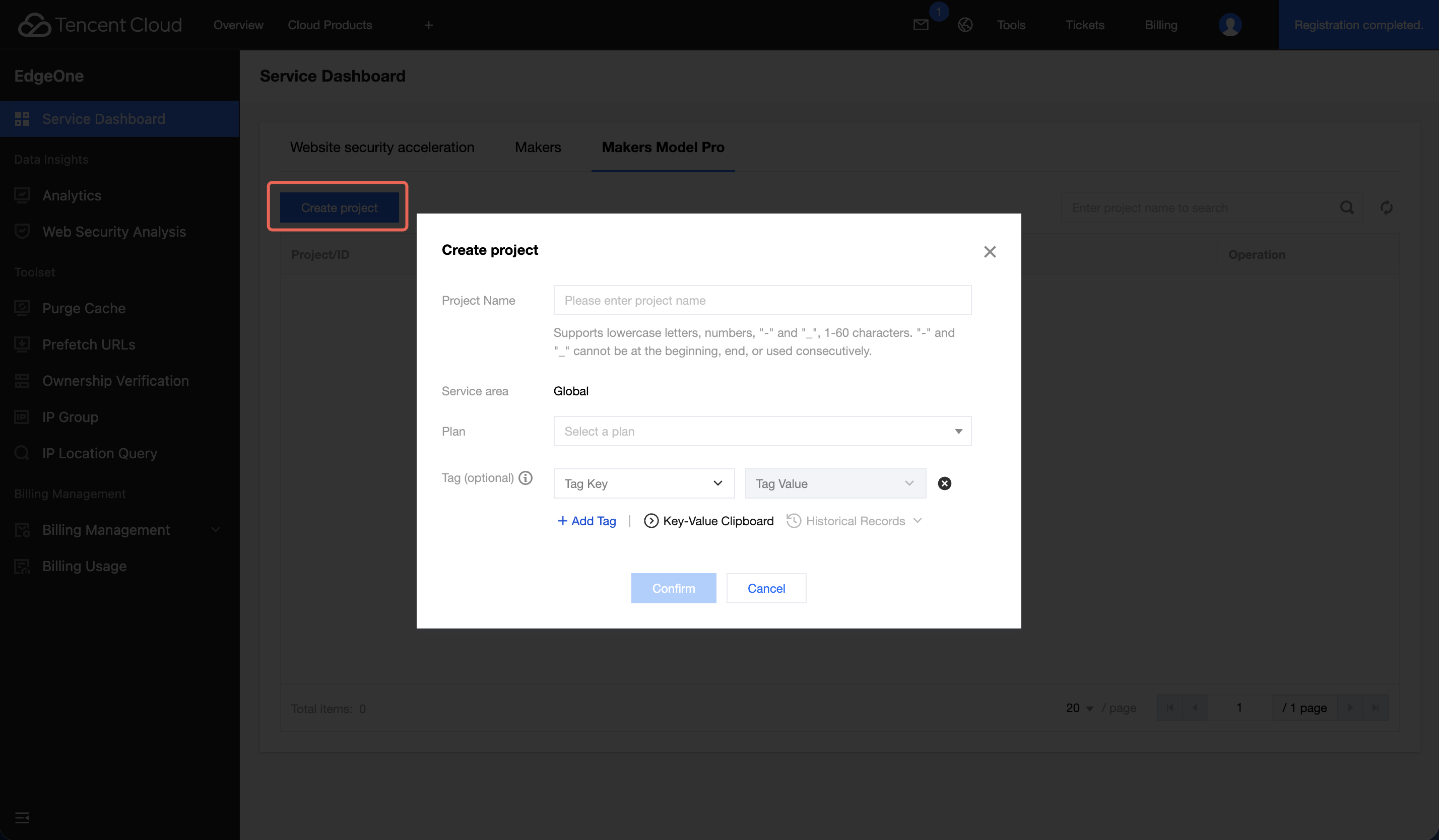
If you already have EdgeOne resources: After you go to the console, the page is already positioned on Makers Model Pro. You can then click Create project.
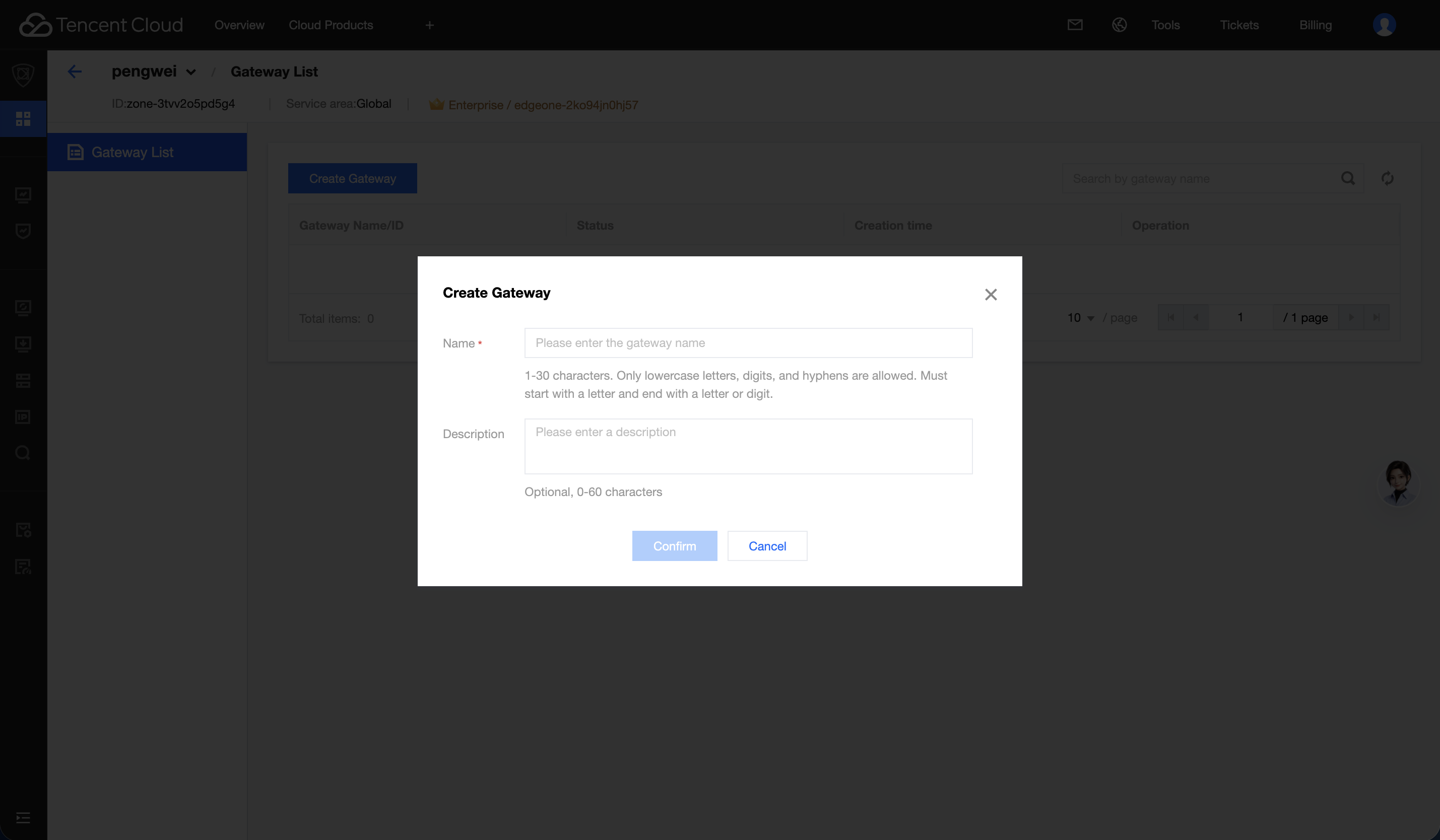
2. After creation is completed, record the gateway domain name and API Key assigned by the system. Securely store the gateway domain name and API Key. Currently, replacing the API Key is not supported. If it is lost, you need to recreate the gateway.
Step 2: Calling the Model
Differences Between Synchronous and Asynchronous Calls
Zhuque supports both synchronous and asynchronous invocation modes, which are determined by the request Header. Please select the appropriate mode based on your business scenario:
Dimension
Sync Mode
Async Mode
Submission Header
No special Header
Work-Mode: async
Query Header
Not required.
Work-Infer-Action: query
Requests
Once
One submission + N queries
Response content
Directly returns the business result JSON
The outer layer returns {TaskId, Status, Output}, where Output is a stringified JSON that requires secondary parsing by the client.
Client blocking
The client is blocked for the entire inference duration.
The response is returned immediately upon submission, and queries can be processed asynchronously.
Typical Latency (Reference)
Text within approximately 10 seconds, images within approximately 5 seconds
Submission takes < 1 second; results are typically ready within 1 to 5 seconds.
Selection Recommendations
Real-time single request, low concurrency, code simplicity prioritized
Batch tasks, long processing time, and client blocking is not desired
Calling Methods and Authentication
Gateway Access Information
Item
Value
Gateway domain
<your-gateway-domain> (Obtain after creating the gateway).
Protocol
HTTPS
Text detection route
/v1/providers/zhuque-text/classify
Image detection route
/v1/providers/zhuque-image/classify
Authentication Method
All requests must include the API Key in the Header:
Header
Value
Description
Authorization
Bearer <API_KEY>
API Key obtained from the EdgeOne AI gateway
Content-Type
application/json
Request body format
Note:
When zhuque-image is invoked, images must be larger than 300×300 pixels, with a size limit of -10 MB. Supported formats are jpg, png, and webp.
Synchronous Calls
Synchronous mode is the default mode. Results are returned with a single request, eliminating the need for polling.
Text Detection (zhuque-text)
Request Parameters:
Parameter
Position
Type
Required
Description
text
Body
string
Yes
Text content to be detected
is_merge
Body
bool
No
Whether to merge paragraphs. The default value is true. When set to false, confidence is output independently for each paragraph.
curl Example:
curl-X POST "https://<your-gateway-domain>/v1/providers/zhuque-text/classify"\\
Inference status, where success indicates success.
labels_ratio
object
The proportion of each content type. "0" indicates the proportion of human (Human) content, "1" indicates the proportion of AI content, "2" indicates the proportion of suspected AI content. All values are within the range of [0, 1].
ratio_confidence
float
The overall proportion of suspected AI content. A higher value indicates a greater likelihood of being AI-generated, while a lower value indicates a greater likelihood of being human-generated.
segment_labels
array
The type tag and AI confidence level for each segment.
softmax_confidence
float
The overall AI confidence level. A higher value indicates a greater likelihood of being AI-generated, while a lower value indicates a greater likelihood of being human-generated.
msg
string
Error message, which is empty under normal conditions.
Image Detection (zhuque-image)
Request parameters.
Parameter
Position
Type
Required
Description
imageUrl
Body
string
Required (choose one)
A public network-accessible image URL
imageBase64
Body
string
Required (choose one)
The Base64-encoded content of the image
curl Example:
curl-X POST "https://<your-gateway-domain>/v1/providers/zhuque-image/classify"\\
Inference status, where success indicates success.
data.confidence
number
The confidence level that the image is AI-generated. The value ranges from 0 to 1, where a value closer to 1 indicates a higher probability of being AI-generated.
message
string
Error message, which is empty under normal conditions.
The asynchronous mode is suitable for batch submissions or long-running tasks and consists of two steps: submission and query. When submitting a request, you must additionally include the Header Work-Mode: async.
Submit Task.
The following sections provide submission examples for text and images respectively. The two examples differ only in the `provider` in the request path and the request body fields, while all other steps are the same.
curl Example (Text):
curl-X POST "https://<your-gateway-domain>/v1/providers/zhuque-text/classify"\\
-H"Authorization: Bearer <API_KEY>"\\
-H"Work-Mode: async"\\
-H"Content-Type: application/json"\\
-d'{"text":"hello world"}'
curl Example (Image):
curl-X POST "https://<your-gateway-domain>/v1/providers/zhuque-image/classify"\\
In asynchronous mode, the result is wrapped in an outer layer {TaskId, Status, Output}, where Output is a stringified JSON that requires an additional JSON parse (json.loads / JSON.parse) on the client side. In synchronous mode, there is no such encapsulation.
Task Status (Status) Field:
Status
Description
QUEUED / PROCESSING
The task is in progress. Continue polling.
SUCCEEDED
The task succeeded. The Output field contains the business result.
FAILED
The task failed. Stop polling and handle the error.
After submission, you must use the returned TaskId to call the /query/<TaskId> endpoint for querying, and you must include the Header Work-Infer-Action: query.
A polling interval of 1s is recommended. Avoid high-frequency polling below 500ms to prevent placing excessive load on the gateway and upstream services.
Synchronous Mode Timeout and Retry
In synchronous mode, the HTTP connection is blocked for the entire inference duration. Therefore, set the client timeout sufficiently large (recommended to be greater than or equal to 30 seconds).
For long text or large images, if you are concerned about synchronous blocking, it is recommended to switch to asynchronous mode to avoid connection timeout risks.
Idempotency Note: Retrying after a failure may result in duplicate inferences. The business side should perform deduplication or rate limiting on its own.
Common Error Codes
HTTP Status Code
Error Message
Meaning
Troubleshooting Suggestion
401
invalid api key
Incorrect or Invalid API Key
Verify that the Key in the Authorization Header is correct.
403
provider_not_allowed
The gateway is not authorized for this Provider.
Check the spelling of the provider name (it should be zhuque-text or zhuque-image).
404
-
Path or TaskId does not exist.
Check whether the URL contains the /v1/providers/ prefix, and verify that the TaskId is correct during queries.