TAT lets you manage Tencent Cloud services by using the console, API and SDK. This document guides you through the usage of TAT by taking Lighthouse console as an example.
Step 1. Installing TAT agent
Note:
TAT agent is pre-installed for instances created using public images after Dec 15, 2020. For instances created before this time, you need to install it manually.
TAT agent is only available for VPC-based instances.
1. Log in to the Lighthouse console and select My Commands under Automation Tools on the left sidebar.
2. In the My commands page, click Create command.
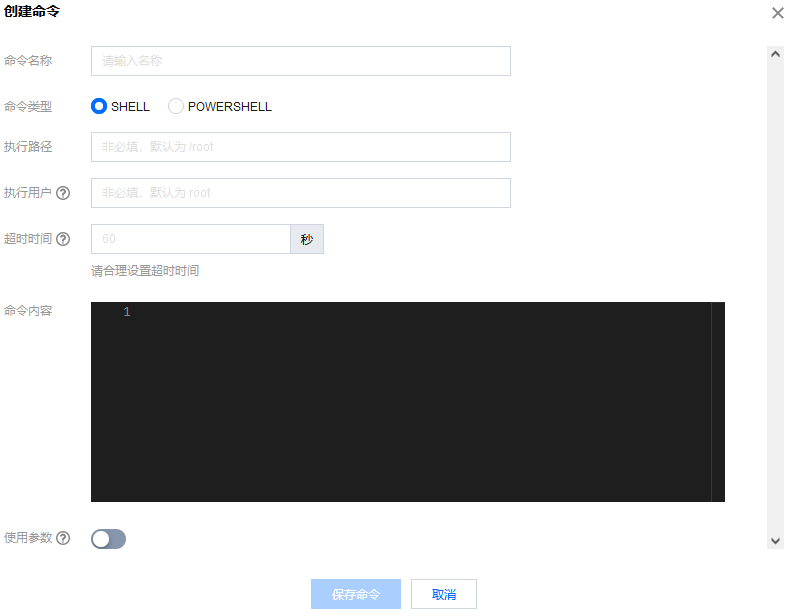
3. Configure the parameters in the Create command page.
Parameter
Description
Command name
Enter the command name.
Command type
Select a command type.
Execution path
Enter the execution path of the command.
For Linux instances, the path defaults to the /home of the root account.
For Windows instances, it defaults to C:\\\\Program Files\\\\qcloud\\\\tat_agent\\\\workdir of the System user
Execution user
The user who executes the command.
For Linux instances, it defaults to the root user.
For Windows instances, it defaults to the System user.
Timeout period
Set the timeout period of the command in the instance. When the task executing the command times out, the task process is terminated. It defaults to 60 seconds, and the range of values is [1, 86400].
Command content
Edit or paste your command.
Use parameters
Specify whether to use parameters in the command. You can configure the variable values in the command in the format of {{key}}.
4. Click Save command to complete the creation.
Step 3. Execute the command
Note: The target instance must be based on a VPC.
1. In the My commands page, select the target command and click Execute.
2. In the Execute command window, select the target instance.
3. Click Execute command.
After the task execution, you can check the task result in My commands - Logs - Log details.