Does Data Egressing a NAT Firewall Pass Through the Firewall Twice?
If the public IP address of NAT Firewall is enabled at the Internet Firewall switch, outbound traffic passes through NAT Firewall first and then through Internet Firewall.
What Is the Difference Between Add Mode and Access Mode for NAT Firewall?
New mode: If no NAT Gateway exists in the current region, the new mode can use the built-in NAT feature of NAT Firewall to enable specified instances to access the Internet through the firewall.
Access mode: If a NAT Gateway already exists in the current region, or if you want to keep the egress IP address for public network access unchanged, the access mode can smoothly integrate NAT Firewall between the NAT Gateway and CVM instances.
Can NAT Firewall Replace the Original NAT Gateway?
NAT Firewall can replace the original NAT Gateway.
Can NAT Firewall Be Enabled for Only One Subnet?
A Firewall Toggle corresponds to one subnet. You can enable the firewall for all subnets in the route table associated with the current subnet, or you can enable the firewall only for the current subnet.
Will Binding an EIP to the NAT Firewall Toggle Cause a Network Interruption?
Binding does not cause transient disconnection.
Will Enabling or Disabling a VPC on the NAT Firewall Toggle Cause a Network Interruption?
Enabling: Due to route changes, a network interruption of 1 to 2 seconds may occur. If you choose to enable only a specific subnet, the system automatically creates a new route table for the current subnet, copies all existing route policies, adds a route policy with the next hop pointing to NAT Firewall in the new route table, and disables the original route policy for public network access. As a result, internet traffic from this subnet passes through NAT Firewall.
Disabling: Due to route changes, a network interruption of 1 to 2 seconds may occur. If you choose to disable only a specific subnet, the system automatically creates a new route table for the current subnet, copies all existing route policies, and disables the route policy with the next hop pointing to NAT Firewall. As a result, the subnet will be disconnected from the internet.
Does Port Forwarding (DNAT) on the NAT Firewall Toggle Support Configuring Consecutive Ports?
Port forwarding does not support configuring multiple ports in a single rule. Each DNAT port requires a separate rule.
Can NAT Firewall Be Configured with SNAT? How to Configure It?
1. Log in to the CFW console, click Firewall Toggle > NAT Edge Toggle to go to the NAT Edge Toggle page.
2. In the operation column on the right side of the NAT Edge Toggle page, click Instance Configuration > Egress Binding > Create Rule.
3. Select the external IP address used by the corresponding subnet or VPC, and click OK.
How to Confirm That the Firewall Is Enabled for All Subnets?
1. Log in to the CFW console, click Firewall Toggle > NAT Edge Toggle to go to the NAT Edge Toggle page.
2. In the NAT Edge Toggle menu, click the Firewall Toggle tab to view information about all enabled and disabled subnets.
After Domain Name Resolution for an Instance in the NAT Firewall Toggle Is Enabled, Is a Server Restart Required? Will It Take Effect Without Any Action?
You do not need to restart the server. Restarting the server only makes the configuration take effect faster, and the time it takes to take effect is the same as configuring DNS in the VPC console. You can use the following command to refresh the network configuration:
Linux: You can run dhclient.
Windows:ipconfig /flushdns
What Is the Automatic Asset Sync Interval for the NAT Firewall Toggle?
10 minutes.
What Is the Maximum Number of Rate Limiting Rules That Can Be Configured for NAT Firewall?
100 entries.
How Many NAT Gateways Can Be Connected Simultaneously in NAT Firewall Access Mode?
By default, up to 5 can be connected simultaneously. If you need more, we recommend using a new NAT Firewall instance for additional connections.
Why Is the NAT Firewall Subnet Toggle Disabled?
1. Default setting factor: The NAT Firewall Toggle is disabled by default during initial configuration and must be enabled manually.
2. VPC and route table association factor: In a VPC environment, when the CFW high-availability VIP toggle in the route table is in a specific state (such as traffic overload, maintenance, or upgrade), system logic may be triggered, causing the NAT Firewall Toggle to be disabled.
Why Can't the NAT Firewall Subnet Toggle Be Enabled?
This may be caused by changes in asset scale during the backend polling interval that have not been synchronized yet. You can log in to the CFW console, click Firewall Toggle > Internet Edge Toggle > Sync Assets to proactively call the backend API to re-read and synchronize subnet asset information, and then try to enable it again.
How to Change the VPC for NAT Firewall?
On the NAT Firewall Instance page, select the firewall you want to modify, click More, and select Access Configuration to re-select the VPC to connect.
How Many VPCs Can Be Associated with NAT Firewall?
For NAT Firewall instances below 600M: In add mode, up to 8 VPCs are supported. In access mode, up to 4 NAT Gateways are supported.
For NAT Firewall instances of 600M and above: In add mode, up to 10 VPCs are supported. In access mode, up to 5 NAT Gateways are supported.
Why Is the Allocated Elastic IP Inaccessible After NAT Firewall Is Enabled?
A newly allocated EIP must be bound before it can be accessed.
Is There a Limit on the Number of NAT Firewall Instances?
The number of NAT Firewall instances is limited. Subject to the general edition quota, the Premium Edition, Enterprise Edition, and Ultimate Edition support 1, 2, and 3 instances, respectively.
Can a Subnet Be Switched from NAT Firewall (New Mode) to NAT Gateway Without Affecting the Network?
1. Purchase a NAT Gateway for each VPC.
2. Modify the route table and set the next hop to the NAT Gateway.
3. Disable the firewall feature and terminate the firewall instance.
The above operations ensure that private network resources can access the public network. Since some of your applications require allowlist configuration for egress IPs, contact the relevant personnel to add the NAT Gateway EIPs to the allowlist. Otherwise, some applications may become inaccessible.
How to Verify Data After NAT Firewall Blocking?
On the NAT Firewall page, go to Status Monitoring, Connections, or Sessions. Perform a "Block" operation and refresh the page. If the original data still exists, perform the following operations:
1. After a "Block" operation is performed, the status on this page is not updated immediately. This is normal, so it is not recommended to perform this operation repeatedly.
2. You can check the Enterprise Security Group to confirm whether the rules have been delivered. When the automatic delivery switch of the Enterprise Security Group is enabled, the rules are delivered automatically. Otherwise, you need to deliver them manually.
Is the Inbound Blocklist/Allowlist Capability of NAT Firewall Consistent with Inline Mode or Bypass Mode?
The capabilities are the same, and the maximum blocking limit is also the same.
How to Count Rules in NAT Firewall and VPC Firewall Instances?
The number of delivered rules = the number of source addresses × the number of destination addresses × the number of ports × the number of protocols.
Number of source and destination addresses: Each IP address/IP address range or asset type is counted as 1. Asset groups, asset tags, and templates are counted based on the number of addresses after splitting.
Number of destination ports: Count the values separated by commas. If there is no comma, the number of destination ports is 1.
Number of protocols: Layer 4 ANY is counted as 3, and Layer 7 ANY is counted as 6. HTTP/HTTPS or SMTP/SMTPS is counted as 2, and a single protocol is counted as 1.
Are DNAT Rules Added on NAT Gateway Automatically Synchronized to NAT Firewall?
Rules added on the NAT Gateway before the NAT Firewall instance is created are automatically synchronized to the firewall after the Firewall Toggle is enabled. However, rules added on the NAT Gateway after the firewall is created do not take effect after being synchronized to the firewall. You need to manually add them on the CFW console.
Are DNAT Rules Automatically Synchronized to NAT Gateway After NAT Firewall Is Disabled or Terminated?
After a NAT Firewall is terminated, the DNAT rules that you added on the CFW console are synchronized to the NAT Gateway. If the NAT Gateway is connected to a NAT Firewall again, the DNAT rules previously created on the firewall are not automatically synchronized back to the NAT Firewall.
Will Users Be Notified of NAT Firewall/VPC Firewall Engine Updates?
If the engine has an update, the console displays a prompt window, and each engine version is prompted only once.
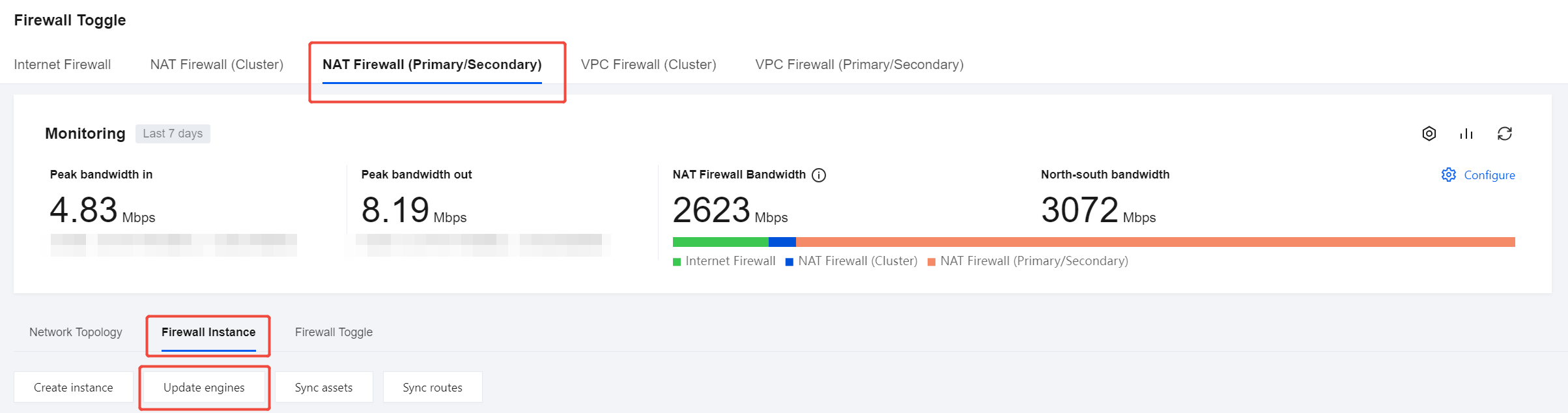
You can go to the Firewall Toggle > NAT Edge Toggle page, click Engine Update on the Firewall Instances tab, and check whether the engine is the latest version.
What Are the Impacts of Exceeding NAT Firewall Bandwidth?
After the bandwidth exceeds the limit, traffic will be throttled, which may increase network latency. Packet loss may also occur after connection access times out. It is recommended to scale out the bandwidth in a timely manner.
If VPC1, VPC2, and VPC3 Each Have Dedicated IP Addresses and All IP Addresses Are Used, Which IP Address Will the Remaining Unbound VPC Use?
If only one unoccupied IP address remains, the dedicated IP feature cannot be used, and this IP address cannot be selected as dedicated.
Why Does telnet Succeed When a Deny-All Rule Is Configured Last in NAT Firewall Without a Preceding Allow Rule, While curl and ping Are Blocked?
If Layer 7 rules are configured in the Access Control rules, traffic is allowed. Because Layer 7 rules need to be inspected, all traffic must first allow the TCP three-way handshake, so telnet can connect here.