Using Circuit Breaking to Protect Backend Services
Unduh
Mode fokus
Ukuran font
Terakhir diperbarui: 2026-05-07 17:24:31
Diterjemahkan oleh AI
Scenarios
This document describes how to implement the following common circuit-breaking scenarios on the Kong Cloud Native API Gateway using the Kong circuit breaking plugin:
Performing circuit breaking based on the backend response time
Performing circuit breaking based on the error code
Overview: This plugin is used to perform circuit breaking for requests from the client to protect upstream services.
Specific capabilities:
1.1 The plugin supports the response time mode and error code mode. You can configure the circuit breaking enabling condition for each mode. The error condition also supports the response time mode and error code mode.
1.1 a. Response time mode: The backend service response time threshold needs to be configured. When the response time exceeds the threshold, an error is counted, and circuit breaking is triggered when the circuit breaking enabling condition is met.
1.1 b. Error code mode: HTTP status codes for abnormal statuses need to be configured, and the status codes are separated by commas. When an abnormal status code is returned for the request, an error is counted, and circuit breaking is triggered when the circuit breaking enabling condition is met.
1.2 Half-open detection is supported after circuit breaking. When circuit breaking is triggered for the first time, it lasts for 2s. After the time expires, the request is forwarded to the backend service again, and the system determines whether the error or health condition is met.
a. If the error condition is met, circuit breaking lasts for 4s, and the time increases exponentially until the preset maximum detection waiting time is reached.
b. If the health condition is met (that is, the number of normal statuses reaches the number of consecutive normal requests), circuit breaking ends.
1.3 The circuit breaking return content, such as the HTTP status code, HTTP response content, and response header can be customized.
Plugin Configuration
Field Name
Required
Field Description
Response Time Threshold
No
Maximum response time of the upstream service backend server, in seconds. The value is greater than or equal to 1.
Abnormal Status HTTP Status Code
No
HTTP status code returned when the upstream service is abnormal. The default value is 503, and the value range is 500 to 599.
Error Rate Threshold
No
Threshold for the ratio of the number of requests that trigger an abnormal status of the upstream service to the total number of requests within a certain period.
Threshold for the Number of Consecutive Errors
No
Threshold for the number of consecutive requests that trigger an abnormal status of the upstream service. The value is greater than or equal to 1.
Maximum Detection Waiting Time
No
Maximum circuit breaking duration of the upstream service, in seconds. The value range is 3 to 300.
Number of Consecutive Normal Requests
Yes
Number of consecutive normal requests when the upstream service is in a healthy status. The value is greater than or equal to 1.
HTTP Status Code When Circuit Breaking Triggered
No
HTTP error code returned when the upstream service is in an unhealthy status.
HTTP Response Content When Circuit Breaking Triggered
No
HTTP response body returned when the upstream service is in an unhealthy status.
Response Header When Circuit Breaking Triggered
No
HTTP response header returned when the upstream service is in an unhealthy status. This field is valid only when break_response_body is configured.
Scenarios and Operation Steps
Scenario 1: Performing Circuit Breaking Based on the Error Code
1. Log in to the Konga console, go to the details page of the service for which circuit breaking needs to be configured, click ADD PLUGIN, and select TSE BREAKER under the Traffic Control group.
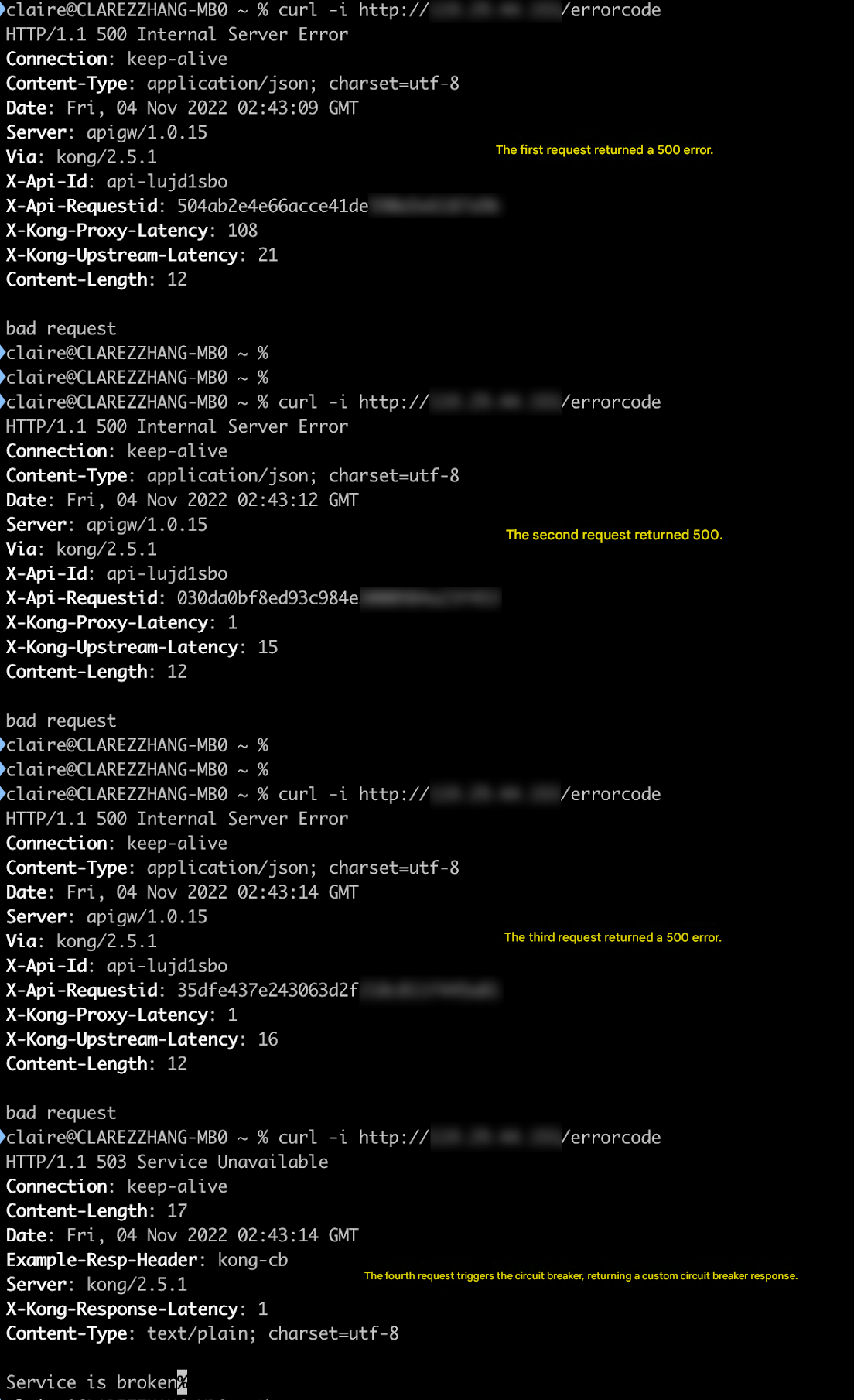
2. In this scenario, it is simulated that the backend service is abnormal when the backend service returns 500, 501, or 502, circuit breaking is triggered after three consecutive request errors, and custom circuit breaking content is returned.
On the plugin configuration page, specify the following parameters:
Error judgment condition: The backend service returns 500, 501, or 502.
Circuit breaking enabling condition: The number of consecutive errors exceeds 3.
3. Initiate an API request. Observe that after three consecutive responses with a 500 status code, circuit breaking is successfully triggered, and a custom circuit breaking response is returned.
HTTP/1.1 503 Service Unavailable //Custom response status code
Scenario 2: Performing Circuit Breaking Based on the Response Time
1. Log in to the Konga console, go to the details page of the service for which circuit breaking needs to be configured, click ADD PLUGIN, and select TSE BREAKER under the Traffic Control group.
2. In this scenario, it is simulated that the backend service is abnormal when the backend service does not return a response within 15 seconds, circuit breaking is triggered after four consecutive request errors, and circuit breaking is disabled after two consecutive correct requests.
On the plugin configuration page, specify the following parameters:
Error judgment condition: The response time of the backend service exceeds 15 seconds.
Circuit breaking enabling condition: The number of consecutive errors exceeds 4.
Circuit breaking disabling condition: The number of consecutive normal requests reaches 2.
3. Initiate API requests and check that circuit breaking is triggered after four consecutive requests time out, and circuit breaking is disabled after two consecutive requests are normal.