Service-level traffic throttling is primarily designed to protect service nodes or data nodes, preventing excessive instantaneous traffic from causing service and data crashes, which leads to service unavailability. When resources become a bottleneck, the service needs to throttle requests and activate the flow control protection mechanism.
The principle of traffic throttling is to monitor the QPS metrics of service traffic. When the specified threshold is reached, traffic control is implemented to avoid being overwhelmed by instantaneous peak traffic, thereby ensuring high service availability. There are two types of throttling modes:
Single-machine traffic throttling: By monitoring the QPS metrics of a single machine, traffic is limited when the rule-specified threshold is reached, ensuring service instances are not overwhelmed by instantaneous traffic.
Distributed traffic throttling: By monitoring the global QPS metrics, traffic is throttled when the rule-specified threshold is reached, ensuring service instances are not overwhelmed by instantaneous traffic.
2. In the left sidebar, select Polaris (North Star), and then select the target engine instance on the instance details page.
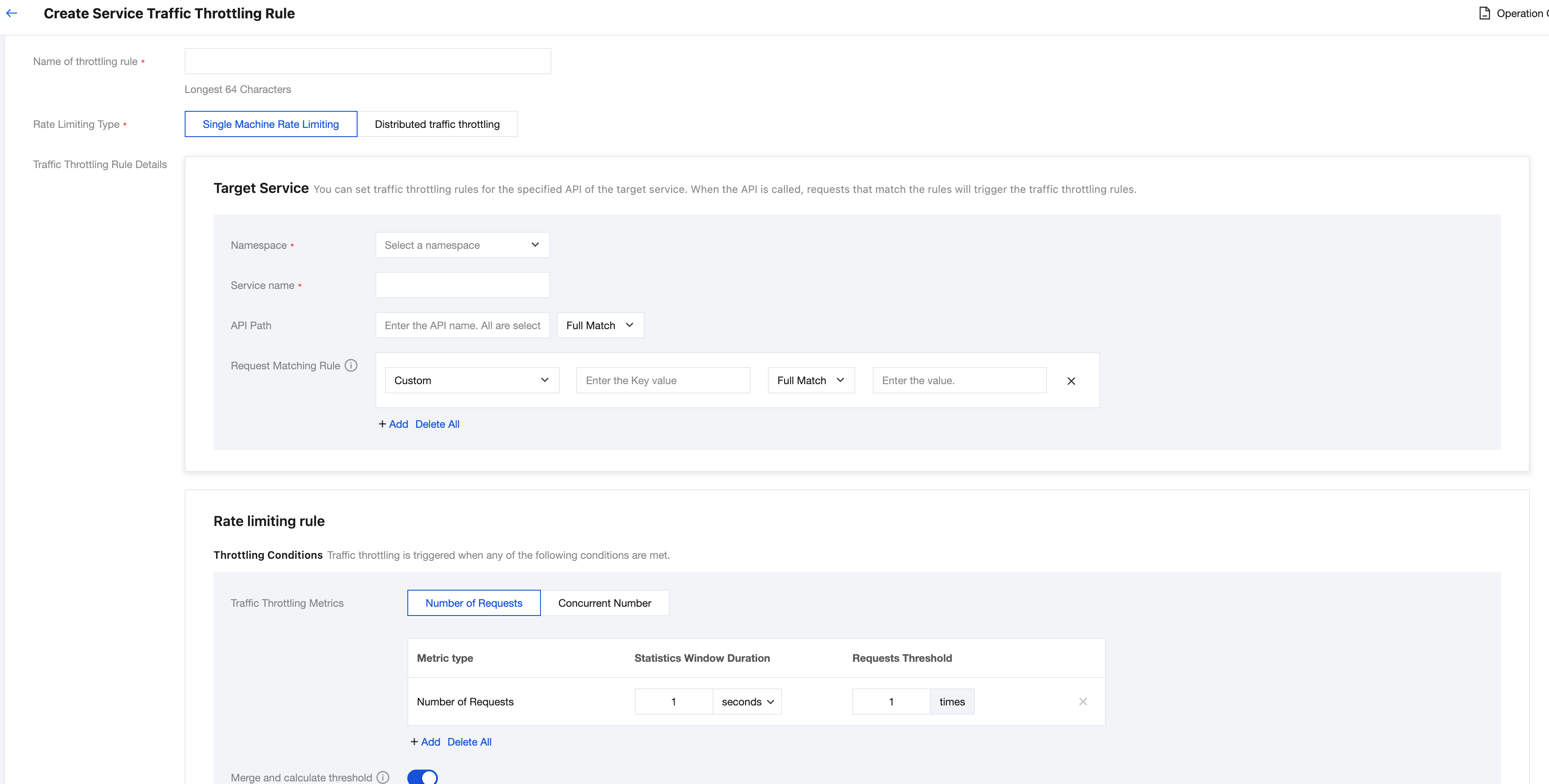
3. Click Access Traffic Throttling in the left sidebar to go to the circuit breaking rules display page, click New Traffic Throttling Rule, and after configuring the traffic throttling rule in the pop-up window, click Submit.
Single-Machine Traffic Throttling
Distributed traffic throttling
Parameter
Required
Description
API Path
No
Specifies the interface filtering parameters for the traffic throttling rule. The interface name can correspond to information such as method names, HTTP, and URL. Leaving it empty means no filtering.
API: the name of the API for which the rule takes effect. It is used to match the method parameter passed by the client and is left empty by default (indicating all APIs).
Matching mode: API field matching mode. Five values are supported: Exact match, Not equal to, Contain, Not contain, and Regular expression.
Request Matching Rules
No
Specifies the request parameter matching conditions for the rate limiting rule. Leaving it empty means no filtering. The following parameter types are supported:
Custom parameters: custom keys and values. Specific request parameter values can be passed via the SDK.
Request Headers (HEADER): filters based on protocol headers (http header/grpc header).
Request Parameter (QUERY): filters based on the protocol request parameter (http query).
Method (METHOD): filters based on the protocol method (http method/grpc method).
Caller Service: filters based on the service name of the caller in microservice call scenarios.
Caller IP: filters based on the IP address of the caller machine.
Caller Instance Metadata: filters based on the caller instance Tags.
Each type of parameter value supports the following value matching modes:
Exact match: The passed value is matched only when it is identical to the configured value.
Regular expression: The user configures a regular expression. Passed values are matched using the regular expression. The regular expression supports the Google RE2 standard.
Not equal to: negated match. The passed value is matched only when it is not equal to the configured value.
Contains: OR matching for multiple strings. A match is considered successful if the passed value matches any one of the strings. The strings are separated by commas. The value format is value1,value2,value3, and matching any one of them is considered successful.
Not contains: Negated OR matching for multiple strings. A match is considered successful only if the passed value is not present in any of the configured strings. The strings are separated by commas. The value format is value1,value2,value3, and a match is successful only when the value is not equal to all of them.
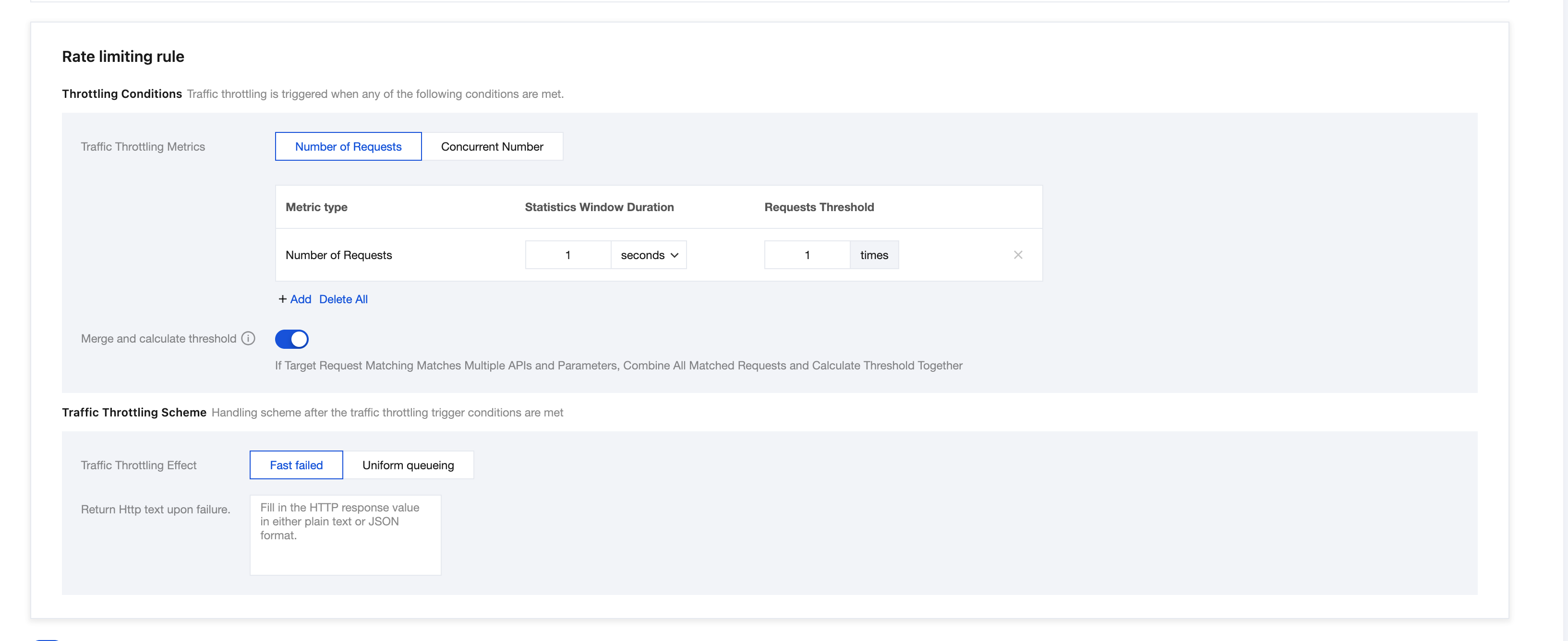
Rate Limiting Metric
Yes
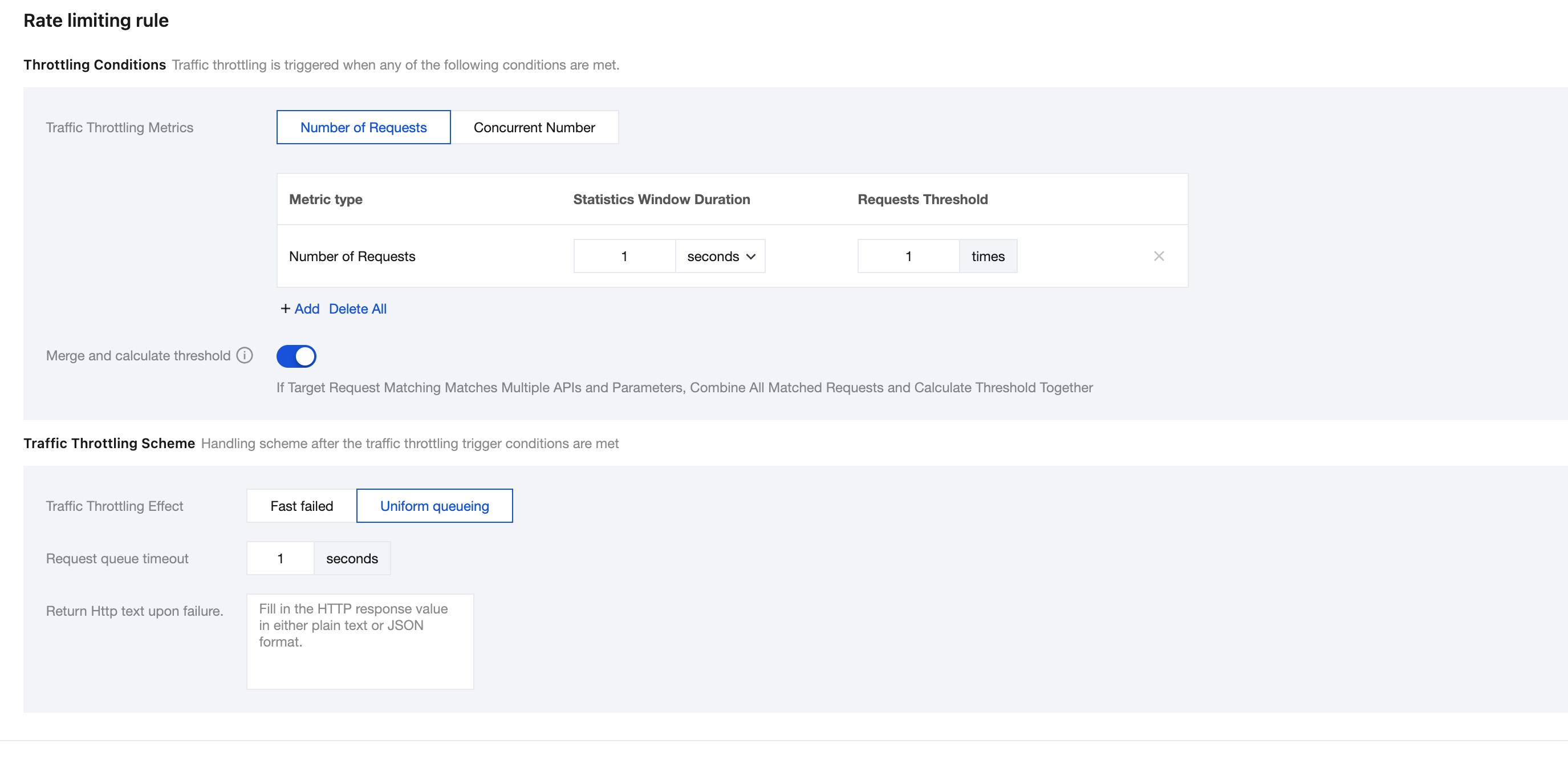
1. Rate Limiting Metric: Number of Requests
Rate limiting is triggered when a specified threshold within the statistical period is reached. Multiple rate limiting thresholds can be configured to take effect simultaneously, and rate limiting will be triggered when any one of the thresholds is reached.
Statistical Window Duration: time period for throttling threshold statistics, in seconds, defaulting to 1 second.
Request Number Threshold: threshold for the number of requests that triggers rate limiting, defaulting to 1 request.
Specify the concurrency threshold. Rate limiting is triggered when the threshold is reached.
Aggregate Calculation Threshold
No
When the rate limiting metric is the number of requests, if a target request matches multiple interfaces and parameters, all matched requests are aggregated, and the threshold is calculated based on the combined total.
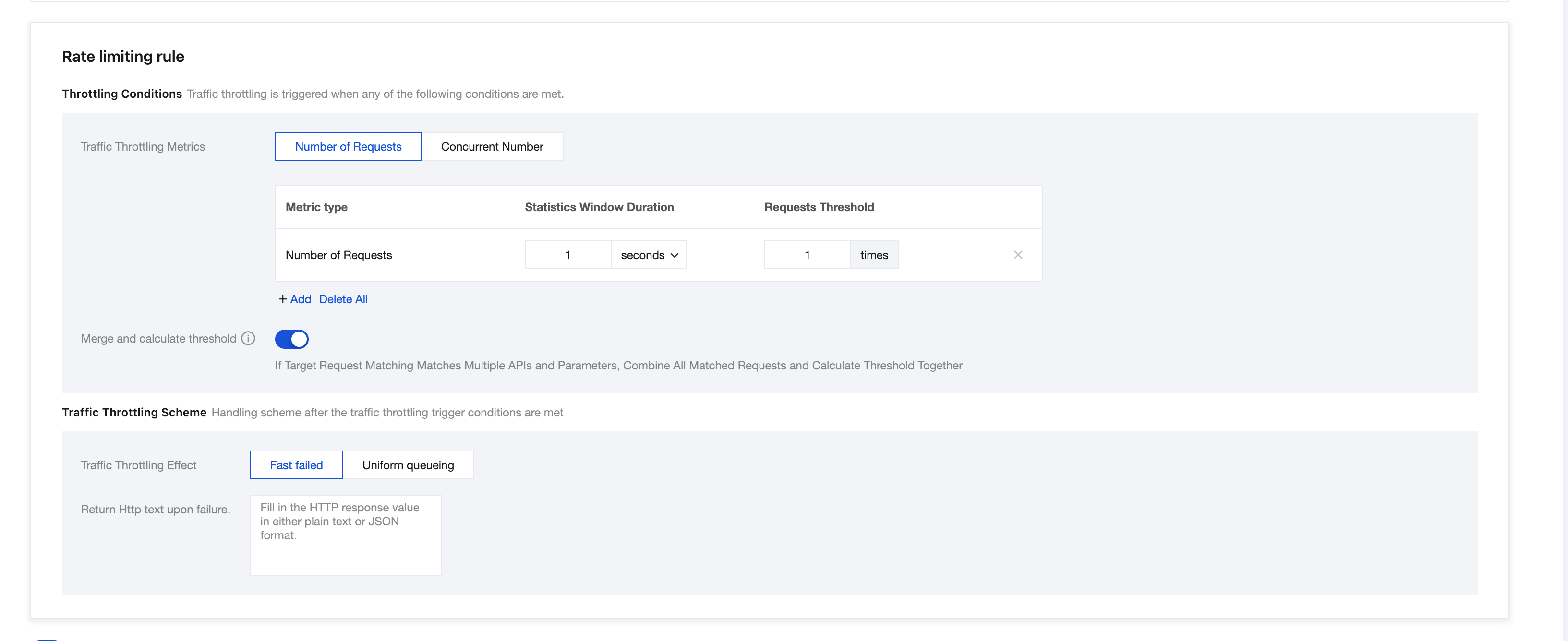
Rate Limiting Effect
Yes
Fail-fast: direct rejection.
Uniform Queuing: Requests pass sequentially based on the configured maximum queuing time.
Failure Handling Policy
No
This option is required only for distributed traffic throttling.
The throttling solution falls back to single-machine throttling. When communication fails or the Token Server is unavailable, the throttling solution falls back to the single-machine throttling mode.
Direct Pass: When communication fails or the Token Server is unavailable, no additional processing is performed, and the request passes directly.
Http Script to Return After Failure
No
Enter plain text or a JSON-formatted http response.
Parameter
Required
Description
API Name
No
Specifies the interface filtering parameters for the traffic throttling rule. The interface name can correspond to information such as method names, HTTP, and URL. Leaving it empty means no filtering.
API: name of the API for which the rule takes effect, used to match the method parameter passed by a client. It is left empty by default, indicating all APIs.
Matching mode: API field matching mode. Five values are supported: Exact match, Not equal to, Contain, Not contain, and Regular expression.
Request Matching Rules
No
Specifies the request parameter matching conditions for the rate limiting rule. Leaving it empty means no filtering. The following parameter types are supported:
Custom parameters: custom Key and Value. Specific request parameter values can be passed via the SDK.
Request Headers (HEADER): filters based on protocol headers (http header/grpc header).
Request Parameter (QUERY): filters based on the protocol request parameter (http query).
Method (METHOD): filters based on the protocol method (http method/grpc method).
Caller Service: filters based on the service name of the caller in microservice call scenarios.
Caller IP: filters based on the IP address of the caller machine.
Each type of parameter value supports the following value matching modes:
Exact match: The passed value is matched only when it is identical to the configured value.
Regular expression: The user-defined regular expression is used to match passed values. The regular expression supports the Google RE2 standard.
Not equal to: negated match. The passed value is matched only when it is not equal to the configured value.
Contain: OR matching for multiple strings. The passed value is considered a successful match as long as it matches one of the strings. The strings are separated by commas in the format 'value1,value2,value3', and matching one of them is considered successful.
Not contains: Negated OR matching for multiple strings. A match is considered successful only if the passed value is not present in any of the configured strings. The value format is 'value1,value2,value3', and a match is successful only when the value is not equal to all of them.
Rate Limiting Threshold
Yes
Rate limiting is triggered when a specified threshold within the statistical period is reached. Multiple rate limiting thresholds can be configured to take effect simultaneously, and rate limiting will be triggered when any one of the thresholds is reached.
Statistical Window Duration: time period for throttling threshold statistics, in seconds, defaulting to 1 second.
Request Number Threshold: threshold for the number of requests that triggers rate limiting, defaulting to 1 request.
Aggregate Calculation Threshold
No
If a target request matches multiple interfaces and parameters, all matched requests are aggregated, and the threshold is calculated based on the combined total. For specific rules, see:
Failure Handling Policy
Yes
Distributed traffic throttling relies on a token server. If the token server becomes inaccessible, the client can degrade according to the configured rules to ensure user requests are minimally affected.
Fallback to single-machine throttling: This is the default policy. Throttling is performed by directly falling back to a single-machine quota calculation method, where the single-machine quota = (global quota / number of nodes).
Direct Pass: No throttling is performed, and all requests are directly passed through.
Whether to Enable
No
After it is enabled, the traffic throttling rule takes effect immediately.
Usage Examples
Service Traffic Throttling
Create a new traffic throttling rule under the RateLimitServiceJava service, set the QPS to 10, and select "Direct Reject" as the traffic throttling effect.
Fine-Grained Traffic Throttling for Interface + Tag
Create a new traffic throttling rule under the RateLimitServiceJava service, set the QPS to 10, specify the method name as /echo, throttle requests when the HTTP HEADER contains user=foo, and select "Direct Reject" as the traffic throttling effect.
Hotspot Parameter-Based Traffic Throttling for Interface + Tag
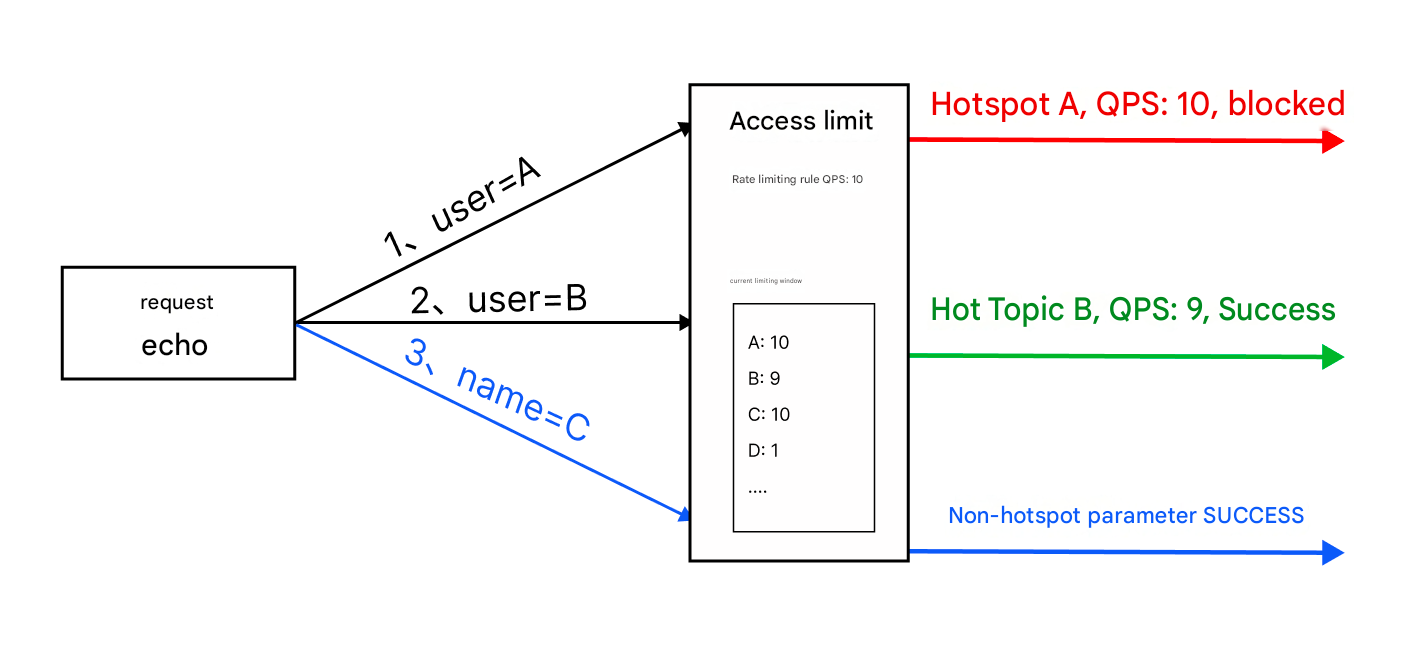
Hotspot parameter-based traffic throttling rule configuration must meet two conditions; otherwise, it will not take effect:
Non-exact match rules exist: In the "interface name" and "request matching rule" configurations, at least one rule is a non-exact match rule, such as "not equal to". If all are exact match rules, then the traffic throttling is just regular traffic throttling.
Disable "Merge Calculation Threshold".
Hotspot parameter-based traffic throttling is a traffic throttling policy targeting certain hotspot parameters in high-concurrency requests; for example, the traffic throttling effect diagram of the above rule is as follows:
Create a new traffic throttling rule under the RateLimitServiceJava service, set the QPS to 10, specify the method name as /echo, throttle each parameter value of the HTTP header user separately, and select "Direct Reject" as the traffic throttling effect.
Uniform Queuing
Create a new traffic throttling rule under the RateLimitServiceJava service, set the QPS to 10, and select "Uniform Queuing" as the traffic throttling effect.