Runtime Filter Use Instructions
Download
포커스 모드
폰트 크기
HASH JOIN is a common join algorithm in columnar read-only analysis instances, consisting of two phases: Build and Probe. When the data volume in the Probe phase is large but the output data after the JOIN is small, enabling Runtime Filter can filter out invalid data in advance, thereby reducing the data scale of the Probe phase and improving query performance.
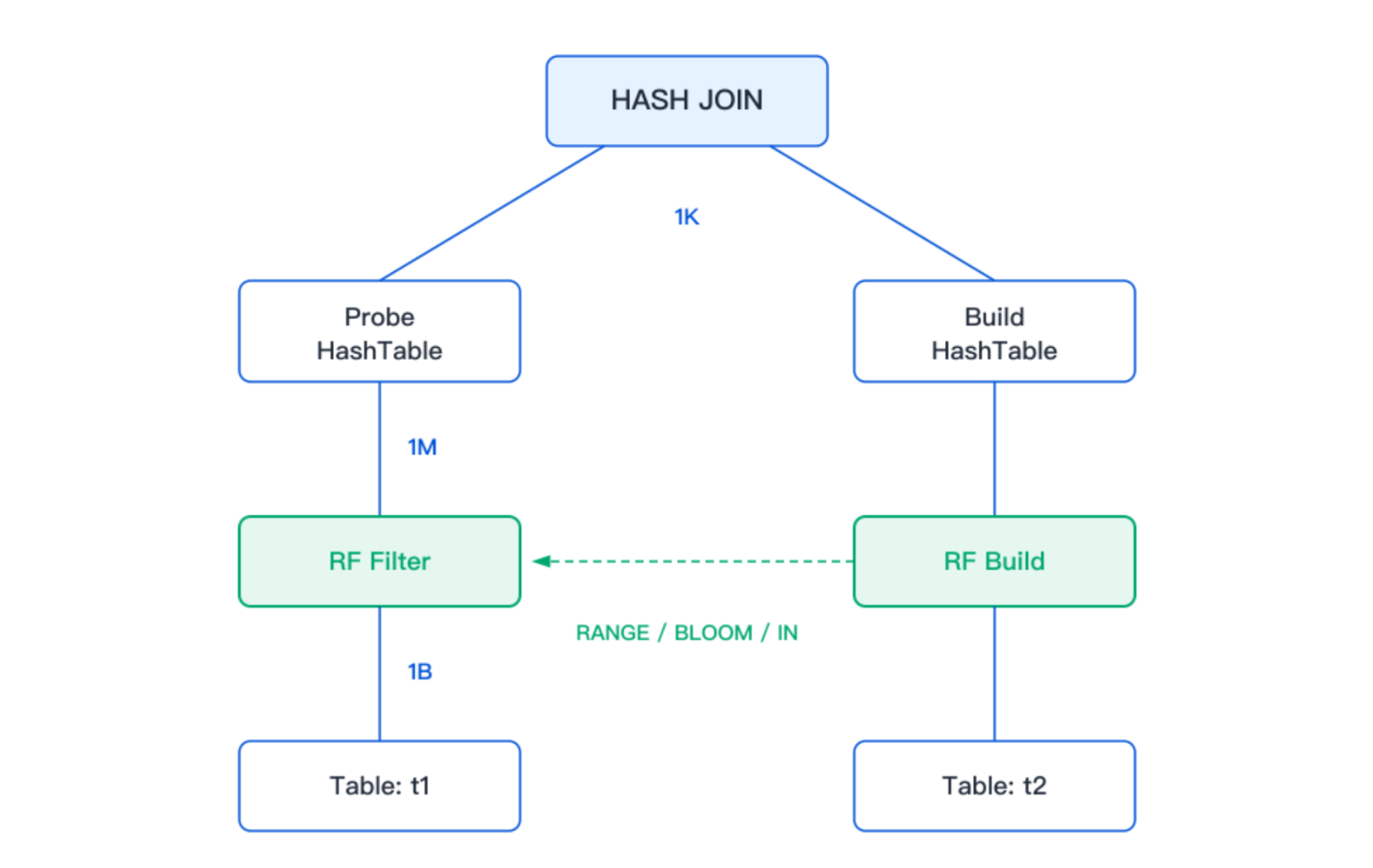
The Runtime Filter in a columnar read-only analysis instance consists of two parts: RF Build resides on the Build side of the HASH JOIN and is responsible for constructing the filter; RF Filter resides on the TableScan of the Probe side and is responsible for filtering data in advance.
Runtime Filter Types
Based on whether the data on the Build side of the JOIN has undergone Shuffle, the columnar read-only analysis instance classifies Runtime Filter into two types: Local Runtime Filter and Global Runtime Filter.
Local Runtime Filter
Local Runtime Filter is applicable to scenarios where the JOIN data on the Build side does not undergo Shuffle. The filter built on the current node can already meet the needs of the Probe side, eliminating the need for cross-node transmission, and can be directly passed to the Probe side within the same plan for use.
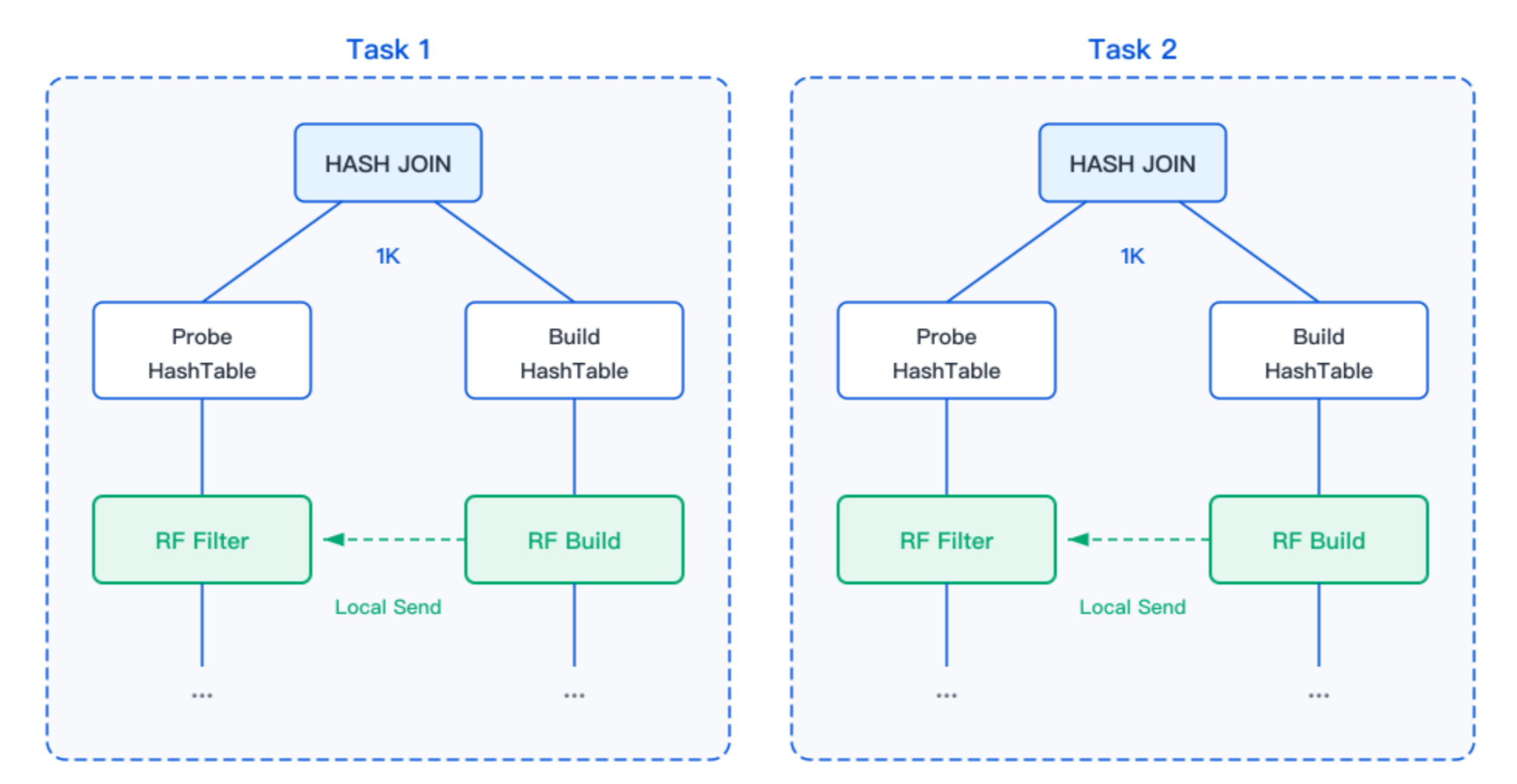
As shown in the preceding figure, when the Build table of the JOIN does not undergo Shuffle, the RF Build operator within the same plan directly sends the constructed filter to the corresponding RF Filter operator in the plan.
Global Runtime Filter
Global Runtime Filter is applicable to scenarios where the JOIN data on the Build side is distributed to different nodes through Shuffle. In this case, the filter built on a single node cannot cover the complete dataset, and filters from other nodes must be received, merged, and then used.
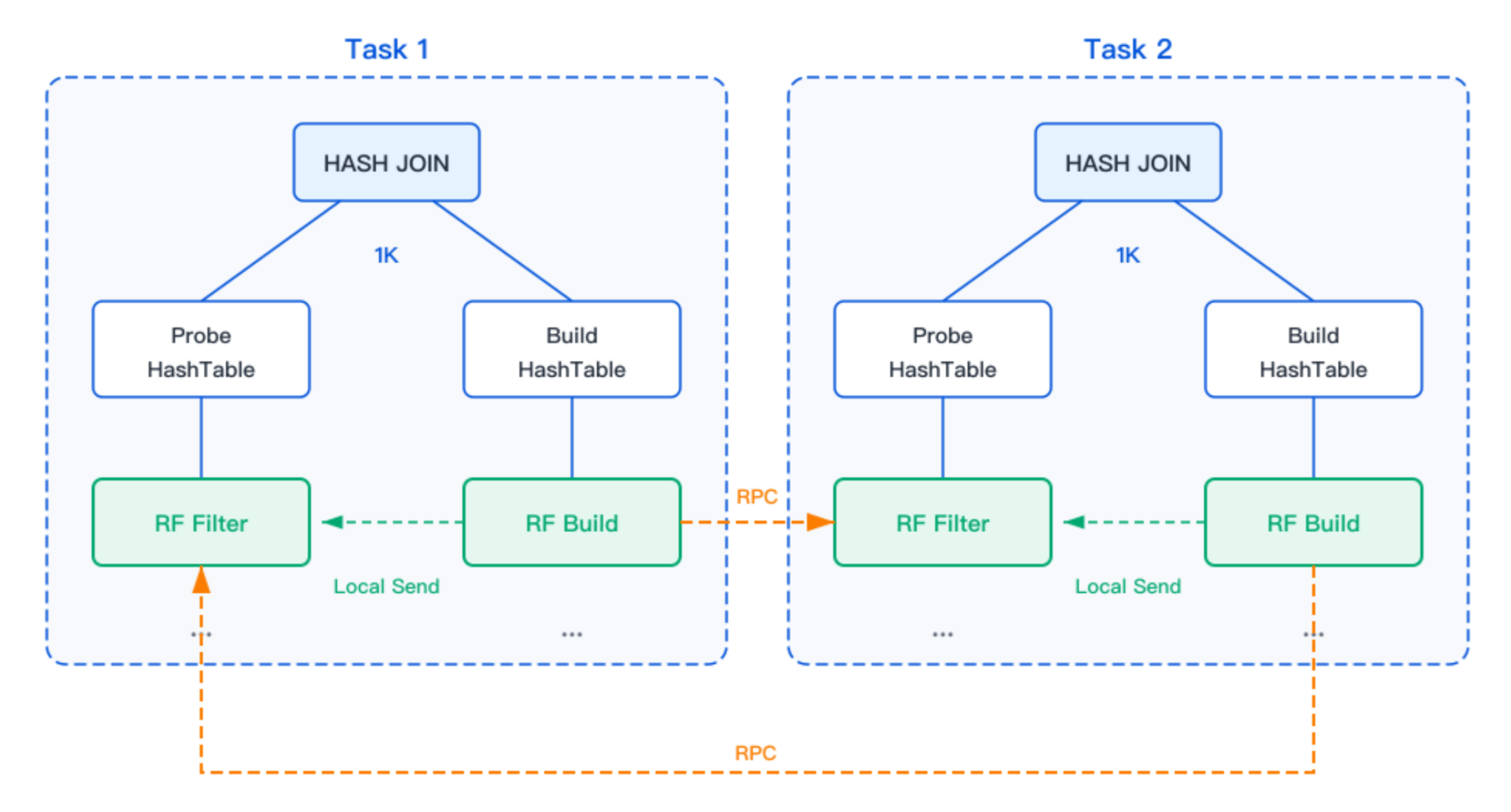
As shown in the preceding figure, when the data of the Build table in the JOIN is shuffled, the filter constructed by the RF Build operator in the current plan is incomplete. It must receive and merge filters constructed by other nodes in the same plan, and then distribute the merged filter to the Probe side for use.
Filter Types
Based on data distribution characteristics, the columnar read-only analysis instance automatically selects one or more filtering algorithms for the JOIN. Currently, it supports the following four filter types.
Bloom Filter
Bloom Filter is a classic filtering algorithm that uses multiple hash functions to determine whether data might exist. The size of the filter is typically determined by the NDV (Number of Distinct Values) of the data. Bloom Filter has a certain False Positive rate, but the falsely identified data is further filtered out during the Probe phase of the JOIN, which does not affect the correctness of the query results.
MIN_MAX Filter
The MIN_MAX Filter collects the maximum and minimum values of the data on the Build side. During filtering, it determines whether data falls within this range. Data outside the range is directly filtered out. The MIN_MAX Filter performs well when the data on the Build side is concentrated within a specific range.
IN Filter
The IN Filter is applicable to scenarios with a small NDV. During construction, all values of that column from the Build side are packaged and then sent to the Probe side for exact matching.
TOPN_FILTER
TOPN_FILTER is applicable to JOIN scenarios that involve the push down of the TopN operator. During construction, it collects the set of JOIN KEY values from the TopN result set and sends them to the Probe side to filter out data that will not go to the final result in advance.
Enabling or Disabling the Runtime Filter
Runtime Filter is enabled by default for the analysis instance. You can control its on/off state using the following system variables.
-- Enable Runtime FilterSET libra_enable_runtime_filter = ON;-- Disable Runtime FilterSET libra_enable_runtime_filter = OFF;
After Runtime Filter is enabled, the optimizer evaluates JOINs based on cost and automatically enables Runtime Filter when conditions are met. To force-enable Runtime Filter for all JOINs, you can disable the cost-based allocation policy.
SET libra_enable_cost_based_runtime_filter = OFF;
Viewing the Runtime Filter Execution Plan
Use
EXPLAIN to view the execution plan with Runtime Filter. In the plan, the filter type is identified by Mode: LOCAL or Mode: GLOBAL.The following example shows a Local Runtime Filter plan. In this plan, there is no data redistribution between the Build side and the Probe side of the HASH JOIN, and three Runtime Filters are allocated on the JOIN.
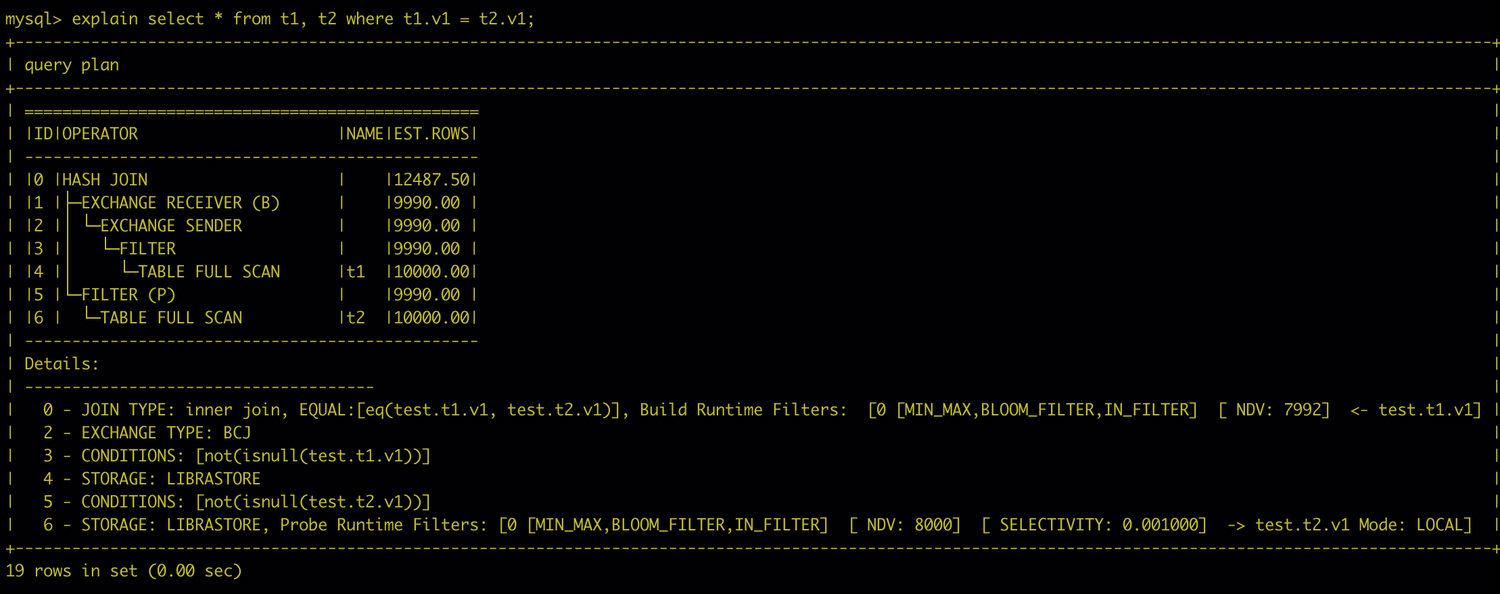
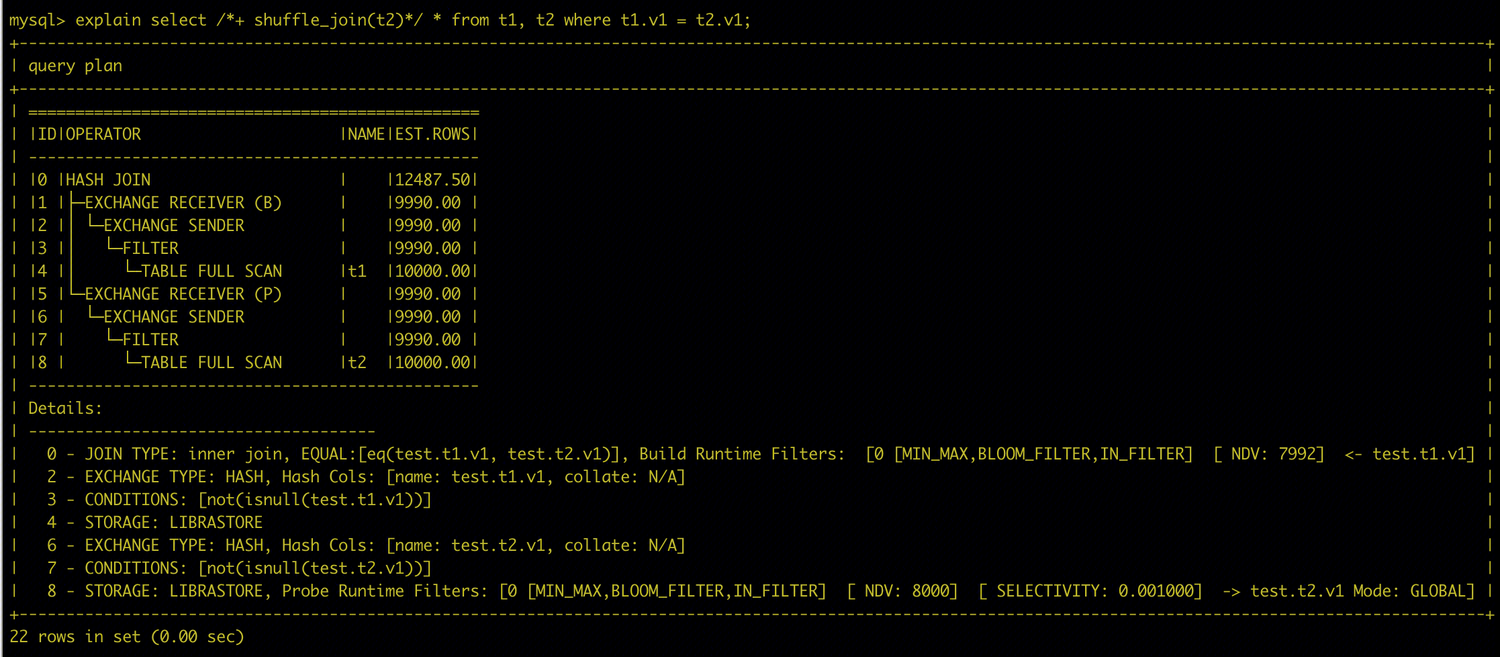
The following example shows a Global Runtime Filter plan. In this plan, data redistribution exists between the Build side and the Probe side. Runtime Filter can filter data in advance before it is transmitted across nodes, reducing network transmission volume and subsequent JOIN overhead.
Adjusting Runtime Filter Parameters
Runtime Filter provides the following system variables for fine-grained control.
libra_enable_runtime_filter
The master switch for controlling the Runtime Filter feature.
Required | Description |
Parameter Type | BOOL |
Default Value | ON |
Value Range | ON: Enable Runtime Filter; OFF: Disable Runtime Filter |
Scope | Global & Session |
SET_VAR Hint supported | Yes |
libra_runtime_filter_type
Controls the types of Runtime Filter available for the optimizer to select. It supports combinations of multiple types, separated by English commas.
Required | Description |
Parameter Type | VARCHAR |
Default Value | MIN_MAX,BLOOM_FILTER,IN_FILTER,TOPN_FILTER |
Value Range | BLOOM_FILTER: Build a Bloom Filter based on the JOIN KEY from the JOIN Build side to filter data from the Probe side; MIN_MAX: Build the maximum and minimum values based on the JOIN KEY from the JOIN Build side to filter data from the Probe side; IN_FILTER: Build a value list based on the JOIN KEY from the JOIN Build side to filter data from the Probe side; TOPN_FILTER: Build a filter for the TopN push down scenario; Empty string: Disable Runtime Filter. |
Scope | Global & Session |
SET_VAR Hint supported | No |
Attention:
This parameter takes a string value. When you set it, you must enclose the value in single quotation marks. Example:
SET libra_runtime_filter_type = 'MIN_MAX,BLOOM_FILTER';.libra_enable_cost_based_runtime_filter
Controls whether to enable the cost-based Runtime Filter allocation policy. After this policy is disabled, a complete Runtime Filter is generated for all eligible JOINs.
Required | Description |
Parameter Type | BOOL |
Default Value | ON |
Value Range | ON: Enable the cost-based allocation policy; OFF: Disable the cost-based allocation policy. |
Scope | Global & Session |
SET_VAR Hint supported | Yes |
libra_max_in_runtime_filter_ndv
This parameter controls the maximum NDV allowed on the Build side when an IN_FILTER type filter is generated under the cost-based allocation policy. When the NDV exceeds this value, the optimizer does not select IN_FILTER.
Required | Description |
Parameter Type | INT |
Default Value | 1024 |
Value Range | [0, 9223372036854775807] |
Scope | Global & Session |
SET_VAR Hint supported | Yes |
libra_runtime_filter_max_wait_ms
Controls the maximum time, in milliseconds, that the Probe side waits for the Runtime Filter to be built. After this time is exceeded, the Probe side stops waiting and starts execution directly using the filters that have currently arrived.
Required | Description |
Parameter Type | INT |
Default Value | 1000 |
Value Range | [0, 9223372036854775807] |
Scope | Global & Session |
SET_VAR Hint supported | Yes |
libra_runtime_filter_max_bloom_filter_size
Controls the maximum number of bytes for a single Bloom Filter. When the estimated filter size exceeds this value, the optimizer does not generate a Bloom Filter.
Required | Description |
Parameter Type | INT |
Default Value | 1073741824(1GB) |
Value Range | [0, 9223372036854775807] |
Scope | Global & Session |
SET_VAR Hint supported | Yes |
피드백