Purchase Data Security Audit
Unduh
Mode fokus
Ukuran font
This document describes how to purchase Data Security Audit in the console.
Prerequisites
Operation Steps
1. Log in to the TencentDB for SQL Server console.
2. Select DSAudit in the left sidebar.
3. On the DSAudit page, click Enable Security Audit.
4. Read the service authorization information in the pop-up, and click Agree and Authorize.
5. Select the desired configuration in the pop-up, click Confirm, and complete the payment to purchase Data Security Audit.
Parameter | Description |
Audit Instance | Select the quota for audit instances. The default is 1. The value range is 1 - 9999. A value greater than or equal to 5 is recommended. The quota can be modified after configuration. |
Log storage | Set the log storage capacity. All database instances share this space. The value range is 0 - 9999TB. The capacity can be scaled up or down after configuration. |
Auto-Renewal | Select whether to enable auto-renewal. If auto-renewal is not enabled, you can manually enable it after the configuration is complete. Note: If auto-renewal is not enabled, you can also click Enable Auto-Renewal after Renewal Method > under Manage Usage > on the DSAudit page after the configuration is complete. 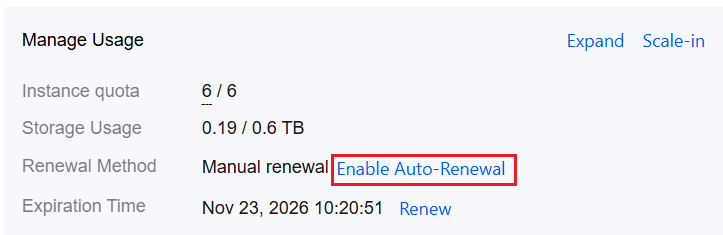 |
6. The DSAudit page after a successful purchase is shown below.

Bantuan dan Dukungan
Apakah halaman ini membantu?
Anda juga dapat Menghubungi Penjualan atau Mengirimkan Tiket untuk meminta bantuan.
masukan