Manual Backup
Unduh
Mode fokus
Ukuran font
Scenarios
When major changes, version upgrades, or potential risks occur, the manual backup feature allows you to initiate a backup task immediately, precisely capture the status at a specific moment, and support temporary protection and recovery point verification. In addition, when the automatic backup system is invalid due to unexpected interruptions, configuration errors, or catastrophic faults, the manual backup feature allows you to obtain the latest and controllable data replicas.
Feature Description
Note:
The backup service of TencentDB for MongoDB will be officially commercialized starting from 00:00:00, November 20, 2025 (UTC+8), and advanced backup features will be launched. You can flexibly set the retention period of manual backup files.
Operation Steps
1. Log in to the TencentDB for MongoDB console.
2. In the left sidebar, choose MongoDB > Replica Set Instance or Shard Instance. The operations for replica set instances and sharded cluster instances are similar.
3. At the top of the instance list page on the right, select a region.
4. In the instance list, locate the target instance.
5. Click the target instance ID to go to the Instance Details page.
6. In the upper-right corner of the Instance Details page, click Manual Backup.
7. In the Manual Backup dialog box, set the backup policy.
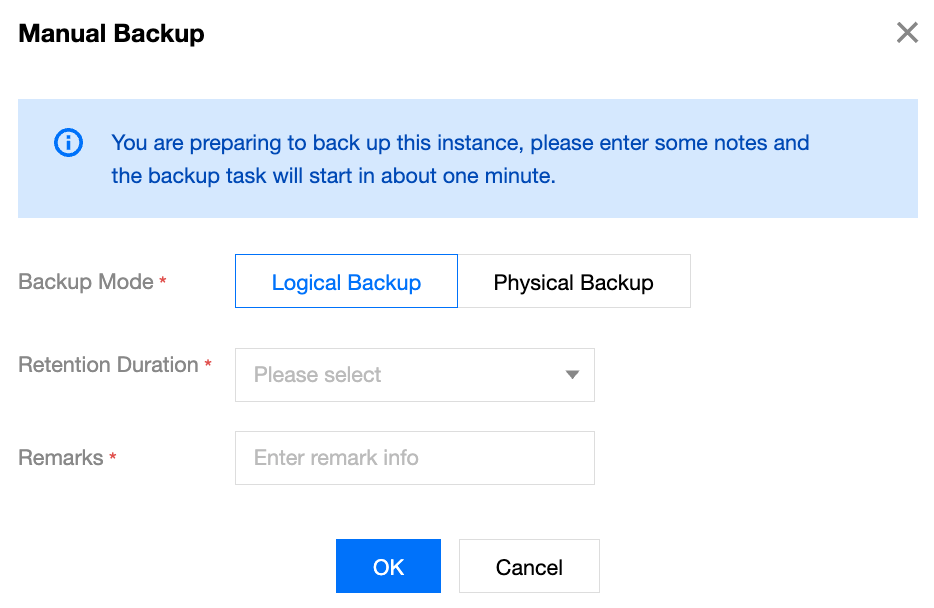
Parameter | Parameter Description | Configuration Suggestion |
Backup Mode | Local Disk: You can choose logical backup or physical backup. The default is logical backup. Cloud Disk: You can choose snapshot-based backup or physical backup. The default is snapshot-based backup. | |
Retention Duration | In the drop-down list, select the retention period for manual backup files. Note: Backup Retention Period is an advanced backup feature. Local Disk: After the backup service enables advanced backup, you can set the backup retention period during manual backup. Cloud Disk: This feature is not currently supported. Backup data is retained for 7 days by default. Follow the full backup duration: The retention period of manual backup files is the same as that set for full backup files in the automatic backup policy. Long-Term retention period: The retention period of manual backup files is the same as that set for long-term backup files in the automatic backup policy. Custom retention period: Set the retention period as required in the input box. The value range is 1 to 1095 days. Set it based on actual requirements. | After the set backup retention period expires, manual backup files are deleted automatically. |
Remarks | In the input box, enter remarks of a string of 30 characters without symbols to identify the business requirements of the manual backup operation. | - |
8. Click OK. The manual backup policy is set. The system starts the backup task in approximately one minute. In the right sidebar, select Task Management to view the backup progress of the manual backup task and wait for it to complete.

9. After the backup task is completed, you can locate the generated backup files in the full backup task list on the Backup and Rollback page. As shown in the following figure, you can click Download in the Operation column to download the backup files.

Related APIs
API | Description |
Querying the Backup Task List of an Instance | |
Backing up an Instance | |
Querying Information About a Backup Download Task | |
Creating a Backup Download Task |
Bantuan dan Dukungan
Apakah halaman ini membantu?
Anda juga dapat Menghubungi Penjualan atau Mengirimkan Tiket untuk meminta bantuan.
masukan