tencent cloud

TencentDB for PostgreSQL

Release Notes and Announcements
Release Notes
Product Announcements
Product Introduction
Overview
Features
Strengths
Scenarios
Information Security
Regions and AZs
Product Feature List
Large version lifecycle description
MSSQL Compatible Version
Billing
Billing Overview
Instance Type and Specification
Purchase Methods
Refund
Overdue Payments
Backup Space Billing
Database Audit Billing Overview
Getting Started
Creating TencentDB for PostgreSQL Instance
Connecting to TencentDB for PostgreSQL Instance
Managing TencentDB for PostgreSQL Instance
Importing Data
Migrating Data with DTS
Kernel Version Introduction
Kernel Version Overview
Kernel Version Release Notes
Viewing Kernel Version
Proprietary Kernel Features
Database Audit
Audit Service Description
Activating Audit Service
View Audit Logs
Modify audit services
Audit Performance Description
User Guide
Instance Management
Upgrading Instance
CPU Elastic Scaling
Read-Only Instance
Account Management
Database Management
Parameter Management
Log Management and Analysis
Backup and Restoration
Data Migration
Extension Management
Network Management
Access Management
Data Security
Tenant and Resource Isolation
Security Groups
Monitoring and Alarms
Tag
AI Practice
Using the Tencentdb_ai Plug-In to Call Large Models
Building Ai Applications with the Tencentdb Ai Plug-In
Combining Supabase to Quickly Build Backend Service Based on TencentDB for PostgreSQL
Use Cases
postgres_fdw Extension for Cross-database Access
Automatically Creating Partition in PostgreSQL
Searching in High Numbers of Tags Based on pg_roaringbitmap
Querying People Nearby with One SQL Statement
Configuring TencentDB for PostgreSQL as GitLab's External Data Source
Supporting Tiered Storage Based on cos_fdw Extension
Implement Read/Write Separation via pgpool
Implementing Slow SQL Analysis Using the Auto_explain Plugin
Using pglogical for Logical Replication
Using Debezium to Collect PostgreSQL Data
Set Up a Remote Disaster Recovery Environment for PostgreSQL Locally on CVM
Read-Only Instance and Read-Only Group Practical Tutorial
How to Use SCF for Scheduled Database Operations
Fix Table Bloat
Performance White Paper
Test Methods
Test Results
API Documentation
History
Introduction
API Category
Making API Requests
Instance APIs
Read-only Replica APIs
Backup and Recovery APIs
Parameter Management APIs
Security Group APIs
Performance Optimization APIs
Account APIs
Specification APIs
Network APIs
Data Types
Error Codes
FAQs
Service Agreement
Service Level Agreement
Terms of Service
Glossary
Contact Us

Instance Lifecycle

PDF
Mode fokus
Ukuran font
Terakhir diperbarui: 2026-03-31 17:14:35
TencentDB for PostgreSQL instances have many status. Instances in different status support different operations. This document describes the instance lifecycle.
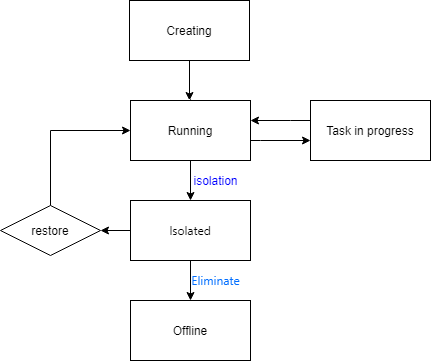
TencentDB for PostgreSQL instances have the following status:


Creating is the initial status of instances, and instances can be used normally after creation.
Running and Executing task mean that the instance is running normally. Specifically, Executing task means that the instance is performing operations, such as modifying its configurations.
If a pay-as-you-go instance has overdue payment or is terminated by users, it is Isolated and moved into the recycle bin.
You can manually Restore an instance from the recycle bin. After that, it becomes Running again.
A pay-as-you-go instance will be retained in the recycle bin for up to three days. Three days later, it expires and will be eliminated automatically. Once eliminated, it is deleted completely, and cannot be restored or viewed in the console.
Bantuan dan Dukungan

Apakah halaman ini membantu?

masukan