Audit Performance Description
Unduh
Mode fokus
Ukuran font
Testing Tool
Sysbench is an open-source, modular, and cross-platform multi-threaded benchmark tool tailored for Online Transaction Processing (OLTP) scenarios. It allows you to evaluate and test the performance of database core parameters under high loads.
In a standard OLTP read/write scenario of SysBench, a transaction contains 18 read/write SQL statements.
In a standard OLTP read-only scenario of SysBench, a transaction contains 14 read SQL statements (ten primary key point queries and four range queries).
In a standard OLTP write-only scenario of SysBench, a transaction contains four write SQL statements (two UPDATE, one DELETE, and one INSERT).
This stress test uses SysBench version 1.1.0. For more information, please see Sysbench official documentation.
Testing Environment
This document describes the environment used for the TencentDB for PostgreSQL performance test.
Region/AZ: Beijing - Beijing Zone 7.
Client: Standard cloud server S6 (16-core 32 GB, SSD volume) 5Mbps.
Client OS: TencentOS Server 2.6 (Final) 64-bit.
Network: Both the CVM and TencentDB for PostgreSQL instances use the Virtual Private Cloud (VPC) network and are in the same subnet.
The information on the TencentDB for PostgreSQL instances tested is as follows:
Storage type: General purpose - local high-performance SSD disk, 8-core 32GB.
Instance architecture: Dual-machine high availability (one primary and one standby) - read/write instance.
Instance version: V14.2.
Primary-standby replication mode: Asynchronous replication.
Test Metrics
This document describes the metrics of the TencentDB for PostgreSQL performance test.
Metrics | Definition |
Queries Per Second (QPS) | Number of SQL statements executed per second by the database, including INSERT, SELECT, UPDATE, DELETE, COMMIT, etc. |
Concurrency | Number of concurrent requests initiated by the client during performance test. |
Parameter Description
pgsql-host: private network address of the TencentDB for PostgreSQL instance.
pgsql-port: port number of the TencentDB for PostgreSQL instance.
pgsql-user: username of the TencentDB for PostgreSQL instance.
pgsql-password: password of the above username.
pgsql-db: database name.
table-size: data volume in a single table.
tables: total number of tables.
threads: number of concurrent threads.
time: running time.
Test Method
Note:
Please replace XXX in the following commands with the actual private network address, port number, username, user password, and database name of the TencentDB for PostgreSQL instance, and the single table data volume and total number of tables in the corresponding test scenario.
1. Prepare the data.
sysbench /usr/local/share/sysbench/oltp_write_only.lua --db-driver=pgsql --pgsql-host=XXX --pgsql-port=XXX --pgsql-user=XXX --pgsql-password=XXX --pgsql-db=XXX --table-size=XXX --tables=XXX prepare2. Run the command to conduct stress testing.
sysbench /usr/local/sharepingsysbench/oltp_read_write.lua --db-driver=pgsql --pgsql-host=XXX --pgsql-port=XXX --pgsql-user=XXX --pgsql-password=XXX --pgsql-db=XXX --table-size=XXX --tables=XXX --threads=XXX --time=XXX --report-interval=1 run3. Clear the data.
sysbench /usr/local/share/sysbench/oltp_write_only.lua --db-driver=pgsql --pgsql-host=XXX --pgsql-port=XXX --pgsql-user=XXX --pgsql-password=XXX --pgsql-db=XXX --table-size=XXX --tables=XXX cleanup Test Results
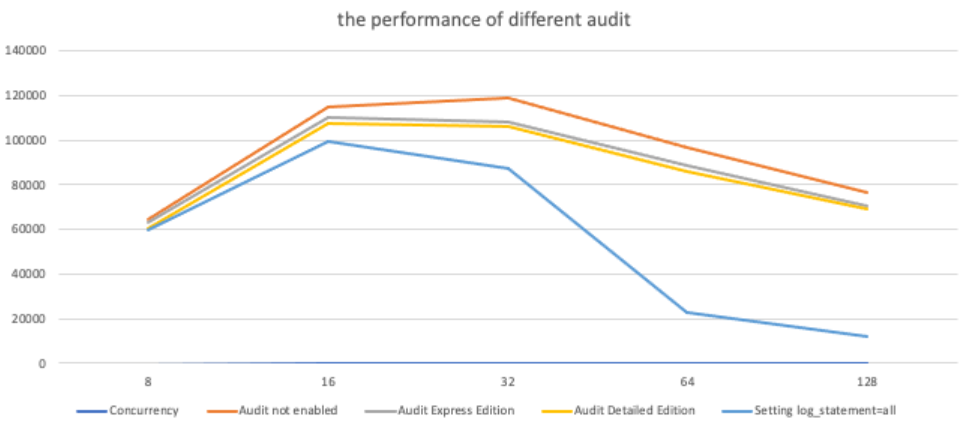
The table below compares the QPS performance in different scenarios under the test conditions with a single table data volume (table_size) of 25,000 and a total of 64 tables.
Concurrency | Audit not enabled | Audit Express Edition | Audit Detailed Edition | Set log_statement=all |
8 | 64435.35 | 63150.59 | 60371.58 | 59686.77 |
16 | 114649.43 | 110425.06 | 107427.92 | 99278.01 |
32 | 118850.71 | 108233.97 | 106368.01 | 87540.78 |
64 | 97012.02 | 88828.3 | 85892.76 | 23017.53 |
128 | 76381.21 | 70592.04 | 69241.45 | 11799.92 |
As shown below.
Bantuan dan Dukungan
Apakah halaman ini membantu?
Anda juga dapat Menghubungi Penjualan atau Mengirimkan Tiket untuk meminta bantuan.
masukan