Multi-AZ Adjustment for Nodes
Unduh
Mode fokus
Ukuran font
Overview
This document describes multi-AZ adjustment for nodes of etcd clusters in the console.
Note:
Node addition (increasing the number of nodes) does not affect normal business operation.
Node removal (decreasing the number of nodes) may trigger a leader election in the cluster. It is recommended to perform this operation at off-peak hours.
Prerequisites
etcd cluster have been created.
Viewing AZ Distribution of Cluster Nodes
1. Log in to the console of Cloud Service for etcd.
2. Go to the etcd cluster list page, select the region at the top of the page, and find the target etcd cluster in the cluster list below.
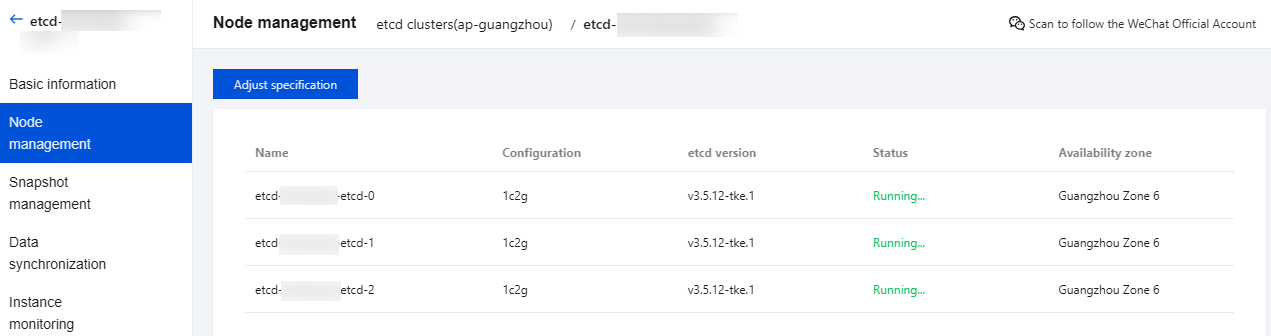
3. View the AZ distribution of nodes on the node management page, as shown in the figure below:
Viewing AZ Distribution of Subnets and Adding Subnets in Different AZs
1. Log in to the console of Cloud Service for etcd.
2. Go to the etcd cluster list page, select the region at the top of the page, and find the target etcd cluster in the cluster list below.
3. Go to the basic information page and view the AZ distribution of current subnets and the button for adding subnets, as shown in the figure below:

4. Click Add subnet, select subnets in different AZs, and click Confirm. If high availability deployment is enabled, subnets in at least three AZs are required.
Multi-AZ Adjustment Methods
Number of Cluster Nodes | Actual Number of AZs in the Region | Number of AZs for Current Cluster Subnets | Actual Number of AZs for Cluster Nodes | Multi-AZ Adjustment Method |
1 node | 1 AZ | 1 AZ | 1 AZ | N/A |
| 2 AZs | 1 AZ | 1 AZ | Add 1 subnet in a different AZ, and increase the number of nodes to 3. |
| | 2 AZs | 1 AZ | Increase the number of nodes to 3. |
| ≥ 3 AZs | 1 AZ | 1 AZ | Add 2 subnets in different AZs, and increase the number of nodes to 3. |
| | 2 AZs | 1 AZ | Add 1 subnet in a different AZ, and increase the number of nodes to 3. |
| | ≥ 3 AZs | 1 AZ | Increase the number of nodes to 3. |
3 nodes | 1 AZ | 1 AZ | 1 AZ | N/A |
| 2 AZs | 1 AZ | 1 AZ | Add 1 subnet in a different AZ, and increase the number of nodes to 5. |
| | 2 AZs | 1 AZ | Increase the number of nodes to 5. |
| | 2 AZs | 2 AZs | N/A |
| ≥ 3 AZs | 1 AZ | 1 AZ | Add 2 subnets in different AZs, and increase the number of nodes to 5. |
| | 2 AZs | 1 AZ | Add 1 subnet in a different AZ, and increase the number of nodes to 5. |
| | 2 AZs | 2 AZs | Add 1 subnet in a different AZ, and increase the number of nodes to 5. |
| | ≥ 3 AZs | 1 AZ | Increase the number of nodes to 5. |
| | ≥ 3 AZs | 2 AZs | Increase the number of nodes to 5. |
| | ≥ 3 AZs | ≥ 3 AZs | N/A |
5 nodes | 1 AZ | 1 AZ | 1 AZ | N/A |
| 2 AZs | 1 AZ | 1 AZ | Add 1 subnet in a different AZ, decrease the number of nodes to 3, and then increase the number of nodes to 5. |
| | 2 AZs | 1 AZ | Decrease the number of nodes to 3, and then increase the number of nodes to 5. |
| | 2 AZs | 2 AZs | N/A |
| ≥ 3 AZs | 1 AZ | 1 AZ | Add 2 subnets in different AZs, decrease the number of nodes to 3, and then increase the number of nodes to 5. |
| | 2 AZs | 1 AZ | Add 1 subnet in a different AZ, decrease the number of nodes to 3, and then increase the number of nodes to 5. |
| | 2 AZs | 2 AZs | Add 1 subnet in a different AZ, decrease the number of nodes to 3, and then increase the number of nodes to 5. |
| | ≥ 3 AZs | 1 AZ | Decrease the number of nodes to 3, and then increase the number of nodes to 5. |
| | ≥ 3 AZs | 2 AZs | Decrease the number of nodes to 3, and then increase the number of nodes to 5. |
| | ≥ 3 AZs | ≥ 3 AZs | N/A |
Bantuan dan Dukungan
Apakah halaman ini membantu?
Anda juga dapat Menghubungi Penjualan atau Mengirimkan Tiket untuk meminta bantuan.
masukan