Synchronization from MySQL/MariaDB/Percona to TencentDB for MySQL
Unduh
Mode fokus
Ukuran font
Scenarios
This document describes how to use Data Transfer Service (DTS) to synchronize data from MySQL, MariaDB, and Percona databases to TencentDB for MySQL.
The deployment forms and versions supported by the source and target databases are as follows:
Synchronization Link | Source Database and Version | Target Database and Version |
MySQL > MySQL | Internet Data Center (IDC)/Self-built MySQL on Cloud Virtual Machine (CVM)/LighthouseDB MySQL | IDC self-built/Self-built MySQL on CVM/LighthouseDB MySQL MySQL from third-party cloud vendors TencentDB for MySQL |
| MySQL from third-party cloud vendors | IDC self-built/Self-built MySQL on CVM/LighthouseDB MySQL MySQL from third-party cloud vendors TencentDB for MySQL |
| TencentDB for MySQL Synchronization between databases under the same Tencent Cloud root account Synchronization between databases under different Tencent Cloud root accounts | IDC self-built/Self-built MySQL on CVM/LighthouseDB MySQL MySQL from third-party cloud vendors TencentDB for MySQL |
MariaDB > MySQL | Self-built MariaDB in the IDC or on CVM | IDC self-built/Self-built MySQL on CVM/LighthouseDB MySQL MySQL from third-party cloud vendors TencentDB for MySQL |
| TencentDB for MariaDB Synchronization between databases under the same Tencent Cloud root account | IDC self-built/Self-built MySQL on CVM/LighthouseDB MySQL MySQL from third-party cloud vendors TencentDB for MySQL |
Percona > MySQL | Self-built Percona in the IDC or on CVM | IDC self-built/Self-built MySQL on CVM/LighthouseDB MySQL MySQL from third-party cloud vendors TencentDB for MySQL |
Since the requirements and operation steps for synchronizing MySQL, MariaDB, and Percona to TencentDB for MySQL are essentially the same, this document only uses data synchronization from MySQL to TencentDB for MySQL as an example. For other scenarios, see relevant content.
Supported Capabilities
Feature Category | Sub-feature or Description | Supported Capability |
Sync Object | - | Ordinary object tables, indexes, views, stored procedures, and functions. |
Synchronization type | - | Structure synchronization. Full synchronization (incremental synchronization continues automatically after full synchronization ends). Incremental synchronization. |
Resumable transfer | - | Resumable transfer is partially supported during the full export (it is not supported for structure export or export of tables without primary keys). Resumable transfer is supported for full and incremental imports. |
Key operations for task channels | Retry | Supported. |
| Pause and resumption | Supported. |
| Modifying synchronization configuration (dynamically adding or removing table objects) | Supported. |
| Creating a similar task | Supported. |
| Speed limiting | Supported. |
Synchronization direction | Many-to-one (multiple instances merged into one/multiple tables merged into one) | Supported. |
| One-to-many | Supported. |
| Bidirectional synchronization | Supported. |
| Synchronization within the same instance (only one-to-one mode is supported) | Only data synchronization from MySQL to TencentDB for MySQL is supported. |
Structure synchronization. | Database and table filtering | Supported. |
| Column filtering | Supported. |
| Database and table name mapping | Supported. |
| Column name mapping | Supported. |
Full synchronization | Filtering using the Where clause | Supported. |
Incremental synchronization | Policy for primary key conflicts | Conflict ignoring, conflict error reporting, and conflict overwriting. |
| DML synchronization (INSERT/UPDATE/DELETE) | Supported. |
| DML filtering | Supported. |
| DDL synchronization | DROP DATABASE and ALTER DATABASE. CREATE TABLE, ALTER TABLE, DROP TABLE, TRUNCATE TABLE, and RENAME TABLE. CREATE VIEW and DROP VIEW. CREATE INDEX and DROP INDEX. |
| DDL filtering | Supported. |
| Filtering using the Where clause | Supported. |
| Synchronization at a specified point-in-time | Supported. |
| OnlineDDL | Supported. |
Check on data consistency | Check on the entire instance | Supported. |
| Check on the number of rows | Supported. |
| Sampling check | Supported. |
| Consistency check after filtering using the Where clause supported (independent check) | Supported. |
| Consistency check on specified columns supported (independent check) | Supported. |
Business Impacts
1. When DTS is used to perform full data synchronization, it reads all data of the source database once, which increases the load on the source database. If your database specification is low, it is recommended to execute the synchronization task during off-peak hours or reduce the DTS speed before the task is started.
The impact varies depending on the specifications of the source database. Take the specification of 8 cores and 16 GB as an example. DTS tasks adopt 8 concurrent threads (adjustable) by default. Assuming that there is no network bottleneck, the impact of DTS tasks on the performance of the source database is as follows:
DTS full export phase: The tasks consume about 18%-45% of the CPU of the source database, increase the query pressure on the source database by about 40-60 MB/s, and occupy about 8 active sessions.
DTS incremental export phase: The tasks put minimal pressure on the source database and establish only one database connection to listen to the binlog of the source database in real time.
2. A lock-free method is adopted by default. No global lock (FTWRL) is applied to the source database during synchronization. Only the tables without primary keys will be locked at the table level, while no locks will be added to other tables.
3. During data synchronization, DTS uses the account for executing the synchronization task to write to the system database
__tencentdb__ in the source database. This database records information from data comparison during synchronization. Do not delete this system database.To ensure that data comparison issues can be traced later, the
__tencentdb__ database in the source will not be deleted after the synchronization task ends.The system database
__tencentdb__ occupies minimal space, approximately 0.01% to 0.1% of the storage capacity of the source database (for example, for a 50 GB source database, the __tencentdb__ system database occupies about 5–50 MB of its storage capacity). It adopts a single-threaded and connection-waiting mechanism, resulting in negligible impacts on the performance of the source database and no resource contention.Preparations
1. Establish the access channel between DTS and the database in advance according to the access type you want to use. For details, see Network Preparations.
IDC self-built databases/Databases of other cloud vendors: The access method can be set to Public Network/Direct Connect/VPN Access/CCN.
Self-built databases on Cloud Virtual Machine (CVM) instances: The access method can be set to Self-Built on CVM.
TencentDB instances: The access method can be set to Database.
Lightweight databases on Tencent Cloud Lighthouse (Lighthouse): Set the access method to Public Network.
2. Grant permissions to the account used for task execution in the source database as follows:
GRANT RELOAD,LOCK TABLES,REPLICATION CLIENT,REPLICATION SLAVE,SHOW DATABASES,SHOW VIEW,PROCESS,SELECT ON *.* TO 'account'@'%' IDENTIFIED BY 'password';//If the source database is an Alibaba Cloud database, you do not need to grant the SHOW DATABASES permission, but you need to create at least one non-system database. Otherwise, the pre-check task will fail. If the source database is not an Alibaba Cloud database, you need to grant the permission. For how to grant the permission when the source database is an Alibaba Cloud database, visit https://help.aliyun.com/document_detail/96101.html.GRANT ALL PRIVILEGES ON `__tencentdb__`.* TO 'account'@'%';FLUSH PRIVILEGES;#(1) Create an account used for task execution.CREATE USER 'account'@'%' IDENTIFIED BY 'password';#(2) Grant permissions.GRANT RELOAD,LOCK TABLES,REPLICATION CLIENT,REPLICATION SLAVE,SHOW VIEW,PROCESS ON *.* TO 'account'@'%';GRANT ALL PRIVILEGES ON `__tencentdb__`.* TO 'account'@'%';#(3) Grant the SELECT permission.#(3.1) If you select full-instance synchronization, grant the permission to all objects.GRANT SELECT ON *.* TO 'account';#(3.2) If objects for synchronization have been specified, grant permissions only to the corresponding objects.GRANT SELECT ON `mysql`.* TO 'account'@'%';GRANT SELECT ON database to be migrated.* TO 'account';#(4) Grant the refresh permission.FLUSH PRIVILEGES;
3. To grant permissions to the account for task execution in the target database, you need to have the following permissions:
ALTER, ALTER ROUTINE, CREATE, CREATE ROUTINE, CREATE TEMPORARY TABLES, CREATE USER, CREATE VIEW, DELETE, DROP, EVENT, EXECUTE, INDEX, INSERT, LOCK TABLES, PROCESS, REFERENCES, RELOAD, SELECT, SHOW DATABASES, SHOW VIEW, TRIGGER, and UPDATE.
Use Instructions
Synchronization Objects
1. Synchronization between different instances and within the same instance is supported.
2. Only basic tables, views, stored procedures, and functions are supported for synchronization.
3. Correlated data objects need to be synchronized simultaneously; otherwise, the synchronization will fail. Common relationships include: views referencing tables, views referencing views, and primary-foreign key associated tables.
4. To avoid data duplication, it is recommended to synchronize tables that have primary keys or non-null unique keys.
5. Synchronizing the entire source instance is not supported. If a database creation operation (CREATE DATABASE) is performed at the source during the subsequent synchronization task, it is recommended that you manually create the corresponding database object at the target before starting the synchronization task, or Modify Sync Configuration to add the new database object after the synchronization task is started.
6. If the CREATE TABLE or RENAME TABLE operation is performed at the source during a synchronization task, you should select the entire database where the table resides when selecting synchronization objects during the configuration phase. Otherwise, the newly created or renamed tables will not be synchronized to the target.
7. When synchronizing views, stored procedures, and functions, DTS checks whether the
DEFINER corresponding to user1 ([DEFINER = user1]) in the source database matches the synchronization account user2. If they do not match, after synchronization, DTS will modify the SQL SECURITY property of user1 in the target database from DEFINER to INVOKER ([INVOKER = user1]), and set DEFINER in the target database to the synchronization account user2 ([DEFINER = synchronization account user2]). Excessively complex view definitions in the source database may cause task failure.8. When using Alibaba Cloud ApsaraDB RDS for MySQL as the source database, MySQL 5.6 does not support synchronizing tables without primary keys, whereas this restriction does not apply to MySQL 5.7 and later versions. For Amazon RDS for MySQL as the source, tables without primary keys also cannot be synchronized.
9. Only InnoDB, TokuDB, and RocksDB database engines are supported for synchronization. Tables using other engine types are skipped by default during synchronization. If the source database contains TokuDB engine data in compressed mode, the target database must support compressed mode synchronization. Otherwise, the task will report errors.
10. When the target is a TencentDB for MySQL instance that uses the RocksDB engine, it supports converting the source InnoDB/TokuDB engine to the target RocksDB engine. However, the following constraints exist when InnoDB is converted to RocksDB.
10.1 If the primary key, or part of the primary key, in a table to be migrated from the source database uses TINYTEXT, TEXT, MEDIUMTEXT, or LONGTEXT field types, SQL statements involving value equality (such as DELETE FROM table_name WHERE primary_key_column = 'some text') will not take effect after synchronization. This is because these field types do not support value equality on the target, which may result in data inconsistencies between the source and target databases.
10.2 During the data consistency check, if the primary key, or part of the primary key, in a table to be migrated from the source database uses TINYTEXT, TEXT, MEDIUMTEXT, or LONGTEXT field types and the table contains more than 50,000 rows, the table will be skipped during the check.
10.3 Due to differences in the underlying storage of DOUBLE data types between the RocksDB and InnoDB engines, when the DOUBLE values on the source are close to the upper limit (such as -1.7976931348623157E+308), false positives may occur during the creation of the consistency check task. Although the actual data is consistent, the check results may indicate inconsistency.
10.4 Migration is not supported for partitioned tables.
11. During synchronization, the
CREATE operation in the CREATE TABLE ... AS SELECT statement generates a new independent GTID transaction.Data Types
1. During incremental synchronization, if binlog statements in
STATEMENT format are generated in the source database, data synchronization will fail.2. If global transaction identifier (GTID) gaps in the binlog of the source database, it may affect the performance of the synchronization task and even cause the task to fail.
3. A single transaction cannot contain both DML and DDL statements at the same time. Such transactions will cause task errors.
4.
ALTER VIEW statements are not supported and will be skipped during synchronization.5. Note on the JSON-formatted data type in the synchronization link between MySQL and TDSQL-C for MySQL:
5.1 If you have requirements for data precision, it is recommended not to use the JSON-formatted data type, but to uniformly use data types such as decimal for separate recording. Since MySQL has inherent limitations in processing JSON-formatted floating-point data, precision may be lost for data with 6 or more decimal places.
5.2 Note on the processing of JSON-formatted floating-point numbers by DTS:
5.2.1 If the target database is MySQL 5.7 or an earlier version, due to inherent processing limitations in MySQL 5.7, a JSON-formatted floating-point number may be x.0 in the source database, but becomes x after it is synchronized to the target database. For example, the value {"a":12.0} may become {"a":12} after it is synchronized from the source database to the target database.
5.2.2 When the source database is MySQL 5.7 or an earlier version and the target database is MySQL 8.0 or a later version, due to inherent processing limitations in MySQL 5.7, a JSON-formatted floating-point number may be x.0 in the source database, but the value read by SELECT is x. Meanwhile, the value is still recorded as a floating-point type in the binlog. DTS processes it as a floating-point number during synchronization to the target database, so it becomes x.0 on the target. For example, if the source data is {"a":12.0}, the value read by SELECT is {"a":12}, and it becomes {"a":12.0} after being synchronized to the target.
5.2.3 Regardless of versions, JSON-formatted floating-point numbers with more than 1 decimal place such as {"a":12.00} and {"a":12.000} will become {"a":12.0} after they are synchronized from the source database to the target database.
HA Switches
If the source is a non-GTID instance, DTS does not support a high availability (HA) switch on the source. If a switch is performed on the source MySQL, the DTS incremental synchronization may be interrupted.
Policy for Primary Key Conflicts
When the policy for primary key conflicts is set to report an error upon conflicts, do not perform dual-write on the target during the full synchronization phase of the task. Otherwise, if a primary key conflict occurs, DTS will not report an error but directly overwrite the conflicting data in the target database with the data from the source database.
Operation Restrictions
Do not perform the following operations during synchronization. Otherwise, they will cause the synchronization task to fail.
1. During structure initialization and full data initialization scenarios, DDL operations are not supported when the step of the synchronization task is full export or full import.
2. Do not modify or delete user information (including usernames, passwords, and permissions) and port numbers in the source and target databases.
3. Do not perform binlog cleanup operations on the source database.
Use Limits on Synchronization Within the Same Instance
Synchronization within the same instance is a more complex scenario. It is recommended to create only one same-instance synchronization task on a single database instance, or ensure that multiple tasks have no overlapping synchronization objects to prevent unexpected data synchronization results.
The use limits of the same-instance synchronization scenario include, but are not limited to the following:
1. Renaming requirements.
When databases and tables are synchronized within the same instance, it is necessary to rename the database and table names to avoid binlog loops and prevent DTS task failures or data exceptions. Therefore, for full database synchronization, the database name must be changed; for single table synchronization, only the table name needs to be renamed; full instance synchronization is not supported (as it does not meet the renaming requirements).
When a table is being synchronized within the same instance, operations on the database must be prohibited. For example, when db1.t1 is being synchronized to db1.t2, CREATE/DROP/ALTER DATABASE operations on the source database (db1) are prohibited to prevent DDL loops that may cause DTS task failures.
2. Synchronization within the same instance does not support cascaded and bidirectional synchronization.
Cascaded or bidirectional synchronization tasks within the same instance are not supported. Examples include: multiple cascaded tasks (for example, configuring two tasks on the same database instance in which Task 1 synchronizes table a to table b, and Task 2 synchronizes table b to table c, attempting to achieve cascaded synchronization from table a to table b to table c); or bidirectional synchronization (for example, configuring two tasks in which Task 1 synchronizes table a to table b, and Task 2 synchronizes table b to table a, attempting to achieve bidirectional synchronization between table a and table b).
Cascaded synchronization cannot be configured within the same-instance synchronization tasks. For example, it is not supported to configure a task to synchronize table a to table b and another task to synchronize table b to table c, in an attempt to form a cascade from table a to table b to table c.
3. Synchronization within the same instance does not support complex topologies.
When the same-instance synchronization is integrated with other upstream and downstream DTS tasks to form a more complex topology, the data flow becomes increasingly intricate and may fail to meet expectations. This approach is not recommended.
Consistency Checks
If the synchronization task modifies synchronization configurations during the incremental check process, the incremental check will fail, requiring the check task to be re-initiated.
Supported SQL Operations for Synchronization
Operation Type | SQL Statement |
DML | INSERT, UPDATE, and DELETE |
DDL | DROP DATABASE, ALTER DATABASE, CREATE TABLE, ALTER TABLE, DROP TABLE, TRUNCATE TABLE, RENAME TABLE, CREATE VIEW, DROP VIEW, CREATE INDEX, and DROP INDEX. |
Note:
The data synchronization feature currently does not support synchronization of an entire instance, nor does it support the CREATE DATABASE statement.
Operation Steps
1. Log in to the DTS console, select Data Sync in the left sidebar, and then click Create Sync Task to go to the synchronization task creation page.
2. On the Create Sync Task page, select the source instance type and its region, the target instance type and its region, and the specification, and then click Buy Now.
Parameter | Description |
Creation Mode | Create new task: Create a task. Create Similar Task: Quickly create a task with the same configuration as the historical task. The settings of the new task, such as the database type and billing mode, are pre-populated to match the historical task. Users can also modify these settings as needed. |
Billing Mode | The yearly/monthly subscription and pay-as-you-go modes are supported. |
Source Instance Type | Select MySQL. It cannot be modified after purchase. |
Source Instance Region | Select the source instance region. It cannot be modified after purchase. |
Target Instance Type | Select MySQL. It cannot be modified after purchase. |
Target Instance Region | Select the target instance region. It cannot be modified after purchase. |
Specification | Select specifications according to your business requirements. Higher specifications deliver better performance. For details, see Billing Overview. |
Tag | Set tag keys and values for synchronization tasks to facilitate efficient management of multiple tasks through tags. |
Task Name | Set it to Name After Creation. The task name is the same as the task ID by default. After the synchronization task is created, the task name can be reset. Set it to Name Now. Enter the task name in the input box below. |
Terms of Service |
3. After the purchase is completed, return to the data synchronization task list to view the newly created data synchronization task. It requires configurations before it can be used.
4. In the data synchronization list, click Configure in the Operation column to go to the synchronization task configuration page.

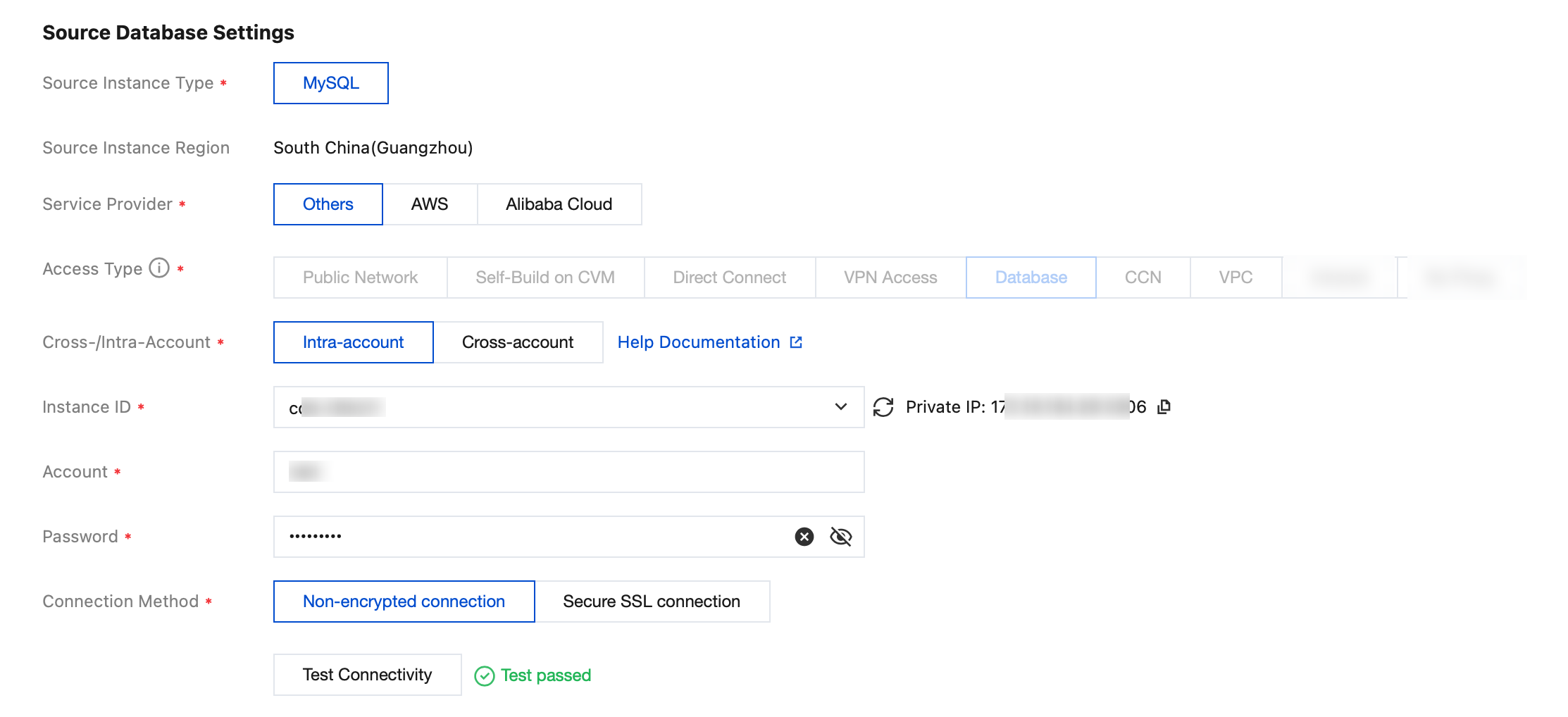
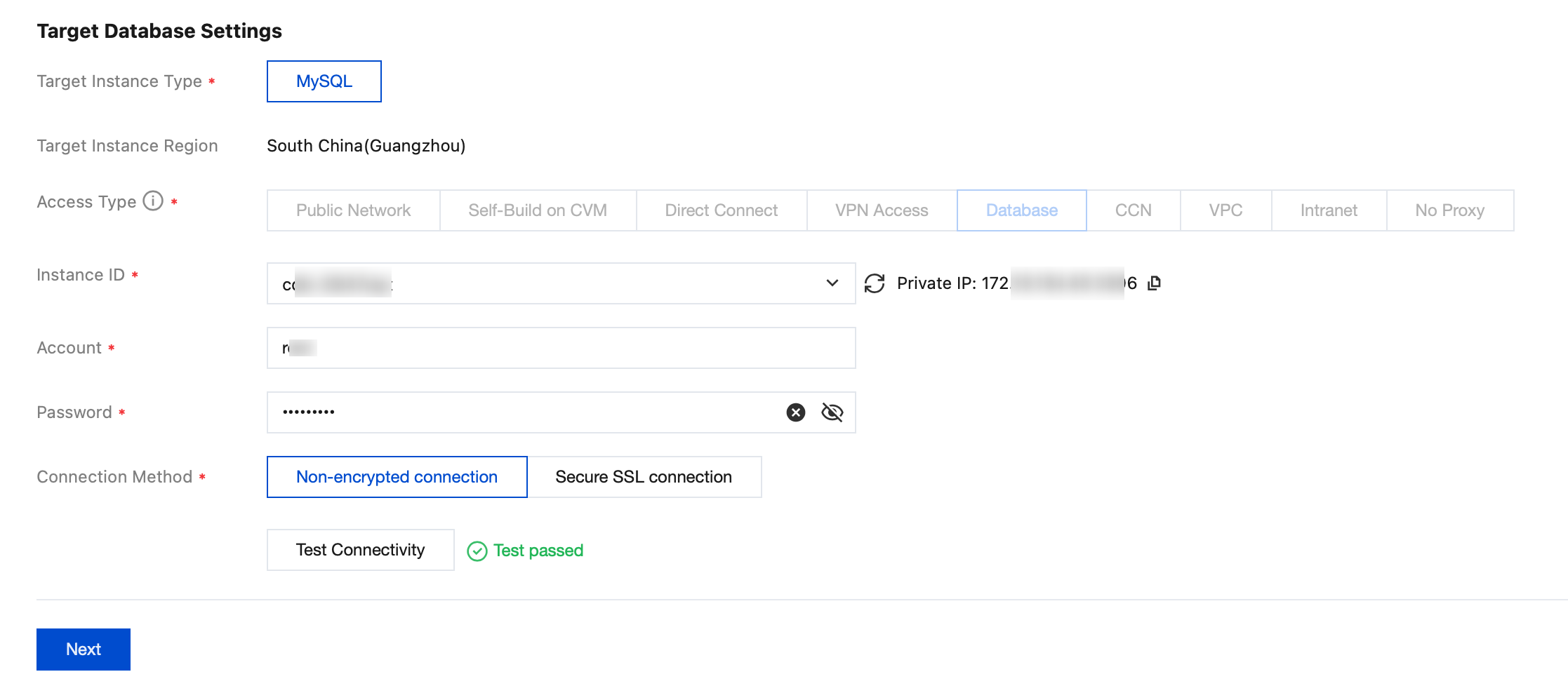
5. On the Set source and target databases page, enter the information about source and target databases, and then click Test Connectivity. After connectivity testing, click Next.
Note:
Synchronization tasks support synchronization within the same instance. When configuring a synchronization task, set instances in the source and target databases to the same instance.
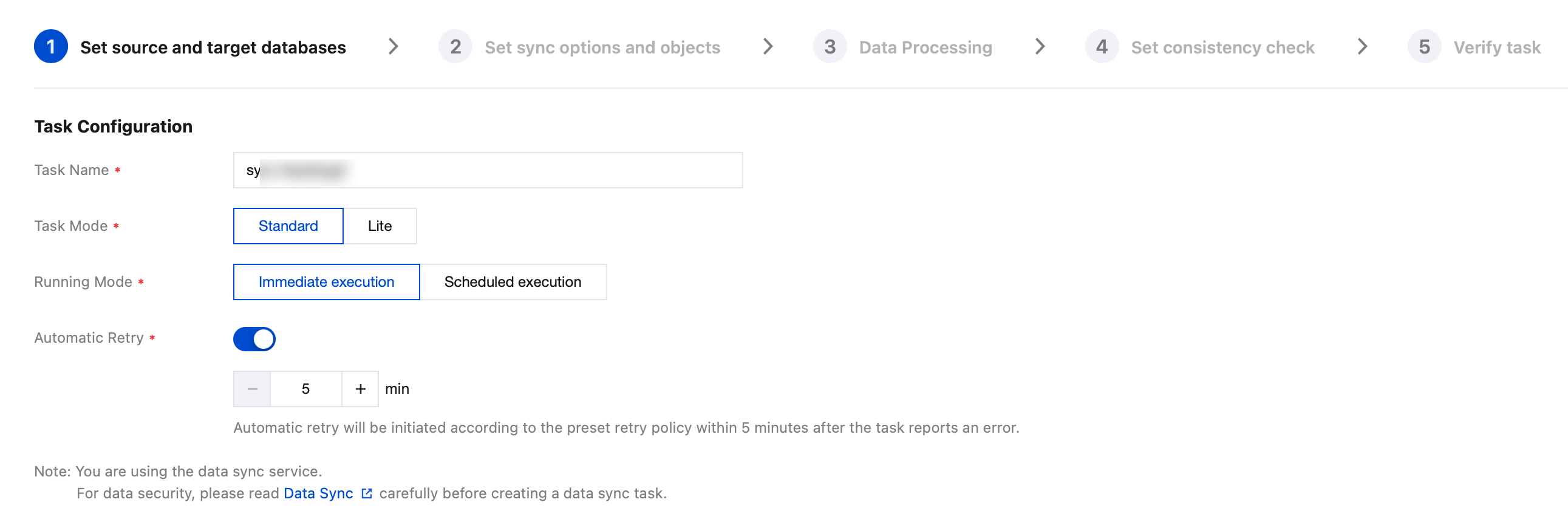
Task Configuration
Parameter | Description |
Task Name | DTS automatically generates a task name. It is recommended that users modify it to a meaningful name to facilitate task identification. |
Running Mode | Immediate execution: The task will be started immediately once the pre-check passes. Scheduled execution: Set a start time for the task execution. After the pre-check passes, the task is not started immediately, but is started at the scheduled time. |
Automatic Retry | When it is enabled, if a synchronization task is temporarily interrupted due to network exceptions or other issues, DTS will automatically retry and resume the task within the specified time range without requiring manual intervention from users. The supported time range for automatic retries is 5–720 minutes. |
Source Database Settings
Parameter | Description |
Source Instance Type | Source instance type selected during purchase. It cannot be modified. |
Source Instance Region | Source instance region selected during purchase. It cannot be modified. |
Service Provider | For self-built databases (including self-built databases on CVM), TencentDB instances, and lightweight databases, select Others. For databases from third-party cloud vendors, select the corresponding service provider. |
Access Type | Select the access type based on the deployment of the source database. Different deployment scenarios require different network operations. For details, see Network Preparation Overview. If the source database is a self-built database in the IDC or a database from other cloud vendors, you can set the access type to Public Network/Direct Connect/VPN Access/CCN. Public Network: The source database is accessible through a public IP address. Direct Connect: The source database can connect to Tencent Cloud Virtual Private Cloud (VPC) through Direct Connect. VPN Access: The source database can connect to Tencent Cloud VPC through VPN Access. CCN: The source database can connect to Tencent Cloud VPC through CCN. VPC: Both the source and target databases are deployed on Tencent Cloud and have a VPC. To use the VPC access type, submit a ticket to apply. When the source database is a self-built database on CVM, set the access type to Self-Built on CVM. When the source database is a TencentDB instance, set the access type to Database. When the source database is a lighthouse database on Lighthouse, set the access type to Public Network. |
Public Network | When Access Type is set to Public Network, the following parameters are required to be configured. Host Address: IP address or domain name of the source database. Port: port used by the source database. |
Self-Build on CVM | When Access Type is set to Self-Built on CVM, the following parameters are required to be configured. CVM Instance: Specify the CVM instance ID. Port: port used by the source database. |
Direct Connect | When Access Type is set to Direct Connect, the following parameters are required to be configured. VPC-Based Direct Connect Gateway: Only the VPC-based Direct Connect gateway is supported for Direct Connect. Confirm the network type associated with the gateway. VPC: Select a VPC network and a subnet. Host Address: IP address or domain name of the source database. Port: port used by the source database. |
VPN Access | When Access Type is set to VPN Access, the following parameters are required to be configured. VPN gateway: Select a VPN gateway ID. VPC: Select the VPC network and subnet associated with the VPN gateway. Host Address: IP address or domain name of the source database. Port: port used by the source database. |
Database | When Access Type is set to Database, the following parameters are required to be configured. Whether Cross-Account Synchronization Is Required Intra-account: The Tencent Cloud root account for both the source and target database instances is the same. Cross-account: The Tencent Cloud root accounts for the source and target database instances are different. For guidance on cross-account synchronization operations, see Migration Between Cross-Account Cloud Database Instances. Instance ID: instance ID of the source database. Validation method Select the authentication method for accessing the database. The options are as follows: Password: Authenticate using the database account and password. CAM verification: Authenticate using Tencent Cloud CAM without entering the database password. |
CCN | When Access Type is set to CCN, the following parameters are required to be configured. When CCN access is used, both same-account CCN access and cross-account CCN access are supported. As this involves complex network configurations, see Migrating Self-built Databases to TencentDB via CCN. Host Network Environment: Select the network environment according to the actual situation. For example, if the source database is a TencentDB instance, select Tencent Cloud; if the source database is an IDC self-built database, select Self-built IDC; if the source database is a database of other cloud vendors, select the corresponding network. Host address: host IP address or domain name of the source database. Port: port used by the source database. CCN Instance Account Type: My account: The Tencent Cloud root account for both the CCN resources and the target database is the same. Other accounts: The Tencent Cloud root accounts for CCN resources and for the target database are different. VPC CCN: Specify the CCN instance name. VPC network and subnet associated with CCN: "CCN-associated VPC" refers to the VPC network that is connected to the synchronization link within CCN. Select VPC networks associated with CCN, excluding the VPC network to which the source database belongs. VPC region: The VPC access region is required to be consistent with the source database region selected during task purchase. If they are inconsistent, the selected source database region will be changed to the VPC access region automatically. |
VPC | When Access Type is set to VPC, the following parameters are required to be configured. VPC: Select a VPC network and a subnet. Host Address: IP address or domain name of the source database. Port: port used by the source database. |
Account/Password | Account/Password: the account and password of the source database. |
Connection Method | Secure Sockets Layer (SSL) connection refers to the use of SSL to establish a secure connection between DTS and the database, encrypting the transfer link. Selecting the SSL connection may increase the database connection response time. Generally, the private network link of Tencent Cloud is relatively secure, and the SSL connection is not required to be enabled. However, for scenarios where transfer methods such as public networks and DC are adopted, and data security requirements are high, the SSL connection is required to be enabled. Before the SSL connection is selected, SSL encryption is required to be enabled for the database first. |
Target Database Settings
The parameter settings of the target database are similar to those of the source database. The access type should be selected according to the actual situation, which is not repeated here.
6. On the Set Sync options and objects page, set the data initialization, data synchronization, and synchronization object options. After the settings are completed, click Save and Go Next.
Note:
When Initialization Type is set to Full data initialization only, the system assumes that the table structure has already been created in the target database. Table structure synchronization will not be performed, and no check will be conducted for existing tables with the same name in the source and target databases. Therefore, if Precheck and report error is selected for If Target Already Exists, the pre-check and error reporting feature will not take effect.
If the user plans to perform a rename operation on a table during synchronization (for example, renaming table A to table B), the Sync Object is required to include the entire database (or the entire instance) where table A is located. If only table A is selected, data from table B will not be synchronized to the target database after the rename operation.
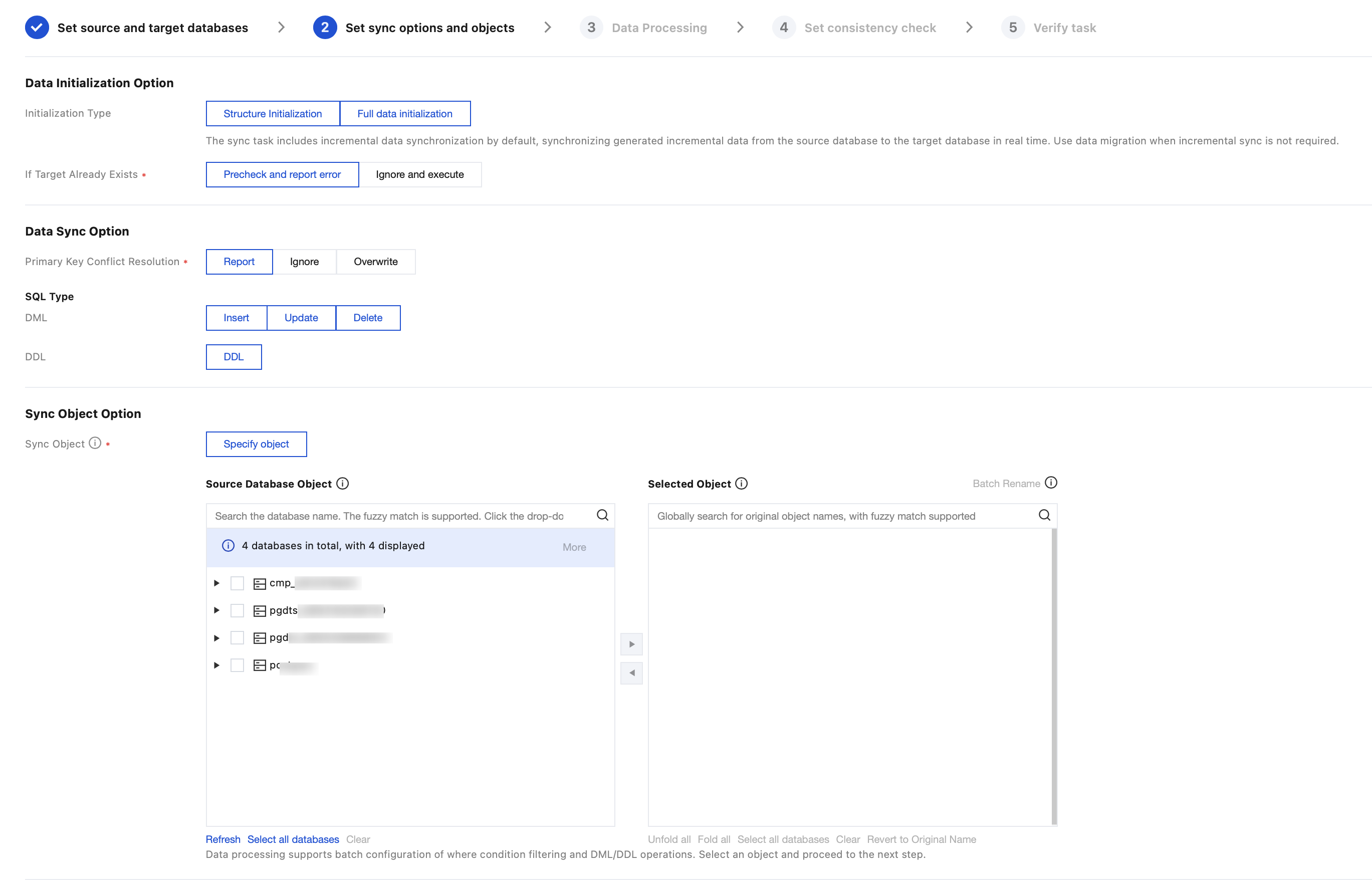
Configuration Item | Parameter | Description |
Data Initialization Option | Initialization Type | Structure Initialization: When a synchronization task is executed, the table structures of the source instance are initialized to the target instance first. Full data initialization: When a synchronization task is executed, the data of the source instance is initialized to the target instance first. For scenarios where only full data initialization is selected, users need to create the table structures in the target database in advance. Both are selected by default and can be deselected if needed. |
| If Target Already Exists | Precheck and report error: If tables with the same name exist, an error will be reported, and the process will be stopped. Ignore and execute: Full and incremental data are directly appended to the tables in the target instance. |
Data Sync Option | Primary Key Conflict Resolution | Conflict error reporting: If a primary key conflict in the table is detected during synchronization, an error is reported, and the data synchronization task is paused. Conflict ignoring: If a primary key conflict in the table is detected during synchronization, the primary key record in the target database is retained. Conflict overwriting: When table primary key conflicts are detected during synchronization, the primary key record of the source database is used to overwrite that of the target database. |
Sync Object Option | Sync Object | Entire instance: Synchronize the entire instance. Specify object: Synchronize the specified object. |
| Advanced Migration Object | Select the objects to be synchronized, including basic databases, tables, views, stored procedures, and functions. Synchronization of advanced objects is a one-time action. It only synchronizes advanced objects existing in the source database before the task starts. Advanced objects added after the task starts will not be synchronized to the target database. For more details, see Synchronizing Advanced Objects. |
| Selected Object | Database and table mapping (database and table renaming) is supported. Hover the mouse pointer over a database or table name to display the Edit button. Click the button and fill in a new name in the pop-up window. When advanced objects are selected for synchronization, it is recommended not to rename databases and tables. Otherwise, advanced object synchronization may fail. |
| Whether to Synchronize Online DDL Temporary Tables | If the gh-ost or pt-osc tool is used to perform Online DDL operations on tables in the source database, DTS supports synchronizing the temporary tables generated by online DDL changes to the target database. If you select gh-ost, DTS will synchronize the temporary table names generated by the gh-ost tool (`_tablename_ghc`, `_tablename_gho`, and `_tablename_del`) to the target database. If you select pt-osc, DTS will synchronize the temporary table names generated by the pt-osc tool (`_tablename_new` and `_tablename_old`) to the target database. |
Advanced Options
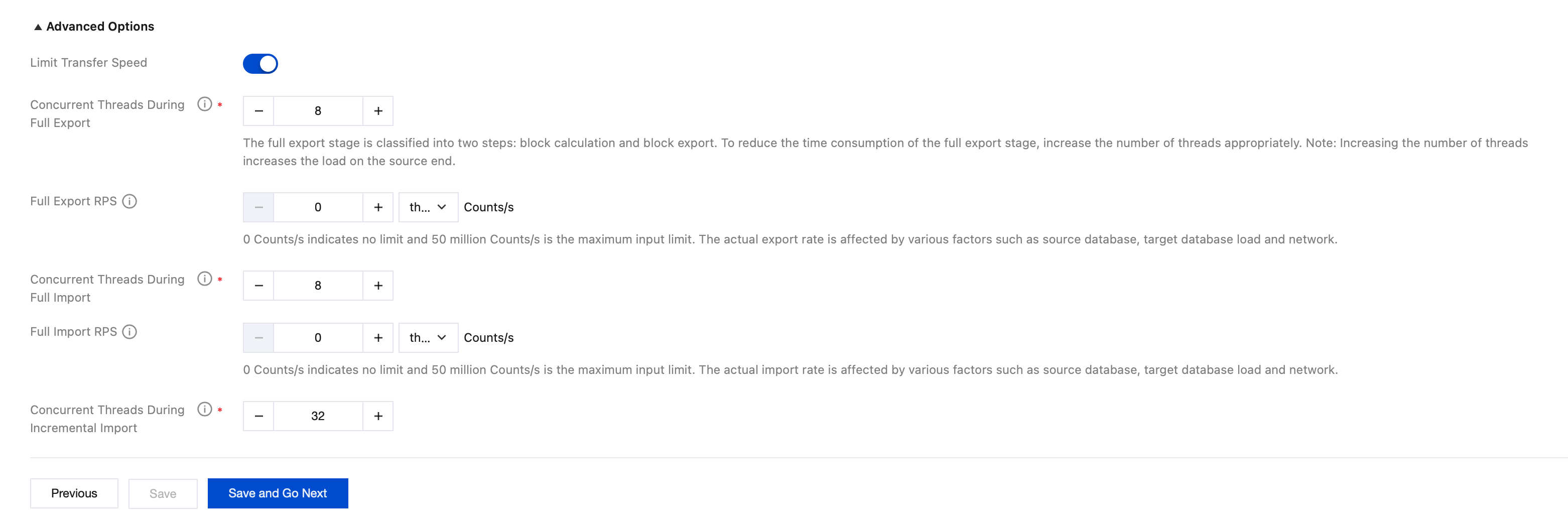
Parameter | Description |
Limit Transfer Speed | Generally, no configuration is required here. Configuration is only required when the database has configurations too low to handle the default number of concurrent threads and RPS of DTS. For details, see Speed Limit. |
7. On the Data Processing page, you can configure incremental data filtering and operation rules for the selected synchronization objects, including DDL & DML Configuration and Where Condition Filtering. After completing the settings, click Save and Go Next.
7.1 DDL & DML Configuration
With the DDL & DML configuration feature, you can set synchronization rules for incremental DML operations (INSERT, UPDATE, and DELETE) and incremental DDL operations separately for an entire instance, an entire database, or a single table, achieving refined object-level data synchronization control.
Note:
DDL & DML configuration rules apply only to selected objects. Child nodes take higher priority over parent node configuration rules, with the priority order being: single table > entire database > instance level. For example, if you select the entire database db1 as a synchronization object and configure it to synchronize all DML operations at the database level, but configure the table tb1 in db1 to not synchronize delete operations at the table level, then delete operations will not be synchronized for db1.tb1, while all DML operations will be synchronized for other objects in db1.
7.1.1 On the Data Processing page, select the DDL & DML tab.
7.1.2 Select objects and configure rules.
7.1.2.1 In the Selected Objects area, select the object to configure, and click Edit on the right.
Note:
When synchronizing an entire instance or database, you can expand the source instance or database table objects to configure a specific object individually.
7.1.2.2 In the dialog box that appears, configure the synchronization rules for incremental DML and incremental DDL operations. The parameters are described as follows:
Incremental DML Configuration
DML Operation | Description |
INSERT | Synchronize the INSERT operation from the source to the target. |
UPDATE | Synchronize the UPDATE operation from the source to the target. |
DELETE | Synchronize the DELETE operation from the source to the target. |
Incremental DDL Configuration
Group by database object type to select the DDL operations to synchronize:
Object Type | Supported DDL Operation |
DATABASE | CREATE,DROP,ALTER |
TABLE | CREATE,DROP,ALTER,TRUNCATE,RENAME |
VIEW | CREATE,DROP |
INDEX | CREATE,DROP |
7.1.2.3 After the configuration is complete, click Save. The Edited label will be displayed on the right side of the configured objects.
7.1.2.4 To restore the default configuration, click Reset on the right side of the object.
Note:
After the reset, the DDL & DML configuration of this object will be cleared and replaced with the configuration of the entire database/instance. This operation cannot be undone.
7.1.3 Confirm the configuration and rules.
After the configuration is complete, you can view the DDL & DML configuration information and rules for all current objects at the bottom of the page. You can filter the view by object level using the dropdown list on the left.
To delete a configuration rule, click Delete in the Operation column of the corresponding rule.
7.2 Where Condition Filtering
The Where condition filtering feature allows you to set filtering conditions for a single table or multiple tables in batches. Only data that meets the configured rules will be synchronized to the target database, allowing users to flexibly split data.
Note:
When the entire database/table is selected as the synchronization object, batch setting of filtering using the Where clause is not supported.
7.2.1 On the Data Processing page, select the Where Condition Filtering tab and check Enable Where Condition Filtering.
7.2.2 Select objects: From the synchronization objects selected in the previous step, further select the specific objects that require where condition settings.
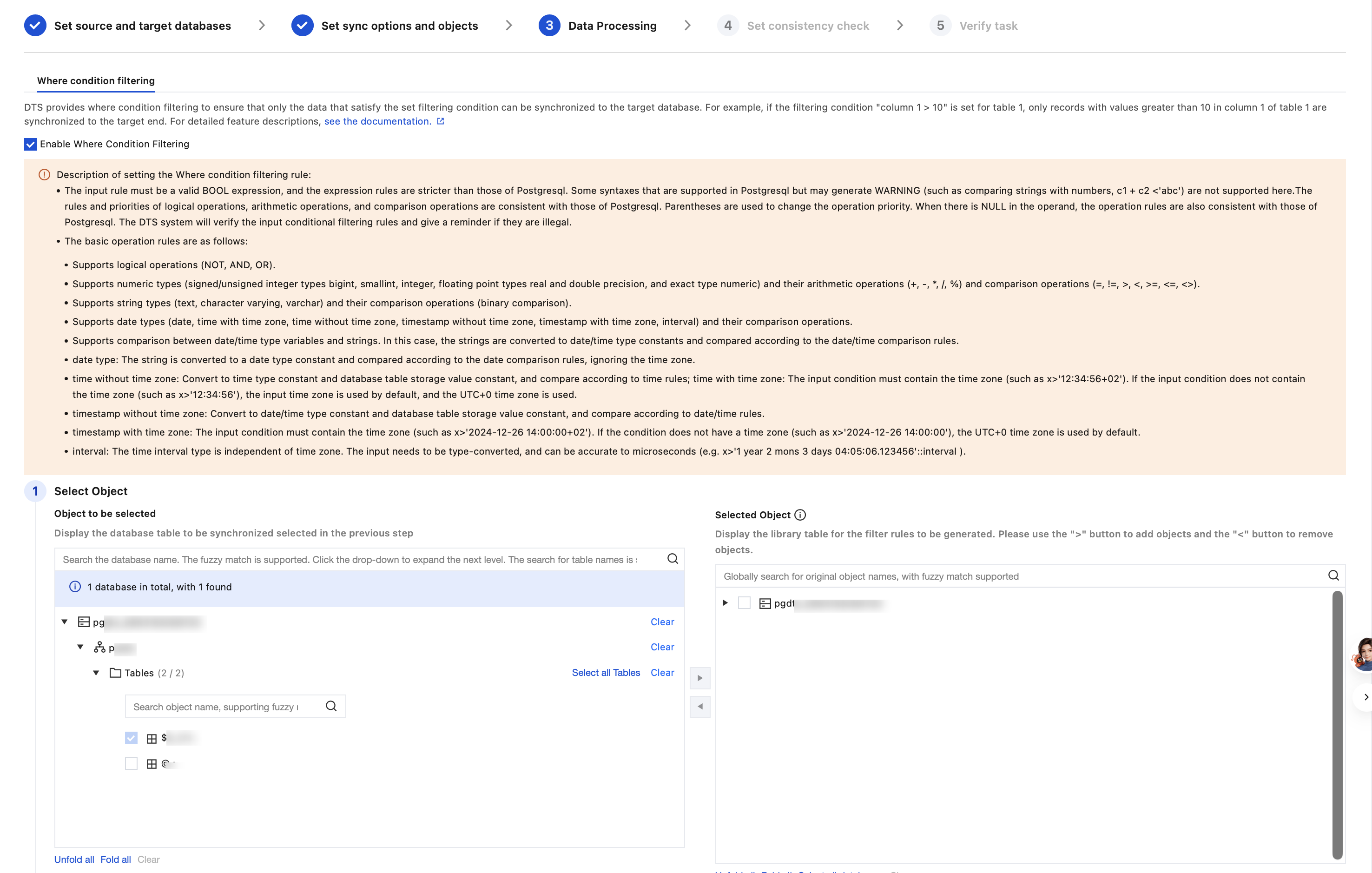
7.2.3 Set filter conditions and confirm.
UTC time zone selection: Specifies the time zone for values for comparing TIMESTAMP fields. It is recommended to keep this consistent with the database time zone.
Data conditions for UPDATE: You can choose Satisfied before and after the update, Satisfied before the update, or Satisfied after the update.
Condition expression: Enter the expression of the Where clause. After setting the Where clause, click Check Conditions to validate the input, and then click Generate Filtering Rule.
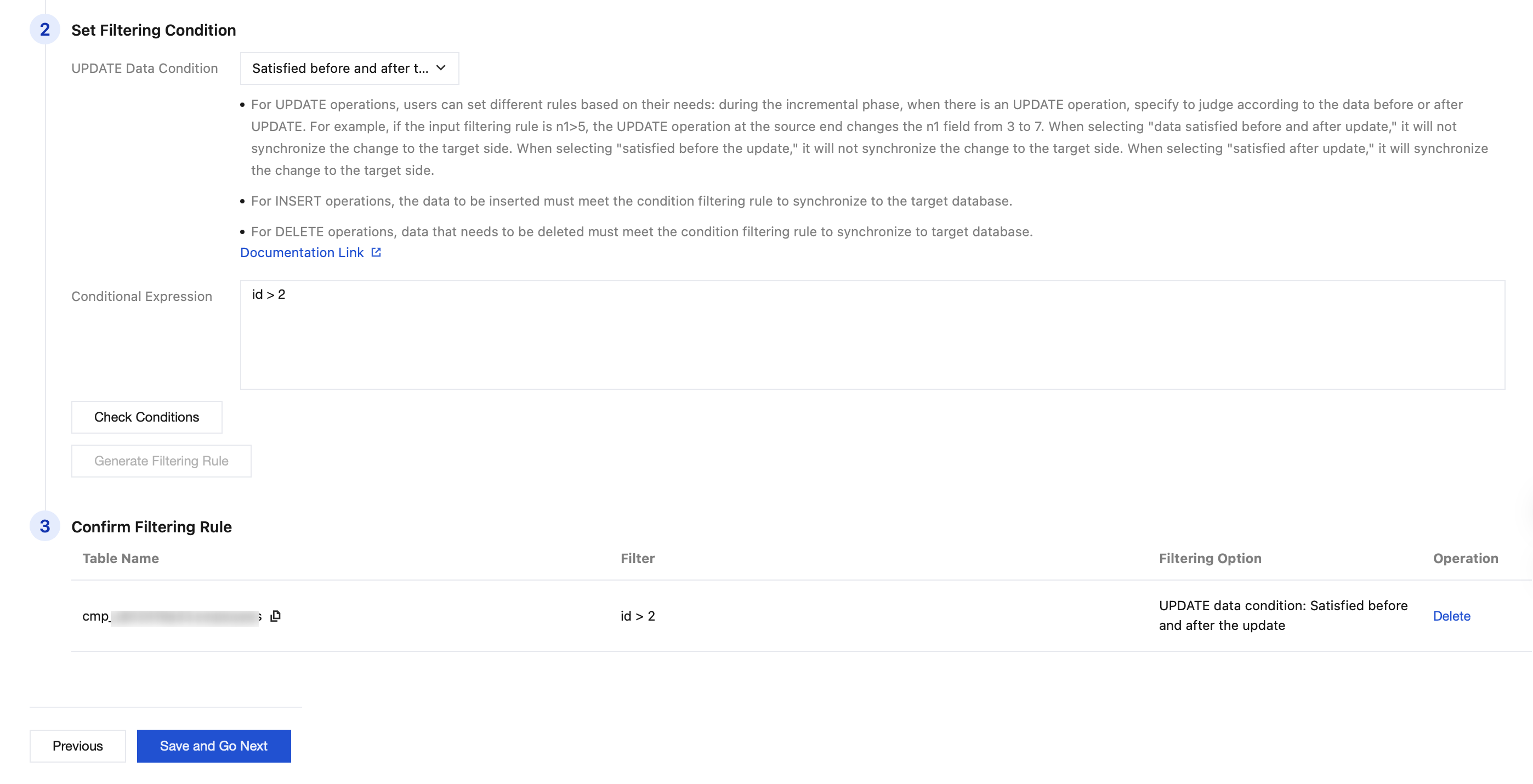
8. On the Set consistency check page, select Enable data consistency verification (enabled by default). After configuring the parameters, click Next.
Configuration Item | Parameter | Description |
check option | Verification Scope | Full check: All data in the source and target databases is compared when a check task is initiated. |
| Verification Benchmark | Both ends: Use data from the source and target as the check benchmark. |
Verification Parameters | Thread Count | The value range is 1–8. Select an appropriate value according to the actual situation. Increasing the number of threads can accelerate the consistency check speed, but it will also increase the load on the source and target databases. |
| Review count | Set the number of rechecks. If the first full data check result is inconsistent, the background will re-initiate a check of the inconsistent data identified during the full check. |
| Recheck time interval | Set the interval for rechecks. |
Verified Object option | Check Object | All sync objects: The check scope includes all objects selected for the synchronization task. Custom: Select specific objects from the selected synchronization objects for checking. |
9. On the Verify task page, after completing the check and passing all check items, click Immediate Start.
If the check task fails, fix the issue as instructed in Check Failure Handling Methods and re-initiate a check task.
Failed: indicates that a check item fails and the task is blocked. Fix the issue and execute the check task again.
Warning: indicates that a check item does not completely meet the requirements, and the task can be continued, but the business may be affected. Users are required to assess whether to ignore the warning or fix the issue before continuing to execute the task based on the prompt.
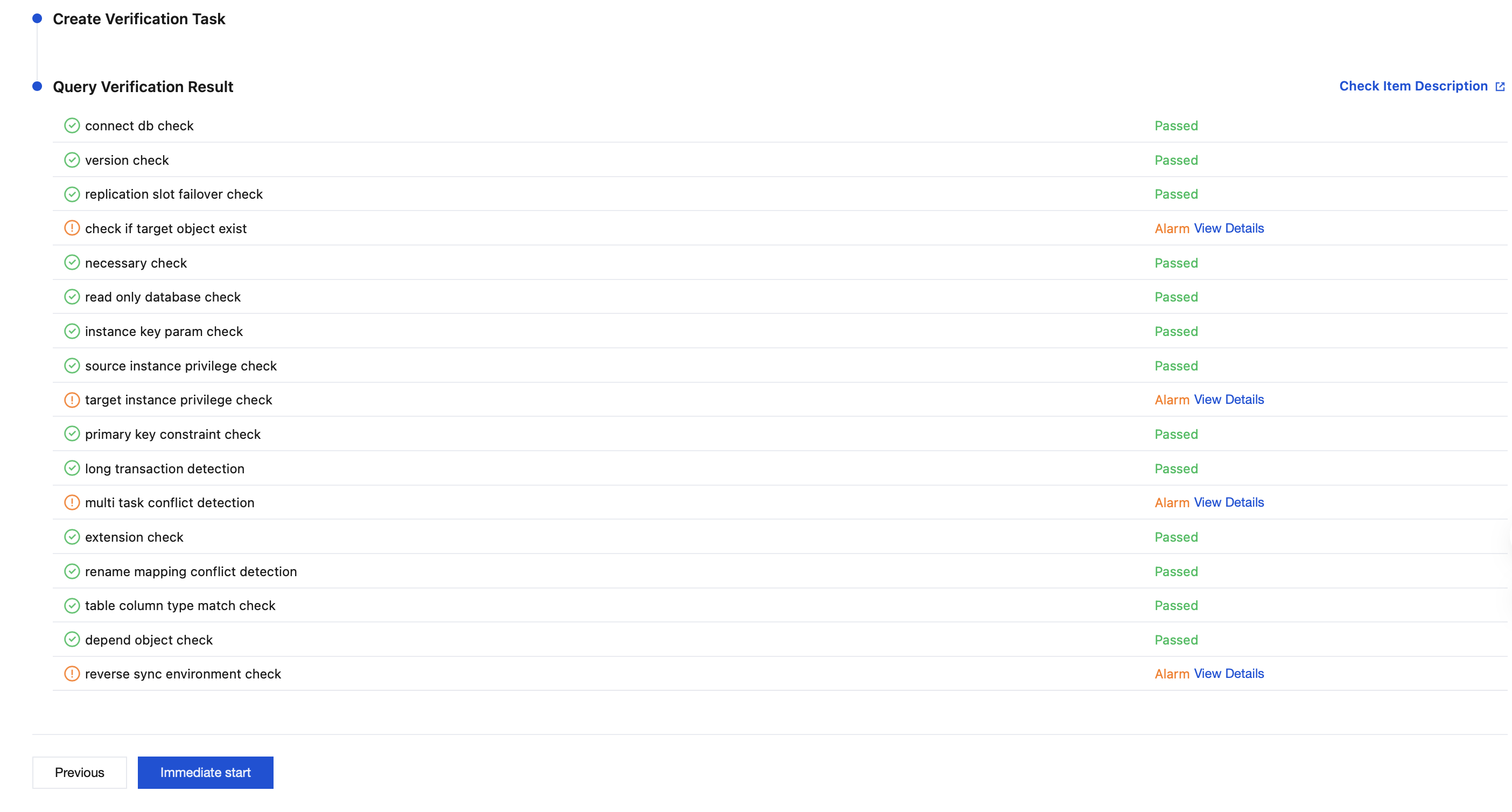
In the pop-up dialog box, click OK.
10. Return to the data synchronization task list, and the task status is changed to Running.
Note:
Choose More > Stop in the Operation column to disable the synchronization task. Ensure that data synchronization is completed before disabling the task.

11. (Optional) You can click the Task ID / Name to go to the task details page and view the task initialization status and monitoring data.
Bantuan dan Dukungan
Apakah halaman ini membantu?
Anda juga dapat Menghubungi Penjualan atau Mengirimkan Tiket untuk meminta bantuan.
masukan