Cloud Resource Configuration Check
ダウンロード
フォーカスモード
フォントサイズ
Feature Description
The Cloud Resource Configuration Check feature inspects the configurations of cloud resources to identify security risks introduced by misconfigurations.
Access Entry
1. Log in to the CSC console, and click CSPM in the left navigation pane.
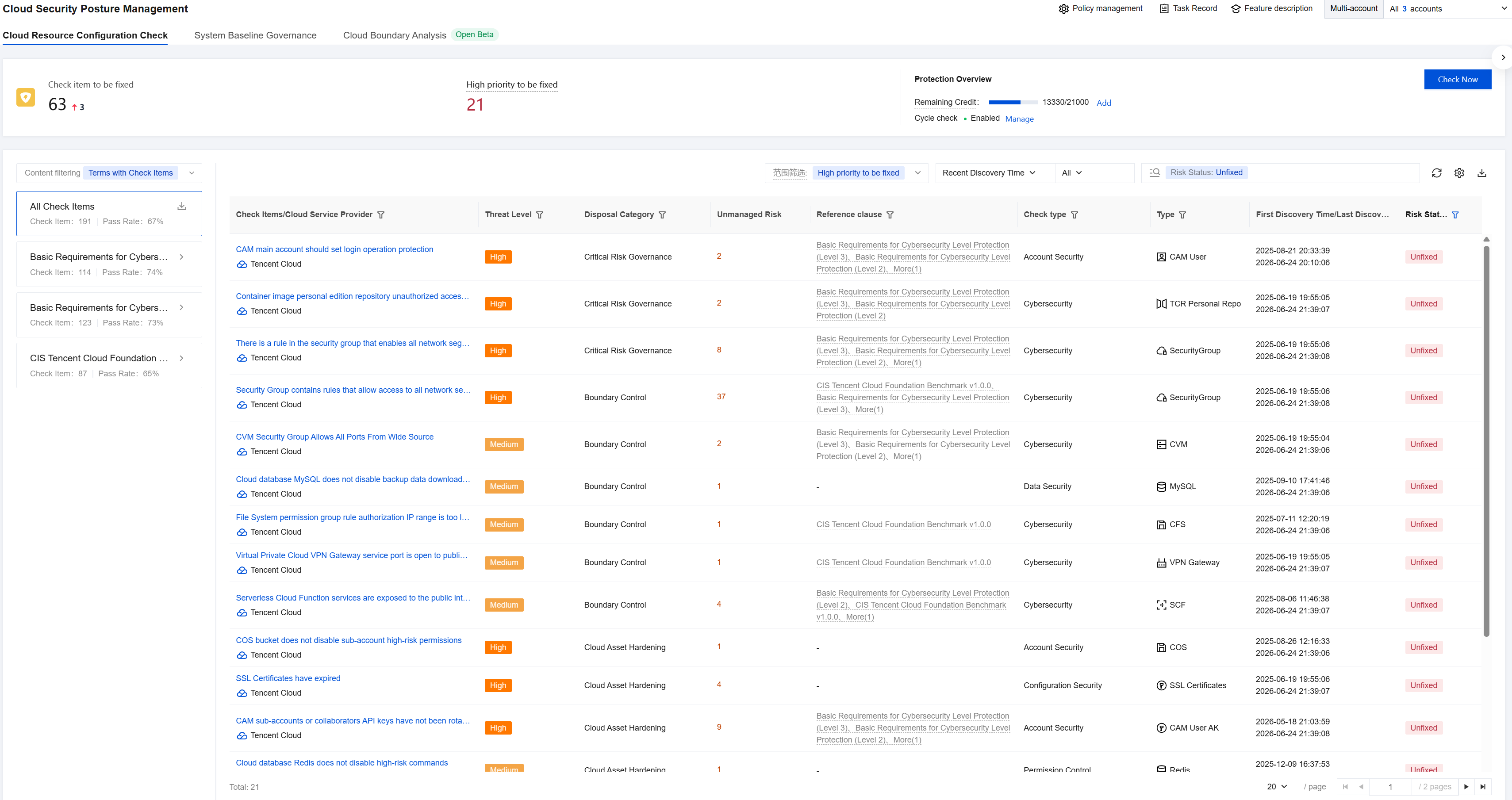
2. In Cloud Security Posture Management > Cloud Resource Configuration Check, you can view cloud resource configuration risks.
Initiating a Risk Check
1. Log in to the CSC console, and click CSPM in the left navigation pane.
2. In Cloud Security Posture Management > Cloud Resource Configuration Check, click Check Now.

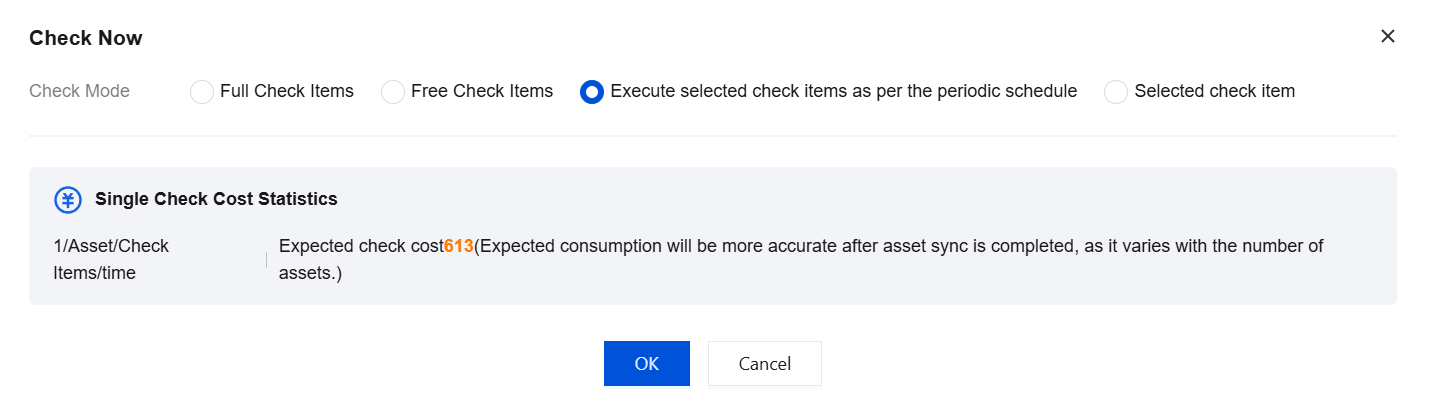
3. In the dialog box that appears, you can select a different detection mode. The detection mode supports four different scenarios: Full Check Items, Free Check Items, Execute selected check items as per the periodic schedule, and Selected check item. You can view the expected quota consumption for each scenario.
Note:
When you perform a cloud resource configuration check, an asset synchronization is triggered. Therefore, the actual quota consumption is expected to have a slight variance.
4. When you hover the mouse over Check Now, you can see the execution time of the most recent detection task.

Periodic Check Management
The Cloud Resource Configuration Check feature supports periodic automatic checks. You must manually enable this configuration.
1. Log in to the CSC console, and click CSPM in the left navigation pane.
2. In Cloud Security Posture Management > Cloud Resource Configuration Check, click Manage.

3. In the drawer that appears, click the switch to enable periodic checks.
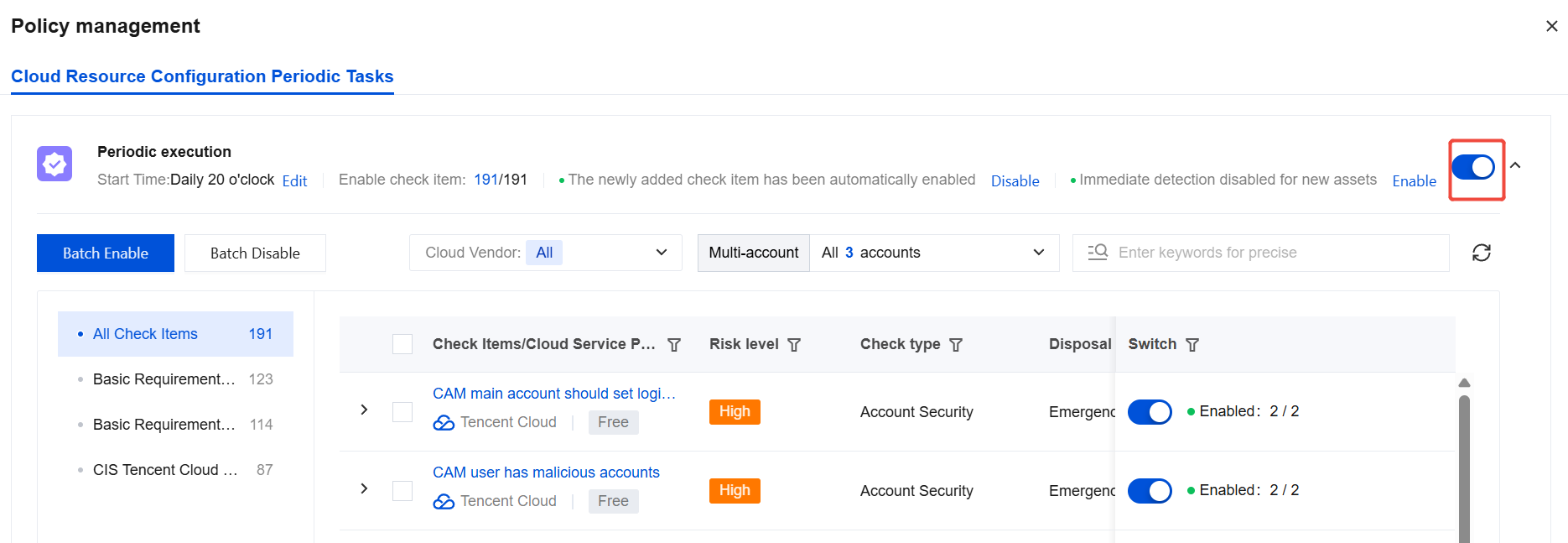
4. You can also click Edit in Periodic execution to adjust the execution time.

5. The "The newly added check item has been automatically enabled" feature works as follows: When this feature is enabled, new check items added by CSC are automatically included in your execution list. When this feature is disabled, new check items added by CSC are not included in your execution list. This feature is enabled by default. We recommend that you keep it enabled to promptly detect new risks.

6. The "Immediate detection disabled for new assets" feature works as follows: When this feature is enabled, CSC, during its routine asset updates, will select and run appropriate check items based on the asset type for any newly discovered assets. This helps you identify risks associated with your new assets more quickly. This feature is disabled by default. You need to decide whether to enable it based on your specific requirements.

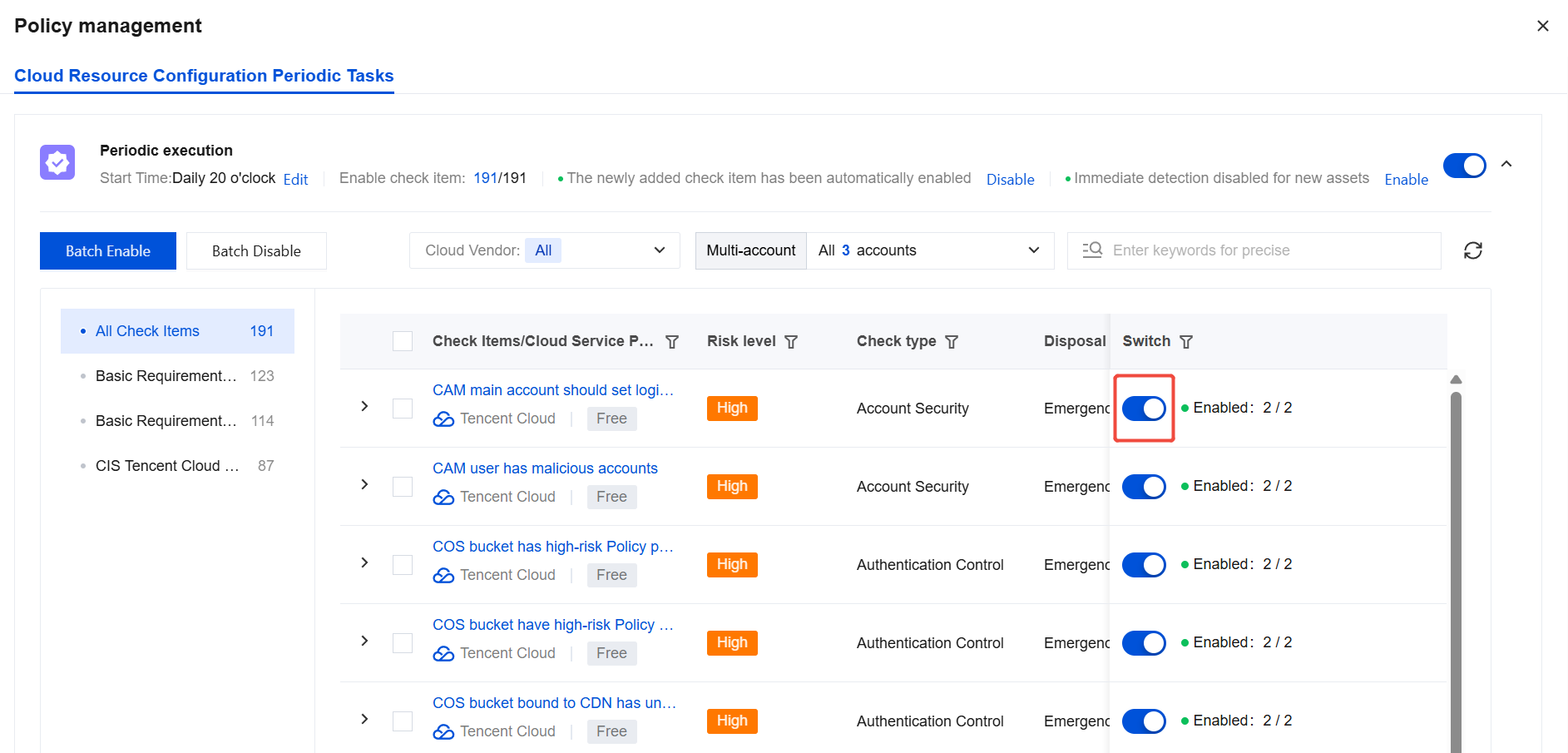
7. You can adjust the list of check items you want to run by toggling the switch for each check item. The list supports search and batch operations.
All Inspection Items
In the All Check Items section, you can view the risk statistics aggregated by check item.
1. Log in to the CSC console, and click CSPM in the left navigation pane.
2. In Cloud Security Posture Management > Cloud Resource Configuration Check, click All Check Items.
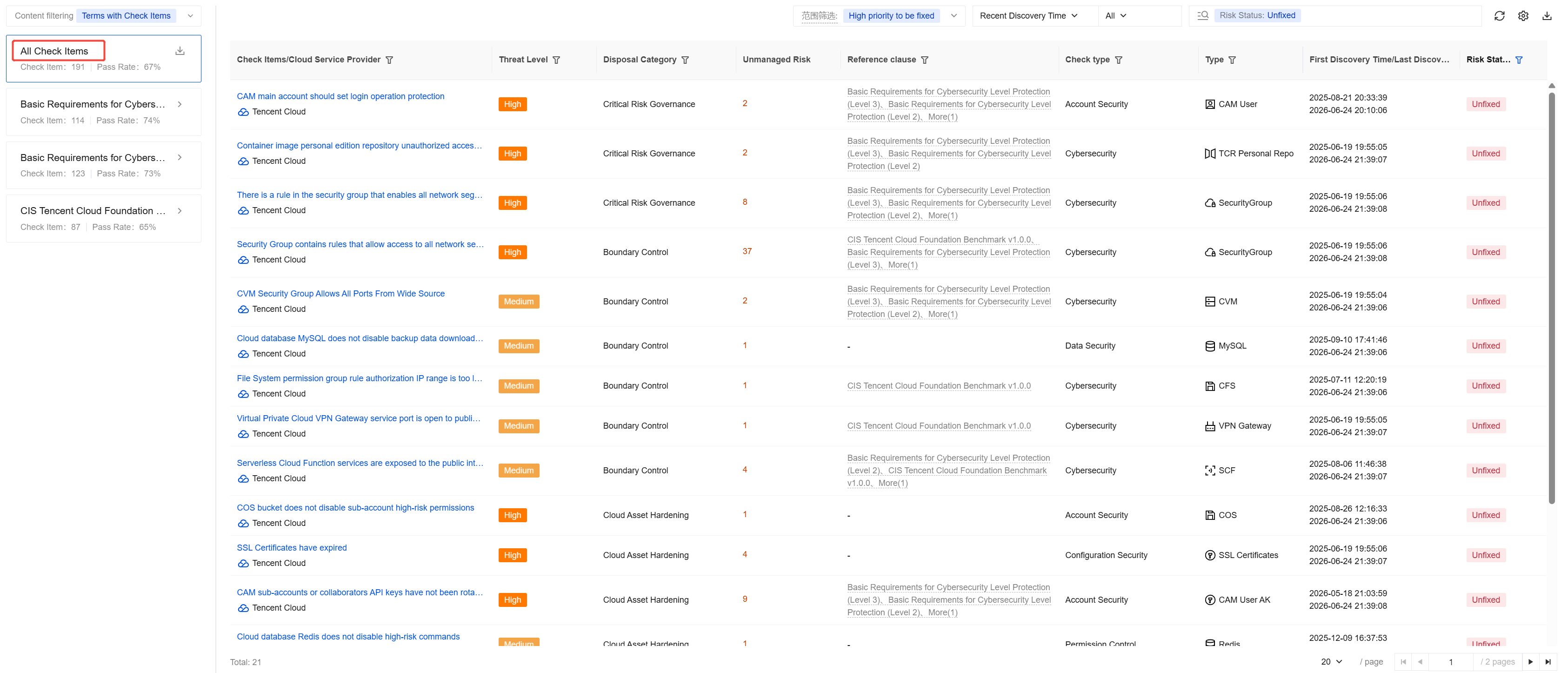
3. Click the Download button on the right side of All Check Items to export a report of all risks in Excel format.

4. The list is sorted by risk priority. You can remediate the risks in order.
5. The scope is set to High priority to be fixed by default, which hides some risks with lower fixing priority. If you are concerned about such risks, you can change the scope to All to view all content.

6. You can filter data by first discovered time, last discovered time, processing status, risk level, cloud vendor, and threat level. The system associates risks with reference clauses such as the baseline requirements for classified protection of cybersecurity and provides a search feature.
7. Select the target data and click the Check item to view all the details of that risk.
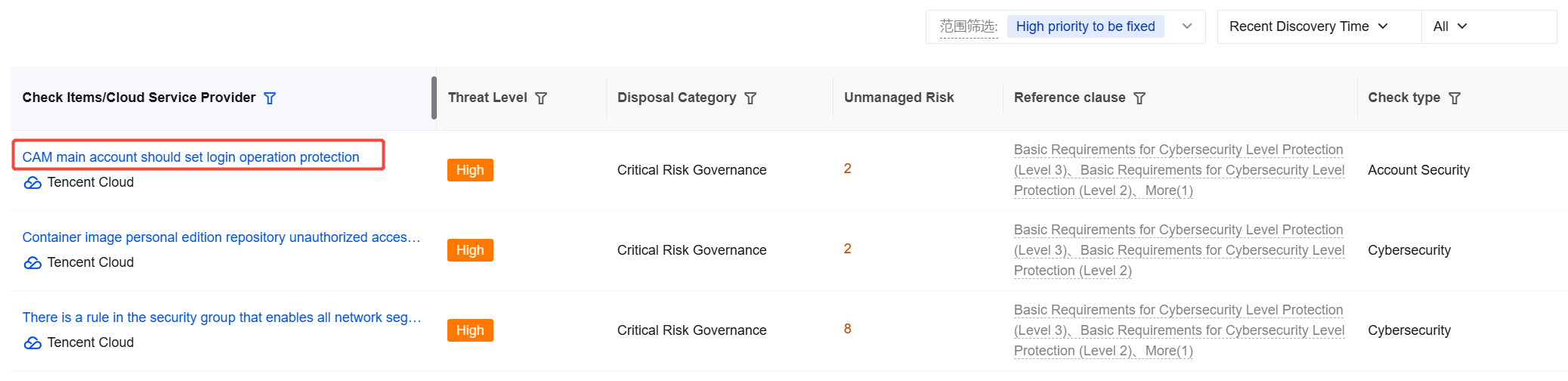
8. On the details page, you can view the risk damage, risk remediation recommendation, and risk details.
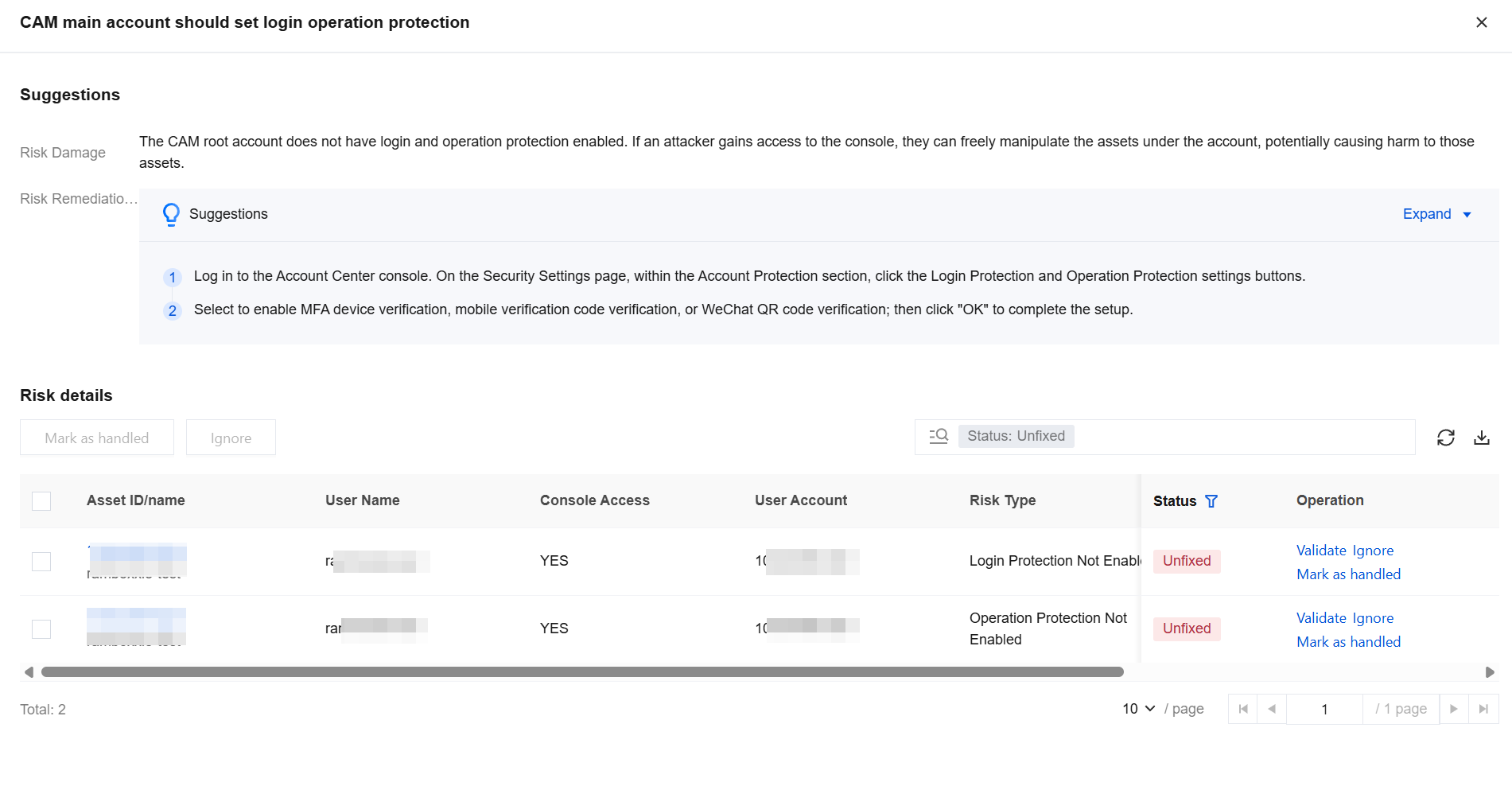
9. In the risk details, you can view the complete risk list for this configuration risk item and perform operations such as verifying, marking as ignored, or marking as handled on the target data.
Reference Specification Perspective
CSC has imported several reference benchmarks, such as the baseline requirements for classified protection of cybersecurity, to help you view check results according to different reference benchmarks.
Note:
Many requirements in the reference benchmarks cannot be checked through automated means, and CSC cannot cover all check items for security requirements. Therefore, this page cannot be used as proof of whether a security standard is passed. It is only intended as a comparison display between the covered check items and the benchmark requirement entries.
1. Log in to the CSC console, and click CSPM in the left navigation pane.
2. In Cloud Security Posture Management > Cloud Resource Configuration Check, click Target Reference Benchmark to view the check results for the corresponding check items based on that benchmark.
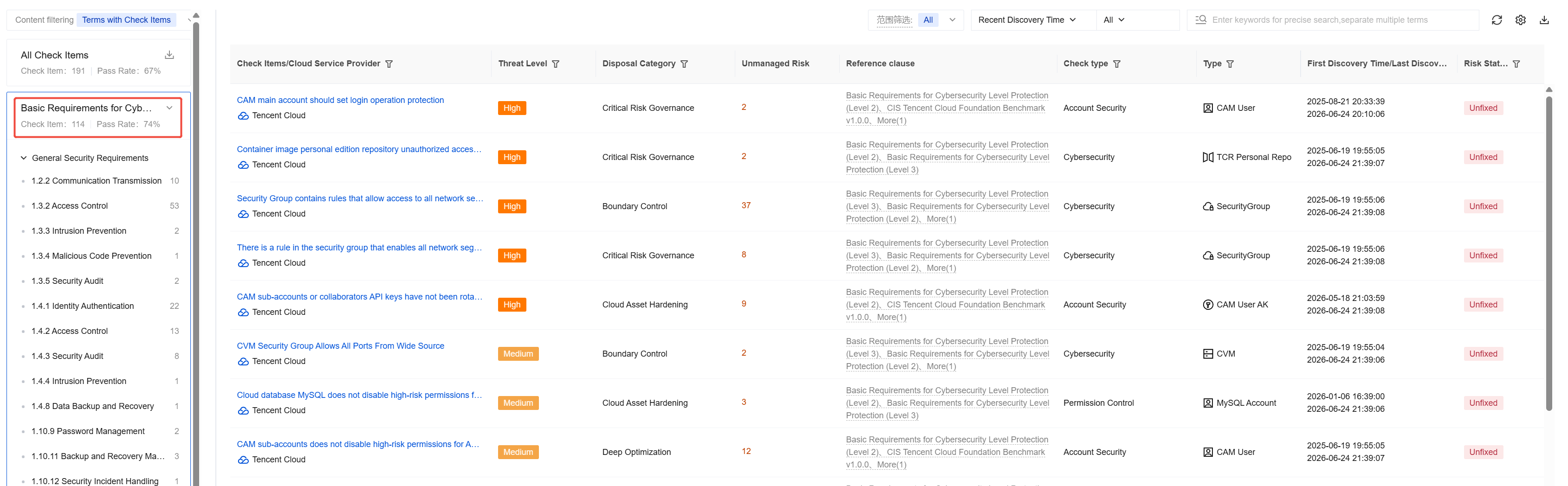
3. In the list below the reference benchmark, click a specific clause to view its description and the check results for the corresponding check items.
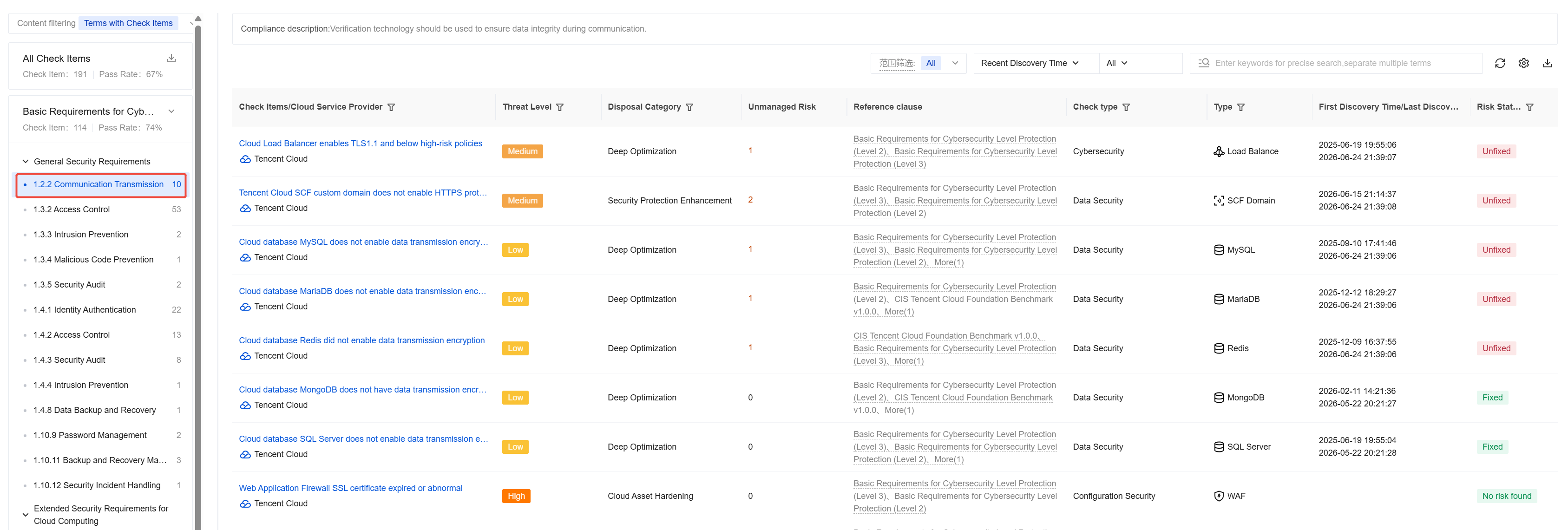
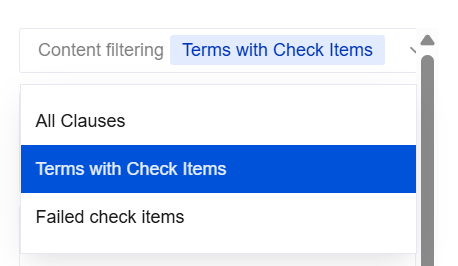
4. In the Content filtering section above, you can select different display logics for the clauses.
Option | Description |
All Clauses | All sections and clause titles are displayed in the reference specification. Note that some clauses cannot be checked automatically, so they have no corresponding check items. |
Terms with Check Items | Clauses with corresponding check items are displayed in the reference specification. This option is the default. |
Clauses That Failed the Check | Clauses whose corresponding check items have failed are displayed in the reference specification. |
Policy Configuration
1. Log in to the CSC console, and click CSPM in the left navigation pane.
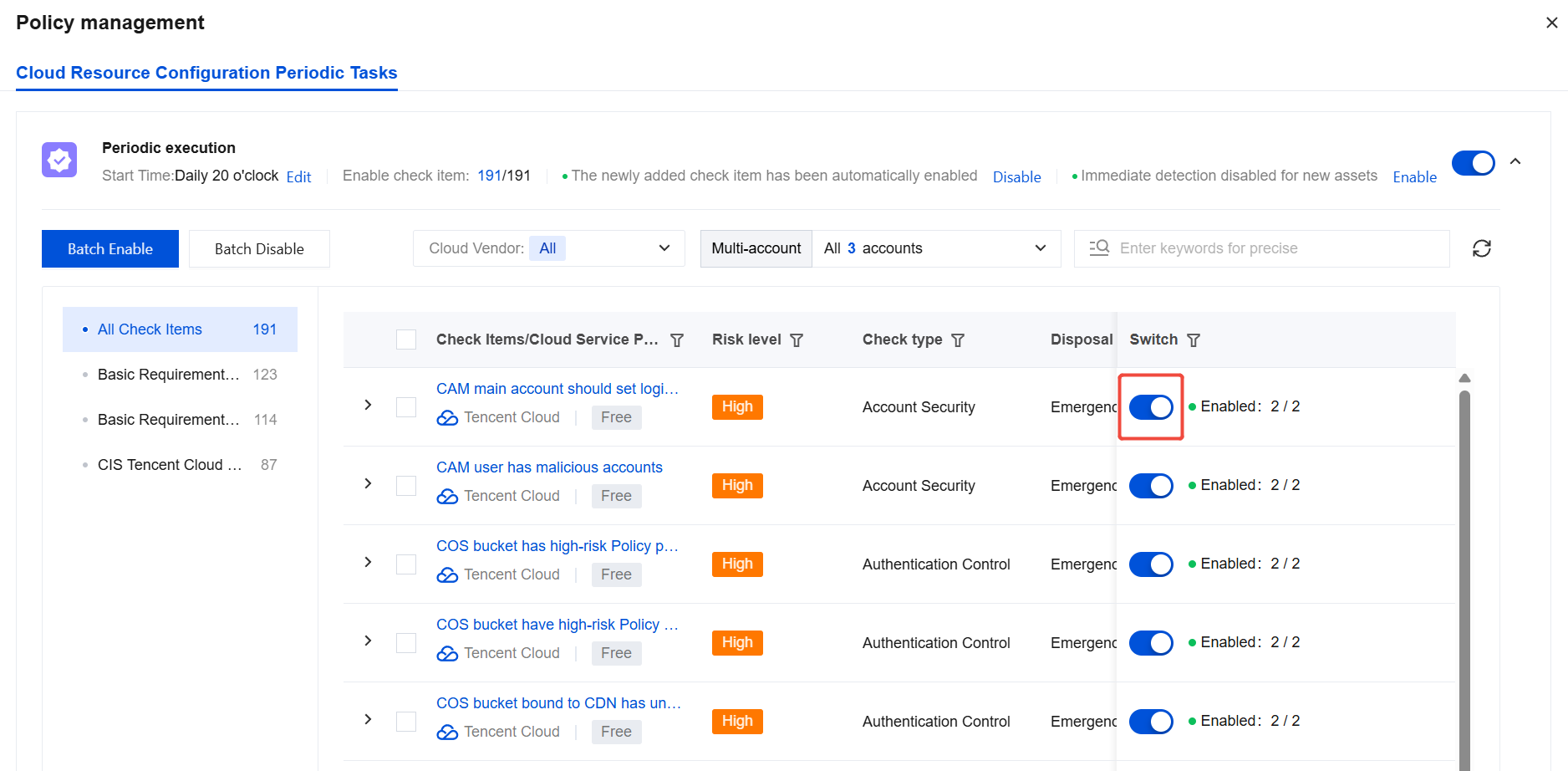
2. In Cloud Security Posture Management > Cloud Resource Configuration Check, click Policy management in the upper-right corner.

3. In Policy Management, you can view the list of check items and select check items to disable.
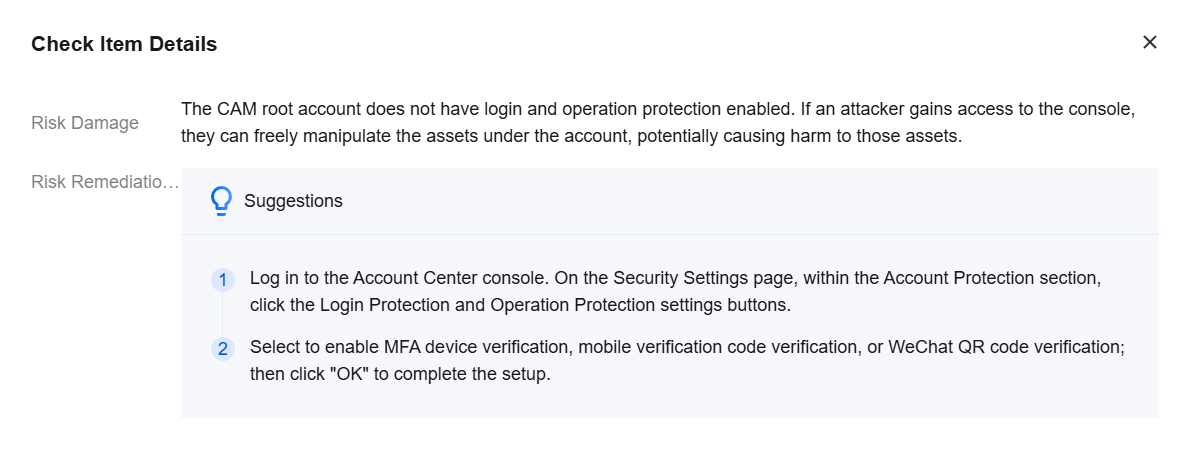
4. Click the target check item name. A dialog box displays the risk damage and risk remediation recommendation for that check item, helping you understand it.
Supported Cloud Products
Cloud Provider | Product Category | Product Name |
Tencent Cloud | Computing | CVM |
| | Lighthouse |
| Containers and Middleware | TKE |
| | Tencent Container Registry (TCR) |
| | SCF |
| | TDMQ for CKafka (CKafka) |
| | TDMQ |
| Networking | CLB |
| | Elastic IP |
| | ENI |
| | NAT Gateway |
| | VPC |
| CDN and Edge | CDN |
| Security | Web Application Firewall (WAF) |
| | CFW |
| | KMS |
| Database | TencentDB for MySQL |
| | TencentDB for MariaDB |
| | TencentDB for SQL Server |
| | TencentDB for MongoDB |
| | TencentDB for PostgreSQL |
| | TencentDB for Redis® |
| | TencentDB for KeeWiDB |
| | Tencent Cloud VectorDB |
| | TDSQL for MySQL |
| | TDSQL-C for MySQL |
| Storage | Object storage |
| | Cloud disk |
| | File storage |
| Big data | Elasticsearch Service |
| | Elastic MapReduce (EMR) |
| Cloud Communication and Enterprise Services | SSL Certificates |
| Development and Ops | Access management |
| | Operation audit |
| | Tencent Cloud Observability Platform |
Alibaba Cloud | Computing | Elastic Compute Service (ECS) |
| Container | TKE |
| | Tencent Container Registry (TCR) |
| Networking and CDN | Server Load Balancer (SLB) |
| | CDN |
| | Elastic IP |
| | ENI |
| | NAT Gateway |
| | Anycast EIP |
| | VPC |
| Big Data Computing | Elasticsearch |
| | Big Data Development and Governance Platform |
| Serverless | Function Compute |
| Middleware | Microservices Engine |
| | API Gateway |
| Database | ApsaraDB RDS |
| | TencentDB for MongoDB |
| | Tair (Redis-compatible) |
| | ApsaraDB for ClickHouse |
| | ApsaraDB for OceanBase |
| | Cloud-native Distributed Database |
| | AnalyticDB for PostgreSQL |
| | AnalyticDB for MySQL |
| | PolarDB |
| | Data Management Service (DMS) |
| Storage | Object Storage Service (OSS) |
| | Log Service |
| Security | Web Application Firewall (WAF) |
| | Cloud Security Center (CSC) |
| | CFW |
| | Cloud Identity Service |
| | Bastion Host |
| Migration and Ops Management | Access Control |
AWS | Computing | Amazon EC2 |
| | AWS Lambda |
| Container | Amazon EKS |
| | Amazon ECR |
| Storage | Amazon S3 |
| | Amazon EFS |
| Database | Amazon RDS |
| | Amazon DynamoDB |
| | Amazon MemoryDB |
| | Amazon ElastiCache |
| Networking and Content Delivery | Amazon VPC |
| Frontend Web and Mobile Applications | Amazon API Gateway |
| Application Integration | Amazon SQS |
| Security, Identity, and Compliance | Amazon IAM |
| Analysis | Amazon MSK |
| | Amazon EMR |
Azure | Security | Certificate. |
| AI + Machine Learning | AI Service |
| Storage | Blob Storage |
| Database | CosmosDB |
| Storage | Cloud disk |
| Database | MySQL Database |
| Database | PostgreSQL Database |
| Database | Redis Cache |
| Networking | Network Security Group |
| Computing | Virtual machine |
フィードバック