tencent cloud

Tencent Container Registry

Release Notes and Announcements
Release Notes
Announcements
User Tutorial
Product Introduction
Overview
TCR Service Levels and Capacity Limits
Strengths
Scenarios
Purchase Guide
Billing Overview
Purchase Methods
Notes on Arrears
Getting Started
Quick Start
TCR Individual Getting Started
Operation Guide
Creating an Enterprise Edition Instance
Access Configuration
Manage Image Repository
Image Distribution
Image Security
Image Cleanup
DevOps
OCI Artifacts Management
Operation Guide for TCR Individual
Terminating/Returning Instances
Use Cases
TCR Personal migration
TKE Clusters Use the TCR Addon to Enable Secret-free Pulling of Container Images via Private Network
Synchronizing Images to TCR Enterprise Edition from External Harbor
TKE Serverless Clusters Pull TCR Container Images
Image Data Synchronization and Replication Between Multiple Platforms in Hybrid Cloud
Nearby Access Through Image Synchronization Between Multiple Global Regions
Using Custom Domain Name and CCN to Implement Cross-Region Private Network Access
API Documentation
History
Introduction
API Category
Making API Requests
Instance Management APIs
Namespace APIs
Access Control APIs
Instance Synchronization APIs
Tag Retention APIs
Trigger APIs
Helm Chart APIs
Image Repository APIs
Custom Account APIs
Data Types
Error Codes
FAQs
TCR Individual Edition
TCR Enterprise Edition
Related Agreement
Service Level Agreement
Contact Us
Glossary

Configuring Garbage Collection

PDF
フォーカスモード
フォントサイズ
最終更新日: 2025-12-22 17:33:21

Overview

This document describes how to configure/update a garbage collection policy for TCR Individual instances.

Notes

A garbage collection policy for TCR Individual instances is only applicable for the instances in the specified regions. For example, TCR Individual instances deployed in Guangzhou and Silicon Valley regions can be configured with other different garbage collection policies.

Directions

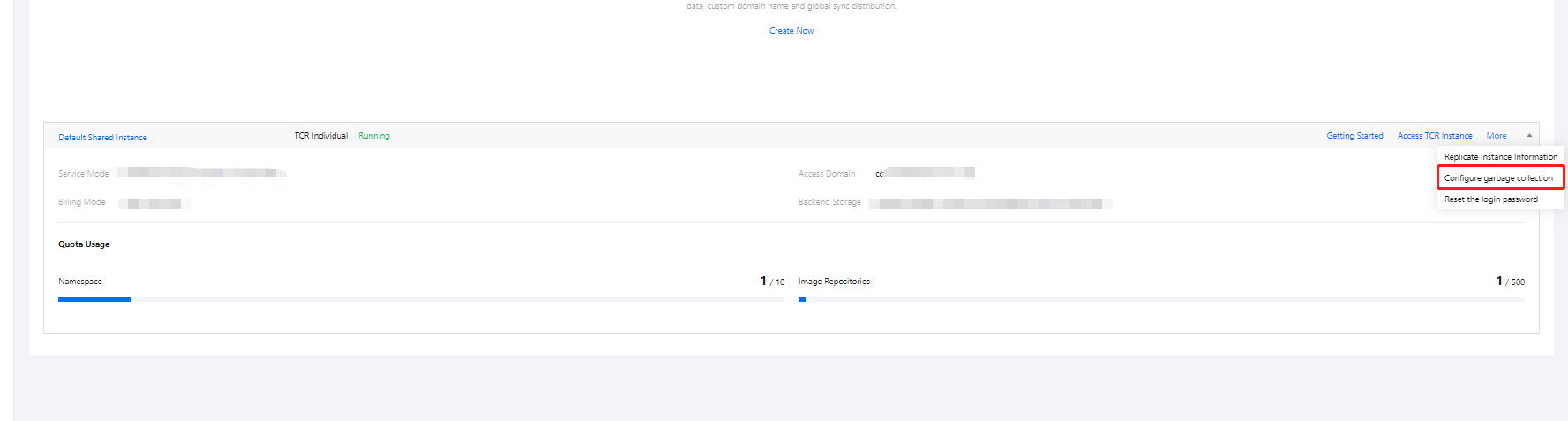
1. Log in to the TCR console and select Instance Management in the left sidebar. On the page that appears, you can view the list of instances under the current account. Select a TCR Individual instance in any region.

2. Click More > Configure garbage collection, as shown in the following figure.

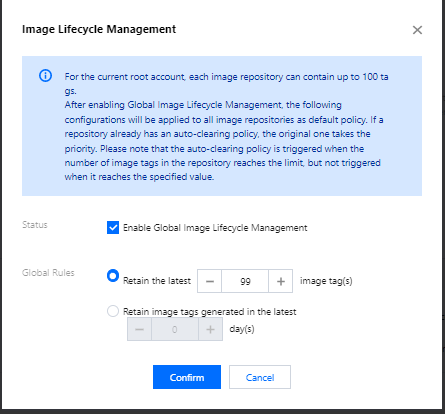
On/Off: Select Enable Global Image Lifecycle Management.
Global rules:
Retain the latest XX image tag: Enter a number based on your actual needs. The number cannot exceed the default quota of image tags under the current root account.
Retain the image tags in the last XX day: Enter a number based on your actual needs.
3. Click OK.

ヘルプとサポート

この記事はお役に立ちましたか?

フィードバック