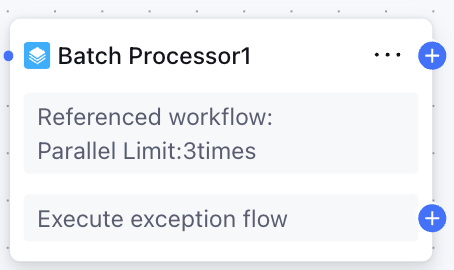
Node Function
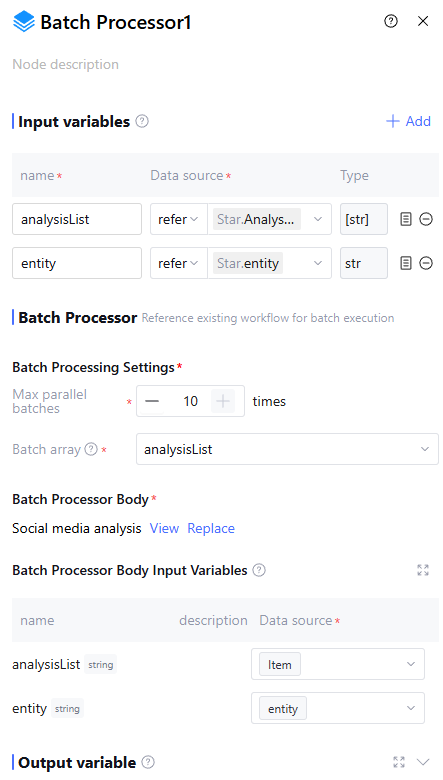
Batch Processor Node is used to execute tasks in parallel batches until all elements of the batch array are traversed. It belongs to Basic Node and supports configuring input variables, batch processing parallel cap, batch array, and batch body (workflow), executing specific workflows in parallel.
Note:
Difference Between Batch Processor Node and Loop Node: Loop Node processes array elements serially, executes the loop body workflow in sequence, and allows conditional judgment on each loop execution result to achieve early termination, suitable for handling tasks with association relationships. Batch Processing Node processes array elements in parallel batches without early termination, suitable for parallel processing scenarios with large amounts of data, such as parallel analysis of media articles and data preprocessing, good for handling multiple unrelated tasks in parallel.
Directions
Input Variables
Input variables take effect only within the same node and cannot be used cross-node. Support up to 50 input variables to meet scene requirements. Click "Add" to configure input variables as follows.
|
Variable Name | The variable name can only contain letters, digits, or underscores, must start with a letter or underscore. Required. |
Description | Description of this variable. Optional |
Data source | The data source of this variable supports two options: "Refer" and "Input". "Refer" allows selecting output variables from all preceding nodes, and "Input" requires manually filling in a fixed value. Required |
Type | The data type of this variable cannot be selected and defaults to the variable type referred or the input string type. |
Batch Processing Settings
Used to set the batch processing execution process, including the following two items:
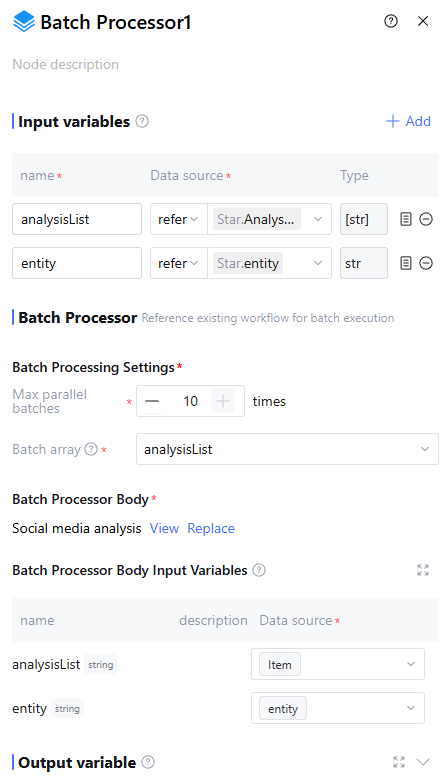
Max parallel batches: Indicates the number of parallel batch processing tasks, used to control how many batch operations can execute simultaneously. Supports a setting range of 1–10. When set to 1, it performs serial execution, with the same effect as the "traverse all elements" function of a loop node.
Batch array: Refers to the array used for executing batch processing tasks. The system will sequentially extract elements from the batch processing array and execute the batch operations according to the batch processing parallel cap.
Note:
Batch array can only select array type of variables, such as array<string>, array<int>, array<object>.
Batch Processor Body
The workflow for batch processing supports selecting workflows in awaiting release and released statuses. After selecting a workflow, the page will automatically display its input variables and support users in setting the data sources for these variables.
Batch Processor Body Input Variable
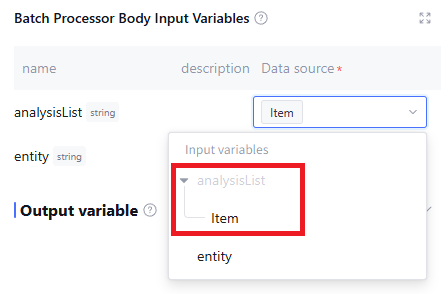
Batch Processor Body Input Variable refers to the selected input variable of the batch processing workflow, supporting referencing input variables of the processing node as well as elements in an array (introduced via the item field, for example, if the batch processing array is arrObj, use arrObj.Item to reference elements in the array).
Output Variable
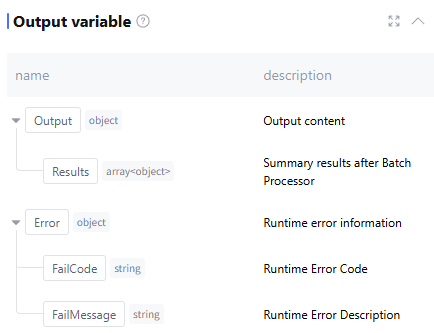
The output variable processed by this node includes the summarized Results after batch processing (data type: array<object>) as well as runtime Error info (data type: object, this field is empty during normal operation). Manually add is not supported.
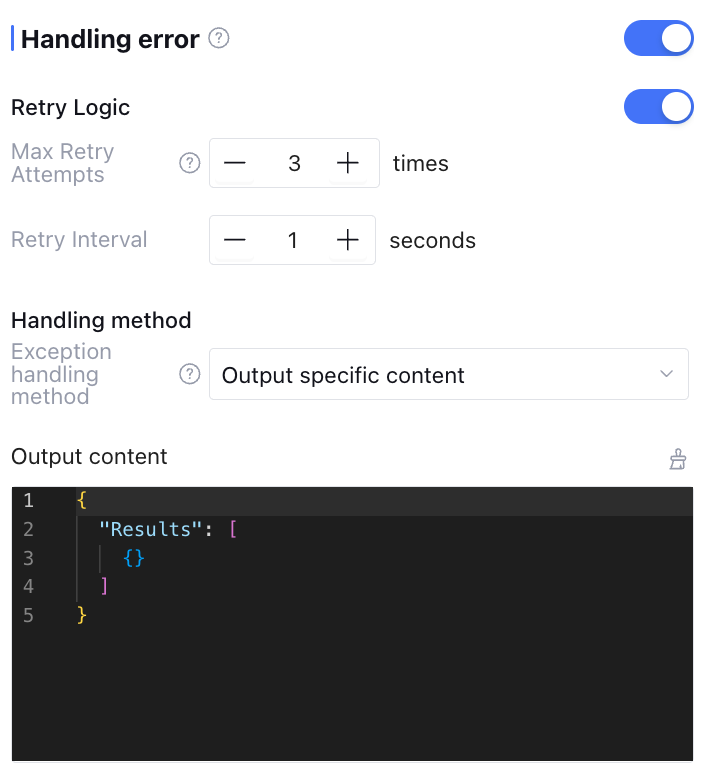
Exception handling can be enabled manually (exception handling is off by default), supporting exception retry and exception handling method configuration. The configuration content is as follows:
|
Max Retry Attempts | Maximum number of times to rerun when the node is running exceptionally. If retries exceed the set number of times, consider that node call failed and execute the exception handling method below. Default is 3. |
Retry Interval | Interval between each rerun, default is 1 second. |
Handling method | Support three types: "Output Specific Content", "Execution Exception Flow", and "Interrupt Flow". |
Exception Output Variable | When the exception handling method is set to "Output Specific Content", the output variable returned when retries exceed the maximum number. |
When the exception handling method is set to "Output Specific Content", the workflow will not be interrupted if an exception occurs. After node retry, it will return directly the output variable and variable value set by the user in the output content.
When the exception handling method is set to "Execution Exception Flow", the workflow will not be interrupted if an exception occurs. After node retry, it will execute the user-defined exception handling process.
When the exception handling method is set to "Interrupt Flow", there are no more settings. The workflow execution will be interrupted if an exception occurs.
Application Example
Batch analyze social media articles, output the label and positive and negative emotion.
Batch Processor Node configuration is as follows:
FAQs
If the number of array elements in batch processing exceeds the Max parallel batches, how to handle it?
At this point, the system will run elements in the batch processing array sequentially based on the parallel capacity limit. Other elements will wait to run via the queuing mechanism.