Backup
ダウンロード
フォーカスモード
フォントサイズ
Billing-Related Questions for Backup Space
How Is Backup Space Billed?
How to Reduce Backup Space Costs
Delete manual backup data that is no longer in use. (You can delete manual backups on the TDSQL Boundless console at the Backup and Restoration > Data Backup List page.)
Reduce the automatic data backup frequency for non-core services. (You can adjust the backup cycle and retention period in the console, with a minimum of two backups per week.)
Note:
Clone Instance is created based on data backups + log backups within the backup cycle and retention period. Reducing the automatic backup frequency and retention period will affect the time range available for instance data rollback. Please weigh your backup configuration accordingly. For non-core services, you can shorten the data backup and log backup retention time. (A retention period of 7 days is sufficient for most scenarios.)
Backup Database-Related Questions
What Backup Types Does TDSQL Boundless Support?
Backup Type | Description | Local SSD Disk | Enhanced SSD Cloud Disk |
Physical backup | Performs a full copy of physical data, with faster backup and restore speeds and lower resource consumption than logical backup. | ✅ | ✅ |
Snapshot backup | Creates a snapshot at the storage disk level, offering high speed and minimal impact on the database. | ❌ | ✅ |
Logical backup | Exports data as SQL statements, supports command-line tools (such as mysqldump) only, and does not support console operations. | ✅ | ✅ |
What Impact Does Backup Have on the Database?
Do not perform DDL operations, as they may cause backup failure. If a DDL operation is already running, the backup task will be delayed and will wait for the DDL operation to complete.
During backup, splitting and scheduling of Replication Groups (RGs) are not supported. After backup is completed, splitting and scheduling of RGs are automatically restored.
It is recommended to perform backups during off-peak hours.
How to Set Up Automatic Backup
You can configure this on the Backup and Restoration page of your instance in the TDSQL Boundless console.
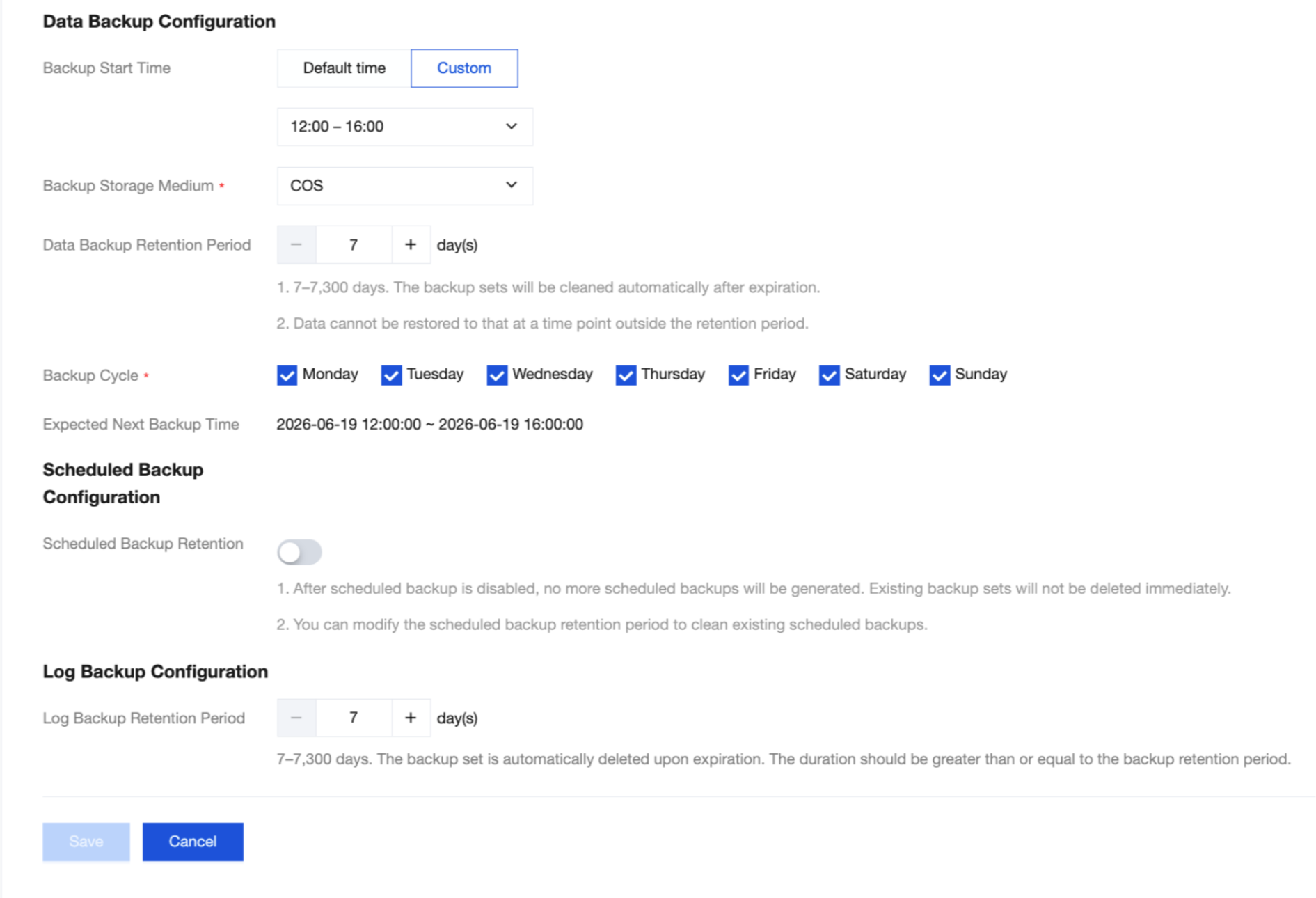
What Is the Retention Period for Automatic Backup? Can It Be Modified?
Note:
Data backups and log backups are retained for 7 days by default. The current retention period cannot be modified at this time.
Data backups and log backups are retained for 7 days by default and are automatically deleted upon expiration.
You can enable periodic backups with a retention period of 90 to 7300 days (20 years). However, this retention period must be longer than that of regular backups.
Can Data and Log Backup Be Disabled?
It cannot be disabled. However, you can reduce backup space usage by decreasing the backup frequency and deleting manual backup data that is no longer in use via the TDSQL Boundless console.
What Are the Limitations of Manual Backup?
Each instance can retain a maximum of three manual backups. When the number of manual backups reaches the limit, you must first delete the manual backups that are no longer needed and then initiate a new manual backup operation. The system does not automatically delete manual backups. You must delete them manually.
Can Backups Be Deleted Manually?
Automatic backups cannot be deleted manually. You can set a backup retention period, after which they are automatically deleted.
Manual backups can be manually deleted from the backup list in the TDSQL Boundless console. They are retained indefinitely unless manually deleted. Manual snapshot backups cannot be deleted.
What to Do When "Backup Is Being Used for Cloning" Appears During Deletion?
The system does not allow you to delete a backup set when a running clone task is using it. Wait for the clone task to complete before deleting it. You can check the execution status of clone tasks on the Clone Instance List tab.
Can Backup Settings Be Modified for Disaster Recovery Instances?
No. Backup settings cannot be modified for disaster recovery instances.
How to Cancel a Backup Task
Backup tasks cannot be canceled.
Can Backups Be Downloaded?
Data backups and log backups cannot be downloaded.
Can Backups Exceeding the Retention Period Still Be Restored?
Expired backup sets are automatically deleted and cannot be restored.
Set the backup retention period appropriately based on your requirements.
You can also back up instance data manually in the console. Manual backups are retained indefinitely.
フィードバック