HY-3D-Texture API Guide
ダウンロード
フォーカスモード
フォントサイズ
Introduction
The texture generation interface can generate the corresponding texture map after a single geometric model and a reference image are input.
Integration Guide
1. Obtaining an API Key
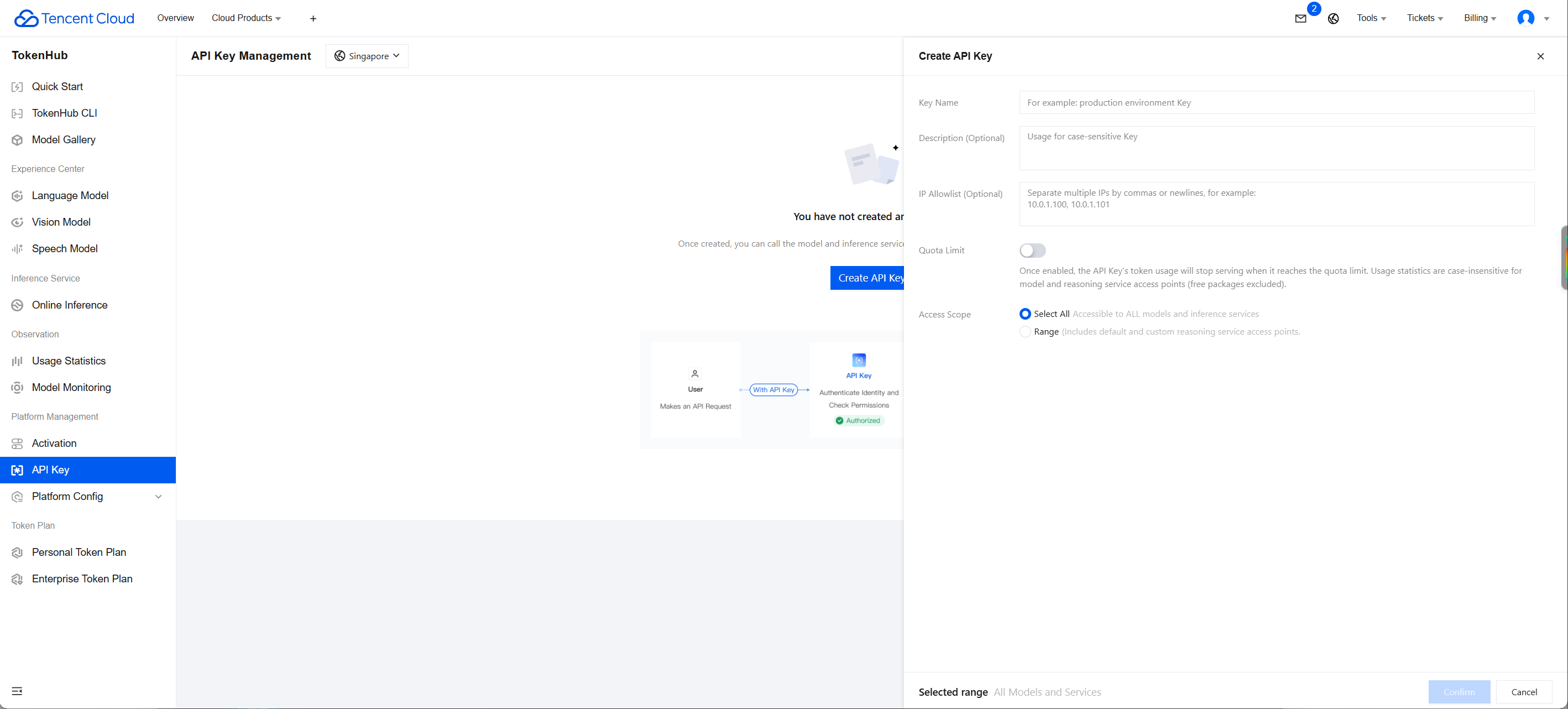
1. Go to the API Key Management page and click Create API Key. For detailed operations, see Create API Key.
2. After creation, be sure to copy and securely store the API Key. This information will be used in the subsequent process of configuring the tool.
Note:
The key of each account can only be queried by that account. Sub-accounts cannot view the key information of the main account. If a sub-account needs to call APIs, it must create its own key information.
If a sub-account cannot be created, the user may not have permission to create keys and needs authorization from the main account. After the main account logs in, click User List, and select Authorize next to the corresponding sub-account. A dialog box for associating policies will appear. Enter the authorization policy name and search, then select the corresponding policy and click Confirm.
Authorization policy: QcloudTokenhubFullAccess
2. Concurrency Quota
One concurrent task is provided by default, meaning that at most one submitted task can be processed at a time. The next task can start only after the previous task is completed.
Concurrent tasks: the maximum number of tasks that can run during the period when the corresponding service is being called. While a task is not completed, the next task cannot be submitted. After the task is completed, the next task can be submitted.
API Documentation
Submitting a Texture Generation Task
Input parameters
Parameter Name | Required | Type | Description |
model | Yes | string | Name of the texture generation model. Default value: hy-3d-texture. Example value: hy-3d-texture |
file_3d | Yes | object | 3d model file. Options: obj, glb. |
multi_view_images | No | array of view_image | Multi-view model images (supported only in version 3.1). View reference values: left: Left view right: Right view back: Back view top: Top view bottom: Bottom view left_front: Left front 45° view right_front: Right front 45° view. Each view is limited to one image. Image size limit: The total size of all encoded images cannot exceed 8 MB. (With base64 encoding, the total image size cannot exceed 6 MB because base64 encoding increases the image size by about 30%.) Image resolution limit: The resolution of each side must be less than 5000 and greater than 128. Supported image formats: jpg or png. |
image | No | object | base64 data and url of the 3D model texture reference image. Either base64 or url must be provided. If both are provided, url takes precedence. Image restrictions: single-side resolution greater than 128 and less than 4096, base64 string smaller than 10 MB after conversion, and supported formats including jpg, jpeg, and png. |
enable_pbr | No | boolean | Whether to enable pbr material generation. Default value: false. Example value: false |
enable_keep_uv | No | boolean | Whether to keep the model uv. After enabled, the model topology and texture remain unchanged, and the uv layout does not change with the texture. Default value: false. Example value: false |
texture_size | No | integer | Only square textures are supported. Resolution range: 720 to 4096. Default value: 4096. Example value: 2048 |
Output parameters
Parameter Name | Type | Description |
id | string | Task id (valid for 24 hours). Example value: 1315932989749215232. |
request_id | string | Unique request id, generated by the server and returned for each request (if a request fails to reach the server for other reasons, no request_id is returned for that request). Provide the request_id of the request when locating issues. |
object | string | Type of the returned object. For 3d jobs, the value is fixed as 3d_job. |
created_at | integer | Task creation time. |
status | string | completed: task succeeded, failed: task failed, in_progress: in progress, queued: queued. Example value: completed. |
Querying a Texture Generation Task
Input parameters
Parameter Name | Required | Type | Description |
model | Yes | string | Name of the texture generation model. Default value: hy-3d-texture. Example value: hy-3d-texture |
id | Yes | string | Task id. Example value: 1357237233311637504 |
Output parameters
Parameter Name | Type | Description |
status | string | completed: task succeeded, failed: task failed, in_progress: in progress, queued: queued. Example value: completed. |
request_id | string | Unique request id, generated by the server and returned for each request (if a request fails to reach the server for other reasons, no request_id is returned for that request). Provide the request_id of the request when locating issues. |
object | string | Type of the returned object. For 3d jobs, the value is fixed as 3d_job. |
created_at | integer | Task creation time. |
completed_at | integer | Task completion time. |
data | array of object | List of generated results, including generated 3d model files and related resource information. For details, see the data data structure. |
Examples
Submitting a Texture Generation Task
Input example
curl -X POST 'https://tokenhub-intl.tencentcloudmaas.com/v1/api/3d/submit' \\-H 'Authorization: Bearer YOUR_API_KEY' \\-H 'Content-Type: application/json' \\-d '{"model": "hy-3d-texture","file_3d": {"url": "https://example.com/test.obj"},"image": {"url": "https://example.com/test.png"}}'
Output example
{"id": "14721*****320","request_id": "11f64379-bb0b-46b2-b89f-17d75fc12365","object": "3d_job","created_at": 1784885898,"status": "queued"}
Querying a Texture Generation Task
Input example
curl -X POST 'https://tokenhub-intl.tencentcloudmaas.com/v1/api/3d/query' \\-H 'Authorization: Bearer YOUR_API_KEY' \\-H 'Content-Type: application/json' \\-d '{"model": "hy-3d-texture","id": "14721*****320"}'
Output example
{"request_id": "74a967e4-0e81-48c1-afde-555b79a1cdf3","object": "3d_job","created_at": 1786947866,"completed_at": 1786947866,"status": "completed","data": [{"type": "obj","url": "https://hunyuan-prod-1258344699.cos.ap-guangzhou.tencentcos.cn/texture_to_3d/output/1254418******-4b66-bc94-8ad7285e659f.obj"},{"type": "glb","url": "https://hunyuan-prod-1258344699.cos.ap-guangzhou.tencentcos.cn/texture_to_3d/output/125441*****3-4b66-bc94-8ad7285e659f.glb"},{"type": "image","url": "https://hunyuan-prod-1258344699.cos.ap-guangzhou.tencentcos.cn/texture_to_3d/output/125441*****d3-4b66-bc94-8ad7285e659f_latent.png"},{"type": "texture_image","url": "https://hunyuan-prod-1258344699.cos.ap-guangzhou.tencentcos.cn/texture_to_3d/output/1254418****3-4b66-bc94-8ad7285e659f_texture.png"},{"type": "mtl","url": "https://hunyuan-prod-1258344699.cos.ap-guangzhou.tencentcos.cn/texture_to_3d/output/125441******-4b66-bc94-8ad7285e659f.mtl"}]}
Data Structure
view_image
Input image objects from multiple views.
Parameter Name | Required | Type | Description |
view_type | No | string | View type. Values: back, left, right. Example: back |
view_image_url | No | string | Image URL. Example: https://cos.ap-guangzhou.myqcloud.com/image.jpg |
view_image_base64 | No | string | Image Base64 address. Example: /9j/4QIQahR0c...N6a2M5ZCI |
data
Generate a result object.
Parameter Name | Type | Description |
type | string | Type of the generated result file. Example value: obj. |
url | string | Download URL of the generated result file. |
フィードバック