OOM Killer Analysis and Handling
ダウンロード
フォーカスモード
フォントサイズ
OOM Killer Overview
When system physical memory is exhausted and sufficient memory cannot be reclaimed, the Linux kernel invokes the OOM Killer (Out-Of-Memory Killer) mechanism to select a process and terminate it to free memory, preventing system crashes.
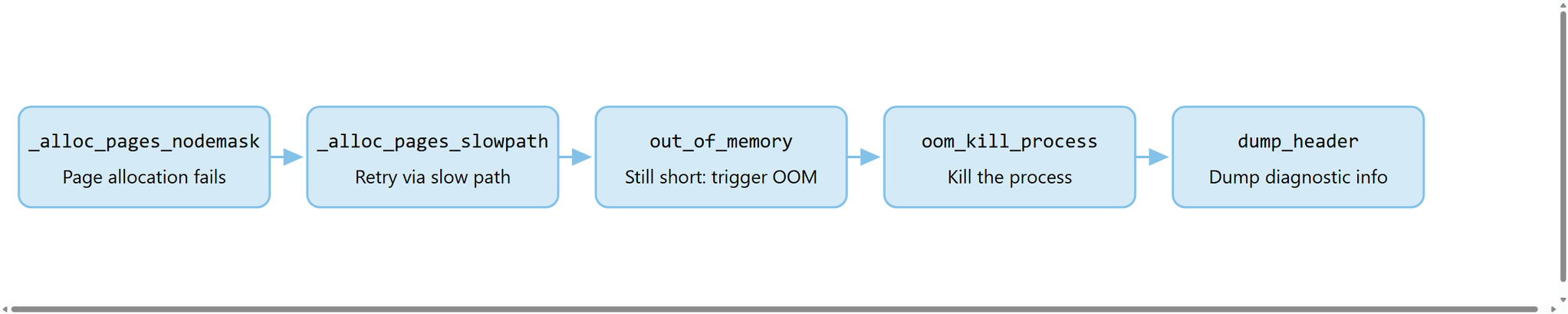
OOM Killer trigger process:

Key Concepts:
The process that invokes the OOM Killer is not the process that gets killed. The invoker is merely the process that happens to trigger the memory allocation failure, while the process with the highest
oom_score is the one that gets killed.OOM Killer is a fallback protection mechanism of the kernel, and its triggering indicates that system memory is already critically low.
How to Confirm an OOM Occurrence
Checking log messages in the kernel ring buffer is the preferred method for troubleshooting OOM events.
Method 1: Using dmesg to View Kernel Logs
dmesg -T | grep -i "oom-killer\\|out of memory\\|Killed process"
Method 2: Using journalctl to View Kernel Logs
Note:
journalctl is a log query tool provided by systemd. It can filter kernel logs by time range and is suitable for systems configured with systemd:journalctl -k --since "1 hour ago" | grep -i "oom\\|killed process"
Method 3: Viewing System Log Files
For systems that do not use systemd, you can directly search the kernel log records in
/var/log/messages:grep -i "oom\\|killed process" /var/log/messages
With the above methods, if the output contains
invoked oom-killer or Killed process, an OOM event has occurred.Method 4: Viewing System Memory Status (Auxiliary)
In addition to checking logs, you can also use the following commands to view the current system memory usage, helping determine whether memory pressure exists:
# View the overall system memory usage overview (total/used/available/cached)free -h# View detailed memory information (corresponding to the Mem-Info field in OOM logs)cat /proc/meminfo# Monitor memory changes in real time (refresh every second, 5 times in total)vmstat 1 5# View the process with the highest RSS (physical memory usage)ps aux --sort=-%mem | head -20
OOM Log Interpretation by Section
The following sections explain the meaning of each field based on a real TencentOS Server OOM log.
Section 1: Trigger Information
Aug 2 00:55:46 VM-223-103-tlinux kernel: bkmonitorbeat invoked oom-killer: gfp_mask=0x14201ca(GFP_HIGHUSER_MOVABLE|__GFP_COLD), nodemask=(null), order=0, oom_score_adj=0
Example Value | Field | Meaning |
bkmonitorbeat | Process Name | Name of the process that triggered OOM Killer (caller, not the killed process) |
0x14201ca | gfp_mask | Memory allocation flag. The value in parentheses is its readable form. GFP_HIGHUSER_MOVABLE indicates a request for movable pages in high-end user space. |
(null) | nodemask | NUMA node mask that limits the nodes from which memory can be allocated. null indicates no restriction. |
0 | order | Requested page order. 0 = 1 page (4 KB), 1 = 2 pages (8 KB), and so on. |
0 | oom_score_adj | OOM score adjustment value, ranging from -1000 to 1000. A positive value increases the probability of being killed, while a negative value decreases it. |
Note:
nodemask is a NUMA concept, while cpuset.mems_allowed is a cpuset concept. They have similar functions but different sources. Even if nodemask=null, a process may still be restricted by cpuset to specific NUMA nodes.Section 2: Process Context
Aug 2 00:55:46 VM-223-103-tlinux kernel: bkmonitorbeat cpuset=collector-bkmonitorbeat-62c1e40fc0a151a2d1796808a16b083c mems_allowed=0Aug 2 00:55:46 VM-223-103-tlinux kernel: CPU: 15 PID: 14566 Comm: bkmonitorbeat Not tainted 4.14.105-1-tlinux3-0023 #1Aug 2 00:55:46 VM-223-103-tlinux kernel: Hardware name: Tencent Cloud CVM, BIOS seabios-1.9.1-qemu-project.org 04/01/2014
The parameters are described as follows:
Example Value | Field | Meaning |
collector-bkmonitorbeat-... | cpuset | cgroup cpuset path of the process |
0 | mems_allowed | NUMA nodes allowed for use. 0 indicates that memory can only be allocated on node 0. |
15 | CPU | CPU core where the trigger occurs |
14566 | PID | Process ID. |
4.14.105-1-tlinux3-0023 | Kernel version | Currently running kernel version |
Tencent Cloud CVM | Hardware | Hardware information |
Note:
The OOM log format of TencentOS Server 3 is basically consistent across different kernel versions, while TencentOS Server 4 has more fields (such as
writepending and shmem_thp), but the interpretation method is the same.Section 3: Kernel Call Stack and Registers
Aug 2 00:55:46 VM-223-103-tlinux kernel: Call Trace:Aug 2 00:55:46 VM-223-103-tlinux kernel: dump_stack+0x63/0x8aAug 2 00:55:46 VM-223-103-tlinux kernel: dump_header+0x9f/0x204Aug 2 00:55:46 VM-223-103-tlinux kernel: oom_kill_process+0x22c/0x440Aug 2 00:55:46 VM-223-103-tlinux kernel: out_of_memory+0x114/0x4a0Aug 2 00:55:46 VM-223-103-tlinux kernel: __alloc_pages_slowpath+0x837/0xab5Aug 2 00:55:46 VM-223-103-tlinux kernel: __alloc_pages_nodemask+0x236/0x2a0Aug 2 00:55:46 VM-223-103-tlinux kernel: alloc_pages_current+0x6a/0xb0...
The call stack shows the trigger path of the OOM Killer:
Section 4: Mem-Info Memory Overview
View the mem-info command:
# View system memory details (corresponding to the fields in Mem-Info)cat /proc/meminfo# View Slab cache usagecat /proc/slabinfo | head -5# View memory distribution across NUMA nodescat /sys/devices/system/node/node*/meminfo | grep -i "active\\|free\\|slab"
Output example:
Aug 2 00:55:46 VM-223-103-tlinux kernel: Mem-Info:active_anon:16087067inactive_anon:27297active_file:1083inactive_file:913unevictable:0dirty:1writeback:0slab_reclaimable:49598slab_unreclaimable:29114mapped:3640shmem:68701pagetables:46710free:73341free_pcp:2500free_cma:0
Note: Values are measured in pages. On x86 architectures, 1 page = 4 KB. You can run
getconf PAGE_SIZE to view the page size.The parameters are described as follows:
Field | Example Value (Pages) | Conversion | Description |
active_anon | 16,087,067 | ~61.3 GB | Active anonymous memory (process heap/stack), a key focus in OOM analysis |
inactive_anon | 27,297 | ~107 MB | Inactive anonymous memory |
active_file | 1,083 | ~4.2 MB | Active file cache (file pages) |
inactive_file | 913 | ~3.6 MB | Inactive file cache, reclaimable |
slab_reclaimable | 49,598 | ~194 MB | Reclaimable Slab cache (dentry/inode) |
slab_unreclaimable | 29,114 | ~114 MB | Unreclaimable Slab cache |
shmem | 68,701 | ~268 MB | Shared memory (tmpfs/shmem) |
pagetables | 46,710 | ~183 MB | Page table usage |
free | 73,341 | ~286 MB | Free pages |
Analysis of this example:
active_anon occupies 61.3 GB, the highest proportion, indicating that anonymous memory (process heap) consumes most of the memory, far exceeding the system's reclaimable capacity and directly causing OOM.Section 5: NUMA Node and zone Details
Aug 2 00:55:46 VM-223-103-tlinux kernel: Node 0 Normal: free:32000kB min:30980kB low:93628kB high:156276kB ...
Focus on the relationship between
free and low:zone | free | low | Diagnosis |
DMA | 15,876 kB | 16 kB | Normal |
DMA32 | 246,028 kB | 4,096 kB | Normal |
Normal | 32,000 kB | 93,628 kB | free is lower than low, which is the direct cause of OOM. |
When the
free value of a zone falls below the low watermark, the kernel considers the zone's memory critically insufficient and triggers the OOM Killer.Section 6: buddyinfo Memory Fragmentation Status
Aug 2 00:55:46 VM-223-103-tlinux kernel: Node 0 Normal: 1480*4kB (UME) 678*8kB (UME) 574*16kB (UME) 193*32kB (UME) 86*64kB (UM) 10*128kB (UM) 0*256kB 0*512kB 0*1024kB 0*2048kB 0*4096kB = 33488kB
buddyinfo shows the distribution of free pages at each order. In this example, although the Normal zone has 33 MB of total free memory, it consists entirely of small blocks ranging from 4 KB to 128 KB and has no contiguous large pages of 256 KB or above, indicating severe memory fragmentation. Although fragmentation itself is not the direct cause of OOM (order=0 requires only 4 KB), it increases the failure rate of higher-order allocations.
Section 7: Huge Page Information
Aug 2 00:55:46 VM-223-103-tlinux kernel: Node 0 hugepages_total=0 hugepages_free=0 hugepages_surp=0 hugepages_size=1048576kB
In this example, huge pages are not configured, and
hugepages_total=0.Common OOM Causes and Troubleshooting Directions
Reason | Feature | Troubleshooting Command |
Process Memory Leak | active_anon keeps increasing without falling back. | top/ps aux --sort=-rss to find the process with the highest RSS. |
cgroup Memory Limit | Logs contain memory.max or the cgroup path. | cat /sys/fs/cgroup/<path>/memory.max |
Slab Cache Expansion | slab_unreclaimable is abnormally large. | cat /proc/slabinfo or slabtop |
Excessive Shared Memory | shmem value is large. | ipcs -m to view shared memory segments. |
Memory Fragmentation | The buddyinfo high-order pages are 0. | cat /proc/buddyinfo |
Prevention and Tuning
Adjusting Process OOM Priority
Protect critical processes from being killed by the OOM Killer:
# Reduce the probability of being killed (-1000 completely prevents OOM from killing the process)echo -1000 > /proc/<pid>/oom_score_adj# Permanent configuration (write to systemd service) Add the following to the [Service] section: OOMScoreAdjust=-100
Using cgroups to Limit Memory
Prevent a single process from consuming excessive memory:
# cgroup v2 example: Limit the maximum memory of a process to 4 GBmkdir /sys/fs/cgroup/myappecho 4G > /sys/fs/cgroup/myapp/memory.maxecho <pid> > /sys/fs/cgroup/myapp/cgroup.procs
Configuring swap
Properly configuring swap can provide a buffer when physical memory is insufficient (using a large swap is not recommended for performance-sensitive scenarios):
# Check swap statusswapon --showfree -h
Upgrade instance specifications
When the workload does exceed the memory capacity of the current instance and the issue cannot be resolved through application-layer optimization (such as fixing memory leaks or adjusting cache policies), consider upgrading the instance specifications to increase available memory:
# View the memory specifications of the current instancefree -h# View the total amount of physical memory recognized by the kernelgrep MemTotal /proc/meminfo
When adjusting instance specifications in the Tencent Cloud console or through the API, note the following:
Upgrading instance specifications usually requires a restart. Prepare service switchover and contingency plans in advance.
Some instance types support online configuration changes without downtime. For the specific types that support this feature, see the CVM product documentation.
Before upgrading, check for memory leaks or misconfigurations first to avoid masking issues by simply scaling out resources.
Monitoring and Alarm
It is recommended to configure alarms for the following metrics:
Available memory is less than 10% of total memory.
The number of
oom-killer events is greater than 0.The process RSS is close to the total system memory.
# Quickly check whether OOM events have occurreddmesg -T | grep -c "oom-killer"
Appendix: Complete OOM Log Sample
The following is the complete log used for analysis in this document, for reference:
Aug 2 00:55:46 VM-223-103-tlinux kernel: bkmonitorbeat invoked oom-killer: gfp_mask=0x14201ca(GFP_HIGHUSER_MOVABLE|__GFP_COLD), nodemask=(null), order=0, oom_score_adj=0Aug 2 00:55:46 VM-223-103-tlinux kernel: bkmonitorbeat cpuset=collector-bkmonitorbeat-62c1e40fc0a151a2d1796808a16b083c mems_allowed=0Aug 2 00:55:46 VM-223-103-tlinux kernel: CPU: 15 PID: 14566 Comm: bkmonitorbeat Not tainted 4.14.105-1-tlinux3-0023 #1Aug 2 00:55:46 VM-223-103-tlinux kernel: Hardware name: Tencent Cloud CVM, BIOS seabios-1.9.1-qemu-project.org 04/01/2014Aug 2 00:55:46 VM-223-103-tlinux kernel: Call Trace:Aug 2 00:55:46 VM-223-103-tlinux kernel: dump_stack+0x63/0x8aAug 2 00:55:46 VM-223-103-tlinux kernel: dump_header+0x9f/0x204Aug 2 00:55:46 VM-223-103-tlinux kernel: oom_kill_process+0x22c/0x440Aug 2 00:55:46 VM-223-103-tlinux kernel: out_of_memory+0x114/0x4a0Aug 2 00:55:46 VM-223-103-tlinux kernel: __alloc_pages_slowpath+0x837/0xab5Aug 2 00:55:46 VM-223-103-tlinux kernel: __alloc_pages_nodemask+0x236/0x2a0Aug 2 00:55:46 VM-223-103-tlinux kernel: alloc_pages_current+0x6a/0xb0Aug 2 00:55:46 VM-223-103-tlinux kernel: __page_cache_alloc+0x6b/0xa0Aug 2 00:55:46 VM-223-103-tlinux kernel: filemap_fault+0x3a6/0x640Aug 2 00:55:46 VM-223-103-tlinux kernel: ext4_filemap_fault+0x31/0x50Aug 2 00:55:46 VM-223-103-tlinux kernel: __do_fault+0x38/0xb0Aug 2 00:55:46 VM-223-103-tlinux kernel: __handle_mm_fault+0xcc1/0x1030Aug 2 00:55:46 VM-223-103-tlinux kernel: handle_mm_fault+0xd1/0x1e0Aug 2 00:55:46 VM-223-103-tlinux kernel: __do_page_fault+0x200/0x500Aug 2 00:55:46 VM-223-103-tlinux kernel: do_page_fault+0x32/0x100Aug 2 00:55:46 VM-223-103-tlinux kernel: async_page_fault+0x45/0x50Aug 2 00:55:46 VM-223-103-tlinux kernel: RIP: 0033:0x923425Aug 2 00:55:46 VM-223-103-tlinux kernel: RSP: 002b:00007f0d30257d80 EFLAGS: 00010202Aug 2 00:55:46 VM-223-103-tlinux kernel: RAX: 00000000000038e4 RBX: 000000c0003fa600 RCX: 0000000000962d67Aug 2 00:55:46 VM-223-103-tlinux kernel: Mem-Info:Aug 2 00:55:46 VM-223-103-tlinux kernel: active_anon:16087067 inactive_anon:27297 active_file:1083 inactive_file:913 unevictable:0 dirty:1 writeback:0 slab_reclaimable:49598 slab_unreclaimable:29114 mapped:3640 shmem:68701 pagetables:46710 free:73341 free_pcp:2500 free_cma:0Aug 2 00:55:46 VM-223-103-tlinux kernel: Node 0 Normal: free:32000kB min:30980kB low:93628kB high:156276kB active_anon:61887756kB inactive_anon:109188kB present:63963136kB managed:62648408kBAug 2 00:55:46 VM-223-103-tlinux kernel: Node 0 DMA: 1*4kB (U) 0*8kB 0*16kB 0*32kB 2*64kB (U) 1*128kB (U) 1*256kB (U) 0*512kB 1*1024kB (U) 1*2048kB (M) 3*4096kB (M) = 15876kBAug 2 00:55:46 VM-223-103-tlinux kernel: Node 0 DMA32: 3673*4kB (UME) 2532*8kB (UME) 1204*16kB (UE) 1630*32kB (UME) 941*64kB (UME) 414*128kB (UME) 84*256kB (ME) 5*512kB (UME) 0*1024kB 1*2048kB (H) 0*4096kB = 245700kBAug 2 00:55:46 VM-223-103-tlinux kernel: Node 0 Normal: 1480*4kB (UME) 678*8kB (UME) 574*16kB (UME) 193*32kB (UME) 86*64kB (UM) 10*128kB (UM) 0*256kB 0*512kB 0*1024kB 0*2048kB 0*4096kB = 33488kBAug 2 00:55:46 VM-223-103-tlinux kernel: Node 0 hugepages_total=0 hugepages_free=0 hugepages_surp=0 hugepages_size=1048576kB
Note: The above log excerpts only key sections, omitting some registers and repeated fields. The complete log can be obtained via the
dmesg command.フィードバック