Creating Custom Route Tables
ダウンロード
フォーカスモード
フォントサイズ
A route table consisting of multiple routing policies is used to control the outbound traffic of the subnet. There are default route table and custom route tables. The default route table (local route) allows private network interconnection in the VPC, which cannot be deleted, but can be configured with routing policies the same way as you configure a custom route table. This document describes how to create and configure a custom route table.
Directions
1. Log in to the VPC console.
2. Click Route table in the left sidebar to go to the route table management page.
3. Click Create Policy.
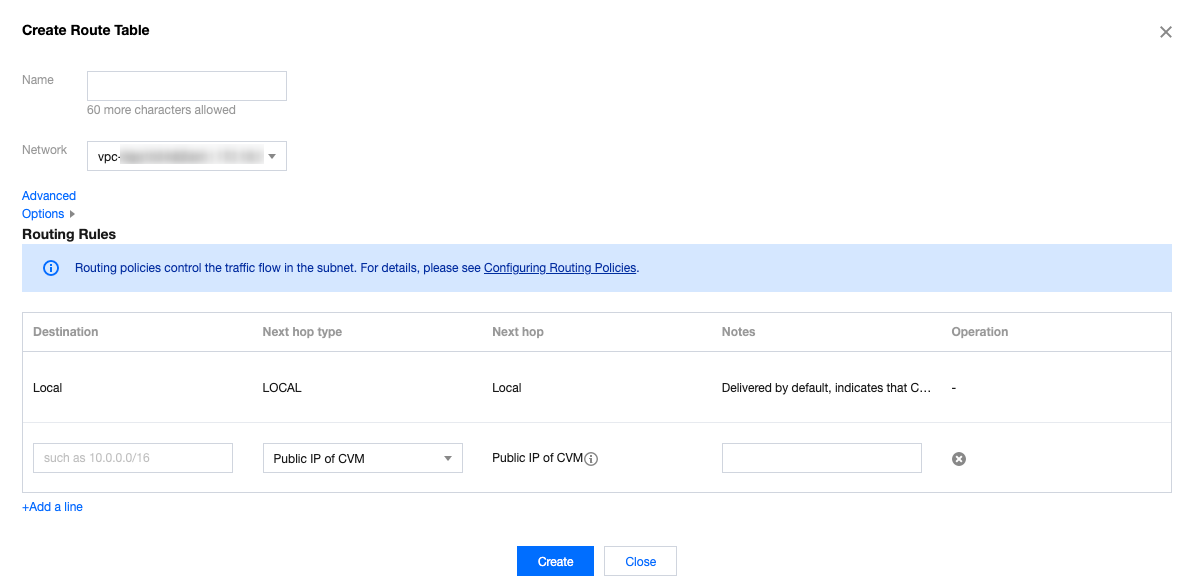
4. In the pop-up window, enter the route table name, select the VPC to which the route table belongs, and configure a routing policy.
Note:
You can configure routing policies when creating a route table. Alternatively, after a route table is created, you can click the route table ID to go to the details page of the route table and click + Add routing policies to configure routing policies.
Configuring a routing policy :
Parameter | Description |
Destination | Specify the destination IP range to which you want to forward traffic. Configure it as follows: Enter an IP range. If you want to enter a single IP, set the mask to 32 (for example, `172.16.1.1/32`). The destination cannot be an IP range of the VPC where the route table resides, because the local route already allows private network interconnection in this VPC. Note: If you have deployed a TKE service in the VPC, when you configure the routing policy of the route table for the VPC subnet, the destination cannot be within the CIDR block range of the VPC, nor can it contain the container IP range. For example, if a VPC CIDR block is `172.168.0.0/16` and the container network CIDR block is `192.168.0.0/16`, when you configure the routing policy for the VPC subnet, the destination IP range cannot be in the range of `172.168.0.0/16`, and cannot contain `192.168.0.0/16`. |
Next hop type | Indicates the egress of data packets for the VPC. Supported types: NAT Gateway: the traffic directed to a destination IP range is forwarded to a NAT Gateway. Peering connections: The traffic directed to a destination IP range is forwarded to the VPC peer of a peering connection. Direct Connect Gateway: the traffic directed to a destination IP range is forwarded to a direct connect gateway. High Availability Virtual IP: the traffic directed to a destination IP range is forwarded to an HAVIP. VPN Gateway: the traffic directed to a destination IP range is forwarded to a VPN gateway. Public IP of CVM: the traffic directed to a destination IP range is forwarded to the public IP (including EIPs) of a CVM instance in the VPC. CVM: the traffic directed to a destination IP range is forwarded to a CVM instance in the VPC. CDC local gateway: Tencent Cloud CDC communicates with the customer IDC by using a CDC local gateway. |
Next hop | Specify the next hop instance to which the traffic is redirected, such as a gateway or CVM IP. |
Notes | Enter the route description for resource management. This parameter is optional. |
New Line | You can click + New line to configure multiple routing policies, or click the deletion icon in the Operation column to delete the unnecessary routing policies. A custom route table should contain at least one routing policy. |
5. After completing the configurations, click Create. Then the route table will be displayed in the list.

Related Operations
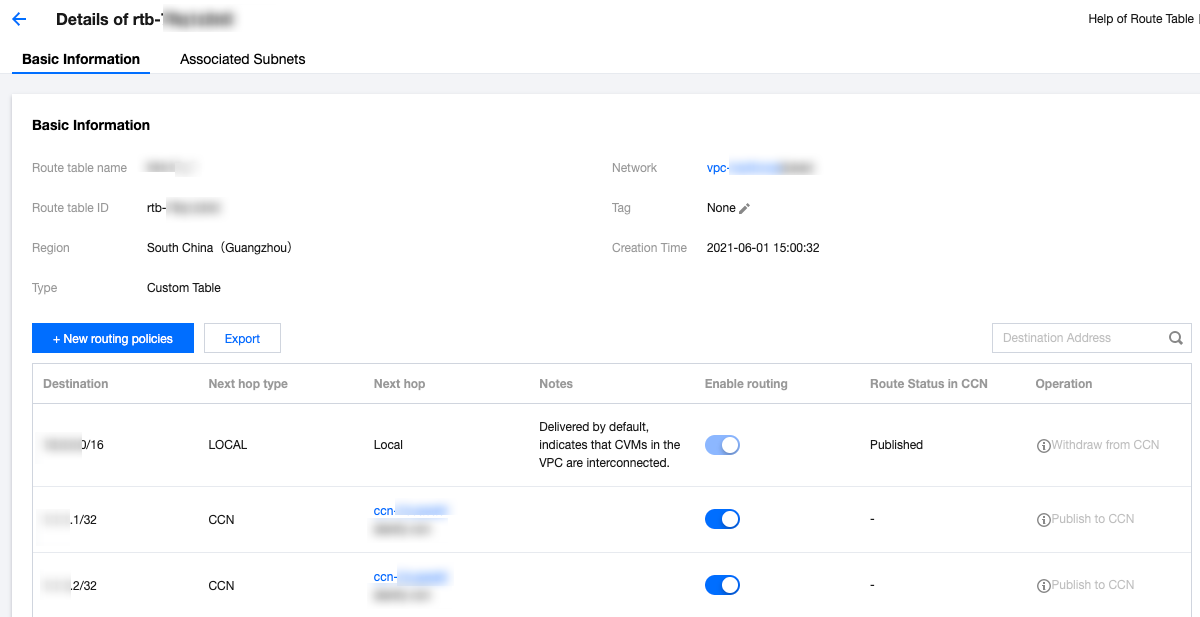
Routing policies whose Next hop type is High availability virtual IP or CVM in the default or custom route tables can be manually published to or withdrawn from CCN.
1. Click the route table ID to enter the details page.
2. You can perform the following operations as needed:
Click Publish to CCN to publish an enabled routing policy to CCN.
Click Withdraw from CCN to withdraw a custom routing policy that has been published to CCN.
Click Edit to modify a routing policy.
Click Delete to delete a disabled routing policy.
フィードバック