TencentDB for SQL Server provides only license-included instances. This means that after an instance is created, it is licensed for the corresponding version of Microsoft SQL Server software. Bring-your-own-license (BYOL) is not supported.
To ensure instance stability and security, TencentDB for SQL Server imposes certain usage constraints. For details, see the table below.
TencentDB for SQL Server instances are available in three editions: single-node (formerly Basic Edition), two-node (formerly HA/Cluster Edition), and multi-node. Each edition has different features. For details, see Features and Differences.
Note:
TencentDB for SQL Server does not support accessing external applications from a database instance. Database instances can only be accessed by external applications.
If you have other usage restriction questions, you can submit a ticket for consultation.
To ensure instance stability, do not increase the database limit when the instance has only 1 CPU core. Keep the limit at 70.
The maximum number of databases you can create for an instance of any specification depends on the value of the `max worker threads` parameter. If this parameter uses the default value of 0, the maximum number of databases is 80 for instances of any edition and specification. If you set this parameter to a value greater than or equal to 20000, the maximum number of databases depends on the number of CPU cores of the instance. You can refer to the calculation formula below. For how to set the parameter, see Setting Instance Parameters.
The SQL Server 2008 R2 Enterprise edition does not support increasing the database limit. Its maximum number of databases is 70. For other SQL Server instances, the maximum number of databases is limited by the number of CPU cores. The detailed calculation formula is as follows:
Multi-node
2017 Enterprise
2019 Enterprise
2022 Enterprise
2025 Enterprise
The maximum number of databases is related to the instance CPUs. For instances with 4 or fewer CPU cores, the maximum number of databases is 80. For instances with 8 or more CPU cores, the maximum number of databases is 100.
Two-node (formerly HA/Cluster Edition)
2012 Standard/Enterprise
2014 Standard/Enterprise
2016 Standard/Enterprise
Maximum number of databases:
The maximum number of databases is the smaller value between X and 300, where X is calculated as follows: take the square root of the number of CPU cores, round the result to one decimal place, multiply by 40, and then add 80. For example, an SQL Server 2014 Enterprise instance (4 cores, 16 GB) supports a maximum of 160 databases.
The maximum number of databases is related to the instance CPUs. For instances with fewer than 8 CPU cores, the maximum number of databases is 80. For instances with 8 or more CPU cores, the maximum number of databases is 100.
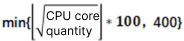
The maximum number of databases is the minimum value between N and 400, where N is calculated as follows: take the square root of the number of CPU cores, round down the result, and then multiply by 100. For example, an SQL Server 2017 Enterprise instance (4 cores, 16 GB) supports a maximum of 200 databases.
Maximum Number of Databases by Instance CPU Cores and Edition
Maximum Number of Databases for Single-node (formerly Basic Edition)
Maximum Number of Databases for Dual-node (formerly HA Edition/Cluster Edition)
Maximum number of databases in multi-node edition
Number of CPU Cores
Single-Node Windows Server 2008 R2 Enterprise Edition
Single-Node Windows Server 2012/2014/2016/2017/2019/2022/2025 Enterprise Edition
2
80
100
4
80
200
8
80
200
12
80
300
16
80
400
24
80
400
32
80
400
48
80
400
64
80
400
Number of CPU Cores
Two-Node Windows Server 2008 R2/2012/2014/2016 Enterprise Edition
Two-Node Windows Server 2017/2019/2022/2025 Enterprise Edition
1
70
70
2
136
176
4
160
200
8
193
233
12
218
258
16
240
280
24
275
315
32
300
340
48
300
340
64
300
340
96
300
340
Number of CPU Cores
Multi-Node 2017/2019/2022/2025 Enterprise Edition
2
80
4
80
8
100
12
100
16
100
24
100
32
100
48
100
64
100
96
100
Link server Limitations
Link server is not supported between other clouds/self-built environments and Tencent Cloud. It is supported only within the Tencent Cloud private network. However, the following restrictions apply to TencentDB for SQL Server instance architectures:
1. Cross-Architecture Scenarios
Cross-Architecture Direction
Description
Changing from a two-node instance to a single-node instance
Not supported.
Changing from a single-node instance to a dual-node instance
Not supported.
Changing from a local disk instance to a cloud disk instance
Not supported.
Changing from a cloud disk instance to a local disk instance
Not supported.
2. Between Two-Node Instances
Cross-Architecture Direction
Description
Two-node local disk instance → Two-node local disk instance
Regions within the Chinese mainland can communicate with each other, regions outside the Chinese mainland can communicate with each other, but regions within the Chinese mainland and regions outside the Chinese mainland cannot communicate with each other.
Two-node cloud disk instance → Two-node cloud disk instance
Communication is supported only within the same region.
3. Between Single-Node Instances
It is supported only when the source and target are the same instance.