Disk Encryption
ダウンロード
フォーカスモード
フォントサイズ
This document describes the disk encryption feature of TencentDB for SQL Server.
Feature Overview
Disk encryption is a technology used to protect the security of data stored on disks (including cloud disks). It prevents unauthorized access and data leakage by encrypting the data on disks. TencentDB for SQL Server provides the disk encryption feature. When data stored on disks needs to be encrypted and protected to meet security or compliance requirements, you can enable the disk encryption feature to effectively protect data security. Enabling the disk encryption feature will not affect your business, and no transformation is required for applications.
Support
Supported region of this feature: Shanghai, Beijing, Guangzhou, Hong Kong, Singapore, Seoul, Tokyo, Jakarta, Frankfurt.
Supported database editions of this feature: SQL Server 2019/2022/2025 Enterprise.
Supported instance architectures and types of this feature: Architectures: single-node, two-node, and multi-node; types: primary instance and read-only instance. Business intelligence servers are not supported.
Supported storage types of this feature: cloud disks of the following types: Premium Disk, Cloud SSD, Balanced SSD, and Enhanced SSD.
Note:
Users who satisfy all the above conditions can apply for whitelisting and use the disk encryption feature. Disk encryption is not supported in other regions or for other versions. You can submit a ticket for application if needed.
Key
After the disk encryption feature is enabled, the privacy of data is effectively protected by using the infrastructure provided by Tencent Cloud Key Management Service (KMS). Tencent Cloud uses the industry-standard AES-256 algorithm and data keys to encrypt your data on cloud disks. The system will automatically create a customer master key (CMK) specially used for cloud disk data encryption in your corresponding region of KMS when you use disk encryption for the first time. The key is unique and is stored on KMS protected under strict physical and logical security controls.
Billing Instructions
Currently, disk encryption is a free feature. Data read/write and storage on cloud disks will not incur fees.
Note
This feature can only be enabled when an instance is created. It cannot be enabled after an instance is created.
This feature cannot be disabled once it is enabled.
The Disk Encryption field is displayed on the details page only for instances with the disk encryption feature enabled.
This feature currently only supports using keys provided by Tencent Cloud. User-defined keys are not supported.
Enabling Disk Encryption
1. Log in to the TencentDB for SQL Server purchase page.
2. Select Premium Disk, Cloud SSD, Balanced SSD, or Enhanced SSD for the Storage Type field.
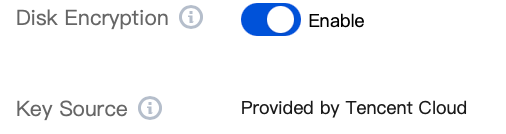
3. Click the button next to Disk Encryption and retain the default option Provided by Tencent Cloud for Key Source.
Note:
Viewing the Disk Encryption Status
1. Log in to the TencentDB for SQL Server console.
2. Select a region and in the instance list, click the Instance ID or Manage in the Operation column for the target instance.
3. In the instance information area on the right side of the Instance Details page, you can view the Disk Encryption field to check whether the disk encryption feature is enabled for an instance.
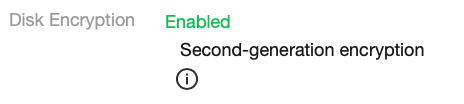
If the Disk Encryption field is displayed and the encryption status is on, the disk encryption feature is enabled for this instance. The second-generation encryption technology ENCRYPT_V2 is used, featuring higher efficiency and better performance.
If the Disk Encryption field is not displayed, the disk encryption feature is not enabled for this instance.
Related APIs
API | Description |
This API is used to create a read-only instance (cloud disk). | |
This API is used to create a Basic Edition instance (cloud disk). | |
This API is used to create a highly available instance (cloud disk). | |
This API is used to query attributes of an instance. |
フィードバック