tencent cloud
プロモーション
製品
ソリューション
価格
パートナー
マーケットプレイス
詳しく知る
Prev
Next
Elastic Network Interface
Product Introduction
Product Overview
Key Concepts
Usage Limits
Related Products
Purchasing Guide
Billing Overview
Purchasing Method
Operation Guide
Operations Overview
Viewing ENI Information
Creating an ENI
Configuring Security Groups
Binding and Configuring an ENI
Setting Service Level
Deleting an ENI
Unbinding from a CVM
Binding Secondary Private IP Addresses
Releasing Secondary Private IP Addresses
Binding EIPs
Unbinding EIPs
Modifying Primary Private IPs
API Documentation
Contact Us
Glossary
ドキュメント
Elastic Network Interface
Operation Guide
Viewing ENI Information
Viewing ENI Information
PDF
フォーカスモード
フォントサイズ
最終更新日: 2024-10-23 10:24:13
1.
Log in to the
VPC Console
.
2.
Choose
IP and ENI
->
ENI
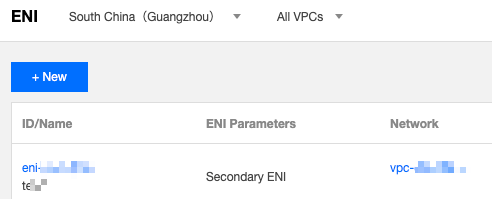
in the left sidebar to go to the ENI list page.
3.
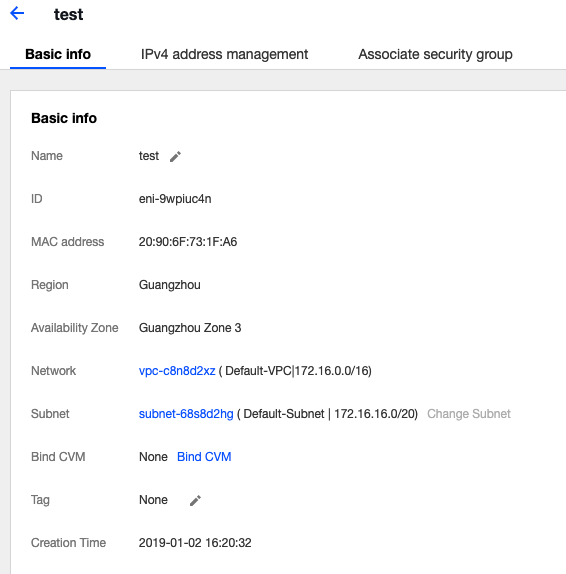
Locate the ENI and click its ID/Name to enter the details page.
前の記事へ: Operations Overview
次の記事へ: Creating an ENI
ヘルプとサポート
この記事はお役に立ちましたか?
はい
いいえ
営業担当者に
お問い合わせ
いただくか
チケットを提出
してサポートを求めることができます。
フィードバック