An HTTP-triggered function runs in the image environment built in it based on the standard programming language. You must create an executable file scf_bootstrap to start your web server, and then package the file with your code files for deployment to create an HTTP-triggered function. During actual request processing, your web server will receive HTTP requests by listening on the specified 9000 port, forward them to the backend service for logic processing, and return the responses to end users.
Bootstrap File Usage
scf_bootstrap is the bootstrap file of your web server and ensures that your web service can normally start and listen on requests. In addition, you can customize scf_bootstrap to implement more personalized operations as needed:
Set the paths and environment variables of the runtime's dependency libraries.
Load the dependency library files and extensions of the custom programming language and version. If there are dependent files that need to be pulled in real time, you can download them to the /tmp directory.
Parse the function file and execute the global operations or initialization processes (such as initializing SDK client (HTTP client) and creating database connection pool) required before function invocation, so they can be reused during invocation.
Start plugins such as security and monitoring.
Note:
SCF only supports reading scf_bootstrap as the bootstrap file name, and other names cannot start the service normally.
In the Tencent Cloud standard environment, only the /tmp directory is readable and writable. When outputting files, select the /tmp path; otherwise, the service will exit abnormally due to the lack of write permission.
Prerequisites
The permission to execute is required. Make sure that your scf_bootstrap file has the 777 or 755 permission; otherwise, it cannot be executed due to insufficient permissions.
It can run on SCF's operating system (CentOS 7.6).
If the bootstrap file is a shell script, it must have #!/bin/bash in the first line.
The bootstrap command must be the absolute path /var/lang/${specific_lang}${version}/bin/${specific_lang}; otherwise, it cannot be invoked normally. For more information, see Absolute Paths in Standard Language Environments.
The recommended listening address is 0.0.0.0, and the internal loopback address 127.0.0.1 cannot be used.
The file must end with an LF carriage return.
Creation Method
Local package upload
Quick creation in console
You can write your scf_bootstrap file locally, make sure that the file permission meets the requirements, package it with the project code, and deploy them together on the HTTP-triggered function.
You can create an HTTP-triggered function in the SCF console.
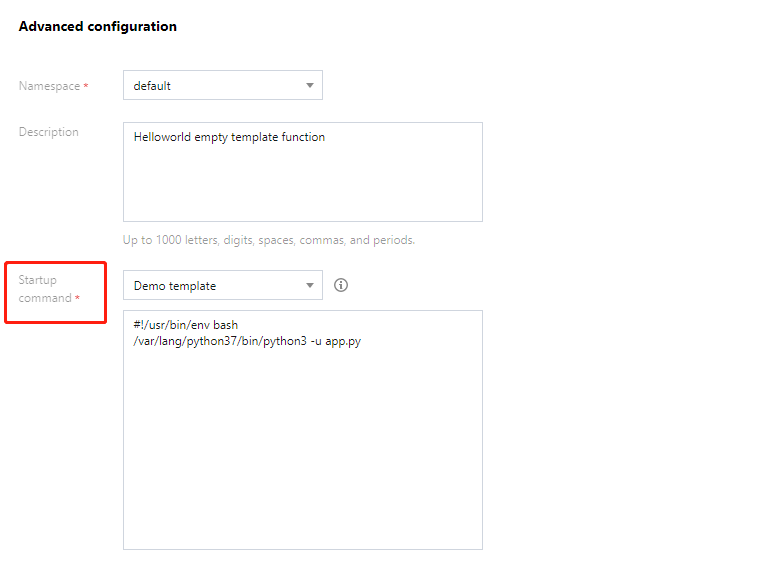
You can edit your bootstrap file in Advanced configuration > Startup command during function creation. SCF provides a general enablement template for commonly used web frameworks. You can also modify it as needed as shown below:
After the creation is completed, the console will automatically package your code and scf_bootstrap for deployment.
Note:
The configuration in the console takes effect only if no scf_bootstrap is detected in the uploaded code. If there is an scf_bootstrap file in your project, the system will deploy the function based on it.
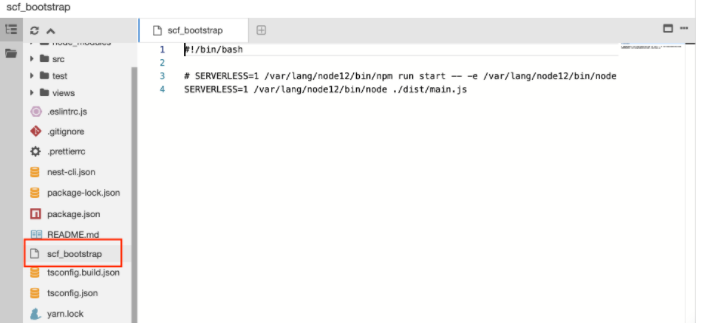
After the deployment is completed, you can view and edit the scf_bootstrap file in the code editor as shown below:
Troubleshooting common errors
Run the scf_bootstrap file as the container bootstrap command. You must ensure that the container can normally start and run the code logic. Therefore, make sure that your bootstrap command is written correctly. If you encounter a 405 error code, it is usually caused by the failure to run the file; therefore, also make sure that your bootstrap file is written correctly.
Absolute Paths in Standard Languages Environments
Language Version
Absolute Path
Node.js 16.13
/var/lang/node16/bin/node
Node.js 14.18
/var/lang/node14/bin/node
Node.js 12.16
/var/lang/node12/bin/node
Node.js 10.15
/var/lang/node10/bin/node
Python 3.7
/var/lang/python37/bin/python3
Python 3.6
/var/lang/python3/bin/python3
Python 2.7
/var/lang/python2/bin/python
PHP 8.0
/var/lang/php80/bin/php
PHP 7.4
/var/lang/php74/bin/php
PHP 7.2
/var/lang/php7/bin/php
PHP 5.6
/var/lang/php5/bin/php
Java 11
/var/lang/java11/bin/java
Java 8
/var/lang/java8/bin/java
Common Web Server Bootstrap Command Templates
Node.js
Python
PHP
#!/bin/bash
exportPORT=9000
/var/lang/node12/bin/node app.js # Change to your own bootstrap function name
#!/bin/bash
exportPORT=9000
/var/lang/python3/bin/python3 app.py # Change to your own bootstrap file name
#!/bin/bash
/var/lang/php7/bin/php -c /var/runtime/php7 -S 0.0.0.0:9000 hello.php # Change to your own entry function name