Viewing and Manually Resetting a Consumption Offset
ダウンロード
フォーカスモード
フォントサイズ
Scenarios
A consumption offset represents the position of message consumption of a consumer. In certain business scenarios, such as data processing exceptions, business logic changes, or system Ops requirements, it may be necessary to reset the consumption offset to consume specific messages again or skip them.
Constraints and Limitations
Resetting a consumption offset may cause duplicate consumption of messages. Proceed with caution.
Prerequisites
TDMQ for CKafka (CKafka) does not support directly resetting a consumption offset when the consumer group is active. Therefore, before resetting the consumption offset, stop all consumption activities for the target consumer group. After stopping the consumer client, you need to wait for the server to recognize that the consumer is offline (the waiting period is determined by the ConsumerConfig.SESSION_TIMEOUT_MS_CONFIG parameter; it is 1000 milliseconds by default).
Viewing a Consumption Offset
1. Log in to the CKafka console.
2. In the left sidebar, click Instance List, select the target region, and click the ID of the target instance to go to the basic instance information page.
3. On the basic instance information page, click the Consumer Group tab to view the list of consumer groups under the instance.
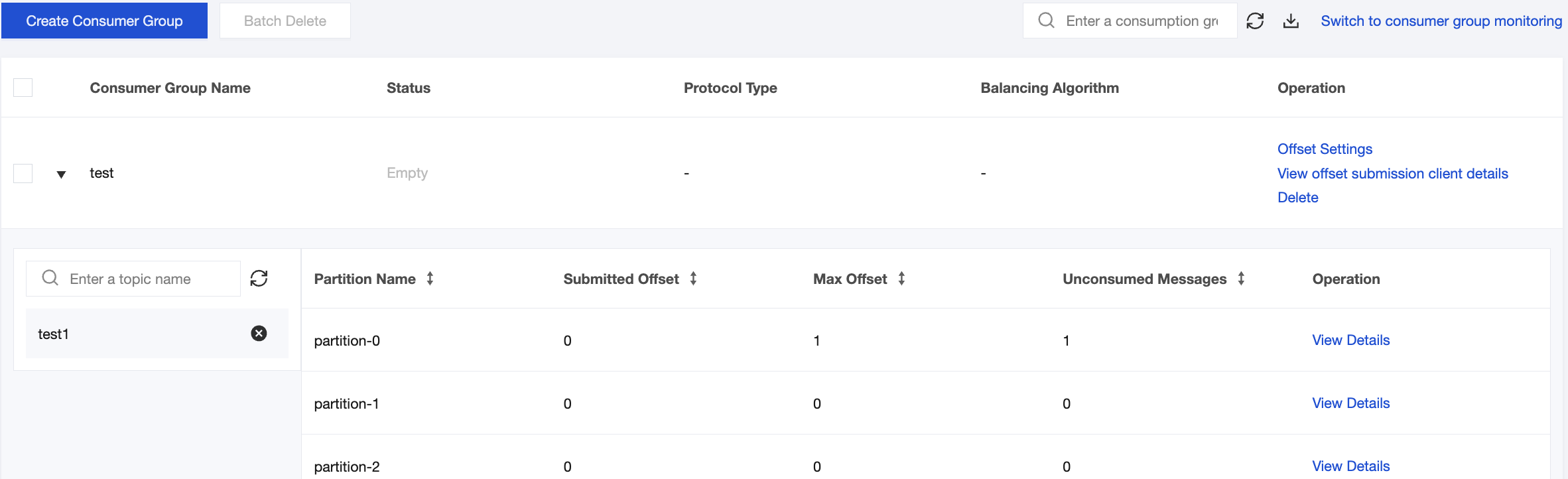
4. Click the small triangle on the left side of the Consumer Group Name column to view information about topics subscribed to by that consumer group, as well as the information about consumption offsets.
Resetting a Consumption Offset
1. Log in to the CKafka console.
2. In the left sidebar, click Instance List, select the target region, and click the ID of the target instance to go to the basic instance information page.
3. On the basic instance information page, click the Consumer Group tab to view the list of consumer groups under the instance.
4. Click Offset Settings in the Operation column of the target consumer group, and select a reset method in the Offset Settings pop-up window.
Set based on Topic: Reset all partitions of an entire topic uniformly. This is suitable for scenarios such as batch resetting consumption offsets and setting consumption offsets by business.
Set based on Partition: Reset a single or multiple specific partitions of a topic. This is suitable for scenarios where certain partitions require special handling, such as resolving data skew or addressing issues in specific partitions.
5. Click Next, and select the object for which the consumption offset needs to be reset in the drop-down list.
Set based on Topic: Select the topic to be reset. Multiple selection is supported. If no selection is made, the offsets of all topics under the instance will be reset by default.
Set based on Partition: Select the partition to be reset. Multiple selection is supported. If no selection is made, the offsets of all partitions under the topic will be reset by default.
6. Click Next to specify the offset.
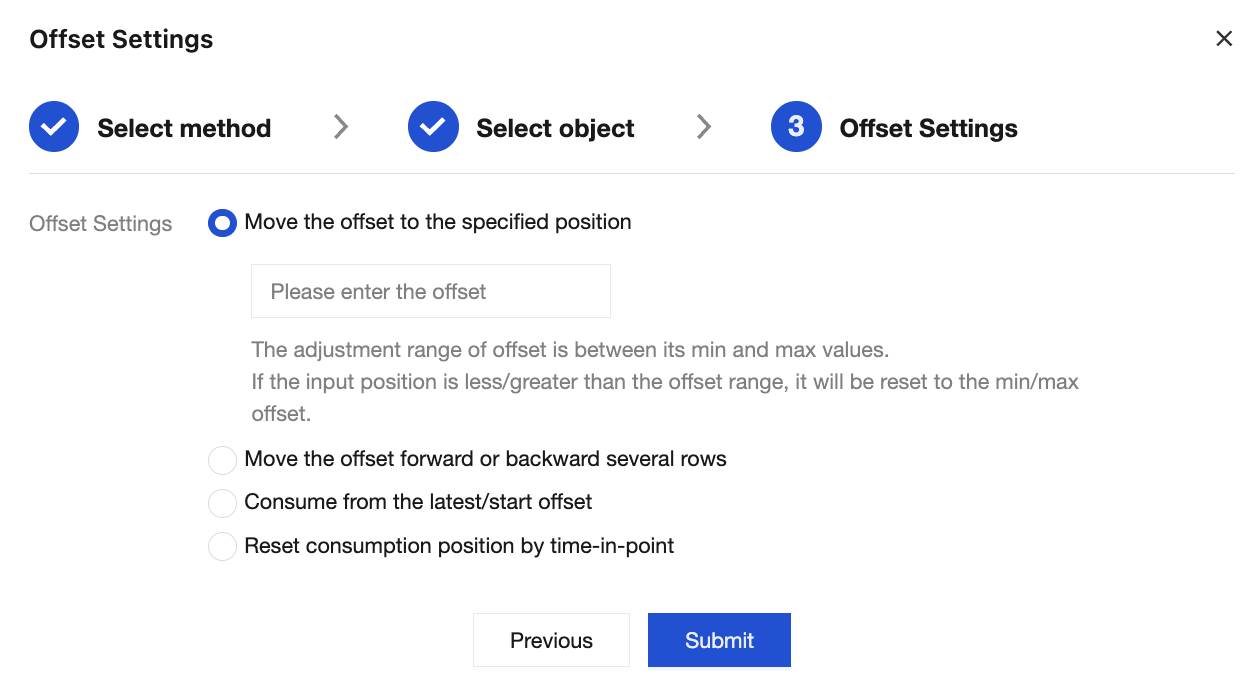
Move the offset to the specified position: Adjust the consumption offset precisely to a specified offset position. The adjustment range of the offset is between the minimum offset and the maximum offset. If the offset input is less/greater than the offset range, it will be reset to the minimum/maximum offset.
Move the offset forward or backward several rows: Relatively adjust offsets based on their current positions. Input a negative number to move offsets forward or a positive number to move them backward. The final position is also limited by the minimum/maximum offsets.
Start conConsume from the latest/start offset: Quickly reset the consumption offset to the start or end position. "Latest" means starting consumption from the most recent message (skipping all backlogged messages), and "earliest" means starting consumption from the very first message.
Reset consumption position by time-in-point: Locate the offset based on a timestamp, allowing specification of the timestamp accurate to the second.
7. Click Submit to complete the reset.
フィードバック