This document uses the Python client as an example to describe how to access TDMQ for CKafka (CKafka) in the public network by using the SASL_SSL method and send and receive messages.
1.1 On the Instance List page, click the target instance ID to go to the instance details page.
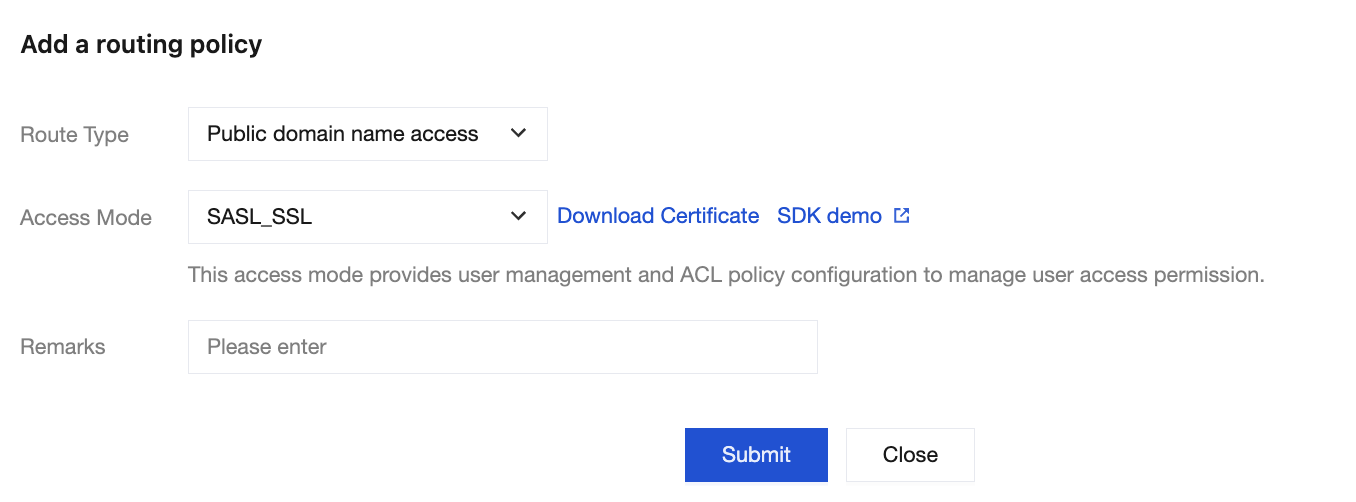
1.2 Choose Basic Info > Access Mode, and click Add a routing policy. In the pop-up window, choose Routing Type: Public Network Domain Name Access > Access Method: SASL_SSL.
2. Create a role.
Choose ACL Policy Management > User Management. On the displayed page, create a role and set the password.
3. Create a Topic.
On the Topic List page in the console, create a topic (see Creating a Topic).
Run the following command to perform the installation:
pip install kafka-python
Step 2: Producing Messages
1. Modify the configuration parameters in the message production program producer.py.
producer = KafkaProducer(
bootstrap_servers =['xx.xx.xx.xx:port'],
api_version =(1,1),
#
# SASL_SSL access in the public network.
#
security_protocol ="SASL_SSL",
sasl_mechanism ="PLAIN",
sasl_plain_username ="instanceId#username",
sasl_plain_password ="password",
ssl_cafile ="CARoot.pem",
ssl_check_hostname =False,
)
message ="Hello World! Hello Ckafka!"
msg = json.dumps(message).encode()
producer.send('topic_name', value = msg)
print("produce message "+ message +" success.")
producer.close()
Parameter
Description
bootstrap_servers
Access network. On the Basic Info page of the instance in the console, select the Access Mode module and copy the network information from the Network column.
sasl_plain_username
Username, in the format of instance ID + # + username. The instance ID can be obtained from the basic information on the instance details page in the CKafka console. Choose ACL Policy Management > User Management to create a user and set the username.
sasl_plain_password
User password. On the instance details page in the CKafka console, choose ACL Policy Management > User Management to create a user and set the password.
topic_name
Topic name. Copy the name on the Topic List page in the console.
CARoot.pem
The certificate path required when the SASL_SSL access method is used.
2. Compile and run producer.py.
3. View the running results.
4. On the Topic List page in the CKafka console, select the target topic, and choose More > Message Query to view the message just sent.
Step 3: Consuming Messages
1. Modify the configuration parameters in the consumption message program consumer.py.
Access network. On the Basic Info page of the instance in the console, select the Access Mode module and copy the network information from the Network column.
group_id
Consumer group ID. Define the group ID according to business requirements.
sasl_plain_username
Username, in the format of instance ID + # + username. The instance ID can be obtained from the basic information on the instance details page in the CKafka console. Choose ACL Policy Management > User Management to create a user and set the username.
sasl_plain_password
User password. On the instance details page in the CKafka console, choose ACL Policy Management > User Management to create a user and set the password.
topic_name
Topic name. Copy the name on the Topic List page in the console.
CARoot.pem
The certificate path required when the SASL_SSL access method is used.
2. Compile and run consumer.py.
3. View the running results.
4. On the Consumer Group page in the CKafka console, select the target consumer group name, enter the topic name in the Topic Name area, and click View Details to view consumption details.
Issue Troubleshooting
SSL Certificate Errors
If the following SSL CERTIFICATE_VERIFY_FAILED error is reported when the above demo is used, check whether the downloaded certificate file (SSL Certificates) is correct. If the error persists, submit a ticket and contact backend engineers for troubleshooting.
File "/root/anaconda3/envs/py39/lib/python3.9/site-packages/kafka/producer/sender-py", line 160, in run_once
self._client.poll(timeout_ms=poll_timeout_ms)
File"/root/anaconda3/envs/py39/lib/python3.9/site-packages/kafka/client_async.py", line602, in poll
self._poll(timeout / 1000)
File "/root/anaconda3/envs/py39/lib/python3.9/site-packages/kafka/client_async.py", line 648, in _poll
conn.connect()
File "/root/anaconda3/envs/py39/lib/python3.9/site-packages/kafka/conn.py", line 429, in connect
if self._try_handshake():
File "/root/anaconda3/envs/py39/lib/python3.9/site-packages/kafka/conn.py", line 508, in _try_handshake
self._sock.do_handshake()
File "/root/anaconda3/envs/py39/lib/python3.9/ssl.py", line 1343, in do_handshake
WARNING:kafka.conn:SSL connection closed by server during handshake.
INF0:kafka.conn:<BrokerConnection node_id=bootstrap-0 host=ckafka-xxx.ap-beijing.ckafka.tencentcloudmq.com:50001 <handshake>[IPv4('x.x.x.x', 50001)]>:Closing connection.Kafka Connection Error:SSL connection closed by server during handshake