Purchase Guide
ダウンロード
フォーカスモード
フォントサイズ
This document describes how to purchase and scale Tencent Cloud WAF instance packages.
Purchase a WAF Instance
1. Go to the WAF purchase page and select basic configurations such as instance types, regions, and packages based on your actual needs.
Parameter Name | Description | |
Instance type | | WAF provides two product forms: SaaS WAF and Cloud Native WAF. For specific differences, see Product Classification. |
Region | | The region to which the WAF belongs. For details about the regions supported by SaaS WAF and Cloud Native WAF, see Supported Regions. Note: Select a WAF cluster region close to the origin server. The region cannot be changed after selection. |
Package | Premium | Customized protection for small and medium-sized ordinary business sites and medium and large-sized official websites. |
| Enterprise | Suitable for large and extra-large business websites and complex business sites. |
| Ultimate | Customized protection for business sites. |
| Exclusive | Customized protection for large and extra-large business websites and complex business sites. Note: |
2. Select value-added features for WAF based on actual requirements:
Add-ons Name | Add-ons Configuration Description |
BOT management | Effectively identify and classify friendly and malicious bot programs to address issues such as resource consumption, information leakage, and ineffective marketing caused by malicious BOT crawling. After activation, the Business Expansion Package and elastic billing will be increased. For details, see Billing Overview. |
API security | To comprehensively discover and organize API assets, facilitate API asset analysis, and mitigate risks of sensitive data leakage. After activation, the Business Expansion Package and elastic billing will be increased. For details, see Billing Overview. |
Note:
The value-added features supported by different specifications vary. For specific supported features, refer to the information displayed on the Purchase page.
3. Select extended configurations for WAF based on actual requirements:
Extended Configuration Name | Extended Configuration Description |
Extra domain package | A domain package includes 10 domain protections (including 1 primary domain and 9 subdomain protections under that primary domain). Up to 500 extension packs can be purchased at a time. |
Extra capacity package | If the request or bandwidth peak of the accessed service exceeds the default specification of the package edition, you can supplement the capacity by purchasing a Extra capacity package or enable elastic billing. Each Extra capacity package supports an additional 1000 QPS service peak and 25Mbps bandwidth peak. Note: After BOT management or API security value-added capabilities are enabled, the unit price of the Extra capacity package will increase accordingly. For details, see Billing Overview. |
Hybrid cloud node | The configurable range is 1-1000 nodes. For each additional node, 5000 QPS of business protection is added to the local cluster by default, and the local cluster is extended with 10 domain packages. Note: Only cloud-native WAF instances with the Enterprise Edition or above support purchasing hybrid cloud nodes. One hybrid cloud node is included by default upon purchase. To use the hybrid cloud management feature, submit a ticket to apply for purchasing additional hybrid cloud nodes. When the number of hybrid cloud nodes > 2, the console automatically enables the hybrid cloud management feature. |
Elastic protection | If there are short-term business activities or unexpected abnormal peak traffic causing an increase in service QPS or bandwidth peaks, it is recommended that you enable elastic service QPS and bandwidth billing. After enabling, postpaid billing for exceeded QPS or bandwidth is supported to prevent instances from entering sandbox mode or bandwidth throttling due to overusage, ensuring normal business operations. Note: If both BOT management and API security are enabled, the unit price for elastic billing will increase accordingly. For details, see Billing Overview. |
Exclusive IP | Exclusive IP resources can be allocated to specific domains to meet customized requirements for business stability, network performance, and resource exclusivity. Exclusive IP does not guarantee a fixed VIP, and each enable or disable operation may result in VIP address changes. Note: Only SaaS WAF supports Exclusive IP. To enable this feature, submit a ticket or contact your dedicated account manager to apply for purchase. |
Auto-renewal | After selecting, if the account balance is sufficient, automatic monthly renewal will be performed upon expiration. |
Instance name | Customize a name for the WAF instance. The name should not exceed 60 characters and can only contain letters, numbers, underscores (_), hyphens (-), or periods (.). If left blank, the system will automatically generate one. |
Log storage package | The Log Storage Package provides 1 TB of storage capacity, supporting access log query and download for up to 180 days. If the log size exceeds 1 TB, the service will only support the logs within the 1 TB capacity. Click Activate now or Upgrade now to go to the activation or upgrade page and complete the configuration. |
Log shipping | After the target delivery configuration is enabled, you can enable the access log shipping capability for domain names. Click Activate now to go to the activation page and complete the configuration. Note: |
Note:
The extended configurations supported by different plan specifications vary. For specific supported features, refer to the information displayed on the Purchase page.
4. Select the required duration for WAF based on actual needs.
Note:
Duration:
Advanced Edition: 3 months, 6 months, 1 year, 2 years, 3 years, 5 years.
Enterprise Edition, Ultimate Edition, Exclusive Edition: 1 month, 2 months, 3 months, 6 months, 1 year, 2 years, 3 years, 5 years.
To learn about detailed configuration instructions and pricing information, see Billing Overview.
5. After configuration is completed, click Buy now. After payment is made, you can complete the purchase of the instance package.
Scale WAF Instance
Add-ons Page
Take API security as an example. If you did not select API security when purchasing the WAF instance, you can purchase this value-added configuration on demand. The same applies to the purchase of other value-added configurations such as BOT traffic management:
1. Log in to the WAF console, and choose API Security in the left sidebar.
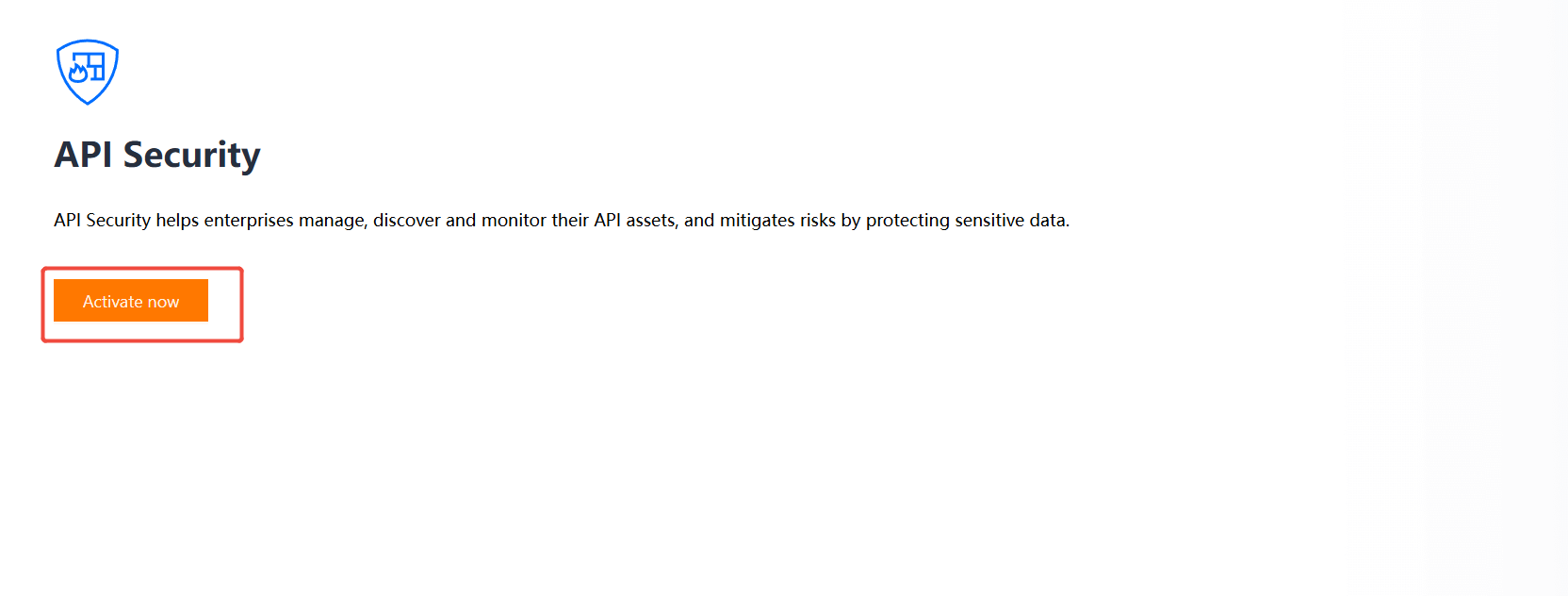
2. On the API Security page, click Activate Now.
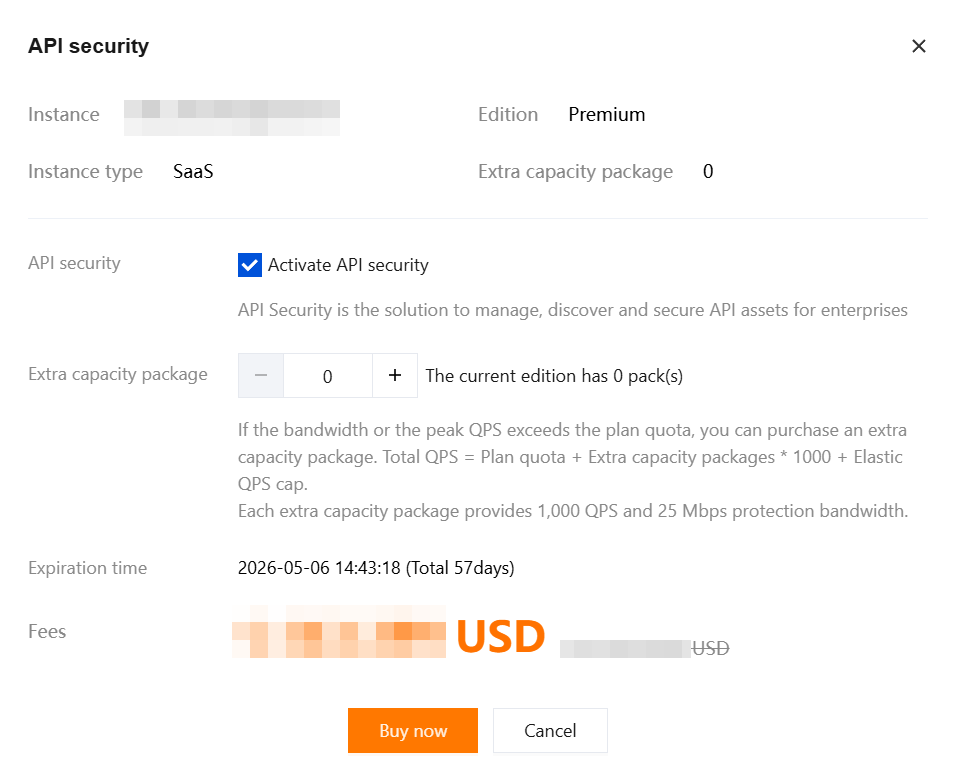
3. Based on your requirements, select the appropriate protection configuration.
Note:
The value-added features supported by different specifications vary. For specific supported features, refer to the information displayed on the Purchase page.
4. After configuration is completed, click Buy now. After payment is made, you can complete the purchase of the value-added configuration.
Instance Page
1. Log in to the WAF console, and in the left sidebar, choose Connection Management > Instance Management.
2. On the Instance Management page, select the target instance and click More. For details about related configurations, see Add-ons Table and Extended configuration Table.
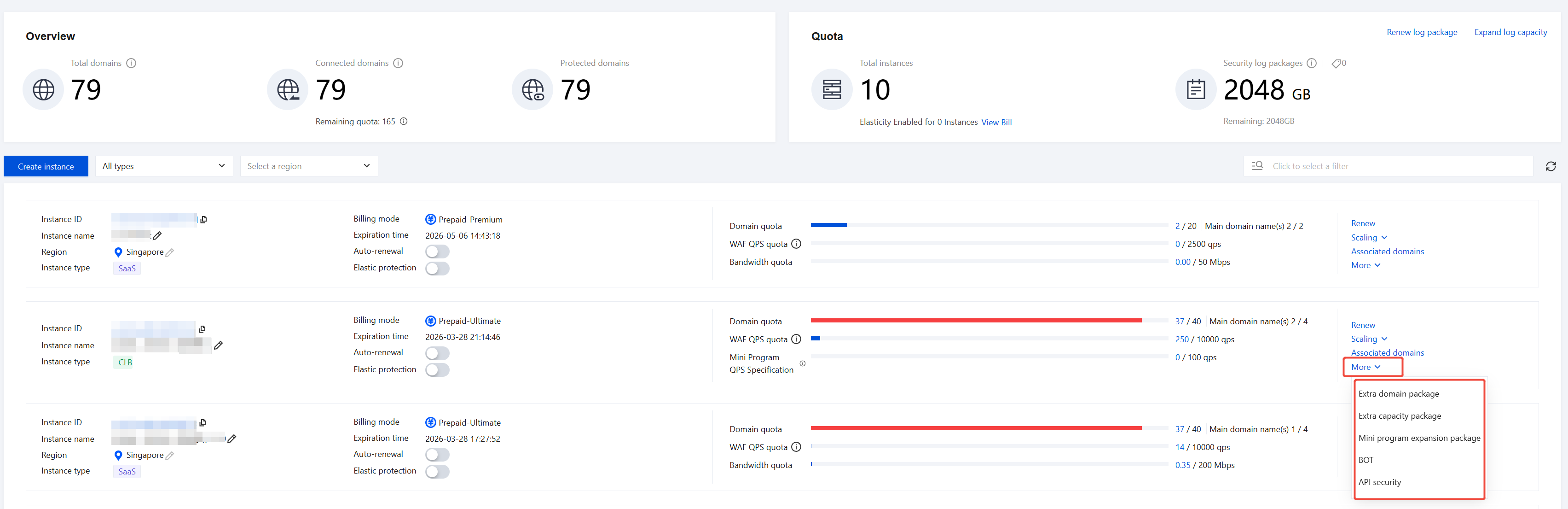
3. Click the configuration that requires scaling or value-added features to go to the purchase page for configuration.
4. After configuration is completed, click Buy now. After payment is made, you can complete the purchase of the value-added configuration or scaling configuration.
Following Steps
After purchasing Web Application Firewall, you can refer to Quick Start for initial operations with SaaS WAF and Cloud Native WAF.
フィードバック