Disassociate a Cross-account VPC
Download
포커스 모드
폰트 크기
You can associate a VPC under another account to your CCN instance. That association can be removed unilaterally by users from either account.
Note:
Once the association is removed by either side, the connection it establishes is severed. Proceed with caution.
Method 1: Remove the Association Using the CCN Console
1. Log in to the CCN console and access the CCN management page.
2. In the CCN list, click the ID of the desired CCN to open the details page.
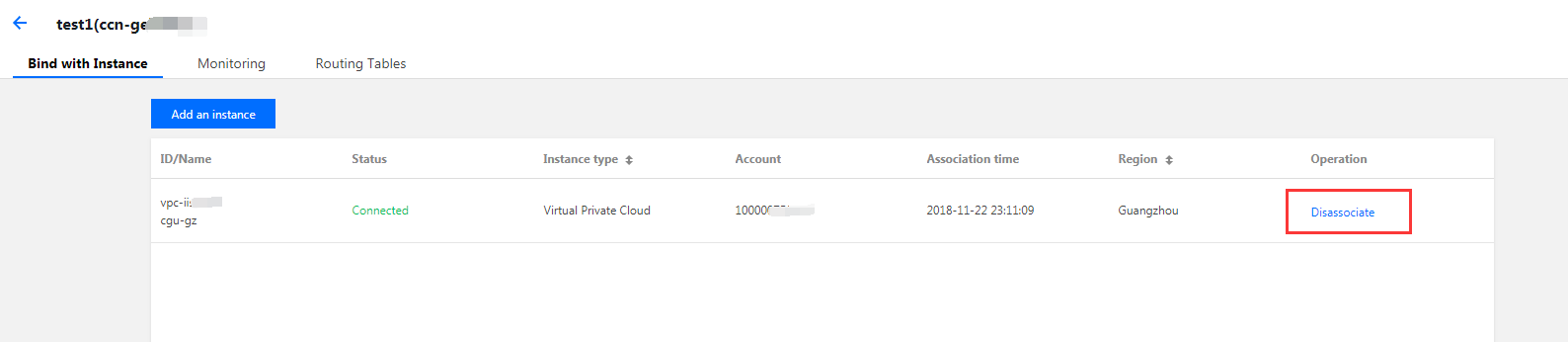
3. On the Associate with Instance tab, find the desired network instance and click disassociate in the Operations column. The Confirm to unbind this instance from the CCN page appears. Click Confirm.
Method 2: Remove the Association Using the VPC Console
1. Log in to the VPC Console and then click the ID of the desired VPC to open the details page.
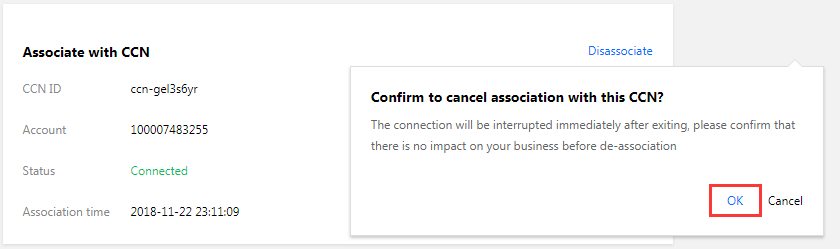
2. In the Associate with CCN section, click Disassociate. The Are you sure you want to disassociate from this CCN instance? page appears. Click Disassociate.
피드백