“Your Connection is Not Secure” is Displayed After the SSL Certificate is Installed
다운로드
포커스 모드
폰트 크기
마지막 업데이트 시간: 2024-03-06 17:56:24
Symptoms
After the SSL certificate is deployed, the
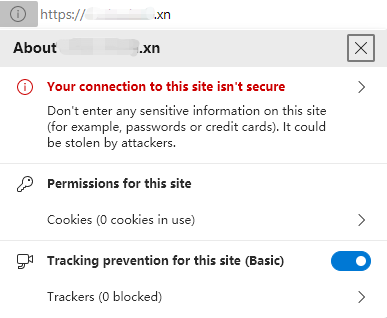
icon and the “Not Secure” warning are displayed in the address bar when you access the website over HTTPS. If you click
, a warning in red, “Your connection is not secure”, is displayed, as shown in the following figure:
Possible Causes
Expired SSL certificate: To ensure the security of private keys, SSL certificates are only effective for a period of time. According to the latest international standard, an SSL certificate can be effective for one year at most. If your SSL certificate has expired but is not replaced in time, the “Not secure” warning in red will be displayed on your website.
Insecure website content: If your website has configured an SSL certificate, but calls external resources such as images and JavaScript files that do not use HTTPS, “Your connection is not secure” may be displayed on your website. If users choose to load the insecure content, the browser will further display the red “Not Secure” warning.
Solutions
Expired SSL certificate
Replace the expired SSL certificate as soon as possible. Then, reapply for a new certificate and deploy it to the website server. The following documents are for your reference:
You can copy the external link to the address bar and append an “s” to the “http” to see whether the external link supports HTTPS access.
If yes, change “http” to “https” in the code directly.
If not, download the resources to the local server, modify the resource path to that on your server, and use a relative path such as image/button.gif, or a complete HTTPS URL such as https://***/image/button.gif.