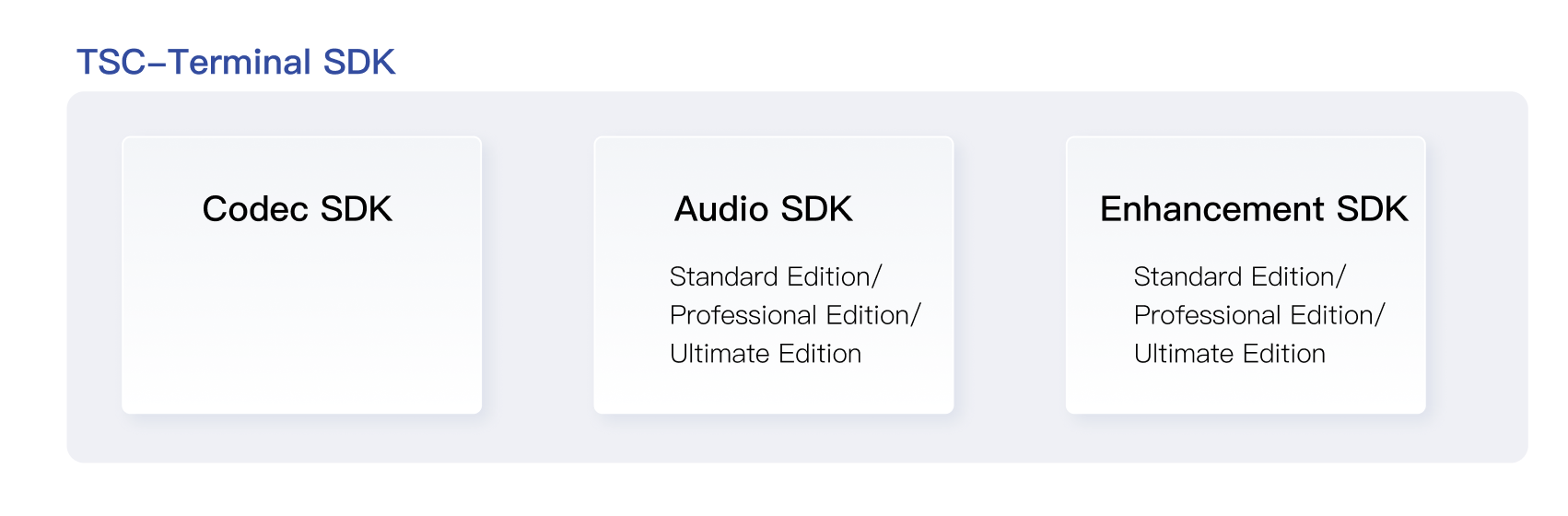
The terminal SDK is a suite of audio and video terminal product capabilities launched by Tencent Cloud. It encompasses three types of SDKs for video encoding, audio enhancement, and video enhancement. Tailored to meet diverse customer needs, it supports access from multiple terminals such as mobile, web, and PC.
Note:
The terminal SDK is an offline delivery product. For the SDK package and API details, please contact your Tencent Cloud business representative and solution architect.
Terminal Video Encoding SDK
Tencent's Top Speed Codec (TSC) terminal video encoder is designed for scenarios requiring low computational power, low latency, and high-quality image on the terminal side. Compared with hardware encoding, its advantages include:
1. Stable, reliable, and quick to start.
2. At the same quality level, it saves bitrate, enhances transmission stability, reduces downlink distribution bandwidth, and saves on storage costs.
3. At the same bitrate, it improves image quality and enhances user experience.
4. A rich set of features meets diverse business needs, such as using Regions of Interest (ROI) encoding to improve the image quality in the face region and dynamically adjusting encoding configuration to adapt to network fluctuations.
The client audio SDK provides audio encoding and audio enhancement capabilities. It achieves effects including adaptive noise suppression, acoustic echo cancellation, and automatic gain control, which can distinctly improve audio quality and eliminate echo and noise.
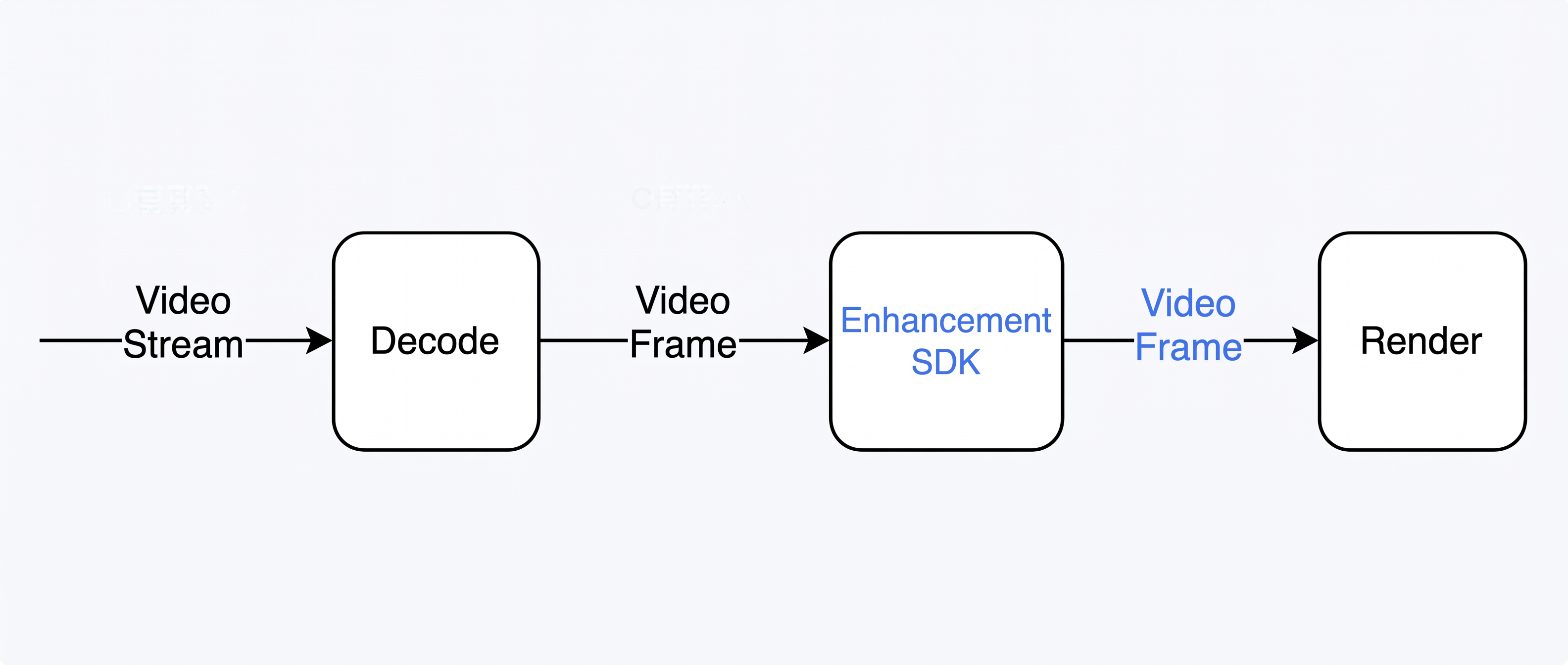
The client enhancement SDK, based on efficient image processing algorithms and AI model inference capabilities, achieves terminal video super-resolution, image quality enhancement, frame interpolation, and other features.
Compared with Video on Demand (VOD) and Cloud Streaming Services (CSS) encoding, terminal-side encoding requires different solutions.
Encoding Mode
VOD
CSS
Terminal-side Codec
Typical Business
WeTV, video account, and other mainstream on-demand services
Video account live streaming, Tencent sports live streaming, and other mainstream live streaming services
VooV Meeting, WeChat video call, and 5G remote control services
Latency Requirements
Pursues an extreme compression rate, with no latency requirements.
Pursues a high compression rate, allowing second-level latency.
Pursues a high compression rate while requiring zero latency.
Real-Time Requirements
Pursues an extreme compression rate, with no real-time requirements.
Allows multi-frame average real-time under multi-threading.
Requires real-time encoding under single-threading.
Network Condition Constraints
Encoding process is unrelated to network status, with fixed encoding configuration.
Encoding process is unrelated to network status, with fixed encoding configuration.
Encoding process is strongly related to network status, requiring dynamic adjustment of encoding configuration based on network status.
Scenario Characteristics
1 -> N, no interaction
1 -> N, no interaction
N <-> N, strong interaction
Solution
Server-side encoding
Server-side encoding
Terminal-side encoding
Tencent's Top Speed Codec (TSC) terminal video encoder is designed for scenarios requiring low computational power, low latency, and high-quality image on the terminal side. Compared with hardware encoding, its advantages include:
1. Stable, reliable, and quick to start.
2. At the same quality level, it saves bitrate, enhances transmission stability, reduces downlink distribution bandwidth, and saves on storage costs.
3. At the same bitrate, it improves image quality and enhances user experience.
4. A rich set of features meets diverse business needs, such as using Regions of Interest (ROI) encoding to improve the image quality in the face region and dynamically adjusting encoding configuration to adapt to network fluctuations.
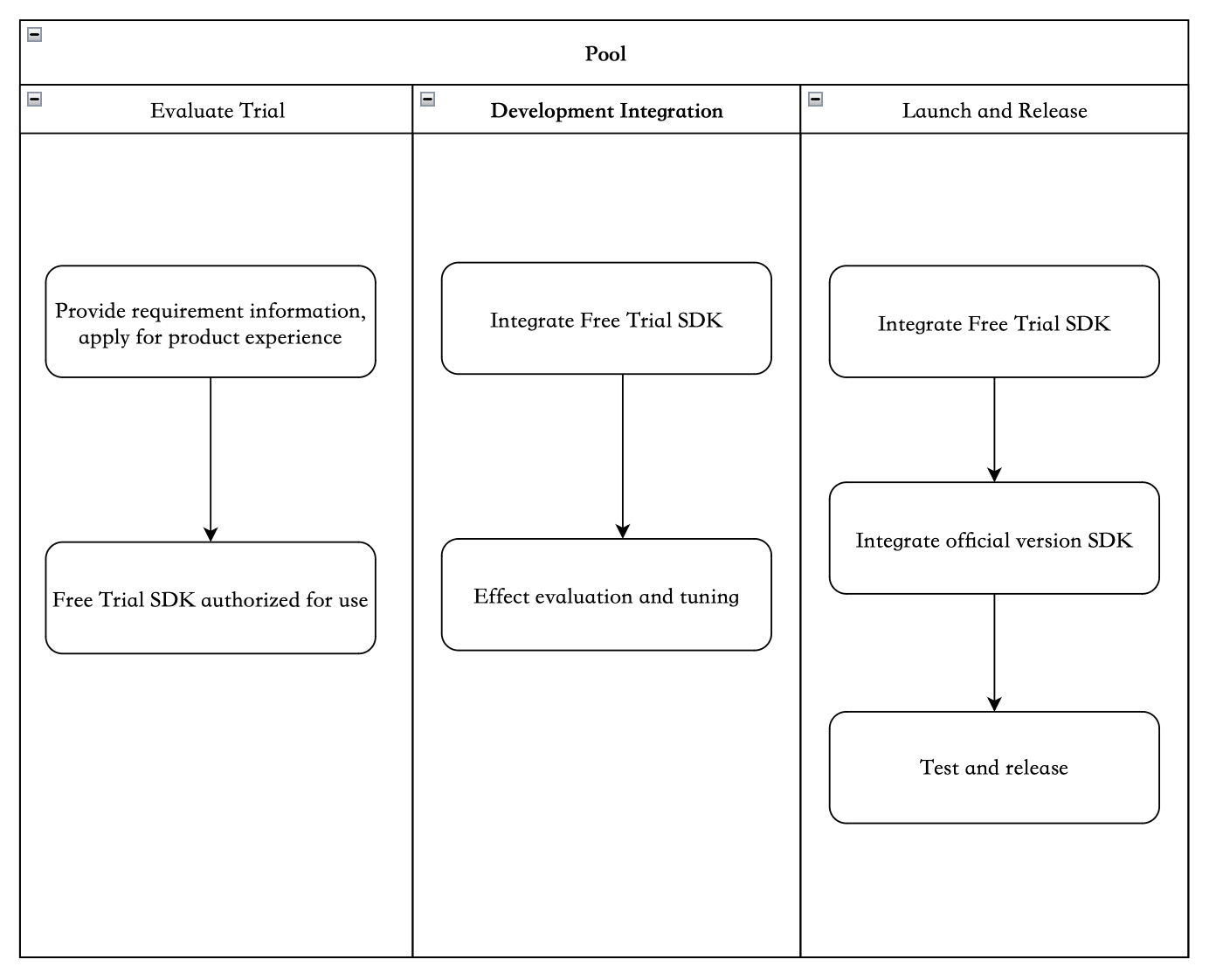
SDK Access Process
1. Evaluation and Trial: Customers provide system platform and demand information, and apply for product trial.
System platform: Android, iOS, Windows, macOS, etc.
Use cases: live streaming, VOD
Encoding specification: encoding format, resolution, frame rate, bitrate, latency requirements, etc.
Optimization objectives: bitrate savings, image quality enhancement, CPU savings, and respective assessment metrics (PSNR, SSIM, VMAF, etc)
2. Development and Integration: Integrate the beta version of the SDK into the app, for performance evaluation and custom optimization.
Based on customer effect evaluation results and specific business scenario needs, provide in-depth optimization support.
3. Launch and Release: Apply for a license, integrate the official version of the SDK with license authorization, and test and launch the app.
If the license is about to expire or has expired, you can apply for a license renewal.
SDK Integration
The video codec SDK is implemented in C/C++/Assembly, providing a unified C interface for various system platforms.
Android
Provides armv7 and armv8 version dynamic libraries, which applications integrate via the NDK.
It provides a Java API wrapper. The interface is largely consistent with Android's hardware-accelerated MediaCodec, facilitating a straightforward replacement of MediaCodec.
iOS
Provides ARMv8 and x86_64 version XCFramework.
macOS
Provides ARMv8 and x86_64 version framework.
Windows
Provides x86 and x86_64 version dynamic libraries.
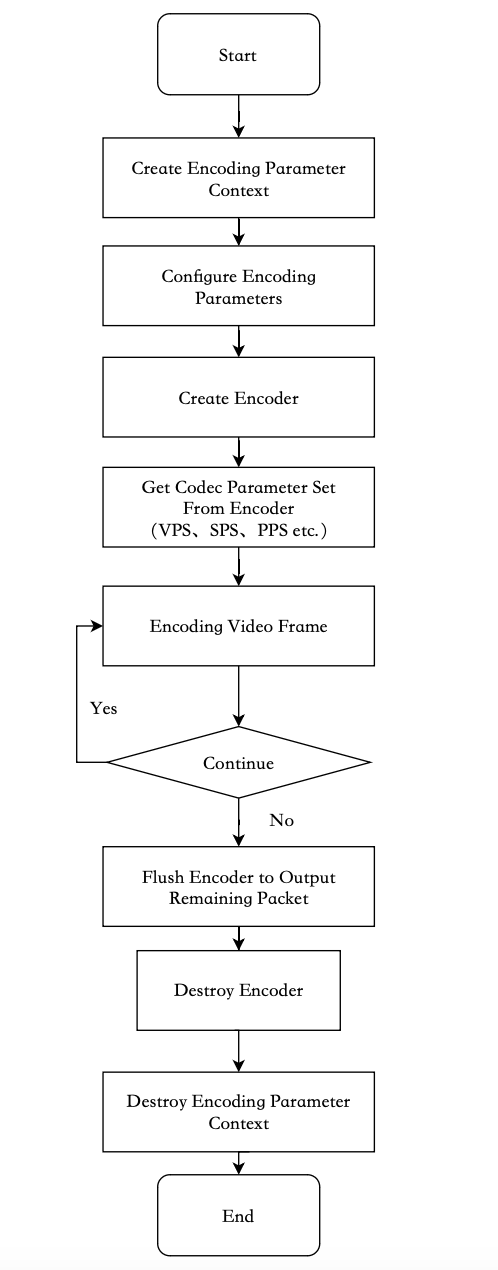
Basic Video Encoding Process
TSC Terminal Audio SDK
Product Overview
The client audio SDK provides audio encoding and enhancement capabilities, significantly improving audio quality by eliminating echo and noise.
Details of features for each edition are as follows:
Feature Point
Standard Edition
Professional Edition
Premium Edition
Acoustic Echo Cancellation
Supported
Supported
Supported
Automatic Gain Control
Supported
Supported
Supported
Adaptive Noise Suppression
Supported
Supported
Supported
Echo Cancellation Music Mode
-
Supported
Supported
Volume Equalization
-
Supported
Supported
AI Intelligent Noise Reduction
-
Supported
Supported
Audio Encoding
-
-
Supported
AI Codec
-
-
Supported
Real-Time Communication Audio 3A
Audio 3A technology is a set of fundamental features in audio signal processing. It is commonly used in real-time communication systems, such as video conferencing, calls, and live streaming with co-hosts, to ensure high-quality transmission of audio signals, thereby providing better communication quality and audio listening experience. The 3A respectively stands for Adaptive noise Suppression (ANS), Acoustic echo cancellation (AEC), and Automatic gain control (AGC).
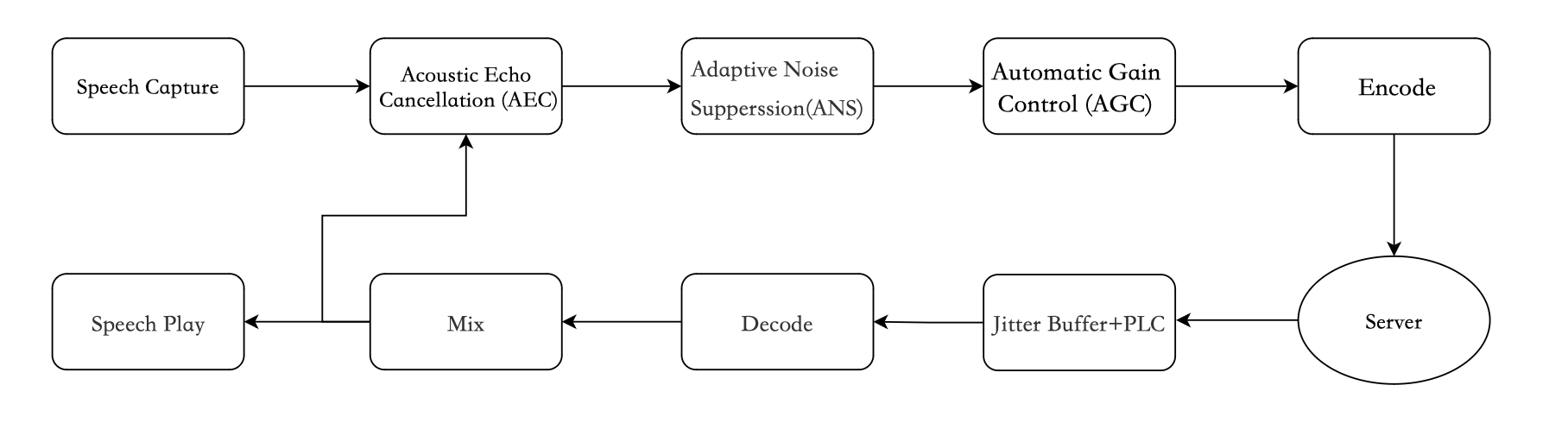
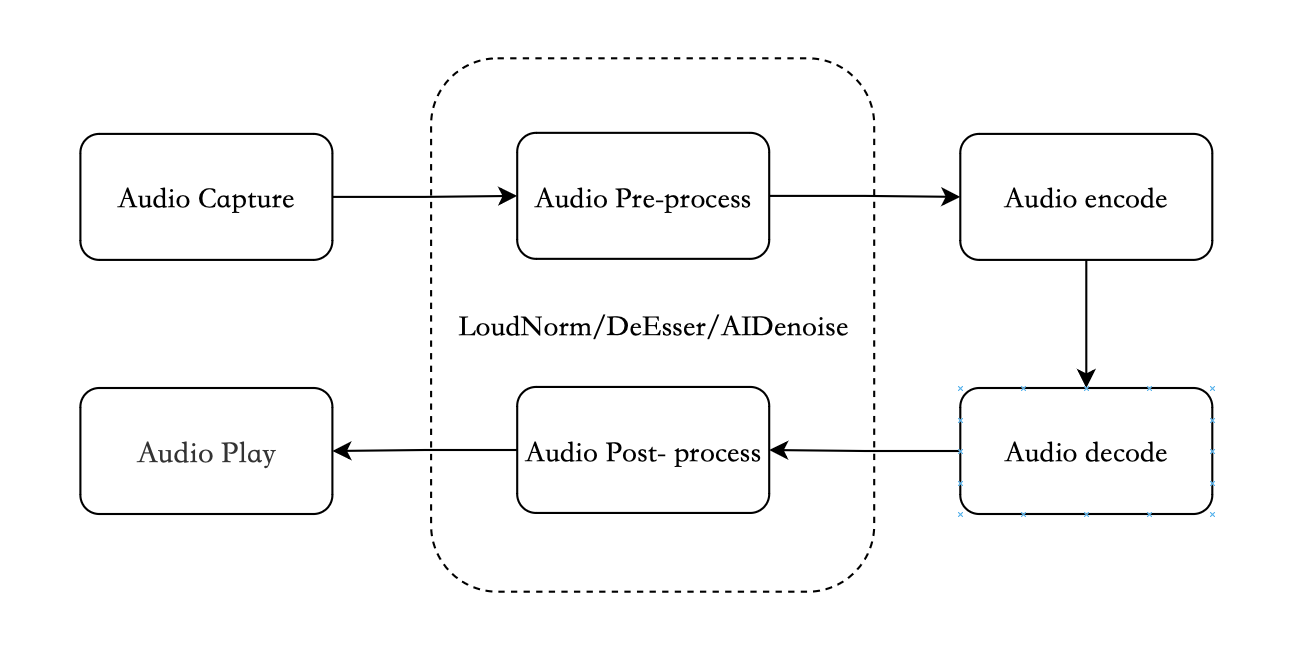
Real-time communication audio link
Adaptive noise suppression (ANS)
The main feature of ANS is to eliminate the background noise components in the voice signal, reduce interference, and therefore improve speech intelligibility and perceptual quality. Based on the additive noise model assumption, the audio signal captured by the microphone can be considered as a superposition of the pure voice signal and noise interference. By tracking and estimating noise in non-voice segments of the audio, and then subtracting the noise component energy in the voice segments, a clearer voice signal can be obtained.
AEC
AEC primarily addresses the echo issue in audio communication. During a call, the sound played by the speaker is captured by the microphone, either directly or after reflection. This causes the far-end user to hear their own voice, which severely degrades call quality. AEC technology processes the near-end signal based on the far-end reference signal, effectively eliminating or reducing this echo phenomenon and thereby improving the call experience.
AGC
AGC is primarily responsible for adjusting the volume level during audio signal transmission. When the sound source volume is too low or too high, it significantly degrades the call experience. AGC can automatically detect the loudness of the audio stream and dynamically adjust the volume level, keeping it within a comfortable range. AGC can mitigate volume instability issues caused by factors such as variations in recording device capture, speaker volume differences, and distance.
Use Cases
The SDK can be applied in the preprocessing of audio encoding in uplink push and the post-processing of audio decoding in downlink pull, to enhance sound quality. Currently, it supports Android, iOS, Windows, and macOS clients.
Online teaching scenario: Eliminating noise and echo enhances the clarity of sound during the teaching process.
In-game voice scenario: Equalizing loud and soft voices improves player listening experience and game experience.
Live streaming scenario: Anchor voice noise reduction and voice gain control improve the overall live streaming quality in voice chat, song rooms, and similar scenarios.
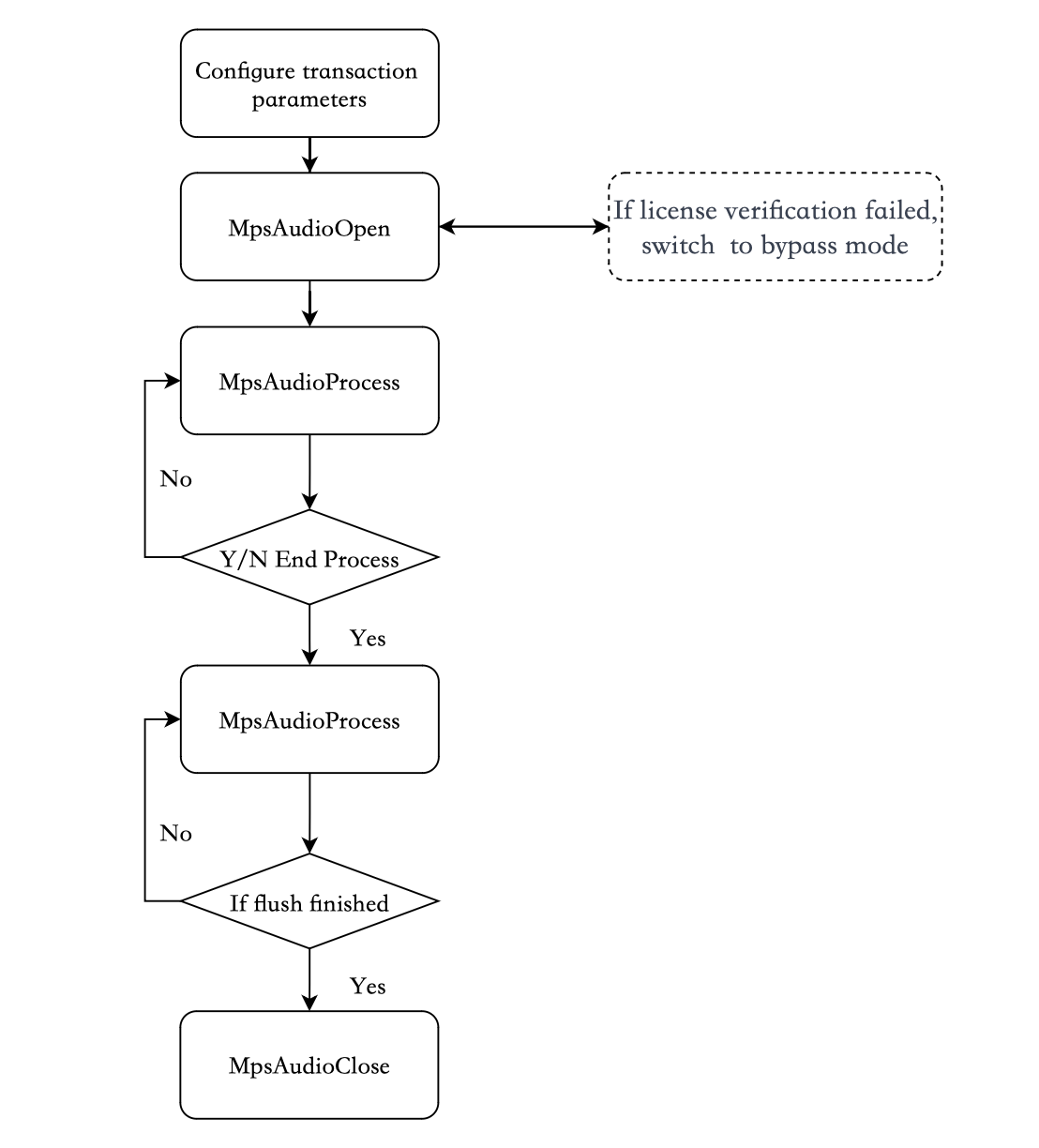
SDK API Calling Process
TSC Terminal Enhancement SDK
Product Overview
The client enhancement SDK implements features such as terminal video super resolution and image quality enhancement, based on efficient Image Process algorithms and AI model inference capabilities.
Details of features for each edition are as follows:
Feature Point
Standard Edition
Professional Edition
Standard image quality enhancement
Supported
Supported
Standard super-resolution
Supported
Supported
Standard super resolution + color optimization
Supported
Supported
Professional image quality enhancement
-
Supported
Professional super-resolution
-
Supported
Professional super resolution + color optimization
-
Supported
Version Selection Recommendations
Standard Edition: It is suitable for performance-sensitive devices and meets basic image quality enhancement requirements.
Professional Edition: Designed for mid-to-high-end devices, it delivers a high-quality visual experience through deep learning models.
Use Cases
1. Terminal Playback Quality Enhancement
By leveraging real-time super-resolution and image quality enhancement technologies, it upscales 480P/720P videos to 1080P display quality, adapts to high-resolution mobile device screens, and improves the clarity and smoothness of streaming media playback.
2. Bandwidth Cost Optimization
In scenarios such as GS and live streaming, a solution for "low-bitrate transmission + high-definition presentation" is implemented through client-side super-resolution technology. Actual tests show that transmitting a 720P (5.6 Mbps) video and upscaling it to 1080P via client-side super-resolution results in a visual quality close to that of a native 1080P (8.2 Mbps) stream, achieving a bandwidth saving of 30%.
3. Multi-Source Video Standardization
In scenarios such as video editing and multi-video image composition, intelligent super-resolution unifies materials of different resolutions, avoids the edge blurring issues caused by traditional interpolation algorithms, and ensures the visual consistency of the composite video.
Product Strengths
Category
Description
Performance
Wide range of scenarios: It can handle various resolutions and is applicable to diverse scenarios.
High-efficiency processing: The Standard Edition algorithm processes 720P super-resolution by 1.5x to 1080P on a 2016-era budget CNY 1000 device with an average per-frame time of less than 1 ms. The Professional Edition algorithm processes 540P super-resolution by 2x to 1080P on a 2020-era budget CNY 1000 device with an average frame time of 20 ms, and processes 720P super-resolution by 1.5x with an average frame time of 29 ms.
Flexible usage: It possesses the capability to adaptively select algorithms based on device performance, ensuring clear playback while preventing stuttering.
Compatibility
It supports the vast majority of mainstream Android and iOS models available on the market.
SDK Integration
Compatibility
Edition
Android Requirements
iOS Requirements
Standard Edition
≥5.0(OpenGL ES 3.1+)
≥12
Pro Edition
≥5.0(OpenCL 1.2+)
≥16
Package Size
Platform
Standard Edition
Professional Edition
Android (Single Architecture)
0.3MB
2.1MB
iOS (Physical Device)
0.8MB
2.5MB
Integration Guide
If you need to access the service, please contact us for offline integration.
Terminal SDK Demo Experience
Open it with an Android mobile browser, then download and install it.