Automatic Backup
다운로드
포커스 모드
폰트 크기
To prevent data loss due to system failures and other factors, TencentDB for CTSDB 3.0 supports data automatic backup.
Backup Policies
CTSDB 3.0 currently only supports system default automatic backup policies and does not support custom backup policies.
1. Log in to the CTSDB Console using a Tencent Cloud account.
2. At the top of the right page, select Version 3.0.
3. Find the target instance in the instance list.
4. In the row of the target instance, click the instance ID or click Manage in the Operation column to access the Instance Details page.
5. On the Backup List tab, click Automatic Backup Settings on upper-right corner.
6. In the Automatic Backup Settings small window, you can refer to the system default backup policies, as shown below.
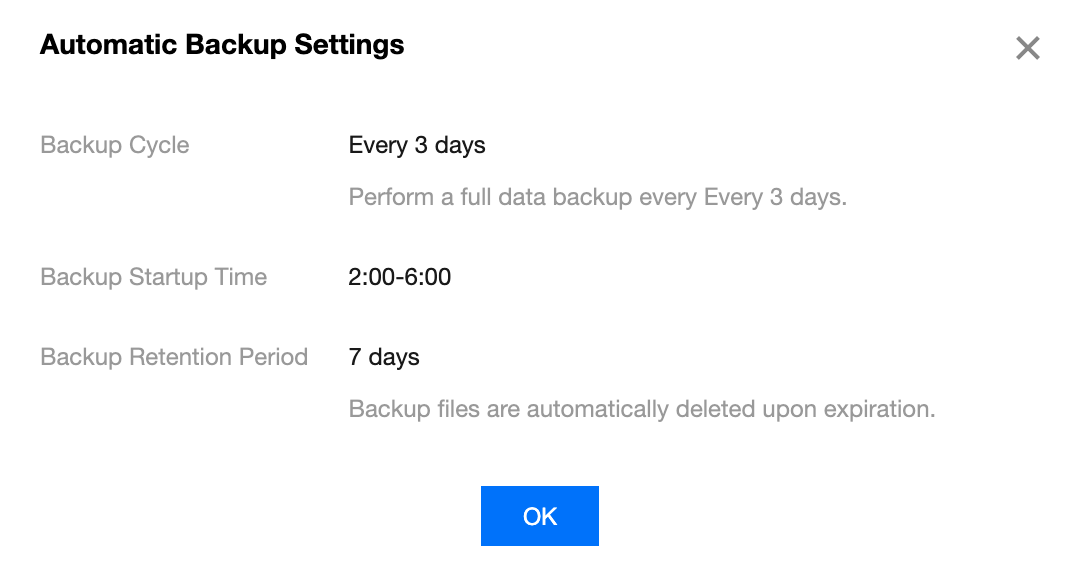
7. Click OK to close the small window.
Viewing the Backup List
1. Log in to the CTSDB Console using a Tencent Cloud account.
2. At the top of the right page, select Version 3.0.
3. Find the target instance in the instance list.
4. In the row of the target instance, click the instance ID or click Manage in the Operation column to access the Instance Details page.
5. On the Backup List tab, select the backup time area of the backup file in the time box on upper-left corner.
6. You can access all the backup information for this time period, as shown below.

피드백