Queue Feature
다운로드
포커스 모드
폰트 크기
This section describes how to integrate the user queue system. We recommend you integrate the user queue system to improve the user experience when the number of users requesting your application becomes greater than the max number of concurrencies.
Sequence diagram
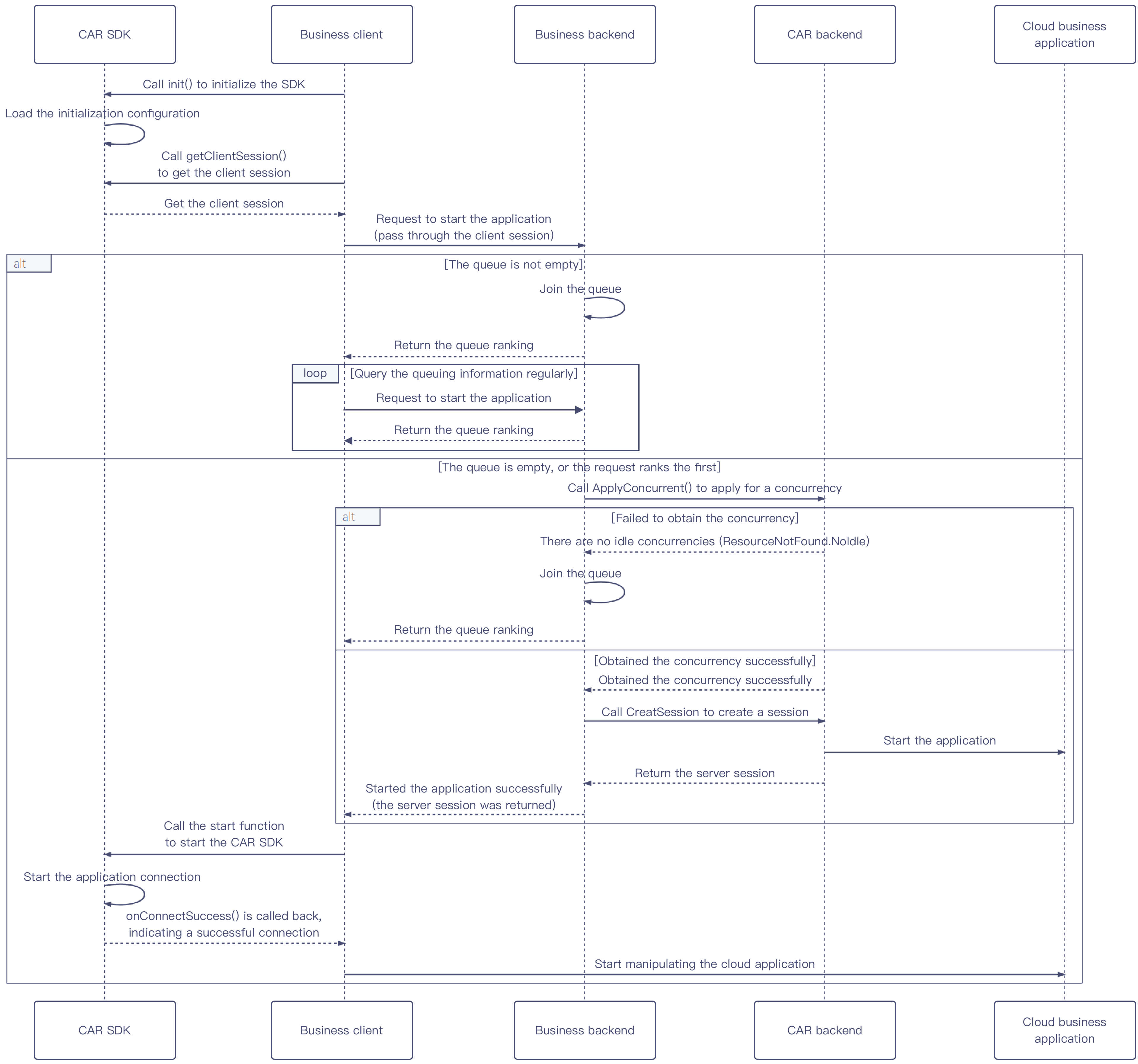
Directions
1. The business client calls the TCGSDK.init() API to perform initialization. After initialization, the client calls the TCGSDK.getClientSession() API to get its
ClientSession.2. The business client requests the business backend to start the application based on parameters passed in such as
UserId and ClientSession. Here, UserId is the unique user identifier customized by the business and should remain unchanged during user queuing and application reconnection. The business backend needs to perform the following operations based on the current queuing status:
If the queue isn't empty, add the user to the queue and return the current queue ranking information. The business client regularly initiates requests after receiving the queue information and repeats step 2 until the application is started successfully.
If the queue is empty or the user ranks the first, proceed to step 3.
3.
The business backend calls the ApplyConcurrent() API to reserve a CAR concurrency and performs the following steps based on the returned result:
If there are no idle concurrencies or another error is returned, add the user to the queue, return the current queue ranking information, and go back to step 2 to initiate a request again.
If the concurrency is obtained successfully, proceed to step 4.
4.
The business backend calls the CreateSession() API to create a session and returns
ServerSession to the business client.5. The business client calls the TCGSDK.start() API to start the cloud application. After the application connection, the SDK will trigger the
onConnectSuccess() callback. We recommend you call the data channel creation API and APIs for other features after this callback.피드백